Category: react native app development

React Native Development Services For iOS and android

Our React Native development services help businesses build stunning, high-performance mobile apps that work seamlessly on both iOS and Android. Instead of developing two separate applications, we leverage React Native’s single codebase to create efficient, cost-effective, and powerful solutions.

Why Choose React Native?

React Native is an open-source framework created by Facebook, a global tech leader. Furthermore, It uses the popular JavaScript library React, which web developers already know, to build truly native mobile applications. Moreover,  this means the user interfaces are rendered using platform-specific components, delivering a user experience that’s virtually indistinguishable from an app built with native languages like Swift or Kotlin.

Our React Native Services

We offer a comprehensive suite of services to meet your specific needs:

  •  Custom App Development: We create tailor-made mobile applications from scratch, focusing on your unique business requirements and user goals.
  • API Integration: We seamlessly integrate your app with third-party services and APIs to enhance functionality.
  • UI/UX Design: Our design team crafts intuitive, beautiful interfaces that ensure a smooth and engaging user experience.
  • Maintenance & Support: We provide ongoing support, updates, and maintenance to keep your app running smoothly and securely.
  • Migration Services: We help you migrate existing applications to the React Native framework, modernizing your app and improving its performance.

Indeed, We combine deep technical expertise with a collaborative approach to ensure your project is delivered on time and within budget. Whether you’re a startup looking to launch your first app or an established enterprise aiming to improve your mobile presence, our team is ready to help you achieve your goals. .

  • Top React Native Developers in India

    Top React Native Developers in India

    Key Takeaways

    • Cost-Effectiveness: React Native allows managing a single codebase for both iOS and Android, reducing development costs by up to 40% compared to separate native systems. Source
    • Performance: Delivers native-like user experiences by bridging the gap between optimal performance and platform consistency. Source
    • Community Support: A vast and active community ensures a rich ecosystem of tools and continuous improvement. Source
    • Growing Demand: The market for React Native developers is expected to grow at a CAGR of 16.7% from 2023 to 2033. Source
    • India’s Expertise: India offers highly skilled React Native developers at cost-effective rates, making it a premier destination for development services. Source

    Top React Native Developers in India: Your Go-To Development Partner

    If you’re planning to build a high-performing, cross-platform mobile app, partnering with the top React Native developers in India is one of the smartest business decisions you can make. India has emerged as a global leader in React Native app development, offering businesses worldwide a unique combination of cost efficiency, technical excellence, and rapid delivery.

    In today’s digital age, the surge in mobile app usage is undeniable, with statistics showcasing a substantial year-over-year growth across global markets. For businesses aiming to thrive in this digital ecosystem, mobile apps are not just a luxury but a necessity. They connect companies directly with customers, enhancing user experiences and fostering business growth.

    One of the leading solutions for crafting such impactful mobile applications is React Native. Developed by Facebook, this open-source framework enables the creation of cross-platform apps with native-like performance using JavaScript and React. Major companies like Netflix, Airbnb, and Instagram have leveraged React Native to enhance their digital offerings, significantly contributing to its popularity and adoption.

    The focus here narrows down to the prowess of React Native developers in India, who are recognized globally for their technical expertise, affordability, and efficiency. This blog post aims to explore why India has become a hub for React Native development and how businesses worldwide can benefit from partnering with Indian developers.

    Top React Native Developers in India in 2025

    Why Choose React Native for Your App Development

    React Native introduces a transformative approach to app development. It embodies the ‘write once, deploy everywhere’ philosophy, drastically reducing the time and resources needed to develop apps for both iOS and Android platforms.

    Advantages of React Native

    • Cost-Effectiveness: Businesses can manage one codebase for both platforms, cutting down development and maintenance costs by up to 40% compared to managing separate native systems (Source
    • Efficiency: Features like hot reloading and reusable components speed up the development process and simplify updates and bug fixes.
    • Performance: React Native bridges the gap between optimal performance and platform consistency, delivering native-like user experiences (Source
    • Community Support: A vast and active community contributes to a rich ecosystem of tools and libraries, which facilitates continuous improvement and support. 
    • Wide Adoption: The framework’s reliability and scalability are validated by its adoption across industries by leading global companies, adding an extra layer of credibility to its capabilities (Source).

    Why Businesses Choose React Native Developers in India

    • Affordable Excellence – Cut development costs by 40–60% compared to Western markets without compromising quality.

    • World-Class Talent – India’s IT ecosystem produces skilled developers specializing in React Native, Expo, Redux, TypeScript, and Firebase.

    • Proven Delivery – Indian teams have built scalable, secure, and user-friendly apps across industries like healthcare, e-commerce, fintech, and logistics.

    • Agile Approach – Faster turnaround with Agile and DevOps-driven workflows.

    • Time Zone Advantage – Benefit from 24/7 development and support through distributed teams.

    The Growing Demand for React Native Developers

    The need for React Native developers is scaling up, with the market anticipated to grow at a CAGR of 16.7% from 2023 to 2033. This escalating demand is due to the framework’s robust capabilities and the expanding necessity for businesses to maintain a competitive edge with high-quality mobile apps (Source).

    Benefits of Hiring Skilled React Native Developers

    • Rapid Prototyping: Developers can swiftly transform creative ideas into working prototypes, significantly speeding up the go-to-market time.
    • Advanced Development Practices: Access to the latest development technologies and methodologies ensures top-notch, innovative solutions.
    • Quality and Reliability: Expert developers deliver high-performing, bug-free apps, enhancing user satisfaction and retention.

    Why India is a Premier Destination for React Native Development

    India is home to a vast pool of skilled software engineers with deep expertise in up-to-date technologies, including React Native. The synthesis of quality, innovation, cost-efficiencies, and a large talent pool makes India a favoured destination for businesses seeking to develop or enhance their mobile applications.

    Key Benefits

    • Cost Advantages: Hiring developers in India is cost-effective, with hourly rates significantly lower than those in Western countries, thereby reducing overall project costs without compromising on quality (Source, Source).
    • Time Zone Benefits: Overlapping work hours with major global markets eases real-time collaboration.
    • English Proficiency and Communication: High English proficiency levels and strong communication skills among Indian developers ensure seamless interaction and project alignment (Source).

    Key Qualities of the Best React Native Development Companies in India

    When shortlisting the right partner, focus on:

    • Successful Portfolios – Check apps built for global brands and startups.

    • Technical Mastery – Ability to leverage React Native’s new architecture (Fabric, TurboModules, Hermes).

    • Security Compliance – Expertise in HIPAA, GDPR, and PCI DSS for regulated industries.

    • Flexible Engagement Models – Hire dedicated teams, hourly experts, or project-based developers.

    • Transparent Communication – Regular updates, English fluency, and collaborative project management.

    Cost of React Native Development in India

    • Hourly Rates: $20 – $40

    • Small Apps: $10,000 – $20,000

    • Medium Complexity Apps: $25,000 – $50,000

    • Enterprise Apps: $60,000+

    This offers 50%–70% savings compared to the US or Europe while ensuring the same global standards.

    Choosing the Right React Native Development Service Provider in India

    Selecting the right react native development service provider, developer, company, or team is crucial for your project’s success. Consider their technical expertise, project delivery track record, client testimonials, and their ability to provide continuous post-development support. Platforms such as Clutch, Upwork, and Google Reviews offer a treasure of information for making informed decisions. 

    Top React Native Development Companies in India

    • Aalpha Information Systems: Known for robust cross-platform applications and transparent processes.
    • Eglobalindia: Excels in deploying advanced technology solutions with a focus on dedicated client support.
    • Euphoric Thought Technologies: Stands out for innovative approaches and sector-specific solutions.
    • Solution Squares: Expert for innovative, budget-friendly and scalable applications with seamless experience.

    It is vital to conduct thorough background checks and review detailed portfolios and client feedback to choose the right partner (Source

    Benefits of Partnering with Indian React Native Developers

    • Build cross-platform apps faster with React Native.

    • Access scalable teams that grow with your project needs.

    • Ensure high performance and reduced app size with code optimization.

    • Long-term support and maintenance partnerships.

    • Strong expertise across healthcare, fintech, e-learning, logistics, and e-commerce apps.


    Top React Native Developers in 2025

    Why Partner with SolutionSquares?

    At SolutionSquares, we specialize in delivering next-gen React Native solutions tailored to your business needs. Our expert team ensures:

    • Custom app development with intuitive UI/UX.

    • Seamless performance across iOS and Android.

    • Enterprise-grade security & compliance.

    • Agile delivery with measurable milestones.

    • Long-term support & scalability.

    Conclusion

    React Native developers in India combine technical dexterity with cost-efficiency and timely delivery, making them ideal partners for global businesses looking to develop impactful mobile applications. We recommend reaching out to top development companies to leverage their expertise in your next mobile app project. For consultations, project assessments, or quotes, contact leading firms to ensure your app’s success.

    Frequently Asked Questions

    Are Indian React Native developers reliable for global projects?

    Yes, they are renowned for their dependability and excellence in managing international projects, backed by extensive case studies.

    How do Indian companies manage time zone differences?

    They employ flexible working hours and skilled project managers, ensuring effective cross-time zone collaboration.

    Is communication effective with Indian developers?

    Absolutely. High proficiency in English guarantees that communication is clear and efficient throughout the project cycle.

    What about post-development support?

    Top developers provide extensive post-development services, ensuring your application remains contemporary and functional.

    Why should I hire React Native developers from India?


    Indian developers provide affordable, high-quality, and scalable solutions, making them ideal for global businesses.

    How much does it cost to develop a React Native app in India?


    Costs range from $10,000 to $50,000+, depending on complexity and features.

    Can Indian developers handle enterprise-level apps?


    Yes. Many Indian firms specialize in enterprise-grade apps with compliance and security standards.

    Do Indian companies provide post-launch support?


    Absolutely. Most leading firms offer maintenance, upgrades, and 24/7 technical support.

    How do I ensure quality when outsourcing to India?


    Check portfolios, case studies, and client testimonials, and start with an MVP or pilot project.

  • Guide For React Native Re-architecture 2025

    Guide For React Native Re-architecture 2025

    Embracing the Future: React Native’s 2025 Re-architecture Unveiled

    Key Takeaways

    • React Native is undergoing a major rearchitecture in 2025 to enhance performance and scalability.
    • The new architecture introduces TurboModules and the Fabric Renderer for optimised resource usage and faster UI updates.
    • Legacy support is phasing out, making it crucial for businesses to adopt the modernized platform.
    • Developers will experience a significantly improved workflow with enhanced debugging and synchronous layouts.

    React Native has long stood as a cornerstone framework in mobile development, favoured for its ability to enable cross-platform functionality for iOS and Android apps using a single codebase. The framework fuses the best of JavaScript and React’s dynamic capabilities, delivering a seamless developer experience and efficient code sharing across platforms. For those looking to dive deeper into mobile app development with React Native, refer to our Comprehensive Guide for Health App Development to understand how React Native can be leveraged in specialized domains.

    Why rearchitect now (benefits)

    For developers and businesses, this rearchitecture isn’t just technical but strategic. The transition to this new architecture is crucial as legacy support phases out, heralding an age where new features are exclusively developed for the modernized platform source. Businesses aiming to stay ahead should consider insights from our Why Your Business Needs a React Native Agency for Mobile App Success to effectively navigate these changes.

    • Faster startup & smoother rendering — Fabric reduces overdraw and gives synchronous layout cycles to the UI thread.

    • Better native integration — JSI-based TurboModules let JS and native modules interoperate with much lower overhead than the old bridge.

    • Predictable performance — Move heavy logic off the JS thread, reduce bridge chatter, and get deterministic frame rates.

    • Hermes support — Smaller JS runtime with improved startup and memory characteristics on Android and iOS (Hermes on iOS is stable in modern RN versions).

    • Easier long-term maintenance — Using Codegen and typed interfaces (Flow/TypeScript) makes native/JS contracts explicit and less error-prone.

    Major Announcement of React Native Re-architecture

    In an exciting development for 2025, React Native is undergoing a transformative rearchitecture. This major update is more than just an iteration; it’s a comprehensive redesign aimed at bolstering performance, improving scalability, and aligning with modern development practices.

    Delving into the Background

    • The Historical Context of React Native’s Architecture

    Originally, React Native utilized an asynchronous bridge to facilitate communication between JavaScript and native modules. This setup, while innovative, led to notable delays and complex debugging, especially affecting advanced UI rendering and animations .

    For developers facing similar challenges, our Mastering React Native Components offers strategies to optimize component performance.

    • The Drive Toward Architectural Overhaul

    React Native’s growth exposed the limitations of its initial architecture, particularly as mobile apps grew in complexity and scale. This realization sparked the need for a dramatic overhaul to reduce technical debt and accommodate evolving mobile development needs source. Insights into managing these transitions can be found in our React Native with Firebase Integration guide.

    Reasons Behind the Rearchitecture

    • Addressing Core Limitations

    React Native’s old architecture faced significant performance bottlenecks, particularly with the non-optimized asynchronous bridge that impacted frame rates and interaction speeds in complex applications source, source, source. To mitigate these issues, our React Native Performance Optimization in 2025 provides essential strategies.

    • Aiming for Scalable Solutions

    The new architecture also targets enhanced scalability, allowing for sustained performance even in larger and more dynamic app scenarios, a boon for enterprise-level deployments source, source. Learn more about building scalable apps in our Mastering React Native UI Libraries guide.

    • Enhancing Developer Experience

    By addressing previous pain points such as slow reloads and cumbersome debugging processes, the rearchitecture fundamentally transforms the developer experience, facilitating a more productive and less frustrating environment source, source. Our Mastering Debugging Techniques for React Native App Development offers comprehensive methods to enhance developer workflows.

    • Modern Development Adherence

    Finally, the shift aims to align React Native with cutting-edge development practices, incorporating synchronous layouts and robust asynchronous capabilities to better meet contemporary development benchmarks source.

    Key Changes in the Rearchitecture

    • TurboModules and Fabric Renderer

    TurboModules introduce lazy loading for native modules, optimizing resource usage and expediting app startup times. Meanwhile, the Fabric Renderer overhauls UI updates with a synchronous, concurrent rendering approach, enhancing both speed and responsiveness source, source, source.

    • Redefined JavaScript Interface (JSI) and Codegen

    The introduction of JSI eliminates the outdated asynchronous bridge, enabling direct and instant communication between JavaScript and native code. Complementing this, Codegen automates bindings between JavaScript and native modules, significantly reducing errors and boilerplate source, source.

    • Advanced Data Management

    Enhancements in data flow and component lifecycle management promise smoother integrations with native modules, paving the way for more robust and dynamic mobile applications source.

    • Technical and Developer Impact

    This strategic overhaul not only elevates the technical framework of React Native but also significantly influences developer operations and productivity. The rearchitecture ensures that React Native remains a key player in the mobile app development arena, well-equipped to handle the challenges of modern mobile applications.

    By modernizing its architecture, React Native sets a new standard in cross-platform development, promising developers and businesses alike the tools to build performant, scalable, and future-proof mobile applications.

    High-level migration strategy (safe, incremental)

    1. Audit & measure baseline

      • Measure startup, memory, FPS, bridge traffic. (Android Profiler, Xcode Instruments, Flipper.)

      • Identify heavy modules and touchpoints between JS and native.

    2. Upgrade React Native to a compatible stable version

      • Move to a recent stable RN release that supports the new architecture. Follow RN upgrade helper and automated codemods when possible.

    3. Enable Hermes

      • Test Hermes in dev (enable for Android and iOS if supported). Fix JS engine-specific issues (e.g., bytecode, global native APIs).

    4. Enable new architecture features behind flags

      • Enable TurboModules and Fabric as opt-in first. Use RN’s CLI flags or Gradle/Xcode settings per RN docs.

      • Keep old bridge modules working in parallel during transition.

    5. Migrate native modules to TurboModules

      • Start with the modules that are high-volume or performance-sensitive (e.g., geolocation, sensors, audio/video).

      • Use Codegen to generate type-safe bindings. Replace NativeModules.X calls with typed TurboModule interfaces.

    6. Refactor UI components to Fabric

      • Convert custom native view managers to Fabric-compatible ViewManagers. Prefer simpler props and avoid synchronous bridge calls during layout.

      • Gradually replace complex view hierarchies that trigger bridge chatter.

    7. Run parallel tests

      • Keep old and new modules side-by-side, toggled via feature flags or config. Use end-to-end and performance tests to compare.

    8. Full rollout & iterate

      • After thorough testing, flip the flags for all users. Monitor telemetry carefully and be prepared to rollback.

    Detailed migration checklist

    • Prep & planning

    1. Create benchmarks: cold start, warm start, first meaningful paint, 60s-memory, frame drops/minute.
    2. Inventory native modules and view managers; tag them by complexity and call frequency.
    3. Decide deployment plan (staged rollout vs feature-flagged pilot).

    • Code & build
    1. Upgrade RN following the Upgrade Helper; resolve breaking changes.

    2. Add TypeScript/Flow to native module interfaces where missing.

    3. Enable Hermes and verify that unit tests pass.

    4. Configure Codegen for your native modules and view managers.

    5. Convert high-impact native modules to TurboModules (use C++ or platform native wrappers when needed).

    6. Convert custom native views to Fabric-compatible implementations.

    • Testing

    1. Unit tests for JS logic and native binding layers.

    2. Integration tests for key flows (login, streaming, checkout, data sync).

    3. End-to-end tests with Detox / Playwright mobile (or your E2E tool).

    4. Performance tests—measure FPS, JS thread latency, bridge calls.

    5. Memory profiling for leaks with Instruments / Android Profiler.

    • CI/CD

    1. Add a build matrix for Hermes vs non-Hermes if testing both.

    2. Automate smoke tests per build.

    3. Staged rollout: internal -> beta testers -> 10% -> 50% -> 100%.

    4. Monitor crash-free sessions, ANRs, and new error spikes.

    • Practical migration tips & gotchas

    1. Keep the old bridge for fallback. Migrate incrementally; don’t do a “big-bang” rewrite.

    2. Fixing native dependencies: Some third-party native modules may not support TurboModules/Fabric yet. Fork or contribute patches upstream if business-critical.

    3. Synchronous native calls: Avoid synchronous bridging from JS to native during render; Fabric enables more direct patterns—refactor these sync calls.

    4. JS engine differences: Hermes has a few differences (internals, debugging). Test thoroughly; some dev tools behave differently (e.g., debugging through Chrome may differ).

    5. Codegen setup is nuanced: Make sure auto-generated bindings are committed or reproducible in CI to avoid build surprises.

    6. Android ABI & NDK: If you use C++ TurboModules, manage NDK versions and ABIs carefully—cross-platform builds can break without consistent NDK/toolchain settings.

    Performance optimization checklist (post-rearchitecture)

    • Use Hermes for both platforms where supported.

    • Reduce JS bundle size: code-splitting, dynamic imports, tree-shaking.

    • Minimize bridge calls: batch operations, pass structured payloads.

    • Use direct native views for heavy UI (avoid building complex layout purely in JS).

    • Offload heavy computation to native threads or background workers.

    • Use useNativeDriver for animations and prefer native-driven gesture handlers (React Native Gesture Handler + Reanimated).

    • Profile with Flipper + performance plugins and native profilers regularly.

    Testing matrix (recommended)

    • Unit tests (Jest) for business logic.

    • Integration tests for TurboModule bindings (mock native implementations).

    • E2E (Detox) covering critical user journeys.

    • Performance tests under network throttling and low-memory device profiles.

    • Regression tests comparing pre- and post-migration metrics.

    CI/CD & monitoring recommendations

    • CI: Run type checks, Codegen generation, native build for both iOS/Android, and run unit tests.

    • CD: Use staged rollouts (Play Store, TestFlight) with feature flags.

    • Monitoring: Sentry/Crashlytics for errors; New Relic / DataDog / AppDynamics for performance; custom telemetry for FPS, JS thread lag, bridge-call rates.

    • Alerting: Set thresholds for crash spike, startup regression, or memory spikes.

    Example: simple migration flow for a native module

    1. Audit NativeModules.Location usage and frequency.

    2. Create a TurboModule interface with Codegen.

    3. Implement the native-side TurboModule (Android: Java/Kotlin + JNI wrapper if needed; iOS: Objective-C++ or Swift wrapper).

    4. Generate JS bindings with Codegen and replace NativeModules.Location references with const Location = TurboModuleRegistry.getEnforcing<Spec>('Location').

    5. Run unit and integration tests, then enable in a feature-flagged build.

    Developer productivity & team organization

    • Form a small cross-functional migration squad (1–2 mobile devs, 1 native dev, QA, product owner).

    • Use feature flags to give product owners control over rollout.

    • Maintain a migration status board (module, owner, status, risk, benchmarks).

    • Schedule migration sprints alongside regular feature work—avoid blocking all feature development.

    Rollout & rollback plan

    • Pilot: internal testers + power users. Monitor real-world metrics for 48–72 hours.

    • Gradual ramp: 1% -> 10% -> 50% -> 100% over days/weeks, depending on impact.

    • Rollback: keep the previous stable build available; use feature flags or staged releases to revert users quickly if major regressions appear.

    Resources & further reading (developer-focused)

    • Official React Native docs on New Architecture, Hermes, TurboModules, and Fabric.

    • RN Upgrade Helper (for smooth RN version upgrades).

    • Community repos and examples that demonstrate TurboModule and Fabric implementations.

    • Instrumentation tools: Flipper, Android Profiler, Xcode Instruments, Sentry/Crashlytics.

    (If you want, I can assemble a checklist PDF or a migration ticket template your engineering team can import directly into Jira/GitHub Projects.).

    When to rearchitect (signals)

    • Startup time or jank complaints from users (especially cold start).

    • Heavy native module usage or constant cross-boundary calls between JS and native.

    • Need to integrate advanced native features (AR, high-frequency sensor streams, real-time video).

    • Planning to scale the app or onboard many device-specific features.

    Further Reading and Resources

    • For a comprehensive understanding and technical details, refer to the official React Native documentation on the rearchitecture: React Native Architecture
    • Developers planning to transition to the new architecture can find valuable guidelines and tools in Expo’s migration guide: Expo New Architecture Guide
    • Engage with the community and stay updated through React Native Community forums, GitHub repositories, and Euroshub’s insightful blogs on the latest updates: Euroshub 2025 Update
    • For strategies on maintaining high performance in React Native apps, visit our React Native Bundle Optimization Guide.

    This rearchitecting marks a pivotal moment in React Native’s journey, promising to redefine the boundaries of cross-platform mobile development. As React Native continues to evolve, it remains essential for developers to embrace these changes, leveraging the new tools and features to enhance their app development strategies for a competitive edge in the ever-changing tech landscape.

    Rearchitecting to the React Native new architecture is an investment: upfront engineering cost and careful planning, but the benefits (startup speed, fewer janks, future-proof native integrations) pay off—especially for apps that demand high performance or complex native features. Use an incremental approach, measure continuously, and keep rollback paths simple

    Frequently Asked Questions

    1. What is the main goal of React Native’s 2025 rearchitecture?

    The main goal is to enhance performance, improve scalability, and align with modern development practices by introducing new architectural components like TurboModules and Fabric Renderer.

    2. How will the new architecture affect existing React Native projects?

    Existing projects may need to transition to the new architecture to benefit from improved performance and scalability. Legacy support is phasing out, so adopting the new architecture is essential for ongoing updates and features.

    3. What are TurboModules, and how do they improve React Native?

    TurboModules introduces lazy loading for native modules, optimizing resource usage and reducing app startup times. This leads to faster and more efficient applications.

    4. How does the Fabric Renderer enhance UI performance?

    The Fabric Renderer provides a synchronous, concurrent rendering approach, which speeds up UI updates and makes the interface more responsive.

    5. What resources are available to help developers transition to the new architecture?

    Developers can refer to the React Native Architecture Guide, Expo New Architecture Guide, and engage with the React Native Community forums and GitHub repositories for support and updates.

  • Optimizing Healthcare Solutions: The Power of React Native for Healthcare Apps

    Optimizing Healthcare Solutions: The Power of React Native for Healthcare Apps


    Key Takeaways

    • React Native is a powerful framework for developing healthcare apps, offering cost-effectiveness and cross-platform capabilities.
    • Utilising React Native can lead to faster development cycles, enhanced user experience, and improved scalability.
    • Proper planning, design, and testing are crucial for successful healthcare app development with React Native.
    • Data security, regulatory compliance, and interoperability are key challenges that React Native effectively addresses.
    • Successful case studies demonstrate the effectiveness of React Native in patient management and telemedicine applications.

    React Native for Healthcare Apps: Revolutionizing Mobile Healthcare Development

    React Native for Healthcare Apps is a dynamic framework designed specifically for crafting vibrant mobile applications within the healthcare sector. As healthcare technology evolves, React Native has gained immense popularity for its robust capabilities and tailored approach to healthcare needs. This framework enables developers to create effective applications that cater to a variety of medical needs and operational efficiencies.

    The healthcare industry is rapidly embracing digital transformation. Patients, doctors, and healthcare providers demand seamless mobile experiences for appointments, telemedicine, patient monitoring, and medical record access. React Native has emerged as a powerful solution for developing cross-platform healthcare apps that are fast, secure, and cost-effective.

    Significance of Application Development in Healthcare

    The development of applications in healthcare is transformative, revolutionizing the way medical practitioners and patients alike manage health-related activities. Key benefits include enhanced patient management processes, streamlined medical workflows, significant support for telemedicine, and improved accessibility to crucial data. Ultimately, these tools empower healthcare providers to offer superior care (Source). For a more in-depth understanding, refer to our Comprehensive Guide for Health App Development.


    • Fastest growth is in digital health overall (24.4% CAGR), signaling opportunities in AI-driven diagnostics, IoT-enabled healthcare, and telemedicine.

    • mHealth apps will see rapid adoption among patients, making them a crucial touchpoint for healthcare providers.

    • The services market shows steady but slower growth, indicating that infrastructure and service delivery will expand at a measured pace.

    • India is emerging as a major hub for digital health innovation, with strong potential for startups and tech-driven healthcare providers.

    Category Key Data Forecast / Growth
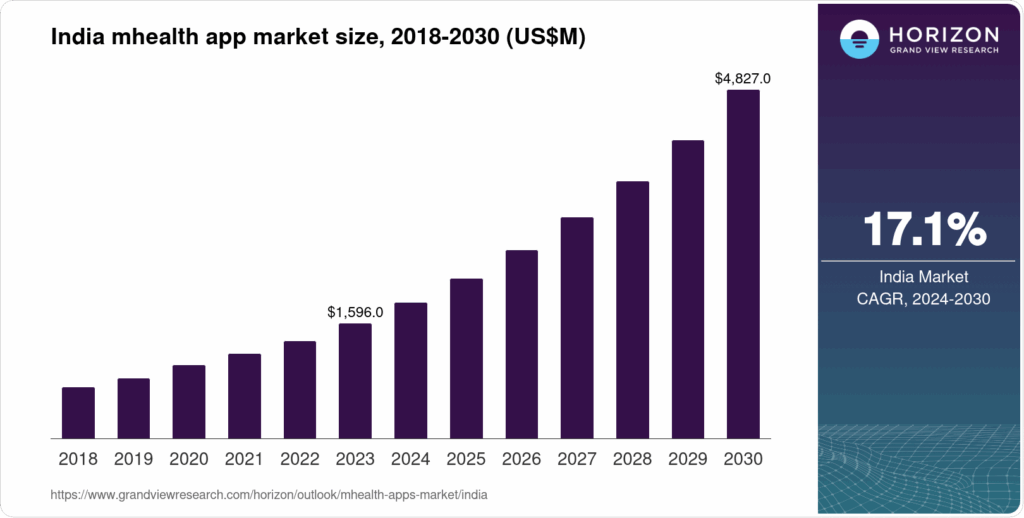
    India mHealth Apps Market Revenue ~ USD 1,883.3 million in 2024 Expected to reach ~ USD 4,827.0 million by 2030; CAGR ≈ 16.8% between 2025-2030. (Grand View Research)
    India mHealth Market (All components) ~ USD 2,498.1 million in 2023 Expected to grow to ~ USD 6,944.1 million by 2030; CAGR ≈ 15.7% (Grand View Research)
    India mHealth Services Market ~ USD 1,003.6 million in 2023 Projected ~ USD 2,447.8 million by 2030; CAGR ~ 13.6% (Grand View Research)
    India Digital Health Market Revenue ~ USD 14,330.2 million in 2024 Forecasted to hit ~ USD 52,395.5 million by 2030; CAGR ~ 24.4% (Grand View Research)

    The Indian healthcare technology ecosystem is witnessing strong and sustained growth, driven by increasing smartphone penetration, demand for telemedicine, and government initiatives supporting digital health adoption.

    1. mHealth Apps Market

      • Valued at USD 1.88 billion in 2024.

      • Expected to reach USD 4.83 billion by 2030, with a 16.8% CAGR.

      • This indicates rapid adoption of patient-facing apps for fitness, teleconsultation, and remote monitoring.

    2. Overall mHealth Market 

      • Worth USD 2.49 billion in 2023, projected to hit USD 6.94 billion by 2030.

      • CAGR of 15.7% highlights a balanced expansion across apps, services, and devices.

    3. mHealth Services Market

      • Accounts for USD 1.0 billion in 2023, forecasted to more than double to USD 2.45 billion by 2030.

      • Growth rate of 13.6% shows steady demand for telemedicine platforms, diagnostic services, and digital therapy.

    4. Digital Health Market 

      • Much larger in scale, valued at USD 14.3 billion in 2024.

      • Projected to skyrocket to USD 52.4 billion by 2030, with a CAGR of 24.4%.

      • This shows that digital healthcare—including AI, IoT, wearables, and hospital IT systems—will be the biggest growth driver.


    growth of healthcare industy application market in india

    Why Choose React Native for Healthcare Apps?

    React Native, initially conceptualised by Facebook, is a distinguished cross-platform development framework. It allows developers to use a unified codebase to build applications for both iOS and Android systems, making it a prime choice for healthcare applications where broad accessibility is crucial.

    Utilizing React Native in healthcare applications offers numerous commercial benefits, such as lowering administrative costs, expanding market reach, and reducing development expenses. Informationally, it enriches medical data access, boosts patient engagement, and provides necessary real-time updates, thus enabling better patient care and service delivery (Source).

    1. Cross-Platform Efficiency

    React Native allows building apps for iOS and Android with a single codebase, ensuring faster development and reduced costs—ideal for healthcare providers looking to scale quickly (Source).

    2. Secure and Compliant Development

    Healthcare apps must adhere to strict compliance regulations such as HIPAA and GDPR. React Native supports integration with secure APIs, encryption standards, and data protection practices.

    3. Real-Time Communication

    Enable telemedicine, chatbots, and instant alerts through React Native’s support for WebSockets and third-party integrations

    4. IoT & Wearable Device Integration

    React Native apps can integrate with wearables and IoT devices to provide real-time monitoring of patient vitals, improving preventive care and remote healthcare.

    5. Scalability & Performance

    React Native’s architecture ensures smooth performance for large-scale healthcare platforms, from appointment booking apps to complex telehealth systems (Source).

    6. Cost-effectiveness

    The framework is not only adaptable but also economical. By facilitating a unified codebase, React Native slashes development and maintenance costs. Further, the availability of extensive open-source resources underlines the cost benefits, making premium healthcare app development accessible at reduced financial overhead (Source). Learn more about budgeting for React Native projects in our React Native App Cost Guide.

    7. Speed of Deployment

    The extensive component libraries available with React Native expedite the development of new features crucial for adapting to the ever-changing healthcare landscape. This rapid deployment capability allows healthcare organizations to remain agile and responsive to industry or regulatory changes (Source).

    8. Faster Development Cycles & Reduced Time-to-Market

    React Native dramatically reduces the development cycle thanks to its shared codebase and extensive pre-built libraries. This acceleration allows healthcare apps to be marketed quickly, providing timely solutions to emerging healthcare challenges (Source).

    9. Reusability of Code

    The reusability of code is a notable advantage when using React Native. Developing simultaneous applications for both iOS and Android from the same codebase not only streamlines the workflow but also speeds up subsequent updates, keeping all platform users on the same functional level (Source).

    10. Enhanced User Experience and Performance

    With the ability to customize UI components to fit specific needs, React Native enhances the user experience by offering native-like performance. This responsiveness is crucial for applications that handle sensitive medical information or support real-time patient-practitioner interactions (Source). Additionally, ensure your app adheres to the highest security standards by following our Mobile App Security Best Practices.


    Key Use Cases of React Native in Healthcare

    • Telemedicine Platforms – Video consultations and online prescriptions.

    • Patient Portals – Access health records, schedule appointments, receive notifications.

    • Remote Monitoring Apps – Track vitals via IoT-enabled devices.

    • Pharmacy Apps – Online ordering, dosage reminders, digital prescriptions.

    • Healthcare Staff Apps – Shift management, patient tracking, secure

    How to Create a React Native Healthcare App

    Here is a step-by-step guide to developing a healthcare App with React Native.

    Step-by-Step Guide on Creating a React Native Healthcare App

    Planning and Defining App Requirements


    Define the goals, target users, and regulatory needs upfront to ensure the app meets all necessary standards and serves its intended purpose effectively (Source).

    Setting Up the Development Environment


    Use the React Native CLI or Expo for initial setup, and configure the necessary tools, such as Android Studio and Xcode, for platform-specific requirements.

    Designing User-friendly Interfaces

    Employ React Native’s UI libraries to develop intuitive layouts that enhance accessibility and user engagement, tailored specifically for healthcare scenarios (Source).

    Implementing Essential Healthcare Features

    Integrate core functionalities like patient record management, appointment scheduling, and telemedicine. These features ensure the app addresses comprehensive health care processes and patient needs (Source). For more detailed feature implementation, refer to our guide on How to Develop the Best Hospital App.

    Testing and Deployment Strategies

    Execute rigorous testing to guarantee the app’s performance, security, and user accessibility standards. Effective deployment strategies uphold continuous improvement and adaptability.

    Best Practices for Application Development in Healthcare

    Maintaining high security, adhering to healthcare regulations, and collaborating with experts for compliance and data handling are paramount for securing user trust and regulatory approval (Source).

    Tools and Resources for Healthcare App Development with React Native

    Building a healthcare app requires more than just React Native—it needs the right set of tools, libraries, and resources to ensure security, compliance, scalability, and a great user experience. Below are some essential tools and resources:

    1. Development & Framework Tools

    • React Native CLI / Expo – For rapid prototyping and cross-platform development.

    • TypeScript – Adds type safety and reduces bugs in complex healthcare apps.

    • Redux / Recoil – Efficient state management for handling real-time health data.

    2. UI/UX Libraries

    • React Native Paper / NativeBase – Prebuilt UI components for healthcare dashboards.

    • React Native Elements – For patient-friendly design and intuitive interfaces.

    • Lottie for React Native – Smooth animations for patient engagement.

    3. APIs & Integrations

    • FHIR (Fast Healthcare Interoperability Resources) APIs – For EHR/EMR integration.

    • Google Fit & Apple HealthKit – Access fitness and health data.

    • Twilio / Vonage – Secure telemedicine video calls and messaging.

    4. Security & Compliance Tools

    • OAuth 2.0 & JWT – For secure authentication.

    • AWS Cognito / Firebase Auth – HIPAA-ready authentication management.

    • Datadog & Snyk – Security monitoring and vulnerability management.

    5. Testing & Quality Assurance

    • Detox – End-to-end testing for React Native apps.

    • Jest & React Native Testing Library – Unit and UI testing.

    • Appium – Cross-platform automation testing.

    6. DevOps & Deployment Tools

    • Fastlane – Automates app builds and deployments.

    • Microsoft App Centre – Continuous integration & delivery.

    • Bitrise / GitHub Actions – Streamlined CI/CD pipelines.

    7. Learning Resources

    • React Native Official Docsreactnative.dev

    • FHIR Standard Docshl7.org/fhir

    • HIPAA Compliance Guide for Developershipaa journal

    • SolutionSquares Blog – Best practices, tutorials, and case studies for healthcare app development.

    Conclusion

    React Native is a powerful framework for healthcare apps, offering scalability, cost-efficiency, and faster time-to-market. It ensures security and compliance while enabling innovation and better service delivery. With its speed, adaptability, and future-ready tools, React Native is the ultimate choice for building modern healthcare solutions. (Source).

    Transform patient engagement with cross-platform healthcare apps—built with React Native! Book a Free Consultation Today.

    Frequently Asked Questions


    1. Why is React Native a good choice for healthcare apps?
    React Native allows developers to build cross-platform apps (iOS and Android) with a single codebase, ensuring faster development, reduced costs, and consistent user experiences. Its scalability and native-like performance make it ideal for complex healthcare solutions.

    2. How does React Native improve patient experience in healthcare apps?
    It enables smooth navigation, real-time updates, telemedicine integrations, wearable device connectivity, and secure data handling—enhancing overall patient engagement and satisfaction.

    3. Is React Native secure enough for healthcare apps?
    Yes. React Native apps can be integrated with advanced security protocols such as HIPAA compliance, end-to-end encryption, multi-factor authentication, and secure data storage to ensure patient data privacy.

    4. Can React Native apps integrate with wearable devices and IoT in healthcare?
    Absolutely. React Native supports APIs and third-party libraries that allow integration with smartwatches, fitness trackers, and IoT medical devices for real-time monitoring and reporting.

    5. What types of healthcare apps can be built with React Native?

    • Telemedicine and virtual consultation apps

    • Electronic Health Record (EHR) systems

    • Appointment booking and scheduling apps

    • Fitness and wellness trackers

    • Remote patient monitoring systems

    • Medicine delivery and pharmacy apps

    6. How does React Native help healthcare providers reduce costs?
    By using a single codebase for multiple platforms, healthcare organizations save on development, maintenance, and upgrade costs while still delivering high-quality, native-like apps.

    7. Can React Native apps scale for large healthcare enterprises?
    Yes. React Native is highly scalable and can support growing user bases, integration with hospital systems, and enterprise-level healthcare solutions.

    8. How long does it take to develop a healthcare app with React Native?
    The timeline varies based on features and complexity, but React Native typically reduces development time by 30–40% compared to building separate native apps.

    9. How can React Native support telemedicine features?
    React Native provides seamless integration for video conferencing APIs, chat systems, secure payment gateways, and cloud storage—key features in telemedicine apps.

    10. What are some successful examples of healthcare apps built with React Native?
    Popular healthcare and wellness apps like MedLife, Ada Health, and CareClinic leverage React Native for speed, scalability, and cross-platform performance.

    react native healthcare application development react native healthcare application development
  • Guide to React Native Bundle Optimization

    Guide to React Native Bundle Optimization

    Key Takeaways

    • React Native bundle optimization is essential for enhancing app performance and user experience.
    • Reducing APK size improves app load time and responsiveness.
    • Utilising tools like Metro Bundler and webpack-bundle-analyser helps identify optimization opportunities.
    • Implementing strategies such as code splitting and lazy loading can significantly enhance startup times.
    • Effective APK management and asset optimization are crucial for maintaining a streamlined app size.

    React Native Bundle Optimization Guide: Cut APK Size, Boost Speed & Deliver Better Apps

    When building mobile apps with React Native, performance and app size directly affect user retention. A heavy APK or sluggish load time can result in poor user experience, low engagement, and even uninstalls. This guide provides a comprehensive overview of React Native bundle optimization strategies to reduce APK size, improve load time, and deliver a faster, smoother app experience.

    In the realm of mobile development, React Native bundle optimization is crucial for enhancing app performance and user experience. This process involves reducing the size and improving the efficiency of your app’s JavaScript bundle and overall binary. Ensuring bundle size optimization in React Native not only improves React Native performance but also significantly improves app load time. In this blog post, we will define what bundle optimization is, why it is important, and walk through various strategies to achieve a streamlined, efficient app. 

    What is a Bundle?

    In React Native, a bundle refers to the compiled JavaScript code, assets, and other resources shipped with the app and loaded at runtime. This bundle is essential for the app’s functionality as it contains all the scripts and data the app needs to function. Callstack Guide, React Native Docs, Essential Practices for Effective React Native Maintenance

    Why Bundle Optimization Matters

    • Smaller APK Size → Faster downloads and installations.

    • Improved Load Time → Keeps users engaged from the first screen.

    • Better Performance → Smooth navigation and reduced crashes.

    • Higher Retention → Lightweight apps are less likely to be abandoned.

    react native bundle optimization techniques

    Analyzing Current Bundle Size

    Tools & Techniques for Analysis

    Utilizing the Metro Bundler, the default packaging tool for React Native, developers can obtain precise statistics about their JavaScript bundle, helping identify key areas for reduction. Additionally, using tools like the webpack-bundle-analyzer can help visualize and pinpoint large modules and dependencies that could be optimized or removed. Callstack Guide

    Identifying Optimization Opportunities

    Detecting unused dependencies, large libraries, and overly large asset files are among the first steps in optimizing your React Native app’s bundle. Dev.to Guide

    Strategies to Reduce APK Size

    Removing Unnecessary Dependencies

    An effective strategy is to audit your imports rigorously. Eliminate large or unused libraries, opting instead for smaller alternatives or importing only the necessary functionalities.  

    Innovative APK Management

    Using Android App Bundles and splitting APKs by architecture can significantly reduce unnecessary binary bloat, ensuring that devices download only the architecture-specific code they need.

    Code Minification and Obfuscation

    Enabling tools like Proguard or R8 for Android can decrease the size of Java and Kotlin code within your app and secure your app by obfuscating the code, adding layer of security and efficiency. 

    Optimizing the React Native Bundle

    Implementing Code Splitting and Lazy Loading

    Dynamic imports and lazy loading are prominent approaches to reducing the initial load of your app, which can tremendously enhance the startup time and smoothness of the app experience. 

    Asset Optimization

    Compressing images, removing redundant assets, and proper asset management can also contribute extensively to reducing the app size and improving performance. 

    Improving App Load Time

    Enhancing JavaScript execution through strategies like minimising heavy computations on startup and deferring non-critical script execution can lead to notable performance improvements. Resource caching and optimizing the way resources block rendering can also decrease load times effectively.

    Step 1: Enable Proguard for Android

    Proguard is a tool that helps shrink, optimize, and obfuscate your code.

    • Go to android/app/build.gradle

    • Enable Proguard:

    minifyEnabled true
    shrinkResources true
    
    • Proguard reduces unused code and libraries, making your APK lighter.

    Step 2: Use Hermes JavaScript Engine

    Hermes is a lightweight JS engine built for React Native.

    • Add Hermes to your android/app/build.gradle:

    project.ext.react = [
      enableHermes: true,
    ]
    
    • Benefits:

      • Reduces app size.

      • Improves startup performance.

      • Faster execution of JavaScript code.

    Step 3: Remove Unused Dependencies

    • Audit your project with tools like depcheck.

    • Remove unnecessary packages and imports.

    • Use lighter alternatives for heavy libraries.

    Example: Instead of using a large UI library, consider writing small reusable components.

    Step 4: Optimize Images and Assets

    • Use compressed image formats (WebP instead of PNG/JPEG).

    • Use react-native-fast-image for efficient caching.

    • Store static assets on a CDN rather than bundling everything.

    Step 5: Split APKs by ABI

    Instead of one universal APK, generate multiple APKs for different CPU architectures.

    In android/app/build.gradle:

    splits {
        abi {
            enable true
            reset()
            include 'armeabi-v7a', 'x86', 'arm64-v8a', 'x86_64'
            universalApk false
        }
    }
    

    This ensures users only download what their device requires.

    Step 6: Code-Splitting and Lazy Loading

    • Load only the necessary parts of your app when needed.

    • Use dynamic imports to split bundles and improve initial load.

    Example:

    const ProfileScreen = React.lazy(() => import('./ProfileScreen'));
    

    Step 7: Optimize Fonts and Icons

    • Use vector icons instead of multiple image assets.

    • Subset fonts to include only required characters.

    • Convert large icon sets into SVG or font-based icons.

    Step 8: Use Release Builds

    Always test performance using release builds rather than debug builds.

    Command:

    cd android && ./gradlew assembleRelease
    

    Release builds are optimized with Proguard and are much lighter than debug versions.

    Step 9: Enable Resource Shrinking

    In android/app/build.gradle:

    shrinkResources true
    

    This removes unused resources from your APK.

    Step 10: Monitor & Analyze Performance

    • Use tools like Android Profiler and React Native Performance Monitor.

    • Track bundle size with react-native-bundle-visualizer.

    • Regularly audit performance after new dependencies are added.

    Commercial Benefits of Optimization

    • Faster Market Adoption → Lightweight apps get installed more often.

    • Reduced Churn → Users stay longer when apps load quickly.

    • Better App Store Rankings → Performance impacts Play Store & App Store visibility.

    • Lower Development Costs → Efficient apps reduce crash reports and maintenance.

    react native bundle optimization strategy

    Conclusion

    Optimizing your React Native bundle isn’t just about reducing APK size—it’s about delivering a high-quality, fast, and user-friendly experience. By implementing Proguard, Hermes, resource shrinking, code-splitting, and image optimization, you can ensure your app stands out in performance and efficiency.

    React Native bundle optimization is essential for a performant, scalable, and user-friendly mobile app. By reducing APK size and optimizing load times, developers not only enhance the user experience but also improve app responsiveness, leading to better user retention. The adoption of ongoing optimization strategies is crucial as the app evolves and scales, ensuring that performance improvements continue over time. Callstack Guide, Creole Studios, Comprehensive Guide to React Native Performance Optimization in 2025

    For more insights and detailed guides on React Native optimization techniques, reference the additional resources provided and always stay updated with the latest tools and strategies in mobile app development.

    Additional Resources

    References

    1. Callstack: The Ultimate Guide to React Native Optimization
    2. Stackademic: Tricks to Reduce Bundle Size in React Native Apps
    3. Creole Studios: Pro Tips to Reduce React Native App Size
    4. Dev.to: Optimizing React Native Performance – A Developer’s Guide
    5. React Native Documentation: Optimizing JavaScript Loading

    Frequently Asked Questions

    Why is my React Native APK size so large?


    A React Native APK can grow large due to unused dependencies, uncompressed assets, bundled fonts, and universal builds that include code for all architectures.

    Q2. How can I reduce my React Native APK size quickly?


    The fastest ways include enabling Proguard, using Hermes engine, compressing images (WebP format), and splitting APKs by ABI so each device downloads only what it needs.

    Q3. Does enabling Hermes always improve performance?


    Yes, in most cases. Hermes reduces JavaScript bundle size and improves startup speed. However, always test before production since certain libraries may need adjustments.

    Q4. What’s the difference between shrinkResources and Proguard?

    • shrinkResources removes unused resources (images, layouts, etc.).

    • Proguard removes unused Java/Kotlin classes and obfuscates code.
      Both together provide maximum optimization.

    Q5. How do I monitor my React Native bundle size?


    You can use tools like react-native-bundle-visualizer or Android Studio’s APK Analyzer to track and optimize your bundle size.

    Q6. Is bundle optimization only for Android APKs?


    No. While APK optimization is common, bundle optimization also benefits iOS apps by reducing IPA size and improving load time.

    Q7. Does lazy loading impact user experience?


    Lazy loading improves initial load time by only loading critical screens first. If implemented correctly with placeholders or loaders, it enhances user experience.

    Q8. How often should I optimize my React Native app?


    Optimization isn’t a one-time process. You should monitor bundle size and performance after every major feature update or dependency installation.

    react native bundle optimization strategy
  • Achieving Excellence in React Native Components Testing

    Achieving Excellence in React Native Components Testing

    Key Takeaways

    • Importance of Testing: Ensures app stability, prevents regressions, and supports confident code refactoring.
    • Essential Tools: React Testing Library and Jest for React Native are crucial for effective component-level testing.
    • Component-Level Testing: Offers faster feedback loops and easier bug identification compared to end-to-end testing.
    • Best Practices: Focus on user interactions, keep tests fast and isolated, and maintain consistency across component types.
    • Advanced Techniques: Include mocking API calls, testing navigation, and performance testing to ensure robust applications.

    Achieving Excellence in React Native Components Testing

    Testing React Native components involves verifying that individual user interface (UI) components render and behave as intended. The importance of testing in React Native applications cannot be overstated—it ensures app stability, prevents regressions, and supports confident code refactoring. For comprehensive testing strategies, visit React Native Testing Strategies. In this blog post, we will delve into the key tools for component-level testing: React Testing Library and Jest for React Native. We aim to equip developers with the knowledge to effectively implement component-level testing in their React Native projects.

    Understanding Component-Level Testing in React Native

    Component-level testing ensures that each part of your UI renders the correct output and handles user interactions correctly. These tests are essential for isolating bugs early in the application development cycle and maintaining high code quality. Component-level testing is more granular compared to end-to-end testing and offers multiple benefits:

    • Faster feedback loops.
    • Easier identification and resolution of specific issues.
    • Enhanced support for incremental development and refactoring.

    For a deeper dive into end-to-end testing methodologies, check out the React Native End-to-End Testing Guide.

    This type of testing complements both unit and end-to-end tests, forming a comprehensive approach to testing React Native applications.

    Source: React Native Testing Overview

    Overview of React Testing Library

    The React Testing Library (RTL) is designed specifically for testing React components, providing tools that simulate how users interact with the application. Key features of RTL include:

    • A render API to mount components in a test environment.
    • The ability to query elements like how a user would, using text, accessibility labels, or roles.
    • fireEvent Methods to simulate user interactions.

    Compared to other libraries, such as Enzyme, RTL focuses on user-centric scenarios, making testing more aligned with real-world usage and less prone to break due to internal changes in components.

    Setting Up React Testing Library for React Native

    To set up the React Testing Library in a React Native project, you’ll need to follow these steps:

    1. Install RTL and Jest as development dependencies:
      yarn add --dev @testing-library/react-native
      yarn add --dev jest
    2. Configure Jest in your package.json. If using Expo, ensure that the jest-expo preset is set up correctly.

    Here’s a basic example of using RTL with a React Native component:

    // Hello.js
    import React from 'react';
    import { Text, View } from 'react-native';
    
    export default function Hello({ name }) {
      return <View><Text>Hello, {name}!</Text></View>;
    }
    
    // Hello.spec.js
    import { render, screen } from '@testing-library/react-native';
    import Hello from './Hello';
    
    describe('Hello', () => {
      it('displays the passed-in name', () => {
        render(<Hello name="Josh" />);
        expect(screen.getByText('Hello, Josh!')).toBeVisible();
      });
    });

    This basic test illustrates how to render a component and verify that it displays the expected text.

    Source: React Native Testing Library

    Introduction to Jest for React Native

    Primary Keyword: jest for react native

    Jest is a versatile testing framework suitable for testing JavaScript and React Native applications. It supports various types of testing, including unit, integration, and snapshot testing. Jest is recognized for its performance and features such as:

    • Auto-mocking of modules.
    • An efficient testing runner.
    • Generation of coverage reports.

    Jest’s integration with React Native, especially via presets like jest-expo, simplifies setting up and running tests in your project environment. For advanced end-to-end testing scenarios, refer to React Native End-to-End Testing Guide.

    Source: BrowserStack Tutorial, LogRocket Guide

    Integrating Jest with React Testing Library

    Primary Keywords: jest for react native, react testing library

    Jest and the React Testing Library complement each other well. Jest handles the overall test framework, while RTL focuses on providing realistic user interaction simulations. Here’s how to combine them in a test:

    import React from 'react';
    import { render, fireEvent } from '@testing-library/react-native';
    import { MyButton } from './MyButton';
    
    test('calls onPress when pressed', () => {
      const onPressMock = jest.fn();
      const { getByText } = render(<MyButton onPress={onPressMock} />);
      fireEvent.press(getByText('Click Me'));
      expect(onPressMock).toHaveBeenCalledTimes(1);
    });

    In this example, jest.fn() is used to create a mock function, which helps verify that the function gets called when the button is pressed. To enhance your understanding of React Native components, visit Mastering React Native Components.

    Source: LogRocket Guide, BrowserStack Tutorial

    Best Practices for React Native Components Testing

    Primary Keywords: react native components testing

    When conducting tests for React Native components, keep the following best practices in mind:

    1. Focus on user interactions and the observable outputs, not the internal structure of components.
    2. Keep tests fast and isolated, allowing for quick feedback and easier maintenance.
    3. Use consistent testing approaches across both functional and class-based components.

    Handling common challenges like mocking external modules and APIs can be achieved through jest.mock(), enabling you to simulate complex user interactions faithfully. For comprehensive unit testing strategies, check out React Native Unit Testing Guide.

    Source: React Native Testing Overview, React Native Testing Library

    Advanced Testing Techniques

    Primary Keywords: jest for react native, react testing library

    Advanced testing techniques include:

    1. Mocking API calls and external modules using jest.mock().
    2. Testing navigation and state management by simulating user interactions and checking for UI updates.
    3. Performance testing, which might involve separate tools from RTL, focusing primarily on component performance issues.

    These techniques are essential for ensuring that your application performs well under various conditions and maintains its integrity over time. To explore more advanced testing strategies, visit React Native Testing Strategies.

    Source: React Navigation Testing

    Real-World Examples and Case Studies

    Primary Keywords: react native components testing, jest for react native

    Various real-world examples highlight the effectiveness of robust component testing in large-scale React Native applications. These case studies show how comprehensive testing can prevent regressions, speed up development, and facilitate significant codebase changes with confidence. Maintaining tests within continuous integration pipelines enhances overall development efficiency and reduces bugs. For detailed case studies on testing strategies, visit React Native Testing Strategies.

    Source: React Native Testing Overview, LogRocket Guide

    Conclusion

    The practice of react native components testing is critical for developing reliable, user-friendly mobile applications. Employing tools like React Testing Library and Jest for React Native enhances the quality and maintainability of your codebase. By adopting these tools and following best practices, developers can significantly improve the resilience and quality of their React Native applications.

    Source: React Native Testing Library, BrowserStack Tutorial, LogRocket Guide

    Additional Resources

    For those interested in further enhancing their knowledge of React Native testing, the following resources can be invaluable:

    Frequently Asked Questions

  • Enhance Your Mobile App with Professional React Native Audit and Consulting Services

    Enhance Your Mobile App with Professional React Native Audit and Consulting Services

    Key Takeaways

    • React Native Audit ensures your mobile application is optimised for performance, security, and scalability.
    • React Native Consulting aligns your app development with business objectives and technological advancements.
    • Combining audit and consulting services leads to a cohesive strategy, enhancing app quality and operational efficiency.
    • Our approach includes comprehensive assessments, tailored roadmaps, and ongoing support to ensure optimal results.
    • Choosing our services means partnering with a seasoned team dedicated to delivering practical and effective solutions.

    Is your mobile app delivering the performance and user experience your customers expect? Many apps face hidden challenges—slow load times, poor scalability, outdated architecture, or unnecessary costs. That’s where our React Native Audit and Consulting Services come in.

    We provide end-to-end auditing and strategic consulting to help you unlock the true potential of your React Native app. Our services are designed to optimise, secure, and future-proof your application so that it stays ahead in today’s competitive digital market

    React Native Audit and Consulting are vital professional services focused on enhancing React Native mobile applications to ensure they perform optimally, are secure, reliable, and scalable. Adopting these services is imperative for preventing performance issues, maintaining code quality, and securing robust security protocols. According to industry experts, consistently optimising React Native applications not only enhances user experience but also significantly alleviates potential bottlenecks.

    What is a React Native Audit?

    A React Native audit is a systematic review of your mobile app to identify bottlenecks, risks, and opportunities for improvement. It typically includes:

    • Code Quality Review – Identifying bad practices, unused code, and potential bugs.

    • Performance Analysis – Measuring load times, rendering speed, and memory usage.

    • Architecture Evaluation – Checking modularity, scalability, and maintainability.

    • Security Assessment – Identifying vulnerabilities in authentication, APIs, and storage.

    • Dependency Check – Ensuring libraries are updated and properly integrated.

    • UI/UX Review – Auditing design patterns and user flows for better engagement.

    Key Aspects of React Native Audit

    • Code Quality Assessment: This process involves checking the code for maintainability, adherence to best practices, and redundancy elimination.
    • Performance Evaluation: This step includes analysing the app’s speed, memory usage, and responsiveness to optimise performance.
    • Security Review: This focuses on identifying security threats and ensuring compliance with current best security practices.

    Benefits of a React Native Audit

    • Better application performance and stability.
    • Proactive identification of issues, reducing costly technical debts.
    • Enhanced security measures and compliance with the standards.
    • Reduced maintenance costs and easier onboarding for developers.
    • Improved maintenance practices,

    Understanding React Native Consulting

    React Native Consulting services ensure applications are not only built correctly but are also continuously aligned with business objectives and technological advancements.

    Core Services in React Native Consulting

    • Strategy Development: Defines the roadmap and technology stacks, assesses risks, and ensures readiness for the market.
    • Troubleshooting: Identifies and resolves existing application issues to improve functionality.
    • Optimisation: Focuses on enhancing app performance, scalability, and overall user experience.
    • Migration Services: Aids in transitioning from legacy systems to React Native smoothly and efficiently.
    The consultative aspect of React Native projects is critical as it provides expert guidance, which helps in circumventing common pitfalls and leveraging industry best practices for optimal results.

    Comprehensive App Audit Services

    Beyond React Native, app audits play an essential role in refining any mobile application across various platforms.

    Audit Techniques Include:

    • Automated Code Analysis: Use of automated tools to ensure code quality and consistency.
    • Manual Code Inspection: Human-led review to catch complex issues that machines might miss.
    • Security Checks: Comprehensive checks to safeguard data and application integrity.
    • Performance Profiling: Real-device testing to ensure the app runs smoothly under various conditions.
    Real-world application of these techniques can significantly boost an app’s performance, as evidenced by a case study detailed by STX Next, where a company saw a 40% increase in app speed post-audit.

    App Consulting: Enhancing Your Mobile Application

    React Native consulting extends beyond troubleshooting to enhance the user experience, scalability, and compliance with industry standards.

    Key Consultation Services:

    • User Experience Enhancement: Revamping the app’s interface to improve user engagement and satisfaction.
    • Scalability Planning: Ensuring the app can handle increased traffic and data without performance drops.
    • Adhering to Industry Standards: Implementing rigorous testing and security standards to meet compliance requirements.
    These consulting services are crucial for longevity and success in the competitive market landscape.

    Benefits of Combining Audit and Consulting Services

    Integrating both auditing and consulting for React Native apps results in a cohesive strategy that significantly improves app quality and operational efficiency.

    Long-term Advantages Include:

    • Continuous improvement through regular audits and updates.
    • Enhanced performance, reducing operational costs and increasing user satisfaction.
    • Competitive advantage via robust and scalable applications that outperform rivals.

    Our Approach to React Native Audit and Consulting

    Our methodical approach to React Native app enhancement is detailed below:
    1. Initial Assessment: Understanding client goals and existing app challenges.
    2. Comprehensive Audit: Tailored code and performance reviews.
    3. Consulting Roadmap: Development of a clear, actionable plan based on audit findings.
    4. Implementation and Follow-up: Ongoing support to implement changes and ensure they deliver desired results.
    5. Customisation: Adapting our services to client-specific needs.
    6. Transparency and Communication: Maintaining open lines of communication throughout the project.

    What We Offer

    1. Comprehensive React Native Code Audit

    • In-depth review of your app’s source code.

    • Identify performance bottlenecks, bugs, and security risks.

    • Provide actionable recommendations for optimisation.

    2. Performance Optimisation

    • Improve speed, responsiveness, and memory management.

    • Enhance cross-platform efficiency for iOS and Android.

    • Reduce crashes, lags, and downtime.

    3. Architecture & Scalability Consulting

    • Evaluate your current app structure and workflows.

    • Propose a scalable architecture for future growth.

    • Modernize outdated frameworks and dependencies.

    4. User Experience (UX) & Interface Review

    • Ensure smooth navigation, intuitive design, and faster interactions.

    • Optimize app UI for higher engagement and retention.

    5. Security & Compliance Audit

    • Protect your app from vulnerabilities and threats.

    • Ensure compliance with global standards (GDPR, HIPAA, PCI DSS, etc.).

    6. Strategic Consulting & Roadmap Planning

    • Provide insights on app improvements and business alignment.

    • Define a clear roadmap for updates, scaling, and feature upgrades.

    • Advise on cost-efficient solutions and technology integrations.

    Why Choose Us?

    • React Native Specialists – Experienced team with proven success across industries.
    • Business-Focused Approach – We align technology with your goals, not just coding.
    • End-to-End Support – From auditing to long-term consulting and execution.
    • Faster ROI – Optimize costs while ensuring a powerful, future-ready app.

    Who Can Benefit?

    • Startups are aiming to launch high-quality apps quickly.

    • Enterprises are scaling their mobile solutions for global audiences.

    • Businesses are struggling with performance, scalability, or user retention.

    • Companies are looking to modernise their existing mobile applications.


    Results You Can Expect

    • Up to 40% faster app performance.

    • Reduced maintenance and development costs.

    • Improved security, stability, and user satisfaction.

    • A future-ready, scalable mobile solution that grows with your business.

    Conclusion

    Engage with our expert team to leverage top-tier React Native audit and consulting services to propel your mobile app to new heights of performance and innovation. Embark on your journey to transforming your mobile applications by getting in touch with our team now. Optimise, enhance, and secure – the pathway to superior mobile applications begins here.

    Frequently Asked Questions

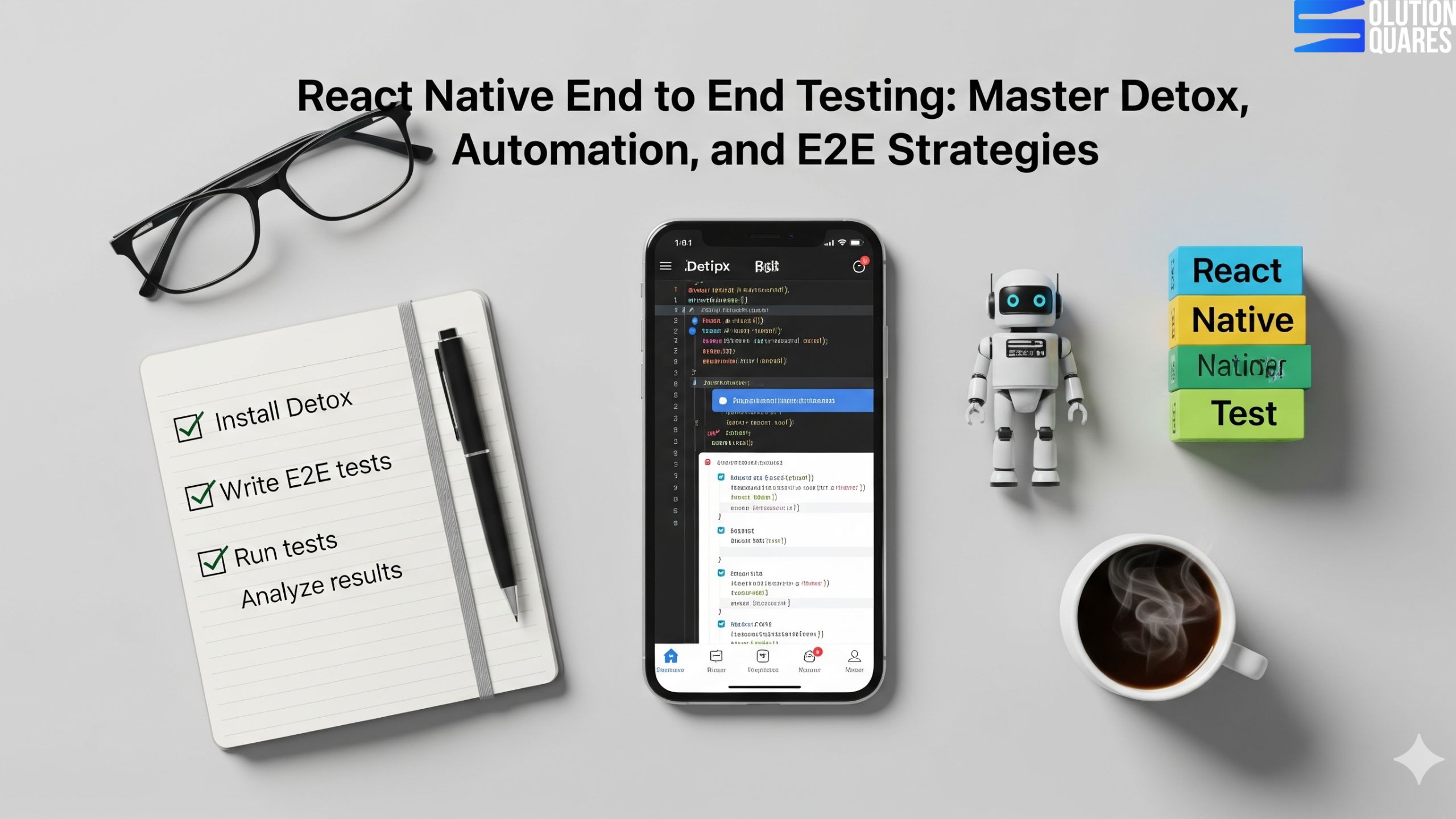
  • React Native End to End Testing: Master Detox, Automation, and E2E Strategies

    React Native End to End Testing: Master Detox, Automation, and E2E Strategies

    Key Takeaways

    • End-to-end (e2e) testing ensures the complete workflow of a React Native app functions as intended.
    • Detox is a reliable framework for e2e testing, offering synchronisation and CI/CD integration.
    • Automation testing enhances efficiency by replicating complex user interactions.
    • Setting up e2e testing with Detox involves installation, configuration, and writing test scripts.
    • Common challenges in e2e testing include flaky tests and slow execution, which can be mitigated with proper strategies.
    React Native end-to-end testing is critical for confirming that your application works flawlessly from a user’s viewpoint. Recognising the importance of testing is key to delivering quality, dependable, and user-friendly React Native applications. This guide will provide you with an understanding of e2e testing React Native apps, the benefits of using Detox as a testing framework, and how automation enhances the efficiency of the testing process.

    Understanding End-to-End (e2e) Testing

    In the realm of software development, e2e testing refers to a method that simulates real user behaviours to verify the complete workflow of an app. This type of testing ensures that all integrated components function collectively as intended, making it a crucial step in the software development lifecycle.
    • Differences from Other Testing Types:
      • Unit Tests: Focus on individual functions.
      • Integration Tests: Evaluate the interactions between integrated units.
      • E2E Tests: Look at the full application’s functionality.
    By implementing e2e testing, you detect UI issues and enhance the reliability of your app, ensuring a seamless user experience.

    Automation Testing in React Native

    Automation testing proves essential in modern app development by using tools to execute tests automatically, which improves coverage and reduces the chances of human error. Automated tests can replicate complex user paths like sign-ups or transactions without intervention, freeing developers to focus on more critical matters. Automation particularly helps with:
    • Regression Testing – ensuring new changes don’t disrupt existing functionality.
    • Repetitive Scenarios – avoiding the monotony and errors of manual testing.

    Introduction to Detox Testing

    Detox stands out in the e2e testing sphere by providing a reliable, faster testing process specifically for React Native apps. Supporting both iOS and Android platforms, Detox allows for comprehensive testing across devices.
    • Key Features:
      • Synchronisation: Awaits app stability before testing.
      • CI/CD Integration: Smooth insertion into automation pipelines.
      • Device Versatility: Functionality across simulators and real devices.
    Confirm the superiority of Detox over other tools such as Appium or Maestro using this detailed comparison.

    Setting Up React Native e2e Testing with Detox

    Starting with Detox involves several straightforward steps, which include installing the CLI, configuring your project, and setting up testing environments for both iOS and Android platforms. Key setup steps include:
    • Step 1: Installation via npm or yarn.
    • Step 2: Configuration for your specific project environment.
    • Step 3: Write your first test scripts, generally using Jest.

    Implementing Automation Testing with Detox

    Detox simplifies writing test scripts with its robust API, capable of handling most user interaction simulations. Examples include:
    • User Authentication Tests: Validate login and logout functionalities.
    • Navigation Tests: Ensure flawless user journeys from one screen to another.

    Overcoming Challenges in React Native e2e Testing

    Common challenges such as flaky tests, slow executions, and complexities in environment setup are prevalent in e2e testing. Solutions include:
    • Flakiness Reduction: Use Detox’s synchronisation to ensure stability.
    • Execution Speed: Optimise CI setups and run tests in parallel.
    React native Testing automation

    Conclusion

    React Native end-to-end testing, particularly through frameworks like Detox and coupled with automation, ensures the delivery of reliable and high-quality applications. Embracing these practices not only addresses early-stage bugs but also complements the agile development process. Start implementing these techniques to enhance your product’s reliability and market competitiveness.

    Frequently Asked Questions

    1. What is end-to-end (e2e) testing in React Native?
    End-to-end (e2e) testing in React Native simulates real user interactions to verify that the entire application workflow functions correctly, ensuring all integrated components work together seamlessly.
    Detox is preferred for e2e testing in React Native because it offers reliable synchronisation, integrates smoothly with CI/CD pipelines, and supports testing across multiple devices and platforms efficiently.
    Automation testing benefits React Native development by increasing test coverage, reducing human error, speeding up the testing process, and allowing developers to focus on more critical aspects of app development.
    Common challenges in e2e testing include flaky tests, slow test execution, and complex environment setups. These can be overcome by using synchronisation tools like Detox, optimising CI configurations, and running tests in parallel.
    Integrating Detox with CI/CD pipelines involves configuring your CI tool to install dependencies, build the app, set up the testing environment, and execute Detox test scripts as part of the pipeline stages.
    • Unit tests check individual functions/components.

    • Integration tests check how modules work together.

    • E2E tests simulate real user journeys across the app.

    Yes, for React Native apps specifically. Detox is optimised for RN and synchronises well with its asynchronous behaviour, while Appium is broader but heavier.


    Focus on critical user flows (login, checkout, navigation). Don’t try to E2E test every single detail — that’s what unit/integration tests are for.
  • React Native Plugins for Developers: Boost Productivity and App Performance

    React Native Plugins for Developers: Boost Productivity and App Performance

    Key Takeaways

    • React Native offers a robust framework for developing cross-platform mobile applications efficiently.
    • Utilising specialised developer tools enhances productivity, code quality, and collaboration.
    • Essential React Native plugins include navigation, state management, UI component libraries, and performance optimisation tools.
    • Key React Native packages for networking, form management, authentication, and animations streamline common development tasks.
    • Best practices in integrating and managing dependencies ensure a maintainable and high-performing application.
    • Engaging with active communities and regularly updating dependencies are crucial for sustainable development.

    React Native Plugins for Developers: Essential Tools for Enhanced Productivity and Performance

    React Native is a prominent open-source framework designed for creating cross-platform mobile applications using JavaScript and React. Known for its efficiency and native-like performance, React Native saves developers time without sacrificing the user experience. The right tools, including top react native plugins and must-have react native packages, are crucial for boosting productivity and enhancing app functionality. This blog post aims to dive deep into essential React Native plugins for developers looking to expand functionality, boost productivity, and ensure top-quality, high-performance apps.

    Overview of React Native Developer Tools

    In the React Native ecosystem, developer tools are instrumental in streamlining the development process. These tools help automate tasks, detect errors early, and enhance code quality, ensuring that your development cycles are faster and more efficient.

    Benefits of Utilising Specialised Developer Tools:

    • Faster Debugging and Code Inspection: Quickly identify and rectify issues to keep your development on track.
    • Improved Code Consistency and Maintainability: Automated tools help maintain a high standard of code quality across teams.
    • Enhanced Collaboration and Deployment Processes: Tools like GitHub streamline workflows and make it easy to manage projects and deployments.
    Boost React native App with plugins

    Popular React Native Developer Tools:

    • Visual Studio Code: This editor is highly customizable, comes with built-in Git, and supports numerous plugins, making it ideal for React Native development.
    • WebStorm: A powerful IDE for JavaScript, providing integrated tools that are useful for React Native developers.
    • Expo: Simplifies the development, testing, and deployment processes for React Native apps.
    • Xcode & Android Studio: Essential tools for native coding and simulation testing.
    • Slack, Jira, GitHub: These tools facilitate communication and project management within development teams, streamlining your workflow.

    Top React Native Plugins

    When it comes to enhancing the functionality and efficiency of your React Native apps, selecting the top plugins is crucial.

    a. Navigation Plugins

    • Overview: Manage screen transitions and user navigation within your apps effectively.
    • Key Plugins:
      • React Navigation: Supports stack, tab, and drawer navigations, plus deep linking and customizable transitions.
      • React Native Navigation: Provides high-performance navigation using native modules.
    • Features and Benefits:
      • Simplifies app navigation.
      • Improves user experiences with smooth transitions.
      • Supports advanced features like deep linking.

    b. State Management Plugins

    • Overview: Manage app states efficiently, crucial for large-scale and complex applications.
    • Key Plugins:
      • Redux: Offers a predictable state container with support for asynchronous actions.
      • MobX: Leverages reactive programming for simpler and scalable state management.
    • Benefits:
      • Facilitates predictable state management.
      • Simplifies debugging and enhances app scalability.

    c. UI Component Libraries

    • Overview: Accelerate UI development with pre-built, customizable components.
    • Key Libraries:
      • NativeBase: Provides cross-platform UI components that adhere to Material Design and iOS standards.
      • React Native Elements: Delivers customizable components for rapid UI development.
    • Benefits:
      • Reduces development time with ready-to-use components.
      • Ensures consistency and enhances customisation options.

    d. Performance Optimisation Plugins

    • Overview: Monitor and improve app performance for a smoother user experience.
    • Key Plugins:
      • React Native Performance: Provides tools for app performance monitoring.
      • Flipper: Offers comprehensive debugging and profiling.
      • Reactotron: Allows real-time state and API inspection.
    • Benefits:
      • Helps identify and resolve performance bottlenecks.
      • Provides detailed insights for real-time debugging.

    Must-Have React Native Packages

    Some packages are essential for handling common development tasks more effectively.

    a. Networking and API Handling

    • Key Packages:
      • Axios facilitates making API requests with features such as interceptors and automatic transformations.
      • Fetch API: A straightforward way to handle network requests.
    • Benefits:
      • Streamlines API interactions and data management.

    b. Form Management

    • Key Packages:
      • Formik: Simplifies the management of form state and validation.
      • React Hook Form: Utilises React hooks for better performance in form management.
    • Benefits:
      • Makes form handling more responsive and user-friendly.

    c. Authentication

    • Key Plugins:
      • Firebase Authentication: Supports various login methods and integrates seamlessly.
      • Auth0: Provides a robust authentication framework.
    • Benefits:
      • Enhances security and simplifies user authentication.

    d. Animation Libraries

    • Key Packages:
      • React Native Reanimated: Allows more complex animations with high performance.
      • Lottie: Seamlessly integrates high-quality animations into your apps.
    • Benefits:
      • Enhances user engagement with smooth and interactive animations.

    How to Integrate These Plugins and Packages

    Integrating these tools into your development workflow can seem daunting, but with the right approach, it’s straightforward.

    Installation:

    • Utilize npm or yarn to install the desired packages (e.g., npm install react-navigation).

    Linking Native Dependencies:

    • Some dependencies may need to be linked to your project manually if auto-linking isn’t available.

    Configuration:

    • Follow the official documentation for each package to configure it properly in your project.

    Best Practices for Managing Dependencies:

    • Maintain consistent versions across environments using lock files.
    • Regularly check for compatibility with peer dependencies to prevent conflicts.

    Best Practices for Using React Native Plugins

    To optimise your use of React Native plugins, follow these guidelines:

    • Choose plugins with active maintenance and strong community support.
    • Regularly update dependencies to leverage new features and patches.
    • Avoid unnecessary plugins to keep your app lightweight and efficient.

    Conclusion

    React Native plugins are pivotal for developers aiming to enhance app productivity and quality. By integrating the discussed tools and adhering to best practices, you can develop more efficient, reliable, and high-performing mobile applications. Engage with the developer community in the comments below to share your experiences and tips.

    Additional Resources

    To further your understanding of React Native plugins, refer to the official documentation and follow tutorials that provide deeper insights into each tool.

    By following the guidelines and integrating the recommended plugins and packages detailed in this blog post, developers can significantly enhance the efficiency and quality of their React Native applications.

    Frequently Asked Questions

    Q1. Do too many plugins slow down a React Native app?

    Yes, excessive or poorly maintained plugins can increase bundle size. Always choose actively maintained and optimised plugins.

    Q2. Can I build custom plugins in React Native?

     Absolutely! Developers can write native modules in Swift/Objective-C (iOS) or Java/Kotlin (Android) and link them with React Native.

    Q3. Are React Native plugins safe to use?


    Trusted plugins from the React Native community or NPM are generally safe. Always review the source code and documentation before use.

    Q4. What’s the difference between a library and a plugin?

    A library provides reusable code (UI kits, state management), while a plugin usually extends functionality by bridging with native device features.

    Q5. How do I keep my plugins up to date?

    Regularly run npm outdated or yarn outdated to track updates and security patches.

  • Comprehensive Guide to React Native Unit Testing

    Comprehensive Guide to React Native Unit Testing

    Comprehensive Guide to React Native Unit Testing

    Key Takeaways

    • React Native unit testing is essential for ensuring code reliability and maintainability.
    • Jest is the preferred testing framework for React Native due to its speed and powerful features.
    • Mocking allows developers to isolate components from external dependencies, facilitating more effective testing.
    • Snapshot testing is effective for capturing and comparing UI changes over time.
    • Adhering to best practices enhances the efficiency and effectiveness of unit tests.

    Testing is the backbone of building reliable and scalable mobile apps. For React Native unit testing ensures that every component and function works as expected—before your app reaches the end users. In 2025, with React Native’s new architecture (Fabric + TurboModules), mastering unit testing is more important than ever.

    React Native unit testing is an indispensable practice in mobile app development, vital for ensuring code reliability and maintainability. This guide delves deep into the what, why, and how of unit testing within the realm of React Native, promising to enhance the robustness and reliability of your codebase.

    React Native unit testing involves verifying individual components of your app—such as functions or UI components—in isolation. This method is crucial for catching bugs early in the development cycle and supporting code changes with confidence. Dive into this guide to explore the myriad benefits and methods of React Native unit testing.

    For more insights, consult these well-detailed sources on the subject:


    Understanding Unit Testing in React Native

    Unit testing specifically for React Native apps is key to maintaining clean and functional code throughout an app’s lifecycle. For React Native, this means:

    • Testing JavaScript functions, classes, or React components in isolation.
    • Employing mocks to isolate components from external dependencies, allowing testers to focus on the unit itself without interference.

    Benefits Of Unit Testing

    The benefits of adopting this practice include:

    • Early bug detection: Prevents future headaches by catching issues early on.
    • Simplified code maintenance: Facilitates easy updates and changes to the code.
    • Improved modularity: Encourages cleaner, more modular code architecture, which simplifies debugging processes.
    • Confidence in refactoring: With a reliable testing suite, developers can refactor confidently, knowing their changes do not break existing functionality.
    • CI/CD facilitation: Seamless integration into continuous integration and deployment pipelines, providing rapid feedback on the team’s code changes.

    Explore more about unit testing in these comprehensive guides:

    Getting Started with React Native Jest Testing

    In the ecosystem of React Native, Jest emerges as the preferred testing framework due to its speed, simplicity in setup, powerful mocking capabilities, and support for snapshot testing.

    Setting up Jest:

    Though Jest often comes preconfigured in many React Native templates, setting up or updating it manually involves the following steps:

    • Install Jest using npm or yarn.
    • Configure the jest.config.js file.
    • Ensure your code is transpile-ready with Babel setup.

    The ease of Jest setup and its comprehensive documentation helps streamline the testing process for developers.

    Key Features of Jest for React Native Unit Testing

    Jest is notably favored for:

    • Built-in Babel and React Native support: Reduces additional setup hassles.
    • Parallel test execution: Speeds up the testing process significantly.
    • Seamless mocking: Simplifies the testing of modules and asynchronous behavior.

    Implementing Snapshot Testing

    Snapshot testing is particularly effective in capturing and comparing versions of a UI component. This method provides a clear distinction between intended and unintended changes during development. Managing snapshots effectively involves:

    • Utilizing Jest’s toMatchSnapshot() to create and manage snapshots.
    • Keeping snapshots concise to ensure they are easily testable and maintainable.
    • Regular reviews and updates of snapshots to align with intentional UI changes.

    Writing Effective Unit Tests for React Native Apps

    To write effective unit tests in React Native, developers should embrace these strategies:

    Strategies for Writing Meaningful Tests:

    • Isolate logic: Test each piece of logic independently.
    • Use descriptive names: Opt for clear and descriptive test names.
    • Mock external dependencies: Simplify testing by mocking APIs and native functionalities.

    Common Test Case Examples:

    • Render components with various props.
    • Validate output accuracy.
    • Simulate user interactions such as button presses and input changes.

    Testing Asynchronous Operations:

    • Utilize async/await or Jest’s done callbacks to handle asynchronous behavior smoothly.

    Best Practices for React Native Unit Testing

    Adhere to these best practices to maximize the efficiency and effectiveness of your React Native unit tests:

    • Keep tests fast and independent: Enhance test frequency and reliability.
    • Organize test files effectively: Maintain clarity by organizing test files properly.
    • Mock wisely: Use realistic data in tests but rely on mocks for complex dependencies.

    Common Challenges and Solutions in Unit Testing React Native

    Challenges such as mocking native modules or managing asynchronous behavior are common in React Native unit testing. Effective solutions include:

    • Advanced mocking: Utilize Jest’s capabilities to simplify complex setups.
    • Use testing libraries: Tools like the React Native Testing Library can help simulate user interactions more effectively.

    Advanced Topics in React Native Unit Testing

    Venture into advanced testing topics such as:

    • React Native Testing Library: For enhanced DOM querying.
    • Jest performance optimization: Tips on speeding up your test suites

    Find out more about these advanced topics in the LogRocket Guide.

    Conclusion

    React Native unit testing is a pillar of high-quality app development, ensuring robustness, detectability, and maintainability of code. By integrating these practices, developers can greatly reduce bugs, improve design quality, and streamline development processes.

    For further reading and resources, consult:

    Embrace these practices and tools to enhance your development workflow and product quality in the React Native ecosystem.

    Frequently Asked Questions

    1. What is React Native unit testing?

    React Native unit testing involves verifying individual components of a React Native application—such as functions, classes, or UI components—in isolation to ensure they work as intended.

    2. Why is unit testing important in mobile app development?

    Unit testing is crucial because it helps identify and fix bugs early in the development cycle, ensures code reliability and maintainability, and facilitates confident code changes and refactoring.

    3. How do you set up Jest in a React Native project?

    Setting up Jest typically involves installing it via npm or yarn, configuring the jest.config.js file, and ensuring your codebase is ready for transpilation with Babel. Many React Native templates come with Jest preconfigured.

    4. What are the best practices for unit testing in React Native?

    Best practices include keeping tests fast and independent, organizing test files effectively, using descriptive test names, mocking external dependencies wisely, and regularly reviewing and updating tests to align with code changes.

    5. What challenges might I face when unit testing React Native apps?

    Common challenges include mocking native modules, managing asynchronous operations, dealing with complex component interactions, and ensuring that tests remain maintainable as the codebase evolves.

  • Mastering React Native UI Libraries: A Comprehensive Guide for 2025

    Mastering React Native UI Libraries: A Comprehensive Guide for 2025

    Key Takeaways

    • React Native UI libraries significantly speed up development and ensure consistent user interfaces across platforms.
    • Top libraries for 2025 include React Native Paper, GlueStack (formerly NativeBase), and React Native Elements.
    • Key selection criteria include performance, community support, customisation options, and comprehensive documentation.
    • Choosing the right library depends on specific project requirements and team capabilities.

    Mastering React Native UI Libraries: A Comprehensive Guide for 2025

    Building visually appealing and highly functional mobile apps is no longer just about coding the backend—it’s about delivering seamless user experiences (UX). In 2025, React Native continues to dominate as a cross-platform framework, and its UI libraries play a critical role in helping developers craft professional, responsive, and engaging interfaces with ease.

    With the rapid proliferation of mobile applications, react native UI libraries have emerged as pivotal resources in streamlining development by offering a myriad of reusable components. These tools not only facilitate speedier app development but also ensure consistency and a polished aesthetic across various platforms, which is why understanding React Native UI frameworks is crucial for any developer in this field.

    stunning React native App With UI Library

     Why UI Libraries Matter in React Native Development?

    React Native UI libraries are fundamental in accelerating React Native development. They provide developers with pre-designed and tested components, such as buttons, inputs, and sliders, which can be reused across multiple projects, thereby reducing the time and effort required to develop new applications. Benefits such as:

    UI libraries are pre-built, customizable components (buttons, modals, forms, navigation bars, etc.) that save developers time and effort. Instead of reinventing the wheel, you can focus on:

    • Consistency: Create a uniform look across iOS and Android.

    • Speed: Faster development with ready-to-use components.

    • Performance: Optimised UI components reduce app lag.

    • Scalability: Easy to adapt when your app grows.

    These efficiencies support quicker project completions, which is essential in a rapidly evolving tech landscape. For more information, visit Algosoft and Antino.

    Understanding React Native UI Frameworks


    In React Native, UI frameworks refer to collections of reusable components, theming tools, and utilities. These frameworks facilitate the design and interaction elements of mobile app development.

    Role and Benefits

    UI frameworks enhance development efficiency by providing standardised components that can fit into various design themes. This not only boosts the visual aesthetics but also ensures user experience consistency across different platforms. For detailed information, refer to Algosoft and Antino.

    Top React Native UI Frameworks


    In 2025, the leading react native UI frameworks noted for their efficiency and aesthetic appeal include:

    • React Native Paper: Known for its Material Design influence. Check out more at Dev. to.
    • GlueStack (formerly NativeBase): Appreciated for its utility-first and customizable nature. More details can be found at Dev. to.
    • React Native Elements: Offers a wide variety of components. Learn more at Antino.

    These frameworks are popular due to their wide selection of components, extensive customisation options, performance optimisations, and strong documentation and community support.

    Best React Native UI Libraries in 2025

    Here’s a curated list of top UI libraries every React Native developer should master in 2025:

    1. React Native Paper

    • Based on Google’s Material Design.

    • Provides clean, customisable components like buttons, cards, dialogues, and navigation.

    • Perfect for apps that need a modern and minimal design.

    • Best for: E-commerce, FinTech, and enterprise apps

    2. NativeBase

    • A universal UI library with cross-platform support.

    • Offers over 40+ components, including theming support.

    • Compatible with both iOS and Android.

    • Best for: Multi-platform apps that require high consistency

    3. React Native Elements

    • Lightweight and highly customizable.

    • Works with any styling framework like Tailwind CSS.

    • Great for developers who want flexibility and design freedom.

    • Best for: Startups and MVPs where speed is key.

    4. Shadcn/UI for React Native(gaining popularity in 2025)

    • Provides a modern, elegant design system.

    • Integrates beautifully with Tailwind CSS.

    • Focused on performance and accessibility.

    • Best for: Modern SaaS and AI-powered apps

    5. React Native Gifted Chat

    • Specialised UI library for chat and messaging apps.

    • Pre-built support for text, images, and custom messages.

    • Saves weeks of development time.
    • Best for: Customer service, social, and community apps.

    6. Lottie for React Native

    • Allows animations and motion graphics.

    • Uses JSON-based animation files from Adobe After Effects.

    • Bring apps to life with smooth and scalable animations.

    •  Best for: Onboarding screens, interactive apps, and games.

    7. React Native Maps

    • Provides maps and geolocation functionality.

    • Supports markers, custom map styles, and navigation.

    • Best for: Travel, delivery, and location-based apps.

    Curated List of Top Libraries

    Heading into 2025, the best react native UI libraries positioned at the forefront include:

    • React Native Paper,
    • GlueStack (NativeBase),
    • React Native Elements,
    • UI Kitten,
    • And React Native Material UI.

    These selections are based on their superior performance, extensive community support, customisation possibilities, and comprehensive documentation.

    Selection Criteria

    The criteria for selecting these top libraries include:

    • Performance: Libraries that ensure smooth and efficient app functionality.
    • Community Support: Strong, engaging communities providing extensive support and updates.
    • Customisation & Theming: Libraries that offer flexible theming and customisation options.
    • Documentation: Well-documented libraries that facilitate easy use for developers.

    Emerging libraries are also innovating with AI-driven layout tools and enhanced performance optimisations, which are covered in detail on Builder.io.

    _React native App With UI Library

    Comparative Analysis: NativeBase vs. React Native Paper

    When comparing NativeBase and React Native Paper, several aspects stand out:

    • Design Focus: NativeBase is utility-first with customizable designs, whereas React Native Paper follows strict Material Design principles.
    • Customisation: NativeBase offers extensive customisation, while React Native Paper provides streamlined theme-based customisation.
    • Performance and accessibility are comparable, with slight variations based on specific project requirements.

    The right choice depends on the specific needs of your project, with NativeBase being ideal for custom, utility-first designs, and React Native Paper excelling in rapid development within Material Design frameworks.

    Conclusion

    In 2025, mastering React Native UI libraries is essential for building apps that are visually engaging, user-friendly, and future-proof. Whether you’re creating an e-commerce app, a finance solution, or an AI-powered mobile app, the right UI library can significantly speed up development, improve user experience, and ensure scalability.

    Selecting the appropriate React Native UI library is crucial for developing applications that are not only efficient but also provide a seamless user experience. This comprehensive guide has an overview of various aspects, from functionality to aesthetic considerations of different libraries, specifically focusing on NativeBase and React Native Paper.

    Developers should consider their project’s specific requirements and team capabilities when choosing between these options to leverage the best of React Native’s extensive UI toolkit.

    For detailed documentation, you may visit nativebase.io for NativeBase and callstack.github.io/react-native-paper for React Native Paper.

    Lastly, for further exploration, you can delve into online tutorials and community forums to enhance your understanding and skills in utilising these libraries effectively.

    Added Internal Links:

    1. Mistakes to Avoid When Developing an App: A Comprehensive Guide
    2. React Native App Development Services
    3. Mastering React Native Components
    4. Top React Native Libraries 2025
    5. React Native Community Support

    Frequently Asked Questions

    What are React Native UI libraries?

    React Native UI libraries are collections of pre-built components, theming tools, and utilities that streamline the development process, ensuring consistency and efficiency across mobile applications.

    Key Takeaways

    • React Native UI libraries significantly speed up development and ensure consistent user interfaces across platforms.
    • Top libraries for 2025 include React Native Paper, GlueStack (formerly NativeBase), and React Native Elements.
    • Key selection criteria include performance, community support, customisation options, and comprehensive documentation.
    • Choosing the right library depends on specific project requirements and team capabilities.

    Mastering React Native UI Libraries: A Comprehensive Guide for 2025

    Building visually appealing and highly functional mobile apps is no longer just about coding the backend—it’s about delivering seamless user experiences (UX). In 2025, React Native continues to dominate as a cross-platform framework, and its UI libraries play a critical role in helping developers craft professional, responsive, and engaging interfaces with ease.

    With the rapid proliferation of mobile applications, react native UI libraries have emerged as pivotal resources in streamlining development by offering a myriad of reusable components. These tools not only facilitate speedier app development but also ensure consistency and a polished aesthetic across various platforms, which is why understanding React Native UI frameworks is crucial for any developer in this field.

    stunning React native App With UI Library

     Why UI Libraries Matter in React Native Development?

    React Native UI libraries are fundamental in accelerating React Native development. They provide developers with pre-designed and tested components, such as buttons, inputs, and sliders, which can be reused across multiple projects, thereby reducing the time and effort required to develop new applications. Benefits such as:

    UI libraries are pre-built, customizable components (buttons, modals, forms, navigation bars, etc.) that save developers time and effort. Instead of reinventing the wheel, you can focus on:

    • Consistency: Create a uniform look across iOS and Android.

    • Speed: Faster development with ready-to-use components.

    • Performance: Optimised UI components reduce app lag.

    • Scalability: Easy to adapt when your app grows.

    These efficiencies support quicker project completions, which is essential in a rapidly evolving tech landscape. For more information, visit Algosoft and Antino.

    Understanding React Native UI Frameworks


    In React Native, UI frameworks refer to collections of reusable components, theming tools, and utilities. These frameworks facilitate the design and interaction elements of mobile app development.

    Role and Benefits

    UI frameworks enhance development efficiency by providing standardised components that can fit into various design themes. This not only boosts the visual aesthetics but also ensures user experience consistency across different platforms. For detailed information, refer to Algosoft and Antino.

    Top React Native UI Frameworks


    In 2025, the leading react native UI frameworks noted for their efficiency and aesthetic appeal include:

    • React Native Paper: Known for its Material Design influence. Check out more at Dev. to.
    • GlueStack (formerly NativeBase): Appreciated for its utility-first and customizable nature. More details can be found at Dev. to.
    • React Native Elements: Offers a wide variety of components. Learn more at Antino.

    These frameworks are popular due to their wide selection of components, extensive customisation options, performance optimisations, and strong documentation and community support.

    Best React Native UI Libraries in 2025

    Here’s a curated list of top UI libraries every React Native developer should master in 2025:

    1. React Native Paper

    • Based on Google’s Material Design.

    • Provides clean, customisable components like buttons, cards, dialogues, and navigation.

    • Perfect for apps that need a modern and minimal design.

    • Best for: E-commerce, FinTech, and enterprise apps

    2. NativeBase

    • A universal UI library with cross-platform support.

    • Offers over 40+ components, including theming support.

    • Compatible with both iOS and Android.

    • Best for: Multi-platform apps that require high consistency

    3. React Native Elements

    • Lightweight and highly customizable.

    • Works with any styling framework like Tailwind CSS.

    • Great for developers who want flexibility and design freedom.

    • Best for: Startups and MVPs where speed is key.

    4. Shadcn/UI for React Native(gaining popularity in 2025)

    • Provides a modern, elegant design system.

    • Integrates beautifully with Tailwind CSS.

    • Focused on performance and accessibility.

    • Best for: Modern SaaS and AI-powered apps

    5. React Native Gifted Chat

    • Specialised UI library for chat and messaging apps.

    • Pre-built support for text, images, and custom messages.

    • Saves weeks of development time.
    • Best for: Customer service, social, and community apps.

    6. Lottie for React Native

    • Allows animations and motion graphics.

    • Uses JSON-based animation files from Adobe After Effects.

    • Bring apps to life with smooth and scalable animations.

    •  Best for: Onboarding screens, interactive apps, and games.

    7. React Native Maps

    • Provides maps and geolocation functionality.

    • Supports markers, custom map styles, and navigation.

    • Best for: Travel, delivery, and location-based apps.

    Curated List of Top Libraries

    Heading into 2025, the best react native UI libraries positioned at the forefront include:

    • React Native Paper,
    • GlueStack (NativeBase),
    • React Native Elements,
    • UI Kitten,
    • And React Native Material UI.

    These selections are based on their superior performance, extensive community support, customisation possibilities, and comprehensive documentation.

    Selection Criteria

    The criteria for selecting these top libraries include:

    • Performance: Libraries that ensure smooth and efficient app functionality.
    • Community Support: Strong, engaging communities providing extensive support and updates.
    • Customisation & Theming: Libraries that offer flexible theming and customisation options.
    • Documentation: Well-documented libraries that facilitate easy use for developers.

    Emerging libraries are also innovating with AI-driven layout tools and enhanced performance optimisations, which are covered in detail on Builder.io.

    _React native App With UI Library

    Comparative Analysis: NativeBase vs. React Native Paper

    When comparing NativeBase and React Native Paper, several aspects stand out:

    • Design Focus: NativeBase is utility-first with customizable designs, whereas React Native Paper follows strict Material Design principles.
    • Customisation: NativeBase offers extensive customisation, while React Native Paper provides streamlined theme-based customisation.
    • Performance and accessibility are comparable, with slight variations based on specific project requirements.

    The right choice depends on the specific needs of your project, with NativeBase being ideal for custom, utility-first designs, and React Native Paper excelling in rapid development within Material Design frameworks.

    Conclusion

    In 2025, mastering React Native UI libraries is essential for building apps that are visually engaging, user-friendly, and future-proof. Whether you’re creating an e-commerce app, a finance solution, or an AI-powered mobile app, the right UI library can significantly speed up development, improve user experience, and ensure scalability.

    Selecting the appropriate React Native UI library is crucial for developing applications that are not only efficient but also provide a seamless user experience. This comprehensive guide has an overview of various aspects, from functionality to aesthetic considerations of different libraries, specifically focusing on NativeBase and React Native Paper.

    Developers should consider their project’s specific requirements and team capabilities when choosing between these options to leverage the best of React Native’s extensive UI toolkit.

    For detailed documentation, you may visit nativebase.io for NativeBase and callstack.github.io/react-native-paper for React Native Paper.

    Lastly, for further exploration, you can delve into online tutorials and community forums to enhance your understanding and skills in utilising these libraries effectively.

    Added Internal Links:

    1. Mistakes to Avoid When Developing an App: A Comprehensive Guide
    2. React Native App Development Services
    3. Mastering React Native Components
    4. Top React Native Libraries 2025
    5. React Native Community Support

    Frequently Asked Questions

    What are React Native UI libraries?

    React Native UI libraries are collections of pre-built components, theming tools, and utilities that streamline the development process, ensuring consistency and efficiency across mobile applications.

    Key Takeaways

    • React Native UI libraries significantly speed up development and ensure consistent user interfaces across platforms.
    • Top libraries for 2025 include React Native Paper, GlueStack (formerly NativeBase), and React Native Elements.
    • Key selection criteria include performance, community support, customisation options, and comprehensive documentation.
    • Choosing the right library depends on specific project requirements and team capabilities.

    Mastering React Native UI Libraries: A Comprehensive Guide for 2025

    Building visually appealing and highly functional mobile apps is no longer just about coding the backend—it’s about delivering seamless user experiences (UX). In 2025, React Native continues to dominate as a cross-platform framework, and its UI libraries play a critical role in helping developers craft professional, responsive, and engaging interfaces with ease.

    With the rapid proliferation of mobile applications, react native UI libraries have emerged as pivotal resources in streamlining development by offering a myriad of reusable components. These tools not only facilitate speedier app development but also ensure consistency and a polished aesthetic across various platforms, which is why understanding React Native UI frameworks is crucial for any developer in this field.

    stunning React native App With UI Library

     Why UI Libraries Matter in React Native Development?

    React Native UI libraries are fundamental in accelerating React Native development. They provide developers with pre-designed and tested components, such as buttons, inputs, and sliders, which can be reused across multiple projects, thereby reducing the time and effort required to develop new applications. Benefits such as:

    UI libraries are pre-built, customizable components (buttons, modals, forms, navigation bars, etc.) that save developers time and effort. Instead of reinventing the wheel, you can focus on:

    • Consistency: Create a uniform look across iOS and Android.

    • Speed: Faster development with ready-to-use components.

    • Performance: Optimised UI components reduce app lag.

    • Scalability: Easy to adapt when your app grows.

    These efficiencies support quicker project completions, which is essential in a rapidly evolving tech landscape. For more information, visit Algosoft and Antino.

    Understanding React Native UI Frameworks


    In React Native, UI frameworks refer to collections of reusable components, theming tools, and utilities. These frameworks facilitate the design and interaction elements of mobile app development.

    Role and Benefits

    UI frameworks enhance development efficiency by providing standardised components that can fit into various design themes. This not only boosts the visual aesthetics but also ensures user experience consistency across different platforms. For detailed information, refer to Algosoft and Antino.

    Top React Native UI Frameworks


    In 2025, the leading react native UI frameworks noted for their efficiency and aesthetic appeal include:

    • React Native Paper: Known for its Material Design influence. Check out more at Dev. to.
    • GlueStack (formerly NativeBase): Appreciated for its utility-first and customizable nature. More details can be found at Dev. to.
    • React Native Elements: Offers a wide variety of components. Learn more at Antino.

    These frameworks are popular due to their wide selection of components, extensive customisation options, performance optimisations, and strong documentation and community support.

    Best React Native UI Libraries in 2025

    Here’s a curated list of top UI libraries every React Native developer should master in 2025:

    1. React Native Paper

    • Based on Google’s Material Design.

    • Provides clean, customisable components like buttons, cards, dialogues, and navigation.

    • Perfect for apps that need a modern and minimal design.

    • Best for: E-commerce, FinTech, and enterprise apps

    2. NativeBase

    • A universal UI library with cross-platform support.

    • Offers over 40+ components, including theming support.

    • Compatible with both iOS and Android.

    • Best for: Multi-platform apps that require high consistency

    3. React Native Elements

    • Lightweight and highly customizable.

    • Works with any styling framework like Tailwind CSS.

    • Great for developers who want flexibility and design freedom.

    • Best for: Startups and MVPs where speed is key.

    4. Shadcn/UI for React Native(gaining popularity in 2025)

    • Provides a modern, elegant design system.

    • Integrates beautifully with Tailwind CSS.

    • Focused on performance and accessibility.

    • Best for: Modern SaaS and AI-powered apps

    5. React Native Gifted Chat

    • Specialised UI library for chat and messaging apps.

    • Pre-built support for text, images, and custom messages.

    • Saves weeks of development time.
    • Best for: Customer service, social, and community apps.

    6. Lottie for React Native

    • Allows animations and motion graphics.

    • Uses JSON-based animation files from Adobe After Effects.

    • Bring apps to life with smooth and scalable animations.

    •  Best for: Onboarding screens, interactive apps, and games.

    7. React Native Maps

    • Provides maps and geolocation functionality.

    • Supports markers, custom map styles, and navigation.

    • Best for: Travel, delivery, and location-based apps.

    Curated List of Top Libraries

    Heading into 2025, the best react native UI libraries positioned at the forefront include:

    • React Native Paper,
    • GlueStack (NativeBase),
    • React Native Elements,
    • UI Kitten,
    • And React Native Material UI.

    These selections are based on their superior performance, extensive community support, customisation possibilities, and comprehensive documentation.

    Selection Criteria

    The criteria for selecting these top libraries include:

    • Performance: Libraries that ensure smooth and efficient app functionality.
    • Community Support: Strong, engaging communities providing extensive support and updates.
    • Customisation & Theming: Libraries that offer flexible theming and customisation options.
    • Documentation: Well-documented libraries that facilitate easy use for developers.

    Emerging libraries are also innovating with AI-driven layout tools and enhanced performance optimisations, which are covered in detail on Builder.io.

    _React native App With UI Library

    Comparative Analysis: NativeBase vs. React Native Paper

    When comparing NativeBase and React Native Paper, several aspects stand out:

    • Design Focus: NativeBase is utility-first with customizable designs, whereas React Native Paper follows strict Material Design principles.
    • Customisation: NativeBase offers extensive customisation, while React Native Paper provides streamlined theme-based customisation.
    • Performance and accessibility are comparable, with slight variations based on specific project requirements.

    The right choice depends on the specific needs of your project, with NativeBase being ideal for custom, utility-first designs, and React Native Paper excelling in rapid development within Material Design frameworks.

    Conclusion

    In 2025, mastering React Native UI libraries is essential for building apps that are visually engaging, user-friendly, and future-proof. Whether you’re creating an e-commerce app, a finance solution, or an AI-powered mobile app, the right UI library can significantly speed up development, improve user experience, and ensure scalability.

    Selecting the appropriate React Native UI library is crucial for developing applications that are not only efficient but also provide a seamless user experience. This comprehensive guide has an overview of various aspects, from functionality to aesthetic considerations of different libraries, specifically focusing on NativeBase and React Native Paper.

    Developers should consider their project’s specific requirements and team capabilities when choosing between these options to leverage the best of React Native’s extensive UI toolkit.

    For detailed documentation, you may visit nativebase.io for NativeBase and callstack.github.io/react-native-paper for React Native Paper.

    Lastly, for further exploration, you can delve into online tutorials and community forums to enhance your understanding and skills in utilising these libraries effectively.

    Added Internal Links:

    1. Mistakes to Avoid When Developing an App: A Comprehensive Guide
    2. React Native App Development Services
    3. Mastering React Native Components
    4. Top React Native Libraries 2025
    5. React Native Community Support

    Frequently Asked Questions

    What are React Native UI libraries?

    React Native UI libraries are collections of pre-built components, theming tools, and utilities that streamline the development process, ensuring consistency and efficiency across mobile applications.