


Key Takeaways
- Understand the core factors affecting React Native performance.
- Implement optimisation techniques like memoisation and efficient list handling.
- Utilise debugging tools to maintain and enhance app performance.
- Stay updated with the latest React Native updates for continued improvement.
- Design responsive UIs that do not compromise on performance.
Introduction
React Native has become the go-to framework for cross-platform mobile development.
In 2025, with growing user expectations for lightning-fast, smooth, and scalable mobile apps, agencies must go beyond simply building apps — they must optimise performance. Whether your clients are startups, enterprises, or consumer-facing brands, react native performance optimisation directly impacts user experience, retention, and revenue.
This guide covers the latest strategies, tools, and best practices to ensure React native performance optimisation performs at its peak
Why Performance Optimisation Matters in 2025?
Optimisation is a necessary step for efficiency, scalability, and seamless user experience. According to Lemosys Blog, Heavy or poorly optimised native modules can slow down your app, making it imperative to optimise or replace them with more efficient alternatives. To avoid common pitfalls in app development, refer to Mistakes to Avoid When Developing an App: A Comprehensive Guide.`Think of performance as the silent hero of your app. When it’s great, users don’t notice it – they just have a seamless experience. When it’s poor, they notice immediately.
-
User Retention & Satisfaction: Fast apps lead to happier users who stick around longer. Agencies that deliver performant apps build lasting client relationships.
-
Reduced Development & Maintenance Costs: Optimised code is easier to maintain and debug. Proactive performance work minimises costly post-launch fixes.
-
Stronger Brand Reputation: Delivering high-quality, responsive applications enhances your agency’s reputation and attracts more clients.
-
SEO & App Store Visibility: App store algorithms often favour well-performing apps, leading to better visibility and organic downloads.
-
Future-Proofing: An optimised architecture is better prepared for future features, scalability, and evolving user demands.
Key Optimisation Strategies for React Native Performance Optimization in 2025
1. Efficient Rendering with Fabric and JSI
-
Leverage React Native’s Fabric architecture for faster UI rendering.
-
Use the JavaScript Interface (JSI) for smoother communication between JS and native modules.
-
Reduce unnecessary re-renders by using React. memo, useCallback, and PureComponent.
- Refer to zignuts for more details.
2. Minimising Bridge Overhead
-
Avoid heavy data transfer between JavaScript and native threads.
-
Use native modules sparingly and rely on JSI for high-frequency operations.
3. Image and Asset Optimisation
-
Serve responsive images based on device resolution.
-
Use WebP format for compressed yet high-quality visuals.
-
Implement lazy loading for heavy assets.
4. Code Splitting and Lazy Loading
-
Split large bundles into smaller chunks.
-
Load modules on-demand instead of at app start-up.
-
Apply Hermes Engine for faster app start times.
5. Memory & State Management
-
Optimise with Redux Toolkit or Recoil for minimal re-renders.
-
Use FlatList with proper
getItemLayoutandkeyExtractorfor handling large datasets. -
Monitor memory leaks with Flipper and Android Profiler.
6. Animation Optimisation
-
Use Reanimated 3 for fluid 60 FPS animations.
-
Move heavy animation work to the UI thread for smooth transitions.
7. Network & API Optimisation
-
Implement request caching and pagination.
-
Compress network payloads (e.g., Gzip, Brotli).
-
Use GraphQL with Apollo/Relay for efficient data fetching.
8. Build Optimisation
-
Enable ProGuard (Android) and Bitcode (iOS) for smaller builds.
-
Remove unused dependencies and assets.
-
Use CI/CD pipelines to automate performance checks.
For the latest architectural improvements in React Native, which aid in performance optimisation, refer to the Callstack eBook and YouTube Video. Besides choosing the right database is vital for performance.
Tools to Measure and Monitor Performance (2025)
| Tool / Platform | Key Features | Best Use Case | Link |
|---|---|---|---|
| Built-In Profiler & Performance Monitor | JS & UI thread timings, FPS tracking, rendering insights | Quick performance checks during development | Docs |
| Flipper + RN Performance Plugins | Frame rate monitoring, app startup analysis, re-render tracking, Flipper UI charts | Deep real-time profiling and debugging | Flipper |
| Shopify React Native Performance Suite | Render durations, navigation metrics, bundle size tracking, and Flipper integration | In-depth performance audits for dev + production | Shopify RN Performance |
| Firebase Performance Monitoring | App startup times, screen rendering, network call monitoring, and custom traces | Post-launch monitoring and tracking real-world performance | Firebase |
| Sentry | Crash reporting, performance tracing, and context logs support Fabric & TurboModules | Error + performance tracking with full-stack visibility | Sentry |
| UXCam | Session replay, heatmaps, freeze detection, conversion funnel tracking | User behaviour + performance insights combined | UXCam |
| LogRocket | Session replay, Redux/React Navigation integration, ML-driven issue prioritisation | Holistic monitoring: performance + usability issues | LogRocket |
Benefits for Agencies Offering Performance Optimisation
-
Upsell services: Beyond app development, agencies can charge for ongoing optimisation retainers.
-
Stronger client relationships: Delivering smooth apps ensures repeat business.
-
Market differentiation: Few agencies offer deep React Native performance expertise.
Staying Updated with React Native Updates
Keeping up with the latest React Native updates is key to performance improvements. It is advised to subscribe to official changelogs, community discussions, and reputable blogs for timely information. Details on integrating new features without compromising performance can be seen in this Callstack eBook and YouTube Video. For deployment best practices, consult: Optimise Deploy React Native App. Read more about balancing aesthetic design with performance in both the Zignuts Blog and the Netguru Blog.

Why Performance Optimisation is Your Agency’s Competitive Edge
Think of performance as the silent hero of your app. When it’s great, users don’t notice it – they just have a seamless experience. When it’s poor, they notice immediately.
-
User Retention & Satisfaction: Fast apps lead to happier users who stick around longer. Agencies that deliver performant apps build lasting client relationships.
-
Reduced Development & Maintenance Costs: Optimised code is easier to maintain and debug. Proactive performance work minimises costly post-launch fixes.
-
Stronger Brand Reputation: Delivering high-quality, responsive applications enhances your agency’s reputation and attracts more clients.
-
SEO & App Store Visibility: App store algorithms often favour well-performing apps, leading to better visibility and organic downloads.
-
Future-Proofing: An optimised architecture is better prepared for future features, scalability, and evolving user demands.
The New Architecture: A Performance Powerhouse for 2025
In the competitive world of mobile applications, performance isn’t just a feature; it’s a fundamental user expectation. A slow, laggy app leads to frustrated users, poor reviews, and ultimately, uninstalls. For agencies, delivering high-performing React Native applications isn’t just about technical excellence; it’s about securing client satisfaction, building a strong reputation, and ensuring the long-term success of every project.
As we step into 2025, the React Native ecosystem is more powerful and complex than ever, driven by the rollout of the New Architecture. This guide will equip your agency with the essential knowledge and strategies to not only identify but also proactively eliminate performance bottlenecks, ensuring your React Native apps are fast, fluid, and a delight for users.
The most significant shift impacting React Native performance in 2025 is the widespread adoption of the New Architecture, comprising Fabric, TurboModules, and JSI. This is a game-changer for agencies:
-
Fabric (The New Renderer):
-
Benefit: Enables concurrent rendering and synchronous layout reading. This means the UI can update more smoothly, even when the JavaScript thread is busy, and complex animations feel truly native.
-
Agency Advantage: Delivers visually fluid and responsive UIs, reducing “jank” and providing a premium user experience that rivals fully native apps.
-
-
TurboModules (Improved Native Module System):
-
Benefit: Allows native modules to be lazy-loaded (only when needed), reducing the app’s startup time and memory footprint.
-
Agency Advantage: Faster app launch times and better resource management, especially critical for apps with many native integrations or limited device resources.
-
-
JavaScript Interface (JSI):
-
Benefit: Replaces the old asynchronous “bridge” with a direct, synchronous connection between JavaScript and native code. This eliminates serialisation overhead.
-
Agency Advantage: Boosts performance for data-intensive operations and real-time interactions, making complex features (like high-frame-rate camera processing or complex data visualisations) significantly more performant.
-
Agency Strategy: Prioritise migrating existing apps to the New Architecture (incrementally, if necessary) and building new projects on it. This foundational change offers the biggest leap in performance.
Key Optimisation Strategies for Your React Native Apps

-
Efficient Component Rendering (Memoisation):
- Challenge: Unnecessary re-renders are a primary cause of performance bottlenecks.
-
Solution: Use
React.memofor functional components andshouldComponentUpdate/or extendReact.PureComponent) for class components. These prevent components from re-rendering if their props or state haven’t actually changed. Also, useuseCallbackanduseMemofor memoising functions and expensive calculations. -
Agency Advantage: Reduces CPU usage, conserves battery, and ensures UI updates only when necessary, leading to a smoother user experience.
-
Virtualised Lists for Large Data Sets:
-
Challenge: Rendering long lists of items with
ScrollViewcan consume excessive memory and lead to sluggish performance. -
Solution: Always use
FlatListorSectionList. These components render only the items currently visible on screen, dramatically optimising memory usage and rendering speed. UsegetItemLayoutfor fixed-height items andkeyExtractorfor efficient list updates. -
Agency Advantage: Delivers fluid scrolling experiences even with thousands of items, essential for social feeds, e-commerce product lists, and large data displays.
-
-
Image Optimisation:
-
Challenge: Large, unoptimized images are a common culprit for high memory consumption, slow loading, and increased app bundle size.
-
Solution:
-
Resize and Compress: Always serve images at the required dimensions and compress them (e.g., using tools like TinyPNG or ImageOptim).
-
Efficient Formats: Prefer modern formats like
.webpfor better compression and quality. -
Caching Libraries: Use
react-native-fast-imagefor efficient image caching and loading.
-
-
Agency Advantage: Reduces app size, speeds up load times, prevents out-of-memory crashes, and improves overall visual responsiveness.
-
-
Optimising Animations:
-
Challenge: JavaScript-driven animations can easily cause jank, especially on lower-end devices.
-
Solution: Leverage
react-native-reanimated(v2 or v3) andreact-native-gesture-handler. These libraries allow animations and gestures to run on the UI thread (native side), completely offloading them from the JavaScript thread. -
Agency Advantage: Delivers truly fluid and smooth animations that feel native, elevating the perceived quality and polish of the application.
-
-
Bundle Size Reduction:
-
Challenge: A bloated app bundle leads to slower download times and increased storage usage on the user’s device.
-
Solution:
-
Enable Hermes: This lightweight JavaScript engine significantly reduces bundle size and startup time on both Android and iOS.
-
Remove Unused Code & Assets: Regularly audit your code
package.jsonfor unused libraries and remove unnecessary images, fonts, and code (tree shaking). -
Code Splitting & Lazy Loading: Use dynamic imports or
React.lazy()withSuspenseto load components only when they are needed. -
Android App Bundles (.aab): For Android, always use
.aabfiles instead of.apkdelivering optimised app versions for different device configurations. -
Proguard/R8 (Android): Enable these tools to shrink, optimise, and obfuscate Java bytecode.
-
-
Agency Advantage: Faster app downloads, quicker installations, and a more pleasant experience for users, especially in regions with limited bandwidth or older devices.
-
-
Effective State Management:
-
Challenge: Overly complex or inefficient state management can lead to excessive re-renders and memory overhead.
-
Solution: Choose the right state management tool for the job (React Hooks for simpler needs, Redux Toolkit for complex global state, or lightweight alternatives like Zustand/Jotai). Ensure immutable data structures are used to simplify change detection.
-
Agency Advantage: Creates a more predictable and debuggable codebase, reducing bugs related to state and enhancing the overall stability of the application.
-
-
Minimise Bridge Interactions:
-
Challenge: In the legacy architecture, frequent communication across the JavaScript bridge could be a bottleneck.
-
Solution: While JSI (part of the New Architecture) largely mitigates this, in existing legacy projects, agencies should still batch bridge calls and use native modules for performance-critical tasks where appropriate.
-
Agency Advantage: Ensures responsiveness in interactions that require significant JavaScript-native communication.
-
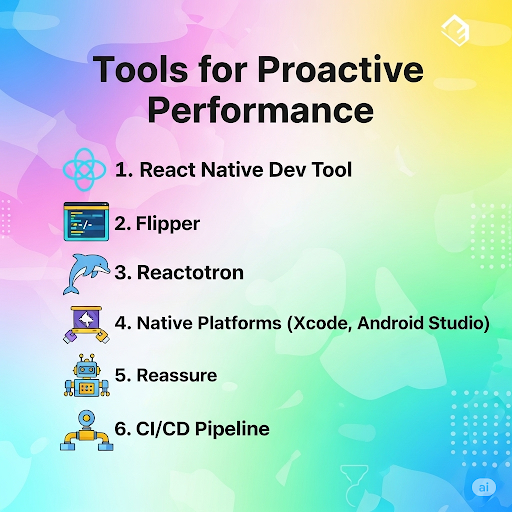
Tools for Proactive Performance Management
Agencies need a strategic approach to performance, not just reactive firefighting. These tools are indispensable:
-
React Native DevTools: The official debugging tool (now often replacing Flipper as default) offers UI inspection, component tree analysis, and performance profiling to identify slow components and unnecessary re-renders.
-
Flipper: (Still highly valuable, especially for plugins) An all-in-one debugging platform with plugins for network inspection, layout viewing, database browsing (SQLite, AsyncStorage), and performance tracking (CPU, memory, frames).
-
Reactotron: Excellent for debugging state management (Redux, MobX), API calls, and AsyncStorage data with a clean, centralised interface.
-
Native Platform Tools:
-
Xcode Instruments (iOS): For deep profiling of CPU, memory, network, and GPU usage on iOS.
-
Android Studio Profiler: Provides similar capabilities for Android, helping identify native-side bottlenecks and memory leaks.
-
-
Reassure (by Callstack): An open-source performance testing library for React Native that helps detect UI regressions at the component level by comparing render durations between versions.
-
CI/CD Pipelines (e.g., Bitrise, GitHub Actions): Integrate performance checks (like bundle size analysis or basic startup time tests) into your Continuous Integration/Continuous Deployment pipeline to catch regressions early.
The Compelling Data: Why Performance Optimisation Matters
Here’s statistical evidence highlighting the crucial role of performance optimisation:
-
User Abandonment Due to Slowness:
-
Approximately 53% of mobile users abandon apps if loading takes longer than three seconds. (Source: MoldStud, VWO)
-
Some studies indicate that this number can be as high as 70% of users abandoning an app that takes too long to load. (Source: Moon Technolabs)
-
40% of users would prefer a better alternative if they didn’t like an app’s performance. (Source: Moon Technolabs)
-
-
Impact on User Engagement and Conversion Rates:
-
Even a one-second delay in app load time can lead to a 7% reduction in user engagement and an 11% reduction in conversions. (Source: Medium – Adi Mizrahi, Ranksol)
-
Platforms with loading speeds below three seconds see an increase in user retention by up to 30%. (Source: MoldStud)
-
Apps maintaining 60 frames per second (FPS) have 52% better user engagement. (Source: VWO)
-
Responsive UI elements can improve user interaction metrics by up to 37%. (Source: VWO)
-
-
User Retention and Churn:
-
On average, an app loses 77% of its daily active users (DAUs) within the first 3 days after install, and this jumps to 90% within 30 days. (Source: Netguru, Business of Apps) While this drop-off is normal, slow performance is a key driver for this churn.
-
A 1-second delay can lead to a 16% decrease in user satisfaction and a 4.1% decrease in daily active users. (Source: Medium – Adi Mizrahi)
-
90% of users abandon apps due to poor performance. (Source: UXCam)
-
-
Business Outcomes:
-
It is five to seven times more expensive to acquire a new customer than to retain an existing one. (Source: Netguru) Performance plays a critical role in retention.
-
Well-optimised apps often achieve higher rankings in app stores, leading to increased visibility and more organic downloads. (Source: UXCam)
-
One case study showed a platform reducing its loading duration from 8 seconds to 3, resulting in a remarkable 20% boost in conversion rates. (Source: MoldStud)
-
These statistics clearly underscore that investing in performance optimisation for React Native apps isn’t just a technical nicety, but a strategic business imperative that directly impacts user satisfaction, engagement, retention, and ultimately, revenue
Conclusion: Empower Your Agency with Peak Performance
In 2025, React Native offers an unparalleled opportunity to build powerful, cross-platform mobile apps. But the true competitive advantage for agencies lies in mastering their performance optimisation. By proactively implementing the New Architecture, adhering to best practices, and leveraging the right tools, your agency can:
-
Deliver apps that consistently exceed user expectations.
-
Minimise development headaches and maximise team efficiency.
-
Build a reputation for technical excellence and reliable solutions.
Invest in performance optimisation, and transform your React Native services from good to truly exceptional.
Additional Resources
For further learning, consider the following resources:
- Callstack’s Ultimate Guide to React Native Optimisation
- React Native official documentation on performance optimisation
- Improvements in image/API caching discussed on Zignuts Blog and animation/network optimisations on Netguru Blog.
Follow these links for tutorials on profiling, DevTools, and the latest features of new React Native releases.
Frequently Asked Questions
Q1: What is the biggest impact of the New Architecture on performance?
The New Architecture, particularly Fabric and JSI, fundamentally improves how JavaScript communicates with native code and how the UI renders. This eliminates the “bridge bottleneck” and enables truly synchronous layouts and smoother animations, leading to significantly better perceived performance and responsiveness, especially for complex UIs.
Q2: How often should an agency perform performance audits?
It’s recommended to perform performance audits at key milestones (e.g., after major feature releases, before launch) and periodically (e.g., quarterly) for mature applications. Integrating performance checks into your CI/CD pipeline ensures continuous monitoring for regressions.
Q3: Is optimising bundle size still relevant with faster internet speeds?
Absolutely. While internet speeds have improved, a smaller bundle size still leads to faster initial download times, quicker installations, and reduced storage consumption on the user’s device. This is particularly important for users in areas with limited connectivity or those with older devices.
Q4: Can performance optimisation negatively impact development speed?
While initial setup (like configuring react-native-reanimated or a testing framework) might take time, but good architectural practices and performance considerations ultimately boost development speed. By preventing bugs, reducing re-renders, and making code more maintainable, you save significant time in the long run.
Q5: What are the common signs of a React Native app with performance issues?
Common signs include slow startup times, “janky” or choppy animations, unresponsive UI (delays after tapping buttons), excessive battery drain, high CPU or memory usage (checked via native profilers), and ultimately, negative user reviews complaining about speed or crashes.
Q6. Why does my React Native app feel slow even after launch?
This often happens due to large bundle sizes, inefficient state management, or unoptimized assets. A performance audit identifies these bottlenecks.
Q7. Is performance in React Native as good as native apps in 2025?
With Fabric, JSI, and Hermes, React Native apps can now match (and sometimes surpass) native performance — provided optimisation best practices are applied.
Q8. Do agencies need separate teams for optimisation?
Not necessarily. With the right tools and training, your existing React Native team can adopt performance optimisation workflows. Agencies may also partner with specialists for complex projects.
Q9. How often should we optimise an app?
Ideally, after major updates or every 6–12 months, especially as user traffic grows and dependencies evolve.
Q10. Can performance optimisation reduce app costs?
Yes. Faster apps mean lower server usage, fewer crash reports, and higher retention — all contributing to long-term cost savings.