React Native enables cross-platform mobile app development with a unified JavaScript codebase.
Integration with native modules and third-party services enhances app functionality and user experience.
Utilising integrations can lead to significant cost savings and reduced development timelines.
The active React Native community provides continuous support and resources for developers.
In today’s digital world, users expect mobile apps to be seamless, fast, and feature-rich. React Native has emerged as a leading choice for cross-platform development, enabling businesses to build native-like apps for both iOS and Android using a single JavaScript codebase.
Its true power lies in integration—with third-party tools, APIs, and native modules—allowing developers to deliver advanced features, cost efficiency, and smooth user experiences. This makes React Native a go-to framework for building high-performing, future-ready mobile applications.
Why React Native?
React Native, developed by Meta, is a robust framework that allows agencies and businesses to build high-performance, cross-platform apps using a single codebase. This means your app can run smoothly on both iOS and Android, reducing development time and cost without compromising quality.
Key advantages include:
Faster Development – One codebase for multiple platforms.
Cost Efficiency – Lower expenses compared to building two separate native apps.
Scalability – Perfect for MVPs and large-scale applications alike.
Rich UI/UX – Native-like user experience with customizable design.
Future-Proof – Supported by a strong developer community and frequent updates.
Unlocking Business Potential with React Native Integration
For agencies and clients, React Native offers more than just speed and savings—it unlocks true business potential. By integrating React Native into your digital strategy, you can:
Reach a Wider Audience: Serve both Android and iOS users with one app.
Accelerate Time-to-Market: Launch faster and gain a competitive edge.
Simplify Maintenance: Updates and fixes are applied across platforms simultaneously.
Enable Growth-Ready Solutions: Add advanced features like AI, IoT, or real-time chat seamlessly.
At Solution Squares, we specialise in harnessing the power of React Native to build apps that aren’t just functional but also strategic business tools. Our approach focuses on aligning your app with your business goals—whether it’s customer engagement, revenue generation, or process optimisation.
Why Partner with Solution Squares?
Proven expertise in React Native app development.
A client-focused approach with tailored solutions.
End-to-end support from ideation to deployment.
Scalable and secure applications built for long-term growth.
Ready to Take the Next Step?
Your mobile app has the potential to transform your business—don’t let technology barriers slow you down. With React Native integration by Solution Squares, you get speed, efficiency, and quality under one roof. Get in touch today!
Understanding React Native Integration
React Native Integration involves integrating the React Native application with native device features, external APIs, or third-party libraries to expand its functionalities. Moreover, this form of integration serves as a bridge connecting the JavaScript-based framework with platform-specific components written in native languages such as Swift, Objective-C, Java, or Kotlin.
Types of Integration
React Native allows developers to connect mobile apps with a wide range of third-party services and APIs. This makes apps more powerful, user-friendly, and business-ready. Here are the most common integrations:
1. Payment Gateways
React Native apps can be integrated with secure payment solutions such as Stripe, PayPal, Razorpay, Braintree, or Square.
Stripe – Widely used for online payments and subscriptions.
PayPal – A trusted option for global transactions.
Razorpay – Popular in India, supporting UPI, wallets, and cards. These integrations allow users to pay directly within the app, making transactions fast and secure.
2. Social Logins
Adding login options via Google, Facebook, Apple, or LinkedIn improves user experience by reducing sign-up friction. Instead of creating new accounts, users can sign in instantly with their existing credentials.
3. Push Notifications
Push notifications keep users engaged by sending real-time updates, offers, or reminders. React Native integrates with services like Firebase Cloud Messaging (FCM), OneSignal, or Amazon SNS to deliver notifications across both Android and iOS.
4. Real-Time Chat and Video Calls
For apps that need communication features, React Native supports integrations with tools like Socket.IO, Twilio, or Agora. These allow businesses to add live chat, video conferencing, or voice calls directly into the application.
5. Maps and Geolocation Services
Apps with delivery, travel, or location-based services can integrate Google Maps, Apple Maps, or Mapbox. Features include real-time navigation, location tracking, geofencing, and custom route planning.
6. Analytics and Tracking Tools
React Native integrates with Google Analytics, Firebase Analytics, Mixpanel, or Amplitude to track user behaviour, measure engagement, and provide insights for business decisions. These tools help agencies and businesses improve app performance and ROI.
In short, React Native integration makes it possible to build apps that are not only feature-rich but also tailored to your business goals—whether it’s secure payments, smooth onboarding, customer engagement, or data-driven growth.
Importance of Integrations in React Native
Indeed, with the integration of third-party libraries and native modules, developers can craft feature-rich, scalable mobile applications optimised for both major platforms, inclusive of functionalities such as push notifications, geographic positioning, and real-time data synchronisation.
Furthermore, the adoption of existing solutions through integration minimises development timelines and reduces the cost involved, significantly influencing the overall project budgets positively.
Third-Party Integrations in React Native
Third-party integrations enable rapid, effective incorporation of extensive features into React Native apps, leveraging external libraries and services that extend beyond basic functionalities. Examples of popular libraries and services are:
Firebase:
Firebase offers a comprehensive backend solution with real-time database capabilities, authentication systems, and cloud functions. Learn how to integrate with Firebase.
Redux:
Redux facilitates efficient state management for React Native applications, ensuring smooth data flow across components.
Axios:
Axios simplifies the execution of HTTP requests, making it easier to interact with web-based services and APIs.
Addressing Challenges and Setting Trends for Future Integrations
Like any technology, React Native comes with challenges—
performance tuning,
third-party plugin dependencies,
staying updated with frequent releases.
At Solution Squares, we see these as opportunities to innovate. We don’t just solve today’s problems—we prepare your app for tomorrow. From AI-driven personalisation to IoT integrations and next-gen user experiences (AR/VR, voice, gesture controls), we’re constantly aligning your mobile strategy with future trends. This ensures your app isn’t just relevant at launch, but remains a long-term business asset.
Conclusion
React Native Integration is a cornerstone in developing powerful mobile applications that are both cost-effective and robust. By harnessing the strengths of third-party integration and the dynamic React Native community, developers can significantly enhance app functionality and operational efficiency.
We encourage you to delve into the myriad of integration options available and to actively participate in the React Native community for enriched learning and solution-oriented collaboration.
Frequently Asked Questions
1. Why should my business choose React Native for app development?
React Native enables faster development, reduced cost, and cross-platform reach. With a single codebase, your app can run smoothly on both iOS and Android, ensuring a wider audience and consistent performance.
2. Is React Native suitable for complex applications?
Yes. React Native supports complex features such as real-time chat, IoT integration, AR/VR, and AI-powered tools through native modules and third-party libraries. It is scalable enough for both startups and enterprise-level solutions.
3. Can React Native apps match the performance of fully native apps?
For most use cases, yes. React Native apps deliver near-native performance. For very performance-heavy tasks, developers can integrate native code directly to maintain speed and a smooth user experience.
React Native integration is essential for enhancing app functionality.
SQLite is a robust storage solution for React Native.
Integrations can reduce development time and costs while improving user satisfaction.
Proper integration ensures scalable and reliable mobile apps.
Harnessing the Power of React Native Integration with SQLite for Superior Mobile Apps
In today’s fast-paced mobile application development world, React Native has emerged as a key player, admired for its ability to enable cross-platform mobile app development with near-native performance. This blog post dives deep into a critical aspect of React Native application development: React Native integration, particularly focusing on storage solutions such as React Native with SQLite.
When it comes to mobile app development, data storage and management play a crucial role in ensuring smooth performance, scalability, and user satisfaction. For React Native developers, integrating a reliable database is essential to handle both offline and online data efficiently. SQLite, a lightweight and open-source relational database, has become one of the most popular choices for mobile applications built with React Native.[””””””
React Native’s popularity continues to soar as developers seek efficient solutions for quick and scalable mobile app deployment across iOS and Android platforms.
Importance of Integrations
Integrations in React Native are vital for enhancing an app’s functionality and scaling up user satisfaction. React Native integration makes it possible to incorporate various external services, APIs, and databases into your apps, therefore boosting their capabilities significantly. This post specifically focuses on React Native with SQLite, a potent combination for handling structured data efficiently.
Outline of the Blog Post
In this post, we will explore why and how to integrate SQLite with React Native, examine different storage solutions available, and provide a comprehensive comparison to help you make the right choice for your app. Additionally, we will cover troubleshooting tips, offer insights from recent statistics, and present real-world case studies to showcase the effectiveness of these technologies.
Understanding React Native Integration
Definition of Integration in React Native
Firstly, let’s clarify what React Native integration implies. It involves connecting React Native with external systems, APIs, or libraries to expand and enhance app features. This could range from adding payment gateways, push notifications, to database integration, thus enabling a richer user experience and streamlined app performance. For a deeper understanding of React Native integrations, refer to Unleashing the Power of React Native Integration for Feature-Rich Mobile App Development.
Common Integration Scenarios
Developers commonly integrate several functionalities depending on the app’s requirements, such as payment gateways for financial transactions, push notifications for user engagement, or databases for data management. Integration extends React Native’s capabilities, making it an even more powerful tool for app developers.
Benefits of Effective Integrations
Integrations can significantly reduce development time, cut down costs, and improve user satisfaction by providing smoother, more functional, and responsive app experiences. According to Computer.org, effective integrations are a key component in delivering superior app performance.
Transition to Storage Solutions
Having understood the basics of React Native integration, let’s explore storage solutions, particularly focusing on SQLite, an excellent choice for structured data management. To explore more about the best databases for React Native, check out Choosing the Best Database for Your React Native App.
Overview of Storage Solutions for React Native
List of Popular Storage Options
There are several storage solutions available for React Native, including AsyncStorage, Realm, Firebase, and SQLite. However, SQLite often stands out for its robust data handling capabilities.
Comparison of Storage Options
Here’s a brief comparison highlighting the strengths and suitable use cases for each storage option:
AsyncStorage is simple, though ideal for small data such as tokens or user preferences.
Realm offers faster reads and writes and is excellent for complex relational data with offline capabilities.
SQLite supports full SQL capabilities, making it ideal for larger, structured data sets.
What is SQLite?
SQLite is a serverless, lightweight SQL database engine that integrates seamlessly into React Native, allowing for robust data management without the need for a separate server process. Unlike server-based databases, SQLite is embedded directly into the app, making it:
Fast and efficient – No need for external server calls for local data.
Reliable for offline use – Perfect for apps that need to function without internet connectivity.
Lightweight – Consumes minimal device resources.
Cross-platform compatible – Works seamlessly on iOS, Android, and beyond.
For agencies, this means building apps that remain functional, responsive, and dependable, even when users are offline.
Why SQLite Stands Out?
SQLite offers unparalleled robustness, performance, and reliability, making it a preferred choice for developers needing to manage structured data efficiently. For optimising SQLite performance in React Native, refer to the Comprehensive Guide to React Native Performance Optimisation in 2025.
React Native with SQLite
Benefits of React Native + SQLite Integration
When React Native and SQLite work together, they create a robust foundation for modern mobile apps. Here are the key advantages:
1. Offline Functionality
Users don’t always have internet access. With SQLite, apps can store critical data locally, ensuring they work smoothly even offline. Data syncs automatically once the device is back online.
2. High Performance for Large Data
Apps handling large volumes of structured data (e.g., e-commerce, finance, healthcare) benefit from SQLite’s fast read/write operations. This leads to quicker load times and a better user experience. SQLite provides excellent performance and efficiency, particularly suitable for reading and writing operations within mobile applications. Reference the SQLite Performance Benchmark for detailed performance stats.
3. Data Security
SQLite supports data encryption to protect sensitive information. This is especially crucial for apps in industries like fintech, healthcare, and enterprise solutions.
4. Easy Integration with React Native
Developers can easily integrate SQLite into React Native apps using libraries like react-native-sqlite-storage. This enables complex queries, reliable storage, and seamless performance across platforms.
5. Cost-Effectiveness for Agencies
By leveraging SQLite with React Native, agencies save costs on additional backend infrastructure for smaller apps while still ensuring top-notch performance.
6. Reliability and Data Integrity
Being ACID-compliant, SQLite ensures all transactions are processed reliably, maintaining high data integrity even in offline conditions. Additionally, its popularity among developers is reflected in the Stack Overflow Developer Survey, showcasing its widespread use and trust.
Key Use Cases of React Native + SQLite
Offline-first apps – news, notes, or task apps.
E-commerce applications – storing cart data, preferences, and caching.
Enterprise apps – local data storage for employees working in low-connectivity areas.
Why React Native + SQLite Integration Works so Well
Insight
Details
Performance Boost
Up to 6× faster and dramatically lower memory usage with op-sqlite
Platform Consistency
iOS performance is uniform, Android benefits from batching and WAL modes
High Adoption
42% of developers reported using React Native development
Use Case Fit
Excellent for offline-capable, structured-data apps
Limitations
Not ideal for high-concurrency or large-scale, encrypted storage out of the box
Integration Steps
Here’s a step-by-step guide to integrating SQLite in your React Native app:
Install SQLite Package:
npm install react-native-sqlite-storage
Link the Native Module:
npx react-native link react-native-sqlite-storage
Initialisation and CRUD Operations Example: Here’s how you can initialise SQLite and perform basic CRUD operations:
javascript
import SQLite from 'react-native-sqlite-storage';
const db = SQLite.openDatabase({ name: 'myApp.db', location: 'default' });

db.transaction(tx => {
  tx.executeSql('CREATE TABLE IF NOT EXISTS users (id INTEGER PRIMARY KEY AUTOINCREMENT, name TEXT, age INT)');
  tx.executeSql('INSERT INTO users (name, age) VALUES ("Alice", 30)');
  tx.executeSql('SELECT * FROM users', [], (tx, results) => {
    console.log('Query completed');
    var len = results.rows.length;
    for (let i = 0; i < len; i++) {
      let row = results.rows.item(i);
      console.log(`ID: ${row.id}, Name: ${row.name}, Age: ${row.age}`);
    }
  });
});
Best Practices for Using SQLite in React Native
Use indexed queries for faster retrieval.
Regularly optimise and vacuum the database to improve performance.
Keep data models normalised for scalability.
Use SQLite for local + cache storage, but consider syncing with a cloud database (like Firebase or GraphQL backend) for hybrid solutions.
Secure sensitive data with encryption libraries like react-native-sqlcipher-storage.
Ensure your queries are optimised by indexing critical columns and using batch transactions to enhance performance.
Handle database schema changes carefully, using version control and migration strategies to manage updates without losing data.
Secure your data by implementing encryption techniques, especially when handling sensitive information to ensure data privacy and security. For detailed mobile app security practices, visit Mobile App Security Best Practices.
Statistical Insights
The adoption and satisfaction rates for SQLite within the React Native community are very high, reflecting its reliability and performance. Detailed surveys like the Stack Overflow Developer Survey reveal a significant preference for SQLite among developers for local data storage in mobile applications.
Case Studies and Real-World Applications
Several high-profile apps in the productivity, health, and finance sectors utilise React Native with SQLite effectively, enhancing their performance and data handling capabilities. For example, Unlocking Financial Freedom: The Surprising Truth About Fintech App Development Costs showcases how fintech applications benefit from robust data management solutions like SQLite.
Use Cases of React Native + SQLite
Agencies and businesses can rely on this combination to power apps across industries:
E-commerce Apps – Store product catalogues, shopping carts, and user data offline.
Healthcare Apps – Securely manage patient records and medical history.
Finance Apps – Handle sensitive transactions and offline account tracking.
Education Apps – Provide offline access to course materials and assessments.
Enterprise Solutions – Enable employees to work seamlessly even without internet connectivity.
Alternatives to SQLite
While SQLite is powerful, you may also consider:
Realm – for real-time syncing and larger datasets.
AsyncStorage – for lightweight key-value storage.
WatermelonDB – optimised for complex offline-first apps.
Troubleshooting Common Issues
Common issues such as installation or linking errors, data corruption, and performance bottlenecks can often be resolved by referring to the official documentation or community support forums.
Conclusion
In summary, React Native integration with SQLite offers a scalable, reliable solution for app development. Opting for SQLite can significantly enhance your app’s performance, especially when dealing with complex or large amounts of data. Ready to enhance your React Native app with SQLite? Start integrating today, and experience seamless performance and robust data management! Book Your Session
Frequently Asked Questions
What is React Native integration?
React Native integration involves extending the framework’s capabilities by connecting it with external systems or libraries.
Why should I use SQLite with React Native?
SQLite offers high performance, reliability, and the ability to handle complex, structured data efficiently.
How does SQLite compare to other storage solutions in React Native?
SQLite excels in scenarios where robust data management and offline capabilities are crucial, outperforming other options like AsyncStorage or Firebase in such use cases.
Can I use SQLite for large datasets in React Native apps?
Yes, SQLite is well-suited for managing large, relational datasets effectively.
What are the best practices for integrating SQLite with React Native?
Key practices include optimising queries, handling schema changes appropriately, and ensuring data security through encryption and other protective measures.
Community Support: Vital for problem-solving and innovation in React Native development.
Code Reusability: React Native allows for a single codebase across multiple platforms, enhancing efficiency.
Collaboration Benefits: Access to pre-built components and libraries accelerates development.
Continuous Innovation: The open-source nature fosters ongoing improvement and knowledge sharing.
Educational Resources: A wealth of tutorials and courses are available to enhance developer skills.
Introduction
The React Native community’s support plays a pivotal role in the development process, complementing the essential React Native documentation. For developers working with the React Native framework, the plethora of resources, forums, and discussions available can significantly streamline and enhance development efforts. This blog post delves into the importance of community involvement, shedding light on how it facilitates better problem-solving and innovation for mobile app development using React Native.
Understanding React Native
React Native is an innovative open-source framework initiated by Facebook. It enables developers to build mobile applications using JavaScript and React, offering the capability to deploy across multiple platforms such as iOS and Android from a single codebase. This framework not only simplifies the development process but also amplifies reach and efficiency.
Advantages of Using React Native
Code Reusability: Developers write code once and reuse it across multiple platforms, significantly reducing development time.
Cost-Efficiency: Utilising a smaller team without the need for platform-specific developers lowers the project costs.
Real-Time Updates: Features like fast refresh cycles facilitate quick iterations and bug fixes, enhancing the development workflow.
Performance and Maintenance: React Native delivers robust performance and simplifies maintenance, allowing for effective updates and streamlined testing across platforms.
The Role of Community Support in React Native
Problem-Solving and Knowledge Sharing
The active React Native community accelerates problem-solving by sharing experiences and code samples available on GitHub, backed by advice from seasoned experts. Whether a developer faces a specific programming challenge or needs general guidance, the community is a vital resource for solutions and enhancements.
Collaboration Benefits
With access to pre-built components and high-quality libraries shared within the community here, developers can ensure their application adheres to the best practices and security standards. Contributions from individuals and giants like Facebook enrich the React Native ecosystem, continually driving it forward.
Innovation and Knowledge Dissemination
The open-source nature of React Native supports ongoing improvement and innovation. The community actively participates in knowledge sharing through various platforms, which propels both personal growth and the advancement of the framework.
Key Sources of React Native Community Support
Official React Native Documentation
The primary go-to resource for developers, the official documentation (React Native Docs), offers comprehensive information on integration and platform-specific behaviours. Developers are encouraged to utilise the document’s search functions and explore detailed guides for best utilisation here.
Online Forums and Discussion Boards
Interactive platforms such as Stack Overflow and GitHub Discussions play a crucial role. Here, developers can pose questions, exchange ideas, and showcase their projects, obtaining feedback from a global network of peers.
Social Media and Online Communities
Social platforms like Reddit, Twitter, and Facebook groups offer lively spaces for real-time support and networking with fellow developers and experts.
Local Meetups and Conferences
Attending local meetups and international conferences provides invaluable opportunities for direct interaction, learning from seasoned experts, and sharing insights on a personal level.
Educational Resources and Tutorials
For those looking to expand their knowledge, numerous blogs, video tutorials, and online courses are available, ranging from beginner to advanced levels. These resources are curated by community members and established React Native contributors.
Maximising the Use of React Native Documentation
Combining official documentation with community insights allows developers to tackle complex challenges with enhanced context and support. It is also crucial to stay updated with the documentation to avoid common pitfalls, such as outdated methods or deprecated features.
Best Practices for Collaborating within the React Native Community
Engaging with the community through contributions to open-source projects, clear and respectful communication, and giving and receiving mentorship cultivates a healthy ecosystem. These practices not only aid personal growth but also contribute to the robustness of React Native.
Case Studies: Successful Problem-Solving through Community Support
Several real-world examples highlight how developers have overcome integration hurdles and enhanced functionalities through community collaboration. These insights are particularly valuable for illustrating practical applications of community support in resolving complex coding challenges.
One of the biggest strengths of the React Native ecosystem is its vibrant, global community. From open-source contributors to developers sharing insights on forums, the community has consistently helped businesses and agencies solve complex challenges faster and more efficiently.
Here are a few real-world examples of how community support has transformed projects:
Case Study 1: Optimising App Performance with SQLite
Challenge: An agency working on an e-commerce app faced issues with offline data management and slow query performance. Community Solution: By engaging with the React Native community, they discovered op-sqlite, a new high-performance SQLite library. With community benchmarks and guidance, the agency reduced query times by almost 5× and significantly improved offline reliability. Result: A seamless shopping experience, even in low-network areas, leading to higher user retention.
Case Study 2: Fixing Third-Party Library Conflicts
Challenge: A fintech app struggled with integrating multiple third-party libraries for payments and notifications, leading to crashes on Android. Community Solution: The development team leveraged community GitHub discussions and Stack Overflow threads where similar conflicts were documented. Solutions included using updated versions of the libraries and adopting autolinking best practices. Result: Stable cross-platform integration, faster deployment, and cost savings by avoiding unnecessary rebuilds.
Case Study 3: Leveraging Community Plugins for Faster MVP Launch
Challenge: A startup agency needed to deliver a client’s MVP in just 8 weeks with limited resources. Community Solution: Instead of building everything from scratch, they adopted open-source community plugins for authentication, maps, and push notifications. Supported by active contributors, these libraries were reliable and customizable. Result: The MVP was delivered on time, with robust features, giving the client a competitive edge in their market.
Key Takeaways for Agencies
The React Native community provides ready-made solutions for common challenges.
Engaging with forums, GitHub, and open-source contributors can save weeks of development time.
Community-driven tools often evolve faster than official releases, offering cutting-edge integrations.
At Solution Squares, we actively leverage community-driven insights to solve problems smarter and faster for our clients. By combining our expertise with the strength of the React Native ecosystem, we ensure apps are built with efficiency, reliability, and innovation.
Need expert guidance beyond community forums? Our React Native specialists are here to support you every step of the way.” Connect with Our Experts Today
Conclusion
The synergy between React Native community support and clear, up-to-date documentation forms the backbone of effective development within this ecosystem. By engaging with both these resources, developers can expect a well-rounded approach to building sophisticated and high-performing mobile applications. We encourage you to dive into the vibrant React Native community to leverage these benefits fully.
For local engagement opportunities, check Meetup.com for upcoming events and sessions.
The collective wisdom and resources of the React Native community are invaluable. Dive in, contribute, and harness the full potential of this dynamic framework!
Frequently Asked Questions
1. How much does it typically cost to develop a mobile app?
The cost can range from $5,000 for a simple app to over $300,000 for a highly complex app, depending on various factors like design complexity, features, and development platform.
2. How long does it take to develop a mobile app?
The development timeline can vary from a few months to over a year, depending on the app’s complexity and the development process.
3. Should I choose native or hybrid app development?
If performance and access to device-specific features are critical, native development is preferable. If budget and development speed are priorities, hybrid development may be suitable.
4. What are some cost-saving strategies for app development?
Prioritising features for an MVP, utilising cross-platform development, and outsourcing to cost-effective regions are effective strategies to manage costs.
5. Why is ongoing maintenance important for my app?
Regular maintenance ensures your app remains competitive, secure, and compatible with the latest devices and operating systems.
React Native agencies offer cross-platform efficiency, enabling a single codebase for both iOS and Android.
Specialised expertise ensures the development of scalable and high-performance mobile applications.
Adoption by major brands like Facebook and Instagram underscores React Native’s reliability.
Cost-effective solutions can reduce mobile app development costs by up to 40%.
Benefits include faster time-to-market and enhanced scalability.
Why Your Business Needs a React Native Agency for Mobile App Success
Introduction
A React Native agency specialises in creating high-performance mobile applications that streamline your digital strategy across multiple platforms. React Native agencies offer a specialised service that focuses on developing cost-effective, efficient, and scalable mobile apps using the React Native framework. For businesses considering an expansion into mobile apps, understanding the benefits of hiring a React Native agency could be the deciding factor for your success. In today’s digital landscape, where speed and performance are paramount, embracing the expertise of a dedicated React Native agency can significantly enhance your mobile presence. Discover how partnering with a React Native agency can transform your mobile strategy.
In today’s fast-paced digital landscape, businesses are under pressure to deliver high-quality mobile applications across both iOS and Android platforms—without breaking the bank or delaying time-to-market. While React Native offers a powerful solution with cross-platform development, the real challenge lies in implementation, optimisation, and scaling.
That’s where a React Native Agency comes in. Partnering with an experienced agency ensures your business leverages React Native to its fullest, avoiding pitfalls and accelerating growth.
What is a React Native Agency?
A React Native Agency is a specialised software development company focused on:
Building cross-platform apps with React Native.
Offering expertise in UI/UX design, development, testing, and deployment.
Providing ongoing support, performance optimisation, and scalability solutions.
Unlike freelancers or in-house teams with limited experience, agencies bring diverse skills, structured workflows, and proven strategies.
How To Include React Native Agencies In Your App Development?
In today’s competitive digital world, building a mobile app that is scalable, fast, and user-friendly requires not just the right technology but also the right expertise. Many businesses choose React Native agencies to accelerate development, reduce costs, and ensure quality delivery. But how exactly can you include a React Native agency in your app development journey?
1. Define Your Business Goals Clearly
Before partnering with an agency, outline what you want your app to achieve:
Do you need faster time-to-market?
Are you targeting both iOS and Android?
Do you need integrations like payments, chat, or offline storage (SQLite)?
Clarity on objectives helps agencies design the right architecture and select tools that align with your goals.
2. Choose the Right React Native Agency
Not all agencies are the same. Look for:
Proven case studies in your industry
Experience with React Native integrations (APIs, third-party libraries, native modules)
Strong UI/UX design capabilities
Transparent communication and project management
3. Collaborate on a Development Roadmap
Agencies should work as strategic partners, not just coders. Together, create a roadmap that includes:
Milestones (MVP → Beta → Full Launch)
Core features and integrations
Testing and performance optimisation cycles
This ensures your app is delivered on time, with room for scalability.
4. Leverage the Agency’s Technical Expertise
Agencies bring specialised skills beyond just coding:
Optimising performance with SQLite for offline-first apps
Seamless API and third-party integrations
Knowledge of best practices for deployment and maintenance
This expertise prevents costly mistakes and ensures a smooth user experience.
5. Establish Long-Term Partnership
App development doesn’t end at launch. Agencies can handle:
Maintenance and updates for new OS versions
Adding new features based on user feedback
Scaling the app as your business grows
A long-term partnership ensures your app stays relevant and competitive. Including a React Native agency in your app development journey is more than outsourcing—it’s about building a collaborative partnership that blends your business vision with technical expertise. The result? High-performing apps that meet user expectations and drive business growth.
Why Choose a React Native Agency?
Cross-Platform Efficiency
React Native allows developers to use a single codebase to deploy applications on both iOS and Android platforms. This unified development approach not only streamlines the process but also maintains consistency across different devices.
According to Le Backyard, this technique dramatically reduces development time and maintains feature parity across platforms, ensuring a seamless user experience regardless of the device. Furthermore, SolutionSquares supports this claim by providing additional insights.
One codebase runs on both iOS and Android—reducing development costs by up to 40-50% compared to native development. Agencies help maximise this advantage.
Faster Time-to-Market
Agencies use pre-built components, proven frameworks, and agile methodologies to deliver apps faster, helping businesses stay ahead of competitors.
Access to Expertise
Agencies provide specialised talent pools, including:
React Native developers
UI/UX designers
QA engineers
DevOps experts
Project managers
This all-in-one expertise ensures end-to-end delivery.
Scalability and Maintenance
A professional React Native agency ensures your app is built with future growth in mind. As your business expands, the agency can seamlessly scale your app to handle more users, new features, or integrations. They also provide ongoing maintenance and updates, so your app remains secure, functional, and aligned with the latest market standards.
Risk Reduction
Partnering with an experienced agency significantly lowers development risks. From the start, agencies anticipate potential challenges—like security loopholes, performance bottlenecks, or compatibility issues—and address them early. Whether it’s secure authentication, memory optimisation, or app speed improvements, agencies proactively solve problems before they affect your users. This saves both time and money while ensuring a smooth user experience.
Expertise & Specialization
Choosing a React Native agency gives you access to a team whose proficiency in the React Native framework ensures robust, scalable solutions tailored to meet specific business needs. Agencies bring a depth of knowledge that translates into high-quality mobile applications. For more insights, consider iTobuz, which highlights how these agencies employ professionals equipped with best practices expertise, fostering robust and scalable solutions. Additionally, SolutionSquares provides further validation.
Widespread Adoption
Major brands such as Facebook and Instagram are leveraging React Native for their mobile apps, showcasing the credibility and reliability of this technology. As noted by Studio Labs, the widespread adoption of React Native across such significant players supports its efficiency and scalability in handling diverse user demands.
Resource Savings
The streamlined development process associated with React Native allows for a 30-40% reduction in mobile app development costs, according to PagePro. This cost efficiency makes React Native an attractive option for businesses looking to optimise development budgets while achieving high-quality outcomes.
Given these substantial benefits, let’s delve into the key services offered by React Native agencies that help businesses maximise their mobile strategy.
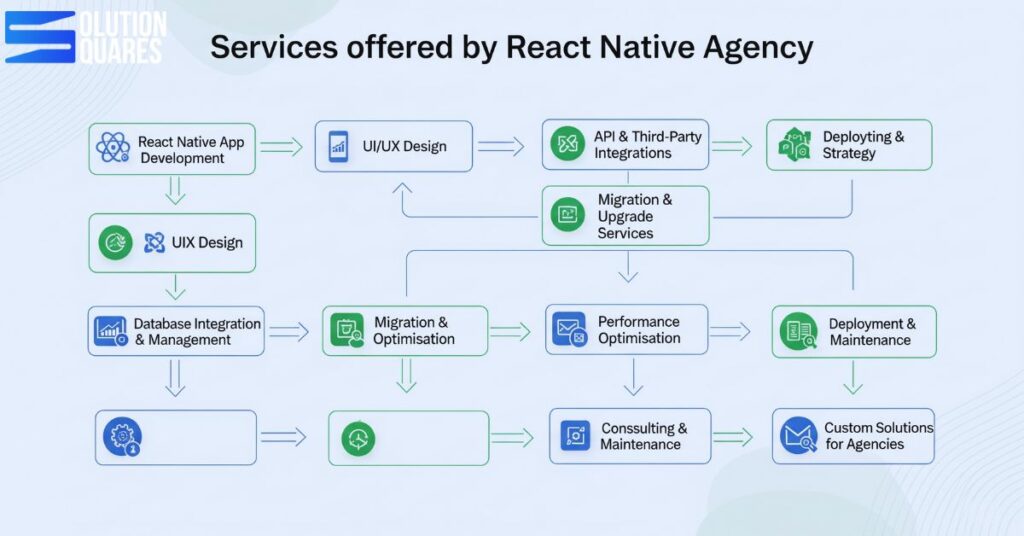
Key Services Offered by React Native Agencies
A React Native agency provides end-to-end mobile app development solutions, helping businesses build high-quality, cross-platform applications that work seamlessly on both iOS and Android. Here are the core services you can expect:
1. React Native App Development
Building apps from scratch using a single JavaScript codebase.
Cross-platform deployment for iOS and Android.
Native-like performance with efficient UI/UX.
2. UI/UX Design
Wireframing and prototyping tailored to business goals.
Custom design systems with responsive layouts.
User-centric design ensures smooth navigation and engagement.
3. API & Third-Party Integrations
Payment gateways (Stripe, PayPal, Razorpay).
Social logins (Google, Facebook, Apple).
Maps, geolocation, analytics, and push notifications.
4. Database Integration & Management
SQLite, Firebase, Realm, and other database solutions.
Offline-first functionality for seamless user experience.
Scalable architecture for large datasets.
5. Migration & Upgrade Services
Migrating existing apps to React Native.
Upgrading older React Native versions to the latest stable release.
Ensuring compatibility with the latest iOS and Android platforms.
6. Performance Optimisation
Speed tuning for faster load times.
Reducing app size and memory usage.
Implementing best practices for stability and scalability.
7. Testing & Quality Assurance
Automated and manual testing.
Debugging and crash analytics.
Ensuring bug-free, high-performing apps before launch.
8. Deployment & Maintenance
Publishing apps to the App Store and Google Play.
Ongoing updates and feature enhancements.
24/7 maintenance and support.
9. Consulting & Strategy
Technical consulting for project planning.
Cost estimation and roadmap creation.
Recommendations for best tools, libraries, and integrations.
10. Custom Solutions for Agencies
White-label app development for agency partners.
Dedicated developer teams for long-term collaboration.
Flexible engagement models (fixed, hourly, or dedicated teams).
Benefits of Hiring a React Native Agency
Keywords: benefits of React Native agency, cost-effective mobile development, scalable mobile apps
Cost-Effectiveness
Using a shared codebase for iOS and Android app development not only streamlines the workflow but also cuts down costs significantly. Agencies utilising React Native can reduce the expenditure associated with app development by up to 40%, as reported by PagePro.
Faster Time-to-Market
The ability to develop quickly due to the unified codebase enables businesses to launch their products much faster. React Native agencies can deliver MVPs in a short timeframe, oftentimes within just six weeks, providing a competitive edge in the market. This benefit is outlined in detail at PagePro.
Scalability
As business needs grow, it’s crucial to have an app that can scale. React Native provides an excellent platform for developing apps that can easily be scaled up to meet increasing user demands or expanded business objectives. Insights into scalability are explored further at iTobuz.
To capitalise on these benefits, selecting the right React Native agency is essential for success. Let’s understand how to make the best choice for your business.
How to Choose the Right React Native Agency
Building a mobile app is a big investment, and the choice of a React Native agency can make or break your project. The right agency doesn’t just write code—it partners with you to deliver a product that is scalable, user-friendly, and aligned with your business goals. Here’s a guide to help you choose the right React Native agency for your app development journey. Choosing the right React Native agency involves several considerations to ensure that their service and expertise align with your business goals. Here are key factors to consider:
1. Check Their Experience & Portfolio
Look at the agency’s past projects:
Do they have experience in your industry?
Have they built apps with features like payment integrations, push notifications, or real-time chat?
Do their apps showcase strong UI/UX design and smooth performance?
A portfolio speaks louder than promises.
2. Evaluate Technical Expertise
The agency should be well-versed in:
React Native core framework
Database solutions like SQLite, Firebase, Realm
API and third-party integrations
Performance optimisation and debugging
Technical depth ensures your app is built to last.
3. Communication & Transparency
A successful project relies on smooth collaboration. Ensure the agency:
Provides clear timelines and cost breakdowns
Uses tools like Slack, Jira, or Trello for updates
Offers transparent progress reports and feedback loops
4. Consider Scalability & Support
Choose an agency that doesn’t stop at launch. They should:
Provide maintenance and regular updates
Scale the app as your business grows
Offer bug-fixing and support packages
5. Look for Client Testimonials & Reviews
Feedback from past clients can reveal:
How the agency handles challenges
Their problem-solving ability
Overall satisfaction with delivery and support
6. Compare Pricing Models
Cost is important, but value matters more. Agencies usually offer:
Fixed-price (best for small projects with a clear scope)
Hourly rates (flexibility for evolving projects)
Dedicated teams (ideal for long-term partnerships)
Choose a model that fits your project scope and budget.
7. Assess Cultural & Strategic Fit
Beyond skills, your agency should align with your vision. A good partner:
Understands your business goals
Suggests improvements, not just execution
Works as an extension of your team
Reviewing the work history and project outcomes of a potential agency gives insight into their capability and expertise. Look for diversity in their projects and relevance to your industry to ensure they can meet your specific needs.
Benefits of Hiring a React Native Agency Over In-House Teams
Factor
In-House Team
React Native Agency
Initial Cost
High (hiring, training)
Optimised (pay for expertise only)
Expertise
Limited
Diverse & specialized
Delivery Speed
Slower (learning curve)
Faster (proven workflows)
Scalability
Challenging
Easily scalable
Long-term Support
Needs extra hiring
Included in services
Case Studies and Success Stories
Real-life examples illustrate the effectiveness of React Native agencies in delivering successful projects. One notable case saw a 40% increase in user engagement after a business revamped its app with the assistance of a React Native agency, as documented in detail in the PagePro Case Study. Such statistics underscore the transformative potential of collaborating with specialised agencies.
With these insights and real-world examples, the value of hiring a React Native agency becomes evident. Moving to an understanding of typical pricing models will help in further shaping your decision.
Pricing Models and What to Expect
Overview of Pricing Structures
Fixed Price: Best suited for projects with a well-defined scope where deadlines and deliverables are clear.
Hourly Rate: Offers flexibility for projects that may evolve or require additional modifications.
Dedicated Teams: A dedicated team works exclusively on your project, providing consistency and depth in engagement.
Factors Influencing Pricing
The cost of hiring a React Native agency can vary significantly based on the complexity of the project, required features, integration with other systems, and ongoing support. Understanding these factors will help anticipate the budget needed for your mobile app development.
Collaboration Process
A typical engagement with a React Native agency involves several phases, including:
Initial Consultation: Understanding client needs and outlining the project scope.
Design and Prototyping: Creating visual and functional plans for the app.
Development: Building the app using React Native, based on agreed milestones.
Testing and Deployment: Ensuring the app is bug-free and ready for launch.
Ongoing Support: Providing maintenance and updates post-launch.
Understanding the pricing and collaboration process enables better planning and helps set realistic expectations for your mobile app project.
Statistical Insights on React Native Agencies
Keywords: React Native agency statistics, mobile development market growth, React Native performance metrics
Market Growth: The mobile development sector is seeing significant uptake of React Native due to its efficiency and cost-effectiveness, as detailed by PagePro.
Performance Metrics: React Native apps are known for up to 90% code reusability, providing near-native performance, which is a major advantage compared to other cross-platform frameworks. For more statistics, refer to Studio Labs.
Industry Adoption: React Native is being adopted across various industries, from tech giants to startups, aiding in faster development and better user engagement as seen in Amplework.
These metrics underline the robust capabilities of React Native and the strategic advantage of enlisting a specialised agency for your mobile development needs.
Conclusion
Partnering with a React Native agency positions your business at the forefront of mobile technology, offering benefits like cost-efficiency, expert knowledge, and enhanced scalability. The information provided reflects how these agencies facilitate better performance, quicker market entry, and long-term digital success. Ready to elevate your mobile presence? Contact a React Native agency today to discuss your app idea and start your digital transformation journey.
A React Native Agency is not just a development partner—it’s a strategic ally that helps businesses launch apps faster, cut costs, and scale efficiently. Whether you’re a startup looking for an MVP or an enterprise optimising for performance, partnering with the right agency ensures your app is future-ready, secure, and high-performing.
Frequently Asked Questions (FAQs)
What is a React Native agency?
Specialises in developing cross-platform mobile apps using React Native, providing both technical expertise and strategic deployment.
Why should I hire a React Native agency instead of in-house developers?
Offers specialised skillsets, quicker development cycles, and cost-effective solutions, freeing you from the burdens of an in-house setup.
How much does hiring a React Native agency cost?
Costs can vary based on project scope, features, and the chosen pricing model, but agencies offer flexibility to fit diverse budget ranges.
How long does it take to develop an app with a React Native agency?
Development time varies depending on app complexity, but agencies are known for rapid delivery, often deploying MVPs within six weeks.
What industries can benefit from React Native app development?
Industries such as finance, healthcare, e-commerce, and entertainment benefit from the cross-platform capabilities and scalability of React Native apps.
React Native enables efficient cross-platform mobile app development using a single JavaScript codebase.
Visual Studio Code (VS Code) offers a lightweight, highly customizable environment tailored for React Native development.
Key benefits of React Native include code reusability, native-like experience, live & hot reloading, and lower maintenance costs.
VS Code enhances productivity with features like rich extensions, built-in Git support, and IntelliSense.
Proper setup and configuration of VS Code are crucial for optimising the React Native development workflow.
Introduction
In the competitive world of mobile app development, efficiency and productivity are everything. Agencies and businesses want high-quality apps built faster, without compromising on performance.
React Native, combined with Visual Studio Code (VS Code), has become the go-to development setup that empowers teams to deliver powerful apps at speed.
This guide explores how React Native and VS Code work together to streamline workflows, improve collaboration, and maximise productivity.
Why Choose React Native for App Development?
React Native is an industry-leading framework that enables the creation of cross-platform mobile applications using JavaScript and React.
This approach allows developers to perform iOS and Android app development simultaneously using a single codebase, which significantly enhances efficiency (PagePro).
In the competitive software development market, the choice of development environment is crucial as it affects productivity, workflow smoothness, and code quality. This blog focuses on “React Native App VS Code,” detailing the advantages of using Visual Studio Code (VS Code) for React Native development.
It provides insights into setup procedures, best practices, advanced tips, and comparative analysis with other Integrated Development Environments (IDEs).
Overview of React Native
React Native simplifies mobile app development, allowing for a single codebase for both Android and iOS platforms. This not only cuts down development time but also reduces costs significantly (PagePro).
Key Benefits of React Native
Code Reusability: Up to 95% of the code can be used across different platforms, providing swift deliveries and cost efficiency (Grazitti).
Native-like Experience: React Native incorporates native UI components to deliver a responsive and immersive user experience (PagePro).
Live & Hot Reloading: Immediate feedback on code alterations speeds up the development process (Grazitti).
Lower Maintenance Costs: Simplified updates and bug fixes due to a unified codebase lead to reduced maintenance efforts (PagePro).
Smaller Team Requirements: A streamlined team can efficiently handle development for both iOS and Android platforms (Cleart).
Faster Time-to-Market: Reusable code saves time, reducing development cycles.
Strong Ecosystem: A vast collection of libraries and third-party integrations.
Scalability: Apps can grow with your business needs.
Cross-Platform Power: Write once in JavaScript, deploy on both iOS and Android.
Introduction to Visual Studio Code (VS Code)
Overview of VS Code
Visual Studio Code is a lightweight, open-source editor by Microsoft, extensively used in web and mobile app development due to its versatility and powerful features.
When it comes to React Native app development, choosing the right IDE (Integrated Development Environment) can make or break your workflow. While there are several editors out there, Visual Studio Code (VS Code) has emerged as the most popular and developer-friendly choice in 2025.
Packed with extensions, integrations, and productivity hacks, VS Code helps developers code faster, debug better, and build apps more efficiently..
Key Features of VS Code
Rich Extension Ecosystem: VS Code supports a myriad of programming languages and frameworks through its extensive extensions.
Built-in Git Support: Simplifies source control management, enriching developer productivity.
React Native allows a single codebase for both iOS and Android, cutting development time by 30–50% compared to building separate native apps.
Teams using a shared codebase report up to 50% faster development, 70% faster release cycles, and 60% improved testing efficiency.
This translates into about 35% faster time-to-market, delivering apps more rapidly.
2. Hot Reloading = Instant Feedback
MoldStud says that React Native’s hot reloading feature slashes development cycles by up to 50%, letting developers see code changes instantly—without requiring full rebuilds.
3. Broad Ecosystem & Reusable Components
According to MoldStudBrilworks, with code-sharing across platforms typically exceeding 90%, React Native reduces duplication and supports reusable component libraries that cut development time by up to 50%.
Supportive plugin ecosystems—fronted by hundreds of UI libraries, integrations, and tools—can reduce development effort for common features by up to 60%, according to IQud.
4. Cost Savings That Matter
As per MoldStudBrilworks, agencies can save 30–40% on development time and costs compared to native builds.
Brilworks says that “Some large-scale implementations, like those by Discord, reported cost reductions of 30% and achieved a 99% crash-free experience.”
5. Impressive Adoption and Brand Trust
As per Brilworks data, React Native ranked as the second most popular development tool in Stack Overflow’s 2024 survey—favoured by 55%+ of developers.
According to Appinventiv, Major brands like Walmart, Facebook, SoundCloud, and Bloomberg use it to modernise their apps and speed up development. Walmart reused 96% of their codebase across platforms. Further, Wix even claims a 300% acceleration in development workflow after switching to React Native.
How VS Code Amplifies These Benefits
Dedicated Extensions: Tools like React Native Tools and React Developer Tools enhance IntelliSense, debugging, and component inspection.
Integrated Debugging & Git Support: Everything from logs to breakpoints and version control is seamlessly available inside VS Code.
Productivity Boosts: Shared settings, snippets, and workspace configs streamline collaboration across teams.
Live Collaboration: Extensions like Live Share elevate teamwork by enabling real-time code editing and debugging sessions.
Boosting Productivity with React Native + VS Code
Feature
Benefit for Agencies
Hot Reloading
Test changes instantly without rebuilding entire apps.
Task Automation
Extensions handle repetitive tasks like linting, formatting, and testing.
Remote Collaboration
Integrations with Live Share allow real-time teamwork.
Debugging Tools
Faster issue resolution, reducing project delays.
Challenges Of VS Code
Performance Bottlenecks: Optimise with VS Code profiling tools and React Native performance libraries.
Complex Integrations: Use VS Code extensions to manage APIs, databases, and native modules effectively.
Team Onboarding: Shared VS Code configurations shorten the learning curve for new developers.
Trends to Watch in React Native + VS Code Development
AI-powered extensions for code suggestions and bug detection.
Deeper integration with cloud services for CI/CD pipelines.
Enhanced mobile debugging with VS Code’s evolving tools.
Agencies that adopt these trends stay ahead of the competition by delivering apps faster and smarter.
Conclusion
React Native and VS Code together form a powerful combination for agencies that want to maximise development efficiency. From cross-platform deployment to faster debugging and collaboration, this setup ensures smooth workflows and high-quality results.
By embracing this stack, agencies not only save time and resources but also position themselves as reliable partners for clients seeking scalable, future-ready mobile apps.VS Code, armed with robust tools and a supportive ecosystem, offers a superior development environment for React Native applications.
It empowers developers with efficiency, versatility, and powerful tooling, making it an optimal choice for those seeking to enhance their productivity and code quality in React Native app development. Embrace the prowess of VS Code and supercharge your development capabilities today. Dive into the React Native Documentation and the VS Code Official Documentation for more comprehensive guidance and start enhancing your React Native projects in VS Code now!
React Native is a framework developed by Facebook that allows developers to create mobile applications using JavaScript and React, enabling cross-platform development for both iOS and Android.
2. Why should I use VS Code for React Native development?
VS Code offers a lightweight, highly customizable environment with powerful features like rich extensions, built-in Git support, and IntelliSense, which streamline the development process and enhance productivity.
3. How does code reusability in React Native benefit my project?
Code reusability allows up to 95% of your code to be used across different platforms, significantly reducing development time and costs while maintaining consistency across your application.
4. What are the essential extensions for React Native development in VS Code?
Essential extensions include React Native Tools for debugging, ESLint for code quality, Prettier for code formatting, and GitLens for advanced Git functionalities.
5. How can I optimise my React Native workflow in VS Code?
Optimising your workflow can be achieved by configuring VS Code settings for auto-save, setting up proper formatting rules, utilising keyboard shortcuts, and integrating necessary extensions that support your development needs.
Top libraries, such as React Navigation, React Native Reanimated, and Tamagui, are essential for building high-performance applications in 2024.
Integrating these libraries and plugins can lead to increased development speed, higher code quality, and reduced costs.
Staying updated with the latest React Native tools is crucial for maintaining and scaling mobile applications effectively.
Overview
In the dynamic world of mobile app development, staying ahead means constantly evolving your toolkit. For agencies specializing in React Native, knowing the essential libraries isn’t just about coding; it’s about boosting productivity, ensuring top-tier performance, and delivering future-proof solutions that keep your clients competitive.
As we move into 2025, the React Native ecosystem continues to mature, especially with the widespread adoption of the New Architecture (Fabric, TurboModules, JSI). This shift impacts how libraries are built and consumed, making it more crucial than ever to identify the must-know tools.
This guide outlines the indispensable React Native libraries for agencies in 2025, grouped by their core functionality, along with why each one is critical for your agency’s success.
What are React Native Libraries?
React Native libraries are pre-built code modules designed to simplify and expedite the development of mobile apps by offering reusable components, utilities, APIs, and integrations specific to React Native. Here are several benefits of using these libraries:
Increased Development Speed: Libraries help avoid repetitive boilerplate code, thus speeding up the development process.
Higher Code Quality and Consistency: These libraries are well-tested, community-reviewed solutions that foster better code quality.
Access to Advanced Features: They allow developers to quickly implement animations, navigation, state management, and other sophisticated functions.
Reduced Development Costs: They facilitate cross-platform compatibility, thus reducing both development and maintenance costs.
1.UI Component Libraries: Building Blocks for Beautiful Apps
These libraries provide pre-built, customizable UI components that significantly accelerate development and ensure design consistency across platforms.
React Native Paper:
Why it’s essential: A comprehensive, Material Design-based library developed by Callstack. It offers production-ready components, extensive theming support (including dark mode), and good web support via React Native Web.
Agency Advantage: Speeds up UI development, ensures a consistent, polished look (familiar to Material Design users), and reduces the need for custom component creation. Great for enterprise apps prioritising a consistent aesthetic.
gluestack UI (formerly NativeBase):
Why it’s essential: Evolved into a performance-optimised UI library, gluestack UI offers a rich set of accessible, customizable components. It emphasises efficiency and consistency.
Agency Advantage: Accelerates development with robust, production-ready components. Its focus on accessibility helps agencies deliver inclusive apps, meeting a critical client requirement.
Tamagui:
Why it’s essential: A high-performance UI library and styling solution designed for both React Native and Web. It focuses on compile-time style optimisation for faster rendering.
Agency Advantage: Ideal for agencies building truly universal apps (mobile + web) from a single codebase, offering superior performance and design system capabilities.
React Native Elements:
Why it’s essential: A general-purpose, highly customizable UI toolkit. It’s easy to use and provides a wide array of components like buttons, forms, and icons.
Agency Advantage: A flexible choice for projects needing quick UI setup and customization without strict adherence to a specific design language.
2. State Management Solutions: The Heartbeat of Your App
Efficiently managing application state is paramount for complex apps.
React Hooks (useState, useContext, useReducer):
Why it’s essential: React’s built-in hooks are fundamental for managing local component state (useState) and sharing state across a component tree without prop-drilling (useContext, useReducer).
Agency Advantage: Reduces boilerplate for simpler state needs, keeps code within React’s paradigm, and is a baseline skill for all React Native developers.
Redux Toolkit:
Why it’s essential: The official, opinionated way to use Redux. It significantly simplifies Redux development by reducing boilerplate and offering built-in utilities for common tasks (e.g., creating reducers, handling asynchronous logic).
Agency Advantage: Provides a predictable and scalable state management solution for large, complex enterprise applications, making collaboration easier and long-term maintenance more manageable.
Zustand / Recoil / Jotai:
Why it’s essential: These are lightweight, modern alternatives to Redux, offering simpler APIs and often less boilerplate for global state management. Zustand is known for its minimalism, Recoil for its atom-based approach from Facebook, and Jotai for its atomic state model.
Agency Advantage: Provides agencies with flexible options for projects where Redux might be overkill, allowing for quicker implementation and potentially better performance for certain use cases.
3. Navigation Architecture: Guiding User Journeys
A smooth and intuitive navigation experience is crucial for user retention.
React Navigation:
Why it’s essential: The most popular and feature-rich navigation library for React Native. It offers various navigators (Stack, Tab, Drawer), deep linking support, and highly customizable options.
Agency Advantage: Provides a robust and flexible solution for structuring complex app navigation, ensuring a consistent and intuitive user flow across iOS and Android. Essential for virtually all multi-screen apps.
4. Data Fetching and Caching: Performance at Scale
Efficiently retrieving and managing data is critical for responsive applications.
React Query (TanStack Query) / SWR:
Why it’s essential: These libraries simplify data fetching, caching, synchronisation, and server-state management. They provide automatic caching, background revalidation, and intelligent refetching.
Agency Advantage: Drastically improves perceived performance and responsiveness by handling complex data fetching patterns, reducing loading states, and ensuring data is always fresh. Reduces boilerplate for API calls and enhances user experience.
5. Animations & Gestures: Bringing Apps to Life
Smooth animations and responsive gestures make an app feel premium.
React Native Reanimated:
Why it’s essential: A powerful and flexible animation library that allows for running animations on the UI thread, leading to buttery-smooth 60 FPS performance, even during complex interactions. It works seamlessly with react-native-gesture-handler.
Agency Advantage: Enables agencies to create highly interactive and visually engaging apps with fluid animations, pushing the boundaries of what’s possible with React Native. Crucial for apps with rich UIs.
Lottie for React Native:
Why it’s essential: Renders animations exported from Adobe After Effects (as JSON) directly in native apps. It’s lightweight and delivers high-quality vector animations.
Agency Advantage: Easily integrates complex, designer-created animations into apps, adding a polished, professional touch without extensive coding.
React Native Gesture Handler:
Why it’s essential: Provides native-driven gesture management, offering a more robust and responsive solution than React Native’s built-in gesture system.
Agency Advantage: Ensures precise and performant handling of user gestures (swipes, pinches, drags), leading to a much smoother and more reliable user experience.
These libraries handle common functionalities and device integrations.
React Native Vector Icons:
Why it’s essential: A highly customizable icon library that provides thousands of icons from various popular icon sets (Font Awesome, Material Icons, etc.).
Agency Advantage: Simplifies icon integration, ensures consistent iconography, and is a staple for almost every React Native project.
React Native Maps:
Why it’s essential: Provides map components for both iOS (Apple Maps) and Android (Google Maps), with extensive customisation options.
Agency Advantage: Essential for location-based services, ride-sharing, or any app requiring map functionalities, offering native map experiences.
Firebase / Amplify / Supabase (BaaS Integration):
Why it’s essential: These Backend-as-a-Service (BaaS) platforms provide ready-to-use services for authentication, databases, storage, and more, significantly reducing the need for custom backend development.
Agency Advantage: Accelerates development of MVPs and full-scale apps by offloading backend complexities, allowing agencies to focus on the front-end and core business logic.
Robust testing is non-negotiable for delivering high-quality apps.
Jest & React Native Testing Library:
Why it’s essential: Jest is a popular JavaScript testing framework, while React Native Testing Library focuses on testing components from the user’s perspective.
Agency Advantage: Empowers agencies to write effective unit and integration tests, ensuring component reliability and a strong test-driven development (TDD) approach.
Detox:
Why it’s essential: A powerful end-to-end (E2E) testing framework that simulates real user interactions on a device or simulator.
Agency Advantage: Guarantees the entire user flow works as expected, catching critical bugs before deployment and providing confidence in the app’s stability.
Conclusion
The right React Native libraries and plugins are pivotal in developing efficient, scalable, and high-quality mobile applications. They unlock advanced features and streamline both development and maintenance processes, allowing developers to focus more on creating value. Staying updated with the latest advancements in React Native libraries and plugins is highly recommended for optimising app development and achieving operational excellence.
In 2025, the React Native ecosystem is stronger than ever, offering a wide range of libraries and plugins to streamline development and improve app quality. Whether it’s animations, navigation, state management, or performance optimisation, the right tools can elevate your mobile app development journey.
By strategically adopting these libraries, developers can save time, reduce bugs, and deliver superior user experiences.
Let’s enhance your mobile app development with these top React Native libraries and plugins now! Contact Us
Frequently Asked Questions
1. What are the essential React Native libraries for 2025?
The essential libraries include React Navigation for navigation, React Native Reanimated for animations, and Tamagui for cross-platform UI components. These libraries enhance development speed, code quality, and app performance.
2. How do React Native plugins differ from libraries?
While libraries provide reusable JavaScript or TypeScript modules, React Native plugins often wrap native code to offer deeper integration with device-specific functionalities like hardware features or third-party services.
3. How can I integrate Firebase into my React Native app?
You can integrate Firebase using the react-native-firebase plugin, which offers seamless integration with Firebase services such as authentication, analytics, and real-time databases. Ensure you follow the configuration steps in the React Native Firebase Documentation.
4. What is the best way to handle navigation in React Native?
The best way is to use React Navigation, a flexible and extensible navigation library that supports stacks, tabs, and drawers, making it suitable for both simple and complex navigation structures.
5. How do I optimise the performance of animations in my React Native app?
Using React Native Reanimated can significantly optimise animation performance by offloading animations to the native thread, ensuring smoother and more responsive user interactions.
Comprehensive Strategies: Implementing unit, integration, and end-to-end testing ensures robust React Native applications.
Tool Selection: Utilising tools like Jest, React Native Testing Library, Detox, and Appium enhances testing efficiency.
Quality Assurance: Integrating QA practices goes beyond testing to ensure performance and user experience.
Best Practices: Maintaining tests and setting up a proper testing environment are crucial for ongoing app quality.
Continuous Improvement: Adopting systematic testing strategies reduces bugs and increases user satisfaction.
Introduction
For agencies building mobile applications, delivering apps that are bug-free, stable, and reliable is just as important as delivering them on time. In 2025, clients expect more than just functioning apps—they expect high-quality digital experiences that work seamlessly across both iOS and Android.
That’s where a strong testing strategy for React Native projects comes in. By implementing the right mix of testing approaches, agencies can reduce costly production bugs, improve client satisfaction, and scale development efficiently.
Testing is a pivotal phase in the development of mobile apps, critical for ensuring that applications are robust, user-friendly, and reliable. In-depth testing strategies help minimise production bugs, thus significantly enhancing user satisfaction and trust in the application. This is particularly true when testing React Native apps, where quality assurance plays a central role in an app’s success.
Why Testing Matters for Agencies
You wouldn’t hand over the keys without ensuring the foundation is solid, the plumbing works, and the roof doesn’t leak. Mobile apps are no different. Clients expect perfection, and with good reason.
Protects Brand Reputation: Poorly tested apps lead to crashes, bad reviews, and client dissatisfaction.
Saves Time & Cost: Fixing bugs in production can cost up to 10x more than fixing them during development.
Ensures Cross-Platform Consistency: Testing guarantees consistent behaviour on iOS and Android devices.
Boosts Client Confidence: Demonstrating a clear testing process reassures clients about project quality.
Reduced Rework & Costs: Catching issues early in the development cycle is vastly cheaper than fixing them post-launch. Testing prevents costly rework and reputational damage.
Enhanced User Experience (UX): A well-tested app ensures a smooth, intuitive, and enjoyable experience, leading to higher user engagement and retention.
Competitive Edge: Agencies known for delivering high-quality applications stand out in a crowded market.
Faster Release Cycles: Automated and efficient testing allows for quicker iterations and confident deployments.
Key React Native Testing Strategies
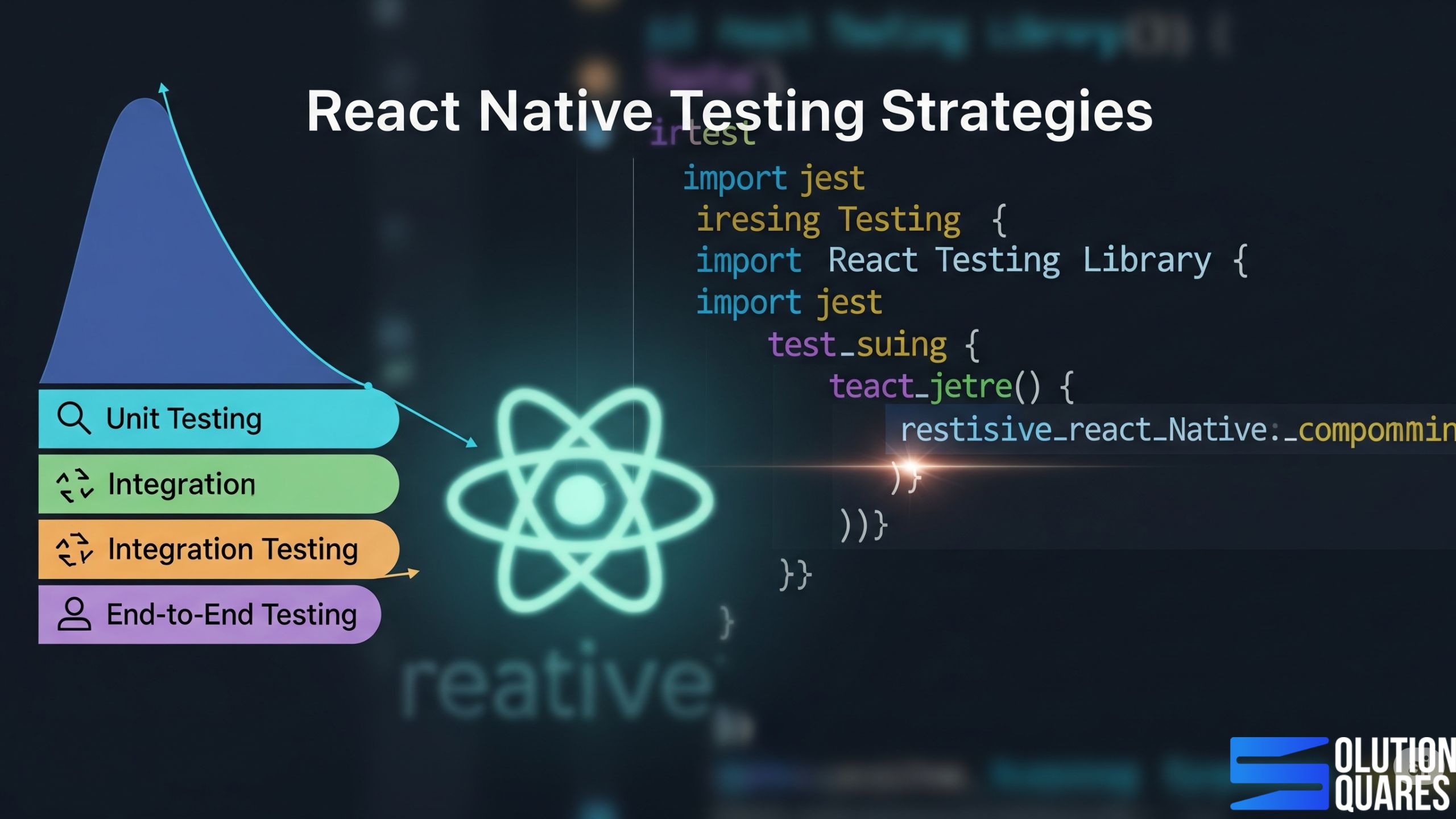
A comprehensive testing approach involves multiple layers, each designed to catch different types of bugs. We advocate for a “Test Pyramid” strategy, focusing on a broad base of fast, isolated tests, tapering up to fewer, more complex end-to-end tests.
1. Unit Testing: The Foundation of Reliability
Unit tests verify the smallest, isolated parts of your code – individual functions, pure components (components without side effects or complex logic), or utility methods. They ensure each “unit” works exactly as intended.
Why it’s important for agencies:
Early Bug Detection: Catches bugs right where they happen, preventing them from propagating.
Code Documentation: Acts as living documentation for how individual pieces of code should behave.
Faster Feedback: Unit tests run incredibly fast, providing immediate feedback to developers.
Essential Tools:
Jest: The go-to JavaScript testing framework, widely adopted in the React and React Native ecosystem. It’s fast, flexible, and provides powerful assertion capabilities.
2. Component Testing: Validating Your UI Blocks
Component tests focus on individual React Native components, ensuring they render correctly, respond to props, and handle user interactions as expected, often in isolation from the full application.
Why it’s important for agencies:
UI Stability: Ensures that your reusable UI components are robust and consistent, no matter where they’re used.
Isolation: Tests components without needing a full app environment, making them faster and more reliable than E2E tests for UI logic.
Designer-Developer Alignment: Verifies that components match design specifications.
Essential Tools:
React Native Testing Library (RNTL): Built on top of Jest, RNTL encourages testing components from the user’s perspective, focusing on what the user sees and interacts with, rather than internal implementation details.
3. Integration Testing: How Pieces Fit Together
Integration tests verify that different units or components interact correctly with each other. This could be two components communicating, a component interacting with a Redux store or a service layer integrating with an API mock.
Why it’s important for agencies:
Inter-Module Confidence: Ensures that when you combine tested units, their interactions don’t break.
Realistic Scenarios: Simulate more realistic application flows than isolated unit tests.
Essential Tools:
Often, Jest and React Native Testing Library can be combined for integration tests by mounting multiple connected components or mocking API calls. For more complex scenarios, E2E tools can be adapted.
4. End-to-End (E2E) Testing: The Full User Journey
E2E tests simulate a full user journey through your application, interacting with the UI, navigating between screens, and verifying the entire flow from start to finish on a real device or emulator/simulator.
Why it’s important for agencies:
Comprehensive Validation: Catches bugs that might only appear when all parts of the app are working together.
User Confidence: Ensures critical user flows (e.g., login, checkout, data submission) are flawless.
Business Logic Validation: Verifies that the app’s core functionalities align with business requirements.
Essential Tools:
Detox: A popular and powerful E2E testing framework specifically designed for React Native. It runs tests on actual devices/simulators, synchronising with the app’s UI to avoid flakiness.
Appium: A versatile open-source test automation framework for native, hybrid, and mobile web apps. It supports iOS, Android, and Windows platforms, allowing the same test cases to run across multiple environments.
5. UI / Snapshot Testing: Guarding Against Visual Regressions
Snapshot tests capture the rendered output of a component (e.g., its JSX structure or a visual image) and save it as a “snapshot.” Future test runs compare the current output to the saved snapshot, alerting you to any unexpected UI changes.
Why it’s important for agencies:
Preventing Visual Bugs: Catches unintended UI changes, which can be critical for brand consistency and user experience.
Faster UI Review: Quickly identifies if a code change has suddenly altered the UI.
Essential Tools:
Jest Snapshot Testing: Integrated directly with Jest, making it easy to create and manage snapshots.
6. Performance Testing: The Need for Speed (and Smoothness)
Performance testing measures an app’s speed, responsiveness, stability, and resource usage under various loads. This includes startup time, frame rates, memory consumption, and network efficiency.
Why it’s important for agencies:
User Satisfaction & Retention: Slow apps drive users away. Performance testing ensures your apps are fast and fluid.
Resource Efficiency: Identifies memory leaks and CPU hogs, leading to better battery life and device compatibility.
Competitive Edge: Delivering highly performant apps is a key differentiator.
Essential Tools:
Flipper: Provides powerful performance tracking, including CPU and memory usage, network monitoring, and a layout viewer.
Native Profilers (Xcode Instruments for iOS, Android Studio Profiler for Android): For deep dives into platform-specific performance bottlenecks.
React Native Performance Monitor: A built-in React Native tool to track frame rates and UI performance.
Reassure: An open-source library that helps detect UI performance regressions at the component level.
7. Accessibility Testing: Inclusivity by Design
Accessibility testing ensures that your app is usable by people with disabilities, including those with visual, auditory, cognitive, or motor impairments. This involves proper semantic HTML (for web), screen reader labels, keyboard navigation, and adequate contrast ratios.
Why it’s important for agencies:
Broader Audience Reach: Ensures your clients’ apps are accessible to everyone, expanding their potential user base.
Manual Testing: Crucial for understanding real user experiences with screen readers and other assistive technologies.
ESLint Plugins: Can enforce certain accessibility rules in code.
Benefits of Strong Testing Strategies for Agencies
Higher Client Retention: Clients trust agencies that deliver stable apps.
Reduced Risk: Minimise costly production bugs and app store rejections.
Scalable Growth: A repeatable testing framework means faster onboarding of new developers.
Upsell Opportunity: Offer Testing-as-a-Service to existing development clients.
Conclusion
In conclusion, a meticulous approach to React Native testing strategies is crucial for developing robust, efficient, and user-pleasing mobile applications. By integrating comprehensive testing protocols, from unit and integration testing to E2E scenarios, and aligning them with effective QA practices, teams can ensure that they deliver high-quality applications. Embracing these practices not only enhances the product quality but also optimises development workflows, ultimately leading to successful project outcomes and satisfied users. Final Thoughts
1. What are the best practices for React Native testing?
Best practices include writing comprehensive unit tests, integrating continuous testing in the CI/CD pipeline, using appropriate testing libraries, and maintaining clear and modular test cases.
2. How does integration testing differ from unit testing in React Native?
Unit testing focuses on individual components or functions to ensure they work correctly in isolation, whereas integration testing verifies that different parts of the application work together seamlessly.
3. Why is E2E testing important for mobile apps?
E2E testing ensures that the entire application flow works as intended from the user’s perspective, catching issues that might not be evident in isolated tests.
4. What tools are recommended for E2E testing in React Native?
Popular tools for E2E testing in React Native include Detox and Appium, which automate testing on real devices and emulators.
5. How can continuous integration improve React Native testing?
Continuous integration automates the testing process, ensuring that tests are run consistently with every code change, which helps in early detection of issues and maintains code quality.
Understand the core factors affecting React Native performance.
Implement optimisation techniques like memoisation and efficient list handling.
Utilise debugging tools to maintain and enhance app performance.
Stay updated with the latest React Native updates for continued improvement.
Design responsive UIs that do not compromise on performance.
Introduction
React Native has become the go-to framework for cross-platform mobile development.
In 2025, with growing user expectations for lightning-fast, smooth, and scalable mobile apps, agencies must go beyond simply building apps — they must optimise performance. Whether your clients are startups, enterprises, or consumer-facing brands, react native performance optimisation directly impacts user experience, retention, and revenue.
This guide covers the latest strategies, tools, and best practices to ensure React native performance optimisation performs at its peak
Why Performance Optimisation Matters in 2025?
Optimisation is a necessary step for efficiency, scalability, and seamless user experience. According to Lemosys Blog, Heavy or poorly optimised native modules can slow down your app, making it imperative to optimise or replace them with more efficient alternatives. To avoid common pitfalls in app development, refer to Mistakes to Avoid When Developing an App: A Comprehensive Guide.`Think of performance as the silent hero of your app. When it’s great, users don’t notice it – they just have a seamless experience. When it’s poor, they notice immediately.
User Retention & Satisfaction: Fast apps lead to happier users who stick around longer. Agencies that deliver performant apps build lasting client relationships.
Reduced Development & Maintenance Costs: Optimised code is easier to maintain and debug. Proactive performance work minimises costly post-launch fixes.
Stronger Brand Reputation: Delivering high-quality, responsive applications enhances your agency’s reputation and attracts more clients.
SEO & App Store Visibility: App store algorithms often favour well-performing apps, leading to better visibility and organic downloads.
Future-Proofing: An optimised architecture is better prepared for future features, scalability, and evolving user demands.
Key Optimisation Strategies for React Native Performance Optimization in 2025
1. Efficient Rendering with Fabric and JSI
Leverage React Native’s Fabric architecture for faster UI rendering.
Use the JavaScript Interface (JSI) for smoother communication between JS and native modules.
Reduce unnecessary re-renders by using React. memo, useCallback, and PureComponent.
Avoid heavy data transfer between JavaScript and native threads.
Use native modules sparingly and rely on JSI for high-frequency operations.
3. Image and Asset Optimisation
Serve responsive images based on device resolution.
Use WebP format for compressed yet high-quality visuals.
Implement lazy loading for heavy assets.
4. Code Splitting and Lazy Loading
Split large bundles into smaller chunks.
Load modules on-demand instead of at app start-up.
Apply Hermes Engine for faster app start times.
5. Memory & State Management
Optimise with Redux Toolkit or Recoil for minimal re-renders.
Use FlatList with proper getItemLayout and keyExtractor for handling large datasets.
Monitor memory leaks with Flipper and Android Profiler.
6. Animation Optimisation
Use Reanimated 3 for fluid 60 FPS animations.
Move heavy animation work to the UI thread for smooth transitions.
7. Network & API Optimisation
Implement request caching and pagination.
Compress network payloads (e.g., Gzip, Brotli).
Use GraphQL with Apollo/Relay for efficient data fetching.
8. Build Optimisation
Enable ProGuard (Android) and Bitcode (iOS) for smaller builds.
Remove unused dependencies and assets.
Use CI/CD pipelines to automate performance checks.
For the latest architectural improvements in React Native, which aid in performance optimisation, refer to the Callstack eBook and YouTube Video. Besides choosing the right database is vital for performance.
Market differentiation: Few agencies offer deep React Native performance expertise.
Staying Updated with React Native Updates
Keeping up with the latest React Native updates is key to performance improvements. It is advised to subscribe to official changelogs, community discussions, and reputable blogs for timely information. Details on integrating new features without compromising performance can be seen in this Callstack eBook and YouTube Video. For deployment best practices, consult: Optimise Deploy React Native App. Read more about balancing aesthetic design with performance in both the Zignuts Blog and the Netguru Blog.
Why Performance Optimisation is Your Agency’s Competitive Edge
Think of performance as the silent hero of your app. When it’s great, users don’t notice it – they just have a seamless experience. When it’s poor, they notice immediately.
User Retention & Satisfaction: Fast apps lead to happier users who stick around longer. Agencies that deliver performant apps build lasting client relationships.
Reduced Development & Maintenance Costs: Optimised code is easier to maintain and debug. Proactive performance work minimises costly post-launch fixes.
Stronger Brand Reputation: Delivering high-quality, responsive applications enhances your agency’s reputation and attracts more clients.
SEO & App Store Visibility: App store algorithms often favour well-performing apps, leading to better visibility and organic downloads.
Future-Proofing: An optimised architecture is better prepared for future features, scalability, and evolving user demands.
The New Architecture: A Performance Powerhouse for 2025
In the competitive world of mobile applications, performance isn’t just a feature; it’s a fundamental user expectation. A slow, laggy app leads to frustrated users, poor reviews, and ultimately, uninstalls. For agencies, delivering high-performing React Native applications isn’t just about technical excellence; it’s about securing client satisfaction, building a strong reputation, and ensuring the long-term success of every project.
As we step into 2025, the React Native ecosystem is more powerful and complex than ever, driven by the rollout of the New Architecture. This guide will equip your agency with the essential knowledge and strategies to not only identify but also proactively eliminate performance bottlenecks, ensuring your React Native apps are fast, fluid, and a delight for users.
The most significant shift impacting React Native performance in 2025 is the widespread adoption of the New Architecture, comprising Fabric, TurboModules, and JSI. This is a game-changer for agencies:
Fabric (The New Renderer):
Benefit: Enables concurrent rendering and synchronous layout reading. This means the UI can update more smoothly, even when the JavaScript thread is busy, and complex animations feel truly native.
Agency Advantage: Delivers visually fluid and responsive UIs, reducing “jank” and providing a premium user experience that rivals fully native apps.
TurboModules (Improved Native Module System):
Benefit: Allows native modules to be lazy-loaded (only when needed), reducing the app’s startup time and memory footprint.
Agency Advantage: Faster app launch times and better resource management, especially critical for apps with many native integrations or limited device resources.
JavaScript Interface (JSI):
Benefit: Replaces the old asynchronous “bridge” with a direct, synchronous connection between JavaScript and native code. This eliminates serialisation overhead.
Agency Advantage: Boosts performance for data-intensive operations and real-time interactions, making complex features (like high-frame-rate camera processing or complex data visualisations) significantly more performant.
Agency Strategy: Prioritise migrating existing apps to the New Architecture (incrementally, if necessary) and building new projects on it. This foundational change offers the biggest leap in performance.
Key Optimisation Strategies for Your React Native Apps
Efficient Component Rendering (Memoisation):
Challenge: Unnecessary re-renders are a primary cause of performance bottlenecks.
Solution: Use React.memo for functional components and shouldComponentUpdate /or extend React.PureComponent) for class components. These prevent components from re-rendering if their props or state haven’t actually changed. Also, use useCallback and useMemo for memoising functions and expensive calculations.
Agency Advantage: Reduces CPU usage, conserves battery, and ensures UI updates only when necessary, leading to a smoother user experience.
Virtualised Lists for Large Data Sets:
Challenge: Rendering long lists of items with ScrollView can consume excessive memory and lead to sluggish performance.
Solution: Always use FlatList or SectionList. These components render only the items currently visible on screen, dramatically optimising memory usage and rendering speed. Use getItemLayout for fixed-height items and keyExtractor for efficient list updates.
Agency Advantage: Delivers fluid scrolling experiences even with thousands of items, essential for social feeds, e-commerce product lists, and large data displays.
Image Optimisation:
Challenge: Large, unoptimized images are a common culprit for high memory consumption, slow loading, and increased app bundle size.
Solution:
Resize and Compress: Always serve images at the required dimensions and compress them (e.g., using tools like TinyPNG or ImageOptim).
Efficient Formats: Prefer modern formats like .webp for better compression and quality.
Caching Libraries: Use react-native-fast-image for efficient image caching and loading.
Agency Advantage: Reduces app size, speeds up load times, prevents out-of-memory crashes, and improves overall visual responsiveness.
Optimising Animations:
Challenge: JavaScript-driven animations can easily cause jank, especially on lower-end devices.
Solution: Leverage react-native-reanimated (v2 or v3) and react-native-gesture-handler. These libraries allow animations and gestures to run on the UI thread (native side), completely offloading them from the JavaScript thread.
Agency Advantage: Delivers truly fluid and smooth animations that feel native, elevating the perceived quality and polish of the application.
Bundle Size Reduction:
Challenge: A bloated app bundle leads to slower download times and increased storage usage on the user’s device.
Solution:
Enable Hermes: This lightweight JavaScript engine significantly reduces bundle size and startup time on both Android and iOS.
Remove Unused Code & Assets: Regularly audit your code package.json for unused libraries and remove unnecessary images, fonts, and code (tree shaking).
Code Splitting & Lazy Loading: Use dynamic imports or React.lazy() with Suspense to load components only when they are needed.
Android App Bundles (.aab): For Android, always use .aab files instead of .apk delivering optimised app versions for different device configurations.
Proguard/R8 (Android): Enable these tools to shrink, optimise, and obfuscate Java bytecode.
Agency Advantage: Faster app downloads, quicker installations, and a more pleasant experience for users, especially in regions with limited bandwidth or older devices.
Effective State Management:
Challenge: Overly complex or inefficient state management can lead to excessive re-renders and memory overhead.
Solution: Choose the right state management tool for the job (React Hooks for simpler needs, Redux Toolkit for complex global state, or lightweight alternatives like Zustand/Jotai). Ensure immutable data structures are used to simplify change detection.
Agency Advantage: Creates a more predictable and debuggable codebase, reducing bugs related to state and enhancing the overall stability of the application.
Minimise Bridge Interactions:
Challenge: In the legacy architecture, frequent communication across the JavaScript bridge could be a bottleneck.
Solution: While JSI (part of the New Architecture) largely mitigates this, in existing legacy projects, agencies should still batch bridge calls and use native modules for performance-critical tasks where appropriate.
Agency Advantage: Ensures responsiveness in interactions that require significant JavaScript-native communication.
Tools for Proactive Performance Management
Agencies need a strategic approach to performance, not just reactive firefighting. These tools are indispensable:
React Native DevTools: The official debugging tool (now often replacing Flipper as default) offers UI inspection, component tree analysis, and performance profiling to identify slow components and unnecessary re-renders.
Flipper: (Still highly valuable, especially for plugins) An all-in-one debugging platform with plugins for network inspection, layout viewing, database browsing (SQLite, AsyncStorage), and performance tracking (CPU, memory, frames).
Reactotron: Excellent for debugging state management (Redux, MobX), API calls, and AsyncStorage data with a clean, centralised interface.
Native Platform Tools:
Xcode Instruments (iOS): For deep profiling of CPU, memory, network, and GPU usage on iOS.
Android Studio Profiler: Provides similar capabilities for Android, helping identify native-side bottlenecks and memory leaks.
Reassure (by Callstack): An open-source performance testing library for React Native that helps detect UI regressions at the component level by comparing render durations between versions.
CI/CD Pipelines (e.g., Bitrise, GitHub Actions): Integrate performance checks (like bundle size analysis or basic startup time tests) into your Continuous Integration/Continuous Deployment pipeline to catch regressions early.
The Compelling Data: Why Performance Optimisation Matters
Here’s statistical evidence highlighting the crucial role of performance optimisation:
User Abandonment Due to Slowness:
Approximately 53% of mobile users abandon apps if loading takes longer than three seconds. (Source: MoldStud, VWO)
Some studies indicate that this number can be as high as 70% of users abandoning an app that takes too long to load. (Source: Moon Technolabs)
40% of users would prefer a better alternative if they didn’t like an app’s performance. (Source: Moon Technolabs)
Impact on User Engagement and Conversion Rates:
Even a one-second delay in app load time can lead to a 7% reduction in user engagement and an 11% reduction in conversions. (Source: Medium – Adi Mizrahi, Ranksol)
Platforms with loading speeds below three seconds see an increase in user retention by up to 30%. (Source: MoldStud)
Apps maintaining 60 frames per second (FPS) have 52% better user engagement. (Source: VWO)
Responsive UI elements can improve user interaction metrics by up to 37%. (Source: VWO)
User Retention and Churn:
On average, an app loses 77% of its daily active users (DAUs) within the first 3 days after install, and this jumps to 90% within 30 days. (Source: Netguru, Business of Apps) While this drop-off is normal, slow performance is a key driver for this churn.
A 1-second delay can lead to a 16% decrease in user satisfaction and a 4.1% decrease in daily active users. (Source: Medium – Adi Mizrahi)
90% of users abandon apps due to poor performance. (Source: UXCam)
Business Outcomes:
It is five to seven times more expensive to acquire a new customer than to retain an existing one. (Source: Netguru) Performance plays a critical role in retention.
Well-optimised apps often achieve higher rankings in app stores, leading to increased visibility and more organic downloads. (Source: UXCam)
One case study showed a platform reducing its loading duration from 8 seconds to 3, resulting in a remarkable 20% boost in conversion rates. (Source: MoldStud)
These statistics clearly underscore that investing in performance optimisation for React Native apps isn’t just a technical nicety, but a strategic business imperative that directly impacts user satisfaction, engagement, retention, and ultimately, revenue
Conclusion: Empower Your Agency with Peak Performance
In 2025, React Native offers an unparalleled opportunity to build powerful, cross-platform mobile apps. But the true competitive advantage for agencies lies in mastering their performance optimisation. By proactively implementing the New Architecture, adhering to best practices, and leveraging the right tools, your agency can:
Deliver apps that consistently exceed user expectations.
Minimise development headaches and maximise team efficiency.
Build a reputation for technical excellence and reliable solutions.
Invest in performance optimisation, and transform your React Native services from good to truly exceptional.
Additional Resources
For further learning, consider the following resources:
Improvements in image/API caching discussed on Zignuts Blog and animation/network optimisations on Netguru Blog.
Follow these links for tutorials on profiling, DevTools, and the latest features of new React Native releases.
Frequently Asked Questions
Q1: What is the biggest impact of the New Architecture on performance?
The New Architecture, particularly Fabric and JSI, fundamentally improves how JavaScript communicates with native code and how the UI renders. This eliminates the “bridge bottleneck” and enables truly synchronous layouts and smoother animations, leading to significantly better perceived performance and responsiveness, especially for complex UIs.
Q2: How often should an agency perform performance audits?
It’s recommended to perform performance audits at key milestones (e.g., after major feature releases, before launch) and periodically (e.g., quarterly) for mature applications. Integrating performance checks into your CI/CD pipeline ensures continuous monitoring for regressions.
Q3: Is optimising bundle size still relevant with faster internet speeds?
Absolutely. While internet speeds have improved, a smaller bundle size still leads to faster initial download times, quicker installations, and reduced storage consumption on the user’s device. This is particularly important for users in areas with limited connectivity or those with older devices.
Q4: Can performance optimisation negatively impact development speed?
While initial setup (like configuring react-native-reanimated or a testing framework) might take time, but good architectural practices and performance considerations ultimately boost development speed. By preventing bugs, reducing re-renders, and making code more maintainable, you save significant time in the long run.
Q5: What are the common signs of a React Native app with performance issues?
Common signs include slow startup times, “janky” or choppy animations, unresponsive UI (delays after tapping buttons), excessive battery drain, high CPU or memory usage (checked via native profilers), and ultimately, negative user reviews complaining about speed or crashes.
Q6. Why does my React Native app feel slow even after launch?
This often happens due to large bundle sizes, inefficient state management, or unoptimized assets. A performance audit identifies these bottlenecks.
Q7. Is performance in React Native as good as native apps in 2025?
With Fabric, JSI, and Hermes, React Native apps can now match (and sometimes surpass) native performance — provided optimisation best practices are applied.
Q8. Do agencies need separate teams for optimisation?
Not necessarily. With the right tools and training, your existing React Native team can adopt performance optimisation workflows. Agencies may also partner with specialists for complex projects.
Q9. How often should we optimise an app?
Ideally, after major updates or every 6–12 months, especially as user traffic grows and dependencies evolve.
Q10. Can performance optimisation reduce app costs?
Yes. Faster apps mean lower server usage, fewer crash reports, and higher retention — all contributing to long-term cost savings.
Authorisation is not just a technical step—it’s a critical layer of security, compliance, and trust. Clients rely on agencies to ensure that their apps are not only functional but also protected from unauthorised access, data breaches, and misuse.
Authentication is one of the most critical aspects of mobile app development. For React Native apps, implementing secure and user-friendly authentication ensures that only authorised users access sensitive features and data.
In the ensuing sections, we’ll delve into various facets of authentication, including methodology, implementation guidance, solid security practices, solution comparisons, troubleshooting, and tips to enhance the user experience. This guide explains the best practices, methods, and tools agencies can use to authorise React Native apps effectively.
Understanding Authentication in React Native
Authentication in React Native, typically manifested through login and signup procedures, is essential for verifying user identities. Here’s a breakdown of the prevalent methods:
Username/password: This traditional approach requires users to create and maintain unique credentials.
Social logins: These allow users to leverage existing credentials from services like Google, Facebook, and Apple for a streamlined authentication process.
Biometric authentication: Modern apps enhance security with biometric options such as Face ID and Touch ID.
Two-Factor Authentication (2FA): This method adds a layer of security by combining passwords with a secondary verification factor, such as a text message or app notification. Learn more.
The importance of a secure React Native login cannot be overstated, as it is fundamental in maintaining user trust and preserving the integrity of application data. Read more.
Why Authorisation Matters for Agencies?
Security & Compliance: Safeguards sensitive user data (e.g., payments, personal info).
Scalability: A proper system supports future growth and feature expansion.
Reduced Liability: Protects agencies and clients from costly data breaches.
Authentication vs. Authorisation: A Clear Distinction
Before diving in, it’s crucial to understand the difference:
Authentication (AuthN): Verifies the identity of a user. It answers the question: “Who are you?” (e.g., logging in with email/password, Face ID, Google).
Authorisation (AuthZ): Determines what an authenticated user is permitted to do. It answers the question: “What are you allowed to do?” (e.g., a standard user can view their profile, an admin can manage all users).
Agencies must implement both effectively to build secure and functional applications.
Authentication Needs by Business Type (with Cost)
Business Type
Needs
Recommended Authentication Options
Why
Approx. Cost
Small Businesses & Startups
Simple, quick setup, cost-effective
Email/Password login, Social Logins (Google, Facebook, Apple), Firebase Authentication
Client Differentiation: Few agencies specialise in secure React Native authorisation.
Long-Term Engagement: Agencies can retain clients with ongoing security monitoring & compliance services.
Core Authentication Strategies for React Native
Choosing the right authentication method depends on the app’s requirements, target audience, and security needs.
Email and Password Authentication:
Description: The most common method. Users register with an email and create a password.
Implementation: Requires a backend (custom API, Firebase Auth, Auth0, Supabase) to handle user registration, password hashing, and login validation.
Security Best Practices:
Strong Password Policies: Enforce minimum length, special characters, etc.
Hashing: Always hash passwords on the server-side (e.g., bcrypt) – NEVER store plain text passwords.
Two-Factor Authentication (2FA/MFA): Add an extra layer of security (e.g., SMS code, authenticator app).
Rate Limiting: Prevent brute-force attacks by limiting login attempts.
Social Logins (Google, Facebook, Apple, etc.):
Description: Allows users to sign in using their existing social media accounts. This greatly simplifies the onboarding process.
Implementation: Typically involves using platform-specific SDKs (e.g., @react-native-google-signin/google-signin, react-native-fbsdk-next, @react-native-apple-authentication) or BaaS providers (Firebase, Auth0) that abstract these integrations.
Security Best Practices:
OAuth 2.0 and OpenID Connect (OIDC): Understand these protocols for secure delegation of authentication.
PKCE (Proof Key for Code Exchange): Crucial for native apps to prevent authorization code interception. Many modern SDKs (react-native-app-auth) support this.
Retrieve Minimal Data: Only request necessary user information from social providers.
Token-Based Authentication (JWT):
Description: After successful authentication (via email/password or social login), the server issues a JSON Web Token (JWT). This token is stored securely on the client (React Native app) and sent with every subsequent request to access protected resources.
Implementation: Your backend generates and signs JWTs. The React Native app uses libraries like axios or the native fetch API to send the token in the Authorization header.
Security Best Practices:
Secure Storage:NEVER store JWTs or sensitive tokens in AsyncStorage directly. Use secure storage mechanisms like expo-secure-store (for Expo projects) or native Keychain (iOS) and Keystore (Android) services.
Short-Lived Access Tokens, Long-Lived Refresh Tokens: Access tokens should expire quickly (e.g., 15-60 minutes). A refresh token (stored even more securely) can be used to obtain new access tokens without requiring the user to re-login.
HTTPS Only: Always communicate with your backend over HTTPS to encrypt data in transit.
Token Revocation: Implement mechanisms on the server to revoke tokens (e.g., when a user logs out or changes their password).
Biometric Authentication (Face ID, Fingerprint):
Description: Uses device-specific biometric sensors for quick and convenient re-authentication.
Implementation: Libraries like react-native-biometrics or expo-local-authentication Provide APIs to access these features.
Security Best Practices:
Not a Primary Authentication: Biometrics should typically be used as a secondary authentication factor or for re-authenticating an already logged-in user (e.g., to confirm a payment) after initial login with a stronger method. Biometric data should not be used as the sole identifier for initial authentication.
Device-Specific: Biometric data is stored securely on the device, not transmitted to your server.
Implementing Authorisation Strategies
Once a user is authenticated, authorisation determines their access levels.
Role-Based Access Control (RBAC):
Description: Users are assigned roles (e.g., “admin,” “editor,” “standard user”), and permissions are attached to these roles.
Implementation:
Backend: Your backend API checks the user’s role (usually decoded from their JWT) for every protected endpoint request.
Frontend (React Native): The app can conditionally render UI elements or enable/disable features based on the user’s role, but always relies on backend validation for true security.
Agency Advantage: Simple to implement and manage for many common scenarios.
Permission-Based Access Control:
Description: Users (or roles) are granted specific, granular permissions.
Implementation: More complex, often involving a dedicated authorisation service or library on the backend that checks individual permissions for each action.
Agency Advantage: Provides highly granular control for complex enterprise applications with diverse user types and actions.
Firebase Authentication: Easy integration with social logins, OTP, and email/password.
AWS Cognito: Scalable, secure identity and access management.
Okta: Ideal for B2B/enterprise identity management.
Best Practices for Agencies: Building Secure Projects
“Never Trust the Client”: Always implement both client-side and server-side validation for all authentication and authorisation checks. The client-side (React Native app) can provide a good user experience, but the backend is the ultimate arbiter of security.
HTTPS Everywhere: Ensure all communication between your React Native app and your backend is encrypted using HTTPS.
Secure Token Handling: Store tokens (especially refresh tokens) in native secure storage (expo-secure-store, Keychain/Keystore), not AsyncStorage.
Least Privilege Principle: Grant users (and app components) only the minimum necessary permissions to perform their tasks.
Error Handling & User Feedback: Provide clear, user-friendly error messages without revealing sensitive information (e.g., “Invalid credentials” instead of “User not found”).
Regular Security Audits: Conduct periodic security audits and penetration testing, especially for apps handling sensitive data.
Stay Updated: Keep all authentication libraries, SDKs, and React Native versions updated to patch known vulnerabilities.
Session Management: Implement proper session expiration and refresh token mechanisms to maintain security without constantly inconveniencing users.
Privacy by Design: Incorporate privacy considerations from the initial design phase, minimising data collection and ensuring compliance with regulations like GDPR and CCPA.
Conclusion: Your Agency’s Gateway to Secure Mobile Experiences
Implementing robust authentication and authorisation is fundamental to the success of any React Native project. For agencies, this expertise is a powerful differentiator, demonstrating a commitment to security, reliability, and ultimately, client satisfaction. By mastering these strategies and leveraging the right tools, your agency can deliver mobile applications that are not only functional and user-friendly but also inherently secure and trustworthy.
Frequently Asked Questions
1. What’s the benefit of using an Identity-as-a-Service (IDaaS) provider like Auth0 or Okta?
IDaaS providers abstract away much of the complexity and security overhead of authentication and authorisation. They handle user management, password hashing, 2FA, social logins, and compliance automatically. For agencies, this means faster development, reduced security risks, and more time to focus on core app features, especially beneficial for enterprise clients with complex identity requirements.
2. Should agencies use Firebase, Auth0, or build custom authorisation?
For startups → Firebase (fast, cost-effective).
For enterprises → Auth0 / AWS Cognito (scalable & feature-rich).
For highly custom apps → Build your own with JWT/OAuth 2.0.
3. How do we secure tokens in React Native?
Use Secure Storage (react-native-keychain) instead of AsyncStorage.
4 . Is role-based access control necessary for every app?
Not always. RBAC is best for apps with multiple user types (admins, staff, customers).
5. How do I handle token expiration and refreshing in React Native?
The standard practice is to use short-lived access tokens and long-lived refresh tokens. When an access token expires, your app should use the refresh token (stored securely) to request a new access token from your server. This process should happen transparently to the user, ensuring a continuous session without frequent re-logins.
1.1 Traditional Authentication
Email & Password: Users register/log in using credentials stored in your backend.
Username & Password: Less common now, usually replaced by email/phone.
1.2 Token-Based Authentication
JWT (JSON Web Token): Stateless, widely used for APIs.
Google, Facebook, Apple Sign-In, Twitter, LinkedIn.
Reduces friction as users don’t need to remember credentials.
1.4 Biometric Authentication
Fingerprint / FaceID: Enhances user convenience and security.
Supported via libraries like react-native-keychain or expo-local-authentication.
1.5 Passwordless Authentication
Magic Links or OTPs (Email/SMS): No password needed, increasing ease of use.
Implementing React Native App Auth
Implementing a React Native app auth involves selecting reliable libraries and tools, alongside proper setup. Here’s a guide to help you get started:
Choose Authentication Libraries and Tools:
Firebase Authentication: Supports a variety of authentication methods, including email/password and social logins. Discover Firebase.
Auth0: Provides broad protocol support through a hosted service.
react-native-app-auth: An SDK supporting OAuth 2.0 and OpenID Connect with PKCE. More details.
Set up Example with Firebase Authentication:
import auth from '@react-native-firebase/auth';
// Email/password sign-in
auth().signInWithEmailAndPassword(email, password)
  .then(userCredential => {
    // User is signed in
  })
  .catch(error => {
    // Handle errors
  });
OAuth Implementation Example with react-native-app-auth:
To safeguard the authentication process, consider these security measures:
Use HTTPS Exclusively: All network requests should employ HTTPS to protect data in transit. Learn more.
Secure Storage of Tokens: Use solutions like Expo Secure Store or react-native-keychain for encrypting and storing authentication tokens safely. Discover secure storage options.
Token Management: Implement secure token formats like JWTs, regularly rotate them, and enforce session expiration protocols. Read about token management.
Comparing Authentication Solutions for React Native
Assess various secure React Native login solutions to determine which best fits your project’s needs.
Consider the pros, cons, and optimal scenarios for each solution stated in the comparison table within the detailed plan.
Recommendations and guidelines for choosing an authentication method suited to your project scale and security requirements can aid in your selection process.
Troubleshooting Common Authentication Issues
Address typical challenges in authentication in React Native, such as token expiration, network failures, and social login discrepancies. Providing effective troubleshooting strategies and highlighting available resources like StackOverflow or GitHub can assist developers in quickly resolving issues. Get troubleshooting tips.
Enhancing User Experience with Seamless Auth
Improving user experience involves balancing seamless authentication processes with robust security measures. Techniques such as implementing biometric options, utilising social logins, and streamlining login processes can significantly enhance user satisfaction and app security. Explore seamless auth solutions.
Best Practices for React Native Authentication
Security Best Practices
Never store tokens in plain AsyncStorage → Use SecureStore (Expo), Keychain (iOS), or Keystore (Android).
Authentication in React Native can be implemented in many ways—whether you choose Firebase for ease, JWT for flexibility, or biometrics for modern security. The key is balancing security, user experience, and scalability.
React Native app auth plays a crucial role in protecting user data. By integrating advanced authentication methods and adhering to recommended practices, developers can create secure and user-friendly mobile applications.
Additional Resources
Consult additional resources for deeper insights into authentication in React Native:
Official documentation and comprehensive guides on securing React Native apps are available through the provided links.
Engage with the development community via forums and discussions to share insights and seek assistance on specific issues related to React Native authentication.
At Solution Squares, we help startups and enterprises implement seamless authentication systems—from Firebase and JWT to social logins and biometrics. Get in touch with us today
Frequently Asked Questions
1. What are the best practices for securing authentication in React Native?
Best practices include using HTTPS for all network requests, securely storing tokens with solutions like Expo Secure Store or react-native-keychain, implementing Two-Factor Authentication (2FA), and regularly updating and rotating tokens.
2. How can I implement social login in my React Native app?
You can implement social login by integrating libraries like Firebase Authentication, Auth0, or react-native-app-auth, which support various social providers such as Google, Facebook, and Apple.
3. What libraries are recommended for implementing OAuth in React Native?
Libraries such as react-native-app-auth are recommended for implementing OAuth 2.0 and OpenID Connect in React Native applications.
4. How do I handle token expiration in my React Native app?
Handling token expiration involves implementing token refresh mechanisms, setting appropriate expiration times, and ensuring the app gracefully prompts users to re-authenticate when necessary.
5. What are common mistakes to avoid when implementing authentication in React Native?
Common mistakes include not using secure storage for tokens, overlooking HTTPS for network requests, improper handling of token expiration, and failing to implement multi-factor authentication where necessary.
Learn how to install React Native using both CLI and Expo.
Configure the development environment for both Android and iOS platforms.
Discover best practices for maintaining and troubleshooting your React Native setup.
Introduction
React Native is a powerful open-source framework that enables developers to build high-quality, cross-platform mobile applications using JavaScript and React. Properly setting up React Native is crucial for a smooth development experience, ensuring reliability and leveraging platform-specific features effectively. In this comprehensive guide, we will walk you through how to set up React Native, install React Native tools, and configure your React Native environment for both Android and iOS development.
React Native allows developers to build high-quality, cross-platform mobile applications using JavaScript and React. Setting it up properly is crucial for smooth development, efficient debugging, and faster builds. This guide will walk you through the installation and configuration process step-by-step.
Why Agencies Choose React Native Setup Services
Faster Development – Build for iOS and Android simultaneously.
Cost-Effective – One codebase reduces resource and budget requirements.
Scalability – Easily integrate with APIs, databases, and third-party tools.
Future-Ready – Stay aligned with the latest mobile development trends.
Version Control Integration (GitHub/GitLab/Bitbucket)
CI/CD Pipeline Setup for seamless deployment
Prerequisites for Setting Up React Native
Before you dive into the React Native setup, ensuring you have the correct software and tools is essential. This section outlines everything you need to prepare. Learn more.
Required Software and Tools
Node.js and npm/yarn: Node.js is a JavaScript runtime, essential for running JavaScript outside the browser, while npm and Yarn are popular package managers for managing JavaScript projects. Make sure to install the latest LTS version of Node.js along with npm or Yarn.
Java Development Kit (JDK): The JDK is crucial for compiling Android applications. Download and install the JDK to facilitate Android app development.
Watchman: Especially recommended for macOS users, Watchman is a tool developed by Meta for watching file changes, which can significantly speed up the development process by efficiently managing file changes.
Android Studio: This is the official IDE for Android development, necessary for both developing and emulating Android applications.
Xcode (macOS only): If you plan to develop for iOS, installing Xcode is necessary as it provides the necessary tools and environment to build iOS applications.
System Requirements by Operating System
Windows: Supports only Android development. It’s not possible to develop iOS applications on Windows.
macOS: Supports both Android and iOS development, offering a more flexible development environment.
Linux: Like Windows, it supports only Android development.
For more details on setting up your environment, refer to detailed resources and tutorials here and here.
Installing React Native
You have two main paths to install React Native: using the React Native CLI for a more traditional native experience, or using Expo for a simplified, abstracted setup.
Step-by-Step Guide to Installing React Native CLI
Install Node.js: Download the LTS version of Node.js from the official website and verify the installation by executing node -v and npm -v in your terminal.
Global Installation of React Native CLI (Optional): Though not necessary due to npx, you can install the React Native CLI globally using:
npm install -g react-native-cli
Alternatively, use npx to run CLI commands without a global installation. For more details, refer to the guide here.
Alternative: Using Expo for Faster Setup
For beginners or those looking for a quick start, Expo provides an alternative way of setting up React Native. Initialise your project using:
npx create-expo-app@latest
Expo simplifies the setup process by managing native configurations behind the scenes. Learn more about using Expo in this video tutorial.
Verifying the Installation
For React Native CLI: Check the installation with react-native --version.
For Expo: After initialising, start your project with npm start or npx expo start, which will launch the project in Expo Go, as demonstrated in this tutorial.
React Native Environment Setup
Setting up your development environment properly is essential for both Android and iOS platforms to ensure that everything runs smoothly.
Configuring the Development Environment for Android
Install Android Studio and Android SDK: Available on the official website, these tools are essential for Android app development.
Set Up Emulator: Use the AVD Manager in Android Studio to create a virtual Android device.
Set Environment Variables: Configure your machine to recognise the Android SDK by setting the ANDROID_HOME and updating your PATH. For detailed guidance, see the documentation here.
iOS Setup (macOS Only)
Install Xcode: Available via the Mac App Store, required for iOS app development.
Configure iOS Simulator: This can be done inside Xcode by downloading components for your desired iOS versions. Learn more.
Creating Your First React Native Project
Whether you choose the React Native CLI or Expo, starting your first project is straightforward. Find out how.
Using React Native CLI
To start a new project, run:
npx react-native init MyNewProject
Replace MyNewProject with your desired project name.
Using Expo
Expo can be used for quicker setup:
npx create-expo-app@latest MyNewProject
This command creates a new project with all required dependencies and directories.
Common Setup Issues and Troubleshooting
Setting up a development environment can sometimes lead to issues, such as the wrong Node.js version, JDK issues, or improperly set environment variables. Always ensure your setup aligns with the official React Native environment setup documentation. For more complex issues, the React Native community on platforms like Stack Overflow and GitHub can provide invaluable help. Additionally, refer to our comprehensive Troubleshooting Guide.
Best Practices for Maintaining Your React Native Setup
Keep all dependencies up-to-date and use environment-specific configurations to manage different stages of development. Regularly cleaning your project and managing dependencies efficiently can avoid common problems and performance issues.
Conclusion
By following this guide, you’ve learned how to set up React Native, install necessary tools, and troubleshoot common issues. With your environment ready, you can now start building robust, cross-platform applications using React Native. Dive deeper into its features, explore third-party libraries, and start building amazing applications!
For further reading and resources, check the React Native documentation and keep engaging with the community to enhance your development skills.
Frequently Asked Questions
1. Do all agencies need the same React Native setup?
No. Each agency has unique requirements depending on client industries, integrations, and scale. We provide a customised setup based on your workflow.
Q2. How long does it take to set up React Native for a new project?
Typically, 2–5 days depending on integrations, CI/CD requirements, and team size.
Q3. Will you also provide documentation after setup?
Yes. We deliver step-by-step documentation so your team can easily continue development.
Q4. Can you integrate third-party tools like Firebase or Stripe during setup?
Absolutely. We configure popular services and APIs during the setup phase to save time later.
Q5. What if my agency has ongoing projects?
We can audit and optimise your existing React Native setup to improve performance, scalability, and maintainability.
Q6. What kind of ongoing support do you provide after the app is launched?
We provide comprehensive post-launch support and maintenance services, including bug fixes, performance monitoring, security updates, and feature enhancements. We ensure your clients’ apps remain secure, up-to-date, and performant in the long term.
Q 7. How do you handle client communication and project transparency?
We believe in a collaborative and transparent approach. Our clients get access to our project management dashboards, where they can track progress, review deliverables, and provide feedback in real time. We also schedule regular meetings to discuss project status and next steps.