Category: Services

  • Optimizing Healthcare Solutions: The Power of React Native for Healthcare Apps

    Optimizing Healthcare Solutions: The Power of React Native for Healthcare Apps


    Key Takeaways

    • React Native is a powerful framework for developing healthcare apps, offering cost-effectiveness and cross-platform capabilities.
    • Utilising React Native can lead to faster development cycles, enhanced user experience, and improved scalability.
    • Proper planning, design, and testing are crucial for successful healthcare app development with React Native.
    • Data security, regulatory compliance, and interoperability are key challenges that React Native effectively addresses.
    • Successful case studies demonstrate the effectiveness of React Native in patient management and telemedicine applications.

    React Native for Healthcare Apps: Revolutionizing Mobile Healthcare Development

    React Native for Healthcare Apps is a dynamic framework designed specifically for crafting vibrant mobile applications within the healthcare sector. As healthcare technology evolves, React Native has gained immense popularity for its robust capabilities and tailored approach to healthcare needs. This framework enables developers to create effective applications that cater to a variety of medical needs and operational efficiencies.

    The healthcare industry is rapidly embracing digital transformation. Patients, doctors, and healthcare providers demand seamless mobile experiences for appointments, telemedicine, patient monitoring, and medical record access. React Native has emerged as a powerful solution for developing cross-platform healthcare apps that are fast, secure, and cost-effective.

    Significance of Application Development in Healthcare

    The development of applications in healthcare is transformative, revolutionizing the way medical practitioners and patients alike manage health-related activities. Key benefits include enhanced patient management processes, streamlined medical workflows, significant support for telemedicine, and improved accessibility to crucial data. Ultimately, these tools empower healthcare providers to offer superior care (Source). For a more in-depth understanding, refer to our Comprehensive Guide for Health App Development.


    • Fastest growth is in digital health overall (24.4% CAGR), signaling opportunities in AI-driven diagnostics, IoT-enabled healthcare, and telemedicine.

    • mHealth apps will see rapid adoption among patients, making them a crucial touchpoint for healthcare providers.

    • The services market shows steady but slower growth, indicating that infrastructure and service delivery will expand at a measured pace.

    • India is emerging as a major hub for digital health innovation, with strong potential for startups and tech-driven healthcare providers.

    Category Key Data Forecast / Growth
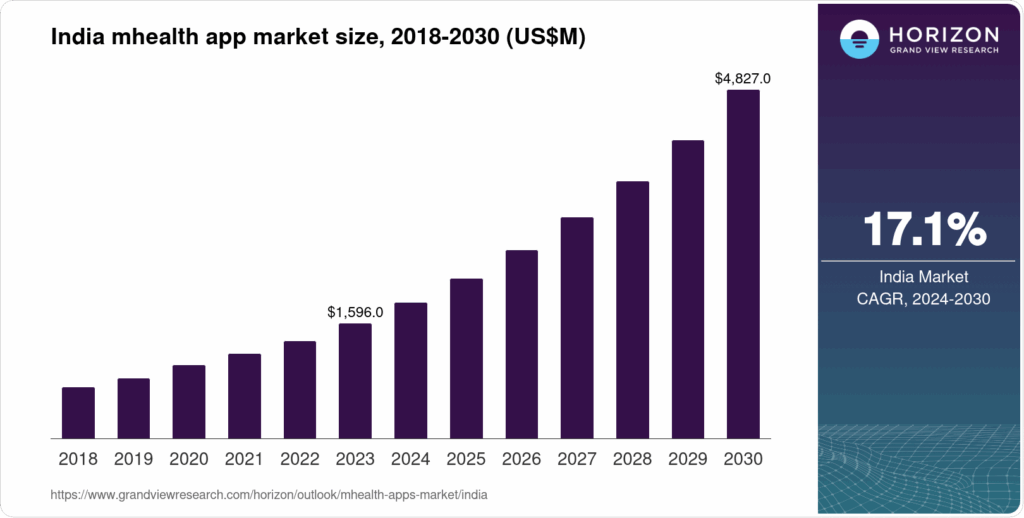
    India mHealth Apps Market Revenue ~ USD 1,883.3 million in 2024 Expected to reach ~ USD 4,827.0 million by 2030; CAGR ≈ 16.8% between 2025-2030. (Grand View Research)
    India mHealth Market (All components) ~ USD 2,498.1 million in 2023 Expected to grow to ~ USD 6,944.1 million by 2030; CAGR ≈ 15.7% (Grand View Research)
    India mHealth Services Market ~ USD 1,003.6 million in 2023 Projected ~ USD 2,447.8 million by 2030; CAGR ~ 13.6% (Grand View Research)
    India Digital Health Market Revenue ~ USD 14,330.2 million in 2024 Forecasted to hit ~ USD 52,395.5 million by 2030; CAGR ~ 24.4% (Grand View Research)

    The Indian healthcare technology ecosystem is witnessing strong and sustained growth, driven by increasing smartphone penetration, demand for telemedicine, and government initiatives supporting digital health adoption.

    1. mHealth Apps Market

      • Valued at USD 1.88 billion in 2024.

      • Expected to reach USD 4.83 billion by 2030, with a 16.8% CAGR.

      • This indicates rapid adoption of patient-facing apps for fitness, teleconsultation, and remote monitoring.

    2. Overall mHealth Market 

      • Worth USD 2.49 billion in 2023, projected to hit USD 6.94 billion by 2030.

      • CAGR of 15.7% highlights a balanced expansion across apps, services, and devices.

    3. mHealth Services Market

      • Accounts for USD 1.0 billion in 2023, forecasted to more than double to USD 2.45 billion by 2030.

      • Growth rate of 13.6% shows steady demand for telemedicine platforms, diagnostic services, and digital therapy.

    4. Digital Health Market 

      • Much larger in scale, valued at USD 14.3 billion in 2024.

      • Projected to skyrocket to USD 52.4 billion by 2030, with a CAGR of 24.4%.

      • This shows that digital healthcare—including AI, IoT, wearables, and hospital IT systems—will be the biggest growth driver.


    growth of healthcare industy application market in india

    Why Choose React Native for Healthcare Apps?

    React Native, initially conceptualised by Facebook, is a distinguished cross-platform development framework. It allows developers to use a unified codebase to build applications for both iOS and Android systems, making it a prime choice for healthcare applications where broad accessibility is crucial.

    Utilizing React Native in healthcare applications offers numerous commercial benefits, such as lowering administrative costs, expanding market reach, and reducing development expenses. Informationally, it enriches medical data access, boosts patient engagement, and provides necessary real-time updates, thus enabling better patient care and service delivery (Source).

    1. Cross-Platform Efficiency

    React Native allows building apps for iOS and Android with a single codebase, ensuring faster development and reduced costs—ideal for healthcare providers looking to scale quickly (Source).

    2. Secure and Compliant Development

    Healthcare apps must adhere to strict compliance regulations such as HIPAA and GDPR. React Native supports integration with secure APIs, encryption standards, and data protection practices.

    3. Real-Time Communication

    Enable telemedicine, chatbots, and instant alerts through React Native’s support for WebSockets and third-party integrations

    4. IoT & Wearable Device Integration

    React Native apps can integrate with wearables and IoT devices to provide real-time monitoring of patient vitals, improving preventive care and remote healthcare.

    5. Scalability & Performance

    React Native’s architecture ensures smooth performance for large-scale healthcare platforms, from appointment booking apps to complex telehealth systems (Source).

    6. Cost-effectiveness

    The framework is not only adaptable but also economical. By facilitating a unified codebase, React Native slashes development and maintenance costs. Further, the availability of extensive open-source resources underlines the cost benefits, making premium healthcare app development accessible at reduced financial overhead (Source). Learn more about budgeting for React Native projects in our React Native App Cost Guide.

    7. Speed of Deployment

    The extensive component libraries available with React Native expedite the development of new features crucial for adapting to the ever-changing healthcare landscape. This rapid deployment capability allows healthcare organizations to remain agile and responsive to industry or regulatory changes (Source).

    8. Faster Development Cycles & Reduced Time-to-Market

    React Native dramatically reduces the development cycle thanks to its shared codebase and extensive pre-built libraries. This acceleration allows healthcare apps to be marketed quickly, providing timely solutions to emerging healthcare challenges (Source).

    9. Reusability of Code

    The reusability of code is a notable advantage when using React Native. Developing simultaneous applications for both iOS and Android from the same codebase not only streamlines the workflow but also speeds up subsequent updates, keeping all platform users on the same functional level (Source).

    10. Enhanced User Experience and Performance

    With the ability to customize UI components to fit specific needs, React Native enhances the user experience by offering native-like performance. This responsiveness is crucial for applications that handle sensitive medical information or support real-time patient-practitioner interactions (Source). Additionally, ensure your app adheres to the highest security standards by following our Mobile App Security Best Practices.


    Key Use Cases of React Native in Healthcare

    • Telemedicine Platforms – Video consultations and online prescriptions.

    • Patient Portals – Access health records, schedule appointments, receive notifications.

    • Remote Monitoring Apps – Track vitals via IoT-enabled devices.

    • Pharmacy Apps – Online ordering, dosage reminders, digital prescriptions.

    • Healthcare Staff Apps – Shift management, patient tracking, secure

    How to Create a React Native Healthcare App

    Here is a step-by-step guide to developing a healthcare App with React Native.

    Step-by-Step Guide on Creating a React Native Healthcare App

    Planning and Defining App Requirements


    Define the goals, target users, and regulatory needs upfront to ensure the app meets all necessary standards and serves its intended purpose effectively (Source).

    Setting Up the Development Environment


    Use the React Native CLI or Expo for initial setup, and configure the necessary tools, such as Android Studio and Xcode, for platform-specific requirements.

    Designing User-friendly Interfaces

    Employ React Native’s UI libraries to develop intuitive layouts that enhance accessibility and user engagement, tailored specifically for healthcare scenarios (Source).

    Implementing Essential Healthcare Features

    Integrate core functionalities like patient record management, appointment scheduling, and telemedicine. These features ensure the app addresses comprehensive health care processes and patient needs (Source). For more detailed feature implementation, refer to our guide on How to Develop the Best Hospital App.

    Testing and Deployment Strategies

    Execute rigorous testing to guarantee the app’s performance, security, and user accessibility standards. Effective deployment strategies uphold continuous improvement and adaptability.

    Best Practices for Application Development in Healthcare

    Maintaining high security, adhering to healthcare regulations, and collaborating with experts for compliance and data handling are paramount for securing user trust and regulatory approval (Source).

    Tools and Resources for Healthcare App Development with React Native

    Building a healthcare app requires more than just React Native—it needs the right set of tools, libraries, and resources to ensure security, compliance, scalability, and a great user experience. Below are some essential tools and resources:

    1. Development & Framework Tools

    • React Native CLI / Expo – For rapid prototyping and cross-platform development.

    • TypeScript – Adds type safety and reduces bugs in complex healthcare apps.

    • Redux / Recoil – Efficient state management for handling real-time health data.

    2. UI/UX Libraries

    • React Native Paper / NativeBase – Prebuilt UI components for healthcare dashboards.

    • React Native Elements – For patient-friendly design and intuitive interfaces.

    • Lottie for React Native – Smooth animations for patient engagement.

    3. APIs & Integrations

    • FHIR (Fast Healthcare Interoperability Resources) APIs – For EHR/EMR integration.

    • Google Fit & Apple HealthKit – Access fitness and health data.

    • Twilio / Vonage – Secure telemedicine video calls and messaging.

    4. Security & Compliance Tools

    • OAuth 2.0 & JWT – For secure authentication.

    • AWS Cognito / Firebase Auth – HIPAA-ready authentication management.

    • Datadog & Snyk – Security monitoring and vulnerability management.

    5. Testing & Quality Assurance

    • Detox – End-to-end testing for React Native apps.

    • Jest & React Native Testing Library – Unit and UI testing.

    • Appium – Cross-platform automation testing.

    6. DevOps & Deployment Tools

    • Fastlane – Automates app builds and deployments.

    • Microsoft App Centre – Continuous integration & delivery.

    • Bitrise / GitHub Actions – Streamlined CI/CD pipelines.

    7. Learning Resources

    • React Native Official Docsreactnative.dev

    • FHIR Standard Docshl7.org/fhir

    • HIPAA Compliance Guide for Developershipaa journal

    • SolutionSquares Blog – Best practices, tutorials, and case studies for healthcare app development.

    Conclusion

    React Native is a powerful framework for healthcare apps, offering scalability, cost-efficiency, and faster time-to-market. It ensures security and compliance while enabling innovation and better service delivery. With its speed, adaptability, and future-ready tools, React Native is the ultimate choice for building modern healthcare solutions. (Source).

    Transform patient engagement with cross-platform healthcare apps—built with React Native! Book a Free Consultation Today.

    Frequently Asked Questions


    1. Why is React Native a good choice for healthcare apps?
    React Native allows developers to build cross-platform apps (iOS and Android) with a single codebase, ensuring faster development, reduced costs, and consistent user experiences. Its scalability and native-like performance make it ideal for complex healthcare solutions.

    2. How does React Native improve patient experience in healthcare apps?
    It enables smooth navigation, real-time updates, telemedicine integrations, wearable device connectivity, and secure data handling—enhancing overall patient engagement and satisfaction.

    3. Is React Native secure enough for healthcare apps?
    Yes. React Native apps can be integrated with advanced security protocols such as HIPAA compliance, end-to-end encryption, multi-factor authentication, and secure data storage to ensure patient data privacy.

    4. Can React Native apps integrate with wearable devices and IoT in healthcare?
    Absolutely. React Native supports APIs and third-party libraries that allow integration with smartwatches, fitness trackers, and IoT medical devices for real-time monitoring and reporting.

    5. What types of healthcare apps can be built with React Native?

    • Telemedicine and virtual consultation apps

    • Electronic Health Record (EHR) systems

    • Appointment booking and scheduling apps

    • Fitness and wellness trackers

    • Remote patient monitoring systems

    • Medicine delivery and pharmacy apps

    6. How does React Native help healthcare providers reduce costs?
    By using a single codebase for multiple platforms, healthcare organizations save on development, maintenance, and upgrade costs while still delivering high-quality, native-like apps.

    7. Can React Native apps scale for large healthcare enterprises?
    Yes. React Native is highly scalable and can support growing user bases, integration with hospital systems, and enterprise-level healthcare solutions.

    8. How long does it take to develop a healthcare app with React Native?
    The timeline varies based on features and complexity, but React Native typically reduces development time by 30–40% compared to building separate native apps.

    9. How can React Native support telemedicine features?
    React Native provides seamless integration for video conferencing APIs, chat systems, secure payment gateways, and cloud storage—key features in telemedicine apps.

    10. What are some successful examples of healthcare apps built with React Native?
    Popular healthcare and wellness apps like MedLife, Ada Health, and CareClinic leverage React Native for speed, scalability, and cross-platform performance.

    react native healthcare application development react native healthcare application development
  • How To Boost Website Speed Optimization?

    How To Boost Website Speed Optimization?

    Essential Website Speed Optimisation Tips for Superior SEO Rankings

    Website speed optimisation is crucial for enhancing user experience and improving search engine rankings. Faster websites lead to better user engagement, lower bounce rates, and higher retention.

    Introduction

    In the digital age, the speed of your website is a pivotal factor affecting user experience and search engine rankings. Website speed optimisation not only enhances user engagement but also boosts your presence in search results.  A slow, poorly optimised website can lead to higher bounce rates, lower rankings on search engines, and ultimately lost revenue opportunities. For companies looking to scale and succeed online, website optimisation is no longer optional — it’s essential.  Further Reading

    A high-performing website is the engine of a modern business. It’s not just a digital brochure; it’s a lead-generation machine, a trust-builder, and a key driver of revenue. For businesses seeking to grow, website optimisation isn’t a “nice-to-have”—it’s a necessity. We help businesses transform their websites from static pages into powerful assets.

    Why Website Optimisation Matters?

    Without ongoing optimisation, a website can become a liability—slow, difficult to find, and ineffective at converting visitors into customers. Optimising your website is a strategic, continuous process that directly impacts your bottom line. Here’s a detailed look at why it’s essential for every business:

    • Improved User Experience – Fast-loading, mobile-friendly websites keep visitors engaged.
    • Higher Search Rankings – Google rewards optimised websites with better visibility.
    • Competitive Advantage – Stay ahead of competitors who neglect optimisation
    • Improved Search Rankings: Optimisation helps your website appear higher in search results, making it easier for potential customers to find you.

    • Reduced Marketing Costs: When you rank organically, you don’t have to spend as much on paid ads to get noticed.

    • Better User Experience (UX): A fast, easy-to-navigate website keeps visitors engaged and encourages them to explore your content.

    • Higher Conversion Rates: Optimisation guides users toward specific actions—like making a purchase or filling out a form—which directly boosts your revenue.

    • Faster Loading Speeds: A fast website reduces frustration and bounce rates, ensuring visitors stay long enough to convert.

    • Looks Professional: A polished, modern, and bug-free website reflects professionalism and reliability.

    • Enhanced Security: Using HTTPS encryption protects user data, which is a major factor in building trust with your audience.

    • Greater Accessibility: Optimising your site for accessibility shows that your business is inclusive and committed to a positive user experience for everyone.

    • Increased Brand Trust: A visible, high-ranking website establishes your business as a credible leader in your industry.

    Key Strategies to Boost Website Optimisation

    transform website optimisation

    1. Improve Website Speed

    • Compress images without losing quality.

    • Use a Content Delivery Network (CDN).

    • Minify CSS, JavaScript, and HTML files.

    2. Mobile-First Optimization

    • Ensure responsive design.

    • Test across multiple devices.

    • Implement accelerated mobile pages (AMP) if required.

    3. Enhance SEO Performance

    • Optimise metadata (titles, descriptions, alt text).

    • Improve internal linking structure.

    • Use schema markup for better indexing.

    4. Streamline Website Architecture

    • Clear navigation and hierarchy.

    • Reduce unnecessary redirects.

    • Create user-friendly URL structures.

    5. Leverage Analytics & Testing

    • Use Google Analytics & Search Console for performance insights.

    • Implement A/B testing for key landing pages.

    • Monitor Core Web Vitals regularly.

    Essential Website Speed Optimisation Tips

    Optimising your website’s speed should never be overlooked. Here are some actionable tips to help boost your site’s performance:

    • Compress and Optimise Images and Videos

    Large media files can slow down your site. Utilise tools like Adobe Photoshop or TinyPNG to minimise file sizes without losing quality, ensuring faster loading times. Read more

    • Use a Content Delivery Network (CDN)

    A CDN can significantly reduce load times by storing cached copies of your content in multiple geographic locations. Providers like Cloudflare and Akamai optimize content delivery, making your site quick and responsive. Explore

    • Minimise HTTP Requests

    Limit scripts, plugins, and third-party integrations that add extra HTTP requests to your site. Simplify your site’s design by combining CSS and JavaScript files where possible.

    • Leverage Browser Caching

    Implement caching to allow users to store certain parts of your site on their browsers, reducing loading times for repeat visitors. Tools like WP Super Cache for WordPress can assist with this. Learn how

    • Optimise Server Response Time

    Choose a reliable hosting provider and periodically optimise your database. Server-side caching solutions like Redis can also improve performance. Web Development Services by Solution Squares

    • Continuous Performance Monitoring

    Regularly check your site’s speed using tools like Google PageSpeed Insights and WebPageTest to stay updated with your website’s performance. Check here

    How Website Performance Affects SEO

    • The Impact of Speed on Rankings

    Fast-loading sites are favoured in Google’s ranking algorithm. Improving your site’s speed is crucial for SEO success and should be a key component of your strategy. Details Additional info

    • User Experience

    Enhancements in website speed have been shown to improve user satisfaction, reduce bounce rates, and increase time on site. Google’s user-centric metrics, such as LCP and CLS, are part of these considerations. Web Design Solution

    Best SEO Practices for Web Development

    Building a visually appealing website is important, but without proper SEO (Search Engine Optimisation), your site may never reach its full potential. SEO ensures that your website is discoverable, user-friendly, and capable of ranking higher in search engine results. For businesses, integrating SEO directly into web development ensures long-term success by combining great design with high visibility.

    Optimise Website Structure

    • Use a clear URL hierarchy (example.com/services/web-design).

    • Implement breadcrumb navigation for user-friendly browsing.

    • Keep code clean and lightweight to reduce load times.

    2. Mobile-First Design

    • Ensure responsive design across all devices.

    • Test on different screen sizes and operating systems.

    • Follow Google’s mobile-first indexing guidelines.

    3. Improve Page Speed

    • Compress images and use modern formats (WebP, AVIF).

    • Enable browser caching and server-side compression (Gzip/Brotli).

    • Minify CSS, JavaScript, and HTML files.

    4. SEO-Friendly URLs & Metadata

    • Use short, descriptive URLs with keywords.

    • Write unique title tags and meta descriptions for every page.

    • Add alt text to images for accessibility and indexing.

    5. Structured Data & Schema Markup

    • Implement schema markup for products, reviews, FAQs, and events.

    • Help search engines better understand and display your content.

    6. Secure the Website (HTTPS)

    • Use SSL certificates for secure connections.

    • Google prioritizes HTTPS websites in search results.

    7. Internal Linking & Navigation

    • Link related pages for better crawlability.

    • Create an XML sitemap and submit it to search engines.

    • Avoid broken links to enhance user experience.

    8. Content Optimisation

    • Use relevant keywords naturally in headings and body text.

    • Structure content with H1, H2, H3 tags.

    • Keep content unique, valuable, and engaging.

    9. Core Web Vitals Compliance

    • Focus on Largest Contentful Paint (LCP) – fast loading.

    • Optimise First Input Delay (FID) – smooth interactivity.

    • Ensure Cumulative Layout Shift (CLS) – stable visuals.

    10. Analytics & Tracking Setup

    • Integrate Google Analytics and Google Search Console.

    • Track page performance, visitor behaviour, and conversions.

    • Use insights to continuously optimise.

    SEO is not just about keywords — it starts with strong web development practices. By implementing these SEO-friendly strategies during development, businesses can ensure their websites are built for performance, visibility, and long-term growth.


    website speed otimisation

    Conclusion

    Implementing the website speed optimisation tips discussed can have a profound impact on your SEO and overall digital success. Start optimising today to enhance user experience and climb the SEO ladder. Ready to enhance your site’s performance? Contact us for professional optimisation services or subscribe for more actionable tips.

    Visuals and Further Engagement

    • Charts and Graphs: Visualise the beneficial impact of speed optimisations on your SEO results.
    • Case Studies: Learn from real-life examples of websites that improved performance after optimisation.
    • Interactive Tools and Simulations: Test your page speed and visualise potential improvements with interactive online tools.

    Frequently Asked Questions

    1. How does website speed affect SEO rankings?

    Website speed is a critical ranking factor for search engines like Google. Faster websites provide better user experience, leading to higher engagement and lower bounce rates, which positively influence SEO rankings.

    2. What tools can I use to test my website’s speed?

    You can use tools like Google PageSpeed Insights, WebPageTest, and GTmetrix to analyse your website’s performance and receive optimisation suggestions.

    3. What is a Content Delivery Network (CDN), and how does it help?

    A CDN is a network of servers distributed globally that store cached versions of your website’s content. By delivering content from a server closest to the user, it significantly reduces latency and improves load times.

    4. How often should I optimise my website’s speed?

    Website optimisation should be an ongoing process. Regularly monitor your site’s performance, especially after making significant changes or updates, to ensure it maintains optimal speed.

    5. Can optimising images make a significant difference?

    Yes, optimising images can greatly reduce page load times. Large image files are one of the most common causes of slow websites. Properly compressed and formatted images improve speed without compromising quality.

  • Building React Native Apps with GitHub

    Building React Native Apps with GitHub

    .Key Takeaways

    • Leveraging React Native app GitHub repositories accelerates mobile app development.
    • GitHub hosts a vast array of open-source React Native apps that provide robust components and best practices.
    • Contributing to GitHub projects enhances developer skills and community recognition.
    • Choosing the right GitHub project involves assessing maturity, community support, and licensing.
    • React Native UI component libraries like React Native Paper and NativeBase streamline UI development.

    Github advance functionality react native

    Unleashing the Potential of React Native App GitHub Repositories for Developers

    In today’s mobile app landscape, using React Native GitHub repositories is a true game-changer. For developers aiming for efficiency and advanced functionality, GitHub offers ready-to-use source code, templates, and real-world examples. Moreover, it speeds up prototyping, encourages best practices, and allows easy customisation. In this guide, we’ll quickly walk you through how to build a React Native app while exploring top GitHub projects, UI components, and practical tools every developer should know.

    Overview of React Native and GitHub

    React Native excels by allowing developers to create native mobile apps using only JavaScript and React, making it a giant in cross-platform mobile development. Its popularity is not unearned; a thriving community and continuous enhancement solidify its standing. On the other hand, GitHub houses an extensive array of open-source React Native apps. This enables unparalleled collaborative possibilities and a repository of readymade components and applications that accelerate development while aligning with community-endorsed standards. This domain of shared knowledge and resources dramatically enriches the developer experience and project outcomes. Prerequisite for React Native Application Development.

    Why React Naive Github?

    There are many advantages of using React Native with GitHub, particularly for agencies. Using GitHub with React Native is more than just version control; it’s a foundation for a professional, efficient, and collaborative development workflow.

    Advantages for Professional Agencies

    • Version Control and Collaboration: GitHub allows your team to manage and track every change made to the codebase. Multiple developers can work on the same project simultaneously without overwriting each other’s work. Features like branching, pull requests (PRs), and code reviews are crucial for maintaining code quality, ensuring bug fixes are thoroughly tested, and facilitating a smooth team workflow.

    • Continuous Integration and Deployment (CI/CD): GitHub Actions, the built-in CI/CD tool, automates your development pipeline. You can configure workflows to automatically run tests, check code quality with linters, and build your app every time a developer pushes code. This catches bugs early, saves a significant amount of manual time, and ensures a stable codebase.

    • Project and Task Management: GitHub provides built-in tools like Issues, Projects, and Milestones. These features allow you to track bugs, manage features, assign tasks to team members, and visualise your project’s progress in a centralised location.

    • Security: GitHub provides robust security features to protect your codebase and sensitive information. You can use GitHub Secrets to securely store API keys, private certificates, and other credentials, ensuring they are not exposed in your codebase.

    • Open-Source Contribution: The open-source nature of React Native means that many of its libraries and tools are hosted on GitHub.1 This allows your team to easily contribute to the community, stay updated on the latest changes, and leverage the vast ecosystem of pre-built components.

    For agencies, using GitHub with React Native is a strategic decision that drives efficiency, ensures professionalism, and guarantees the quality of the final product. It transforms a solo coding effort into a well-managed, collaborative, and automated process, delivering a better experience for both your team and your clients.


    Top React Native GitHub Projects

    Featured React Native App GitHub Repositories

    When scoping out leading repositories, a few stand out by offering extensive app codebases and examples that not only demonstrate robust architecture but also innovative features:

    1. React Native Elements – This repository provides a rich set of customizable components, excellently documented and regularly updated, making it ideal for robust application design.
    2. Expo – Known for enabling rapid development cycles and providing a plethora of APIs, this repository is perfect for developers aiming for high productivity without compromising quality.

    Each repository provides a unique advantage, whether for learning advanced features or for employing high-quality code structures, ensuring they cater to a wide spectrum of development needs. 

    Highlighting a selection of open-source React Native apps offers insights into various applications from productivity to entertainment:

    • Peel – Focusing on minimalist design, this productivity app utilises React Native to offer seamless cross-platform functionality. It serves as an excellent starting point for developers interested in building an intuitive UI/UX.
    • MoviesApp – An entertainment app that utilises a rich set of media content APIs and offers a robust example of handling streaming data and state management in React Native.

    Developers can explore these apps to understand the real-world application of React Native in different contexts and use cases, enhancing their capability to develop versatile and responsive applications.

    Github advance functionality react native expert

    GitHub React Native Examples

    For those sharpening their skills or entering the field, studying specific GitHub React Native examples that emphasise clean architecture and best practices is invaluable:

    • Navigator – This project showcases exemplary implementation of navigation and routing in React Native, a crucial aspect of any mobile app.
    • WeatherApp – Implements Redux for state management, effectively demonstrating a scalable app architecture suitable for larger applications or future growth.

    Each example provides a foundation in different aspects of app development, from modularisation to efficient state management. This is making these repositories not only templates but also significant learning tools.

    React Native UI Components on GitHub

    React Native UI GitHub Repositories

    The React Native Paper and NativeBase are two standout repositories that offer an extensive range of customizable UI components:

    • React Native Paper – Boasts a collection of material design components that are easy to implement and customise, suitable for projects aiming for modern aesthetics.
    • NativeBase – Provides a wide array of components that are easily adaptable to existing themes, ideal for projects requiring rapid UI development without starting from scratch.

    Developers aiming to enhance their app’s interface with high-quality, pre-designed elements will find immense value in these repositories.

    Utilising UI Templates in Your Projects

    Integrating these UI components involves specific steps such as installing dependencies through npm or yarn and importing statements in your project files. Here’s how you can customise these templates:

    • Adapt Styles: Ensure your UI components match your app’s theme, modifying or overriding styles as necessary.
    • Extend Functionality: Add custom components or tweak existing ones to meet your specific needs.

    This process not only streamlines UI development but also ensures a cohesive look and functionality across your application.

    How to Choose the Right React Native GitHub Project for Your Needs

    Choosing the right project involves assessing several factors:

    • Project Maturity and Maintenance: Opt for projects with a solid history of updates and active maintenance.
    • Community Support: A vibrant community, indicated by stars, forks, and active contributions, assures ongoing development and support.
    • License Type: Ensure the license aligns with your intended use, be it commercial or personal.

    Moreover, reviewing documentation quality, code readability, and structure is essential to ensure the project meets your developmental and learning needs.

    Contributing to React Native Open Source Projects on GitHub

    Contributing back to these projects not only enhances your skills but also helps you gain recognition within the developer community:

    • Fork and Clone: Start by forking a project and cloning it locally.
    • Understand and Follow Contribution Guidelines: Each project has its own set of rules; adhere to them to make meaningful contributions.
    • Submit Pull Requests: Engage with project maintainers through clear communication and well-documented pull requests.

    This active participation fosters learning and community building.

    Our team has extensive experience in setting up and managing professional React Native projects on GitHub. We handle the complexities of CI/CD pipelines, automated testing, and secure secret management, allowing your team to focus on what matters most: building incredible applications. Ready to professionalise your React Native development workflow? Contact us for a free consultation today!

    Conclusion

    Exploring and utilising React Native app GitHub repositories significantly boosts project outcomes, driving innovation and efficiency. As you embark on this journey, remember that each repository is not just a toolkit but a gateway to community collaboration and continuous learning. Dive into these resources, contribute actively, and leverage the collective wisdom of the React Native community to enhance your development projects. Through these endeavours, GitHub remains an invaluable resource, continuously fostering a vibrant ecosystem of shared knowledge and cutting-edge technology.

    Frequently Asked Questions

    1. Is GitHub required to build a React Native app?

    No, you can build a React Native app without using GitHub. However, a modern professional agency relies on a version control system like GitHub for collaboration, project management, and quality control. Without it, you’d have no way to track changes, review code, or automate builds.

    2. How does GitHub improve a project’s quality?


    GitHub improves quality by making the development process transparent and collaborative. Features like Pull Requests allow team members to review each other’s code for bugs and inconsistencies before it’s merged. Additionally, GitHub Actions can run automated tests to catch errors as soon as a change is pushed, preventing bugs from making it into the final product.

    3. Is our code safe and secure on GitHub?


    Yes. GitHub offers a range of security features. You can set up private repositories so only your team and clients can access the code. For sensitive information like API keys, GitHub Secrets provides a secure way to store them without exposing them in your codebase.

    4. How does GitHub help with project management?


    GitHub provides a suite of project management tools like Issues, Projects, and Milestones. Agencies can use these to track a project’s progress, assign tasks, report bugs, and keep a transparent history of decisions. This is invaluable for communicating with clients and managing a complex project

    5. How does this help with client communication?


    Using GitHub creates a single source of truth for the project. Clients can be added to the repository to see the project’s progress, read code review comments, and view bug reports in real-time. This level of transparency builds trust and keeps everyone on the same page.

    What are the benefits of using React Native for mobile app development?
    • React Native is a framework for building mobile apps using React.
    • It allows you to build native apps using React and JavaScript.
    • It is a popular choice for building mobile apps.
    • It is a mature framework with a large community.
    • It is a mature framework with a large community.
    How can GitHub repositories accelerate my React Native project?
    • GitHub repositories can accelerate your React Native project by providing a way to share your code with others.
    • It can also help you find and use existing code that others have written.
    •  It can also help you find and use existing code that others have written.
    What should I consider when contributing to an open-source React Native project? You should consider the license of the project.
  • How to Build a Quiz App Using React Native – Beginner’s Guide

    How to Build a Quiz App Using React Native – Beginner’s Guide

    Key Takeaways

    • React Native enables cross-platform mobile app development, reducing time and cost.
    • Setting up the development environment is crucial for leveraging a React Native app template.
    • Implementing features like authentication, state management, and navigation enhances app functionality.
    • Utilising GitHub fosters collaboration and efficient code management.
    • Advanced features and proper deployment strategies ensure a robust and user-friendly quiz app.

    Introduction: Dive into React Native Development

    The term react native app example conjures up ideas of innovation and simplicity in mobile app development. In this blog post, our focus is to inspire and educate you by walking through a feature-rich React Native app template for building a quiz application. This example serves as an excellent template for your own projects, leveraging the unique advantages of React Native.

    What is React Native? Unlocking Cross-Platform Development

    React Native is a powerful JavaScript framework used to develop mobile applications that render natively on both iOS and Android platforms from a single codebase. This approach offers significant benefits:

    • Code Reuse: Write once and deploy on multiple platforms, significantly cutting down development time.
    • Large Ecosystem and Community: Access to a wide range of libraries, tools, and support from a global community.
    • Faster Development Cycles: Immediate updates without app store approval and rich development tools enhance developer productivity.

    For a closer look at React Native’s capabilities, watch this detailed overview video.

    Setting Up Your Development Environment

    To kickstart your development with a React Native app template, beginning with the setup is essential, especially for novices. Here’s how to initiate:

    1. Install Node.js: A core platform needed for running the JavaScript codebase.
    2. Install Expo CLI: Expo simplifies the initial setup and provides useful tools for rapid app prototyping.
    3. Emulator/Simulator Setup: Depending on your target OS, set up an Android emulator or an iOS simulator. Xcode is required for iOS.

    You can then initialise your React Native project using the selected template. For detailed setup guidance, view this setup video or visit Prerequisite React Native Development.

    community support partner

    Exploring a React Native App Example: Quiz App

    Our React native quiz app illustrates practical application architecture and features:

    • Data-Driven Questions: Fetches multiple-choice questions from an external source.
    • Progress Tracking: Uses a visual progress bar to indicate user advancement.
    • Score Handling: Computes scores automatically and displays results at the end.
    • Navigation: Enables smooth transition between different quiz screens.

    Implementing Authentication in Your Quiz App

    User authentication is pivotal for a personalised app experience. Using React native app auth tools like Firebase Auth or Auth0 allows you to:

    • Secure user data.
    • Provide personalised features such as leaderboards.
    • Save and fetch user progress.

    For an in-depth authentication setup guide, check this tutorial or visit Mobile App Security Best Practices.

    Managing App State and Navigation

    Effective state management and seamless navigation are keys to a smooth user experience. For state management, you might choose between local state, Context API, Redux, or Zustand based on your app’s complexity. Navigation can be handled adeptly with React Navigation, enabling users to move between screens like Home, Quiz, and Results effortlessly.

    Discover more about efficient state management in this Video on State Management or visit React Native App Development Services.

    cross platform react native agency

    Leveraging GitHub for Collaboration

    Utilising React native app GitHub repositories can significantly enhance your development process. Here you can fork existing quiz app projects or contribute to community-driven projects. Always ensure to comply with licensing terms when using or sharing code. Learn more at React Native vs Flutter 2025.

    Customizing and Personalizing Your Quiz App

    Enhance your app’s appeal by tweaking its aesthetics and functionality:

    • App Naming: Modify app.json or utilise React Native tools to rename your app.
    • Icon Customisation: Employ a React native app icon generator for unique and recognisable app icons.

    Guidelines for customising your app’s features are detailed in this App Customisation Guide.

    Advanced Features and Deployment

    To keep your users engaged, consider incorporating advanced features like push notifications and analytics. Tools like Expo Push Notifications or Firebase Cloud Messaging work well for these purposes.

    Ready to deploy? Ensure you optimise assets, configure production settings, and build standalone binaries for iOS and Android. Follow best practices for app store submissions to enhance your app’s acceptance chances.

    For deployment insights, watch this deployment tutorial.


    Conclusion: Utilising This React Native App Example

    By now, you should be equipped with the know-how to build and customise your own React Native quiz app by leveraging the materials and guidance provided. We encourage you to experiment, refine, and innovate based on the example and templates shared.

    For complete access to the source code and additional learning resources, visit our React native app GitHub repository and start transforming your app ideas into reality. Dive deep, create, and share your innovations!

    Frequently Asked Questions

    Q1: Do I need prior experience with React Native to build this app?

    Not necessarily. Basic knowledge of JavaScript and React is enough to get started.

    Q2: Can I connect my quiz app to an online database?

    Yes. You can integrate APIs or use Firebase/Firestore to fetch and store quiz data.

    Q3: Will my quiz app work on both Android and iOS?

    Yes. React Native allows you to build cross-platform apps with a single codebase.

    Q4: Can I monetise my quiz app?

    Absolutely. You can add ads, in-app purchases, or premium quiz packs.

    Q5: How long does it take to build a simple quiz app?

    A basic version can be built in a few days, while a feature-rich quiz app may take several weeks.

  • How To Excel React Native Development Services?

    How To Excel React Native Development Services?


    Key Takeaways

    • Cost-Effective Development: React Native enables building applications for both iOS and Android platforms using a single codebase, reducing development costs.
    • Rapid Deployment: Features like “Hot Reloading” accelerate the development process, ensuring faster time to market.
    • High Performance: Delivers user experiences close to native applications with robust interfaces and smooth interactions.
    • Scalability and Customisation: Custom React Native solutions are scalable and can be tailored to unique business needs.
    • Comprehensive Service Offerings: Services range from custom app development, UI/UX design, cross-platform development, to post-launch support.

    React Native App Development Services signify professional services that capitalise on the React Native framework to craft superior mobile applications for both iOS and Android platforms. These services encompass a holistic approach, utilising a technology known for its cost-effectiveness, high performance, and scalability. Harnessing a single code base, React Native is becoming the go-to solution in the mobile app development sphere. 

    This blog aims to equip businesses with the necessary insights to evaluate React Native development offerings, understand their myriad benefits, and choose the right development partner with confidence.

    What Are React Native App Development Services?

    React Native, created by Facebook, is an innovative open-source framework that allows developers to engineer applications that operate seamlessly across iOS and Android from a singular JavaScript codebase.

    React Native has become a leading framework for building cross-platform mobile apps. To stand out and excel in providing React Native development services, companies and developers must focus on technical expertise, process optimisation, and client satisfaction. The offerings under React Native app development are broad and varied, tailored to meet diverse business needs:

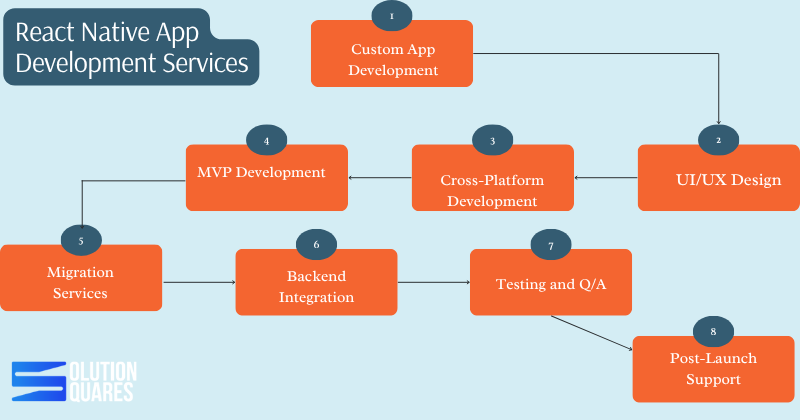
    React Native App Development Services

    • Custom App Development: Specific solutions designed to meet unique business requirements. 
    • UI/UX Design: Development of engaging and intuitive user interfaces. 
    • Cross-Platform Development: Apps that deliver a consistent experience across iOS and Android.
    • MVP Development: Quick validation of business concepts through Minimum Viable Products.
    • Migration Services: Upgrading legacy systems to modern React Native solutions.
    • Backend Integration: Linking applications with essential APIs, payment systems, and cloud services.
    • Testing and QA: Comprehensive testing to ensure application reliability and performance.
    • Post-Launch Support: Ongoing maintenance and updates to enhance the app lifecycle.

    Selecting a competent development partner is vital to ensuring a project’s success, from seamless execution and cost efficiency to robust post-launch support.

    Steps to Excel in React Native Development Services


    1. Build a Strong Technical Foundation

    • Master React Native Core: Understand components, state management, navigation, and APIs.

    • Stay Updated: React Native is evolving—track updates, new libraries, and performance improvements.

    • Integrate Native Modules: Learn how to connect Swift/Objective-C (iOS) and Java/Kotlin (Android) for advanced features.

    • Leverage Third-Party Libraries: Utilise trusted libraries to accelerate development without compromising quality.

     2. Focus on Performance Optimisation

    • Use Hermes Engine: Improves performance on Android.

    • Optimise Rendering: Minimise unnecessary re-renders with memo and PureComponent.

    • Lazy Loading: Load resources only when needed.

    • Efficient Navigation: Implement React Navigation or Reanimated for a smooth user experience.

    3. Deliver Cross-Platform Consistency

    • Ensure apps look and perform well on both iOS and Android.

    • Test UI layouts on different screen sizes (phones & tablets).

    • Implement a responsive design for a uniform experience.

    4. Implement Robust Testing Practices

    • Unit Testing: Use Jest for testing components and logic.

    • End-to-End Testing: Utilise Detox or Appium for realistic device simulations.

    • Continuous Integration (CI/CD): Automate testing and deployment for faster delivery.

    5. Prioritise Security

    • Secure API calls with authentication (JWT, OAuth).

    • Store sensitive data using secure storage libraries.

    • Follow OWASP Mobile Security Guidelines.

    • Keep dependencies updated to avoid vulnerabilities.

    6. Provide Scalable Architecture

    • Use proper state management tools (Redux, Recoil, Zustand).

    • Maintain modular and reusable code.

    • Structure projects for easy scaling as apps grow.

    7. Focus on Client-Centric Approach

    • Understand client goals and target audience.

    • Provide transparent progress updates.

    • Offer post-launch support and updates.

    • Suggest improvements based on analytics and feedback.

     8. Build a Strong Portfolio & Case Studies

    • Showcase successful apps built with React Native.

    • Highlight performance improvements, cost savings, and user engagement results.

    • Include client testimonials to build trust.

    cross platform react native agency

    Benefits of React Native Development

    React Native development comes with numerous advantages:

    • Cost-Effectiveness: Develop iOS and Android apps on one platform, significantly cutting costs.
    • Faster Development & Market Deployment: “Hot Reloading” and other features expedite the development process, enhancing speed to market.
    • Enhanced Performance: Delivers a close-to-native user experience, ensuring robust app interfaces and smooth user interactions.
    • Community Support & Updates: An active community and ongoing updates from the open-source network foster continuous improvement and innovation.

    What is Custom React Native Development?

    Customisation is key in React Native development. It ensures that apps not only meet unique business requirements but also embody preferred aesthetics and functionality:

    • Tailored Solutions: Custom development can significantly enhance brand presence and user engagement.
    • Scalability: Ensures apps are future-proof and can evolve with your business.
    • Bespoke Designs: Specific features and modules tailored exclusively for your business needs.

    What are Enterprise React Native Development?

    Large-scale businesses benefit tremendously from Enterprise React Native Development. This service offers high scalability, robust security, and rich features suitable for enterprise needs:

    • Seamless Integration: Harmonises with existing corporate systems and databases to enhance business operations.
    • Security & Maintenance: Prioritises high security and easy maintainability, crucial for enterprise environments.

    Providing dedicated support and ensuring compliance with industry standards are crucial elements offered by seasoned providers.

    Cross-Platform React Native App Services

    Cross-Platform React Native App Services ensure that businesses can deploy applications that deliver uniform functionality and appearance across all device platforms:

    • Consistent UI/UX: Maintains a high-quality, consistent user experience across platforms.
    • Cost and Time Efficiency: Reduces the time and cost involved in developing and maintaining multiple codebases.
    • Simple Updates: Streamlines the update process, making it quicker and less complex.

    Prominent applications such as Facebook and Instagram are prime examples of successful cross-platform apps developed using React Native.

    Aspect Native Development React Native
    Codebase Count 2 1
    Development Time Longer Shorter
    Cost Higher Lower
    UI Consistency Variable High
    Maintenance Complex Simplified

    Hosting services For react native

    Hiring React Native Developers

    When looking to hire React Native developers, consider the following essential skills and models for collaboration:

    • Required Skills: Proficient in JavaScript, adept in native modules, and knowledgeable in modern UI/UX practices.
    • Hiring Models: Choose between in-house, outsourcing, or dedicated teams based on your project needs and budget.

    Evaluating portfolios and client feedback are crucial steps in selecting a team that aligns with your technical expectations and business ethos. 

    Why Choose Our React Native App Development Services

    Our React Native App Development Services stand out due to our commitment to technical excellence, award-winning design capabilities, fast delivery times, and extensive support post-launch. We ensure each project is handled with the utmost professionalism and tailored to meet individual client requirements and business objectives.

    react native cross platform app agency

    Conclusion

    React Native offers a compelling array of benefits, from cost savings and speed to scalability and community support. By partnering with experienced developers, businesses can leverage these advantages to achieve robust, efficient, and effective mobile app solutions.

    Considering React Native for your next mobile app project? Request a free consultation or quote today to explore how we can tailor our services to your needs. For more information, feel free to contact us or visit our service pages. Your journey towards an innovative, efficient mobile solution starts here!

    Frequently Asked Questions

    1. How much does it typically cost to develop a React Native application?

    The cost can vary significantly based on the app’s complexity, features, and the development team’s location. On average, development costs range from $30,000 to $100,000.

    2. How long does it take to develop a React Native app?

    Development timelines depend on the app’s complexity. A basic app might take 3-4 months, while more complex applications can take up to a year or more.

    3. What are the key advantages of using React Native over native development?

    React Native offers cost savings through a single codebase for both iOS and Android, faster development times with features like Hot Reloading, and a robust community for support and continuous improvement.

    4. Can React Native apps achieve performance comparable to native apps?

    Yes, React Native apps can achieve performance close to native apps, especially for applications that do not require intensive computational resources.

    5. What services are typically included in React Native App Development?

    Services often include custom app development, UI/UX design, cross-platform development, MVP development, backend integration, testing and QA, and post-launch support.

  • The Ultimate Prerequisites Guide Of React Native Application

    The Ultimate Prerequisites Guide Of React Native Application

    Key Takeaways

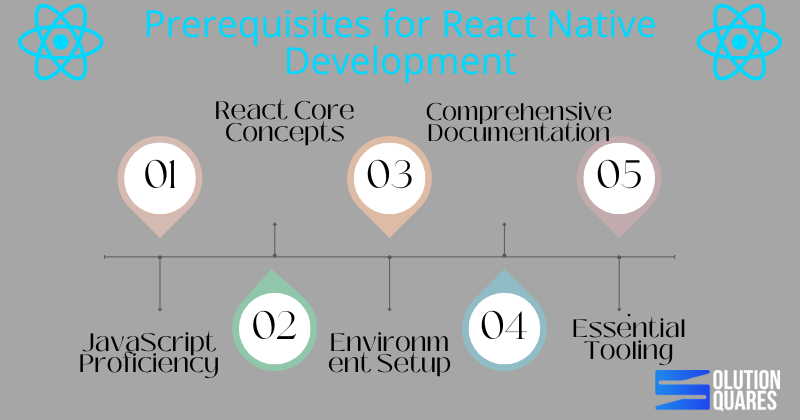
    • JavaScript Proficiency: Mastery of JavaScript is fundamental for developing high-performance React Native applications.
    • React Core Concepts: A solid understanding of React’s ecosystem, including components and state management, is essential.
    • Environment Setup: Proper setup of the development environment is crucial for seamless React Native application development.
    • Comprehensive Documentation: Utilising React Native’s official documentation can significantly enhance development efficiency and troubleshooting.
    • Essential Tooling: Familiarity with tools like Node.js, npm, and version control systems like Git is important for managing dependencies and collaborating effectively.

    Incorporating the Prerequisites for React Native Application Development

    In the world of app development, React Native has emerged as a game-changer. Empowering developers to craft stunning, high-performance applications for both Android and iOS platforms, React Native streamlines development like never before. However, before diving into this powerful framework, it’s crucial to establish a solid foundation. In this blog post, we’ll navigate through the essential prerequisites for React Native application development, including detailed environment setup, core knowledge areas, and essential tooling to ensure a successful development journey.

    Understanding the Prerequisites for React Native Development

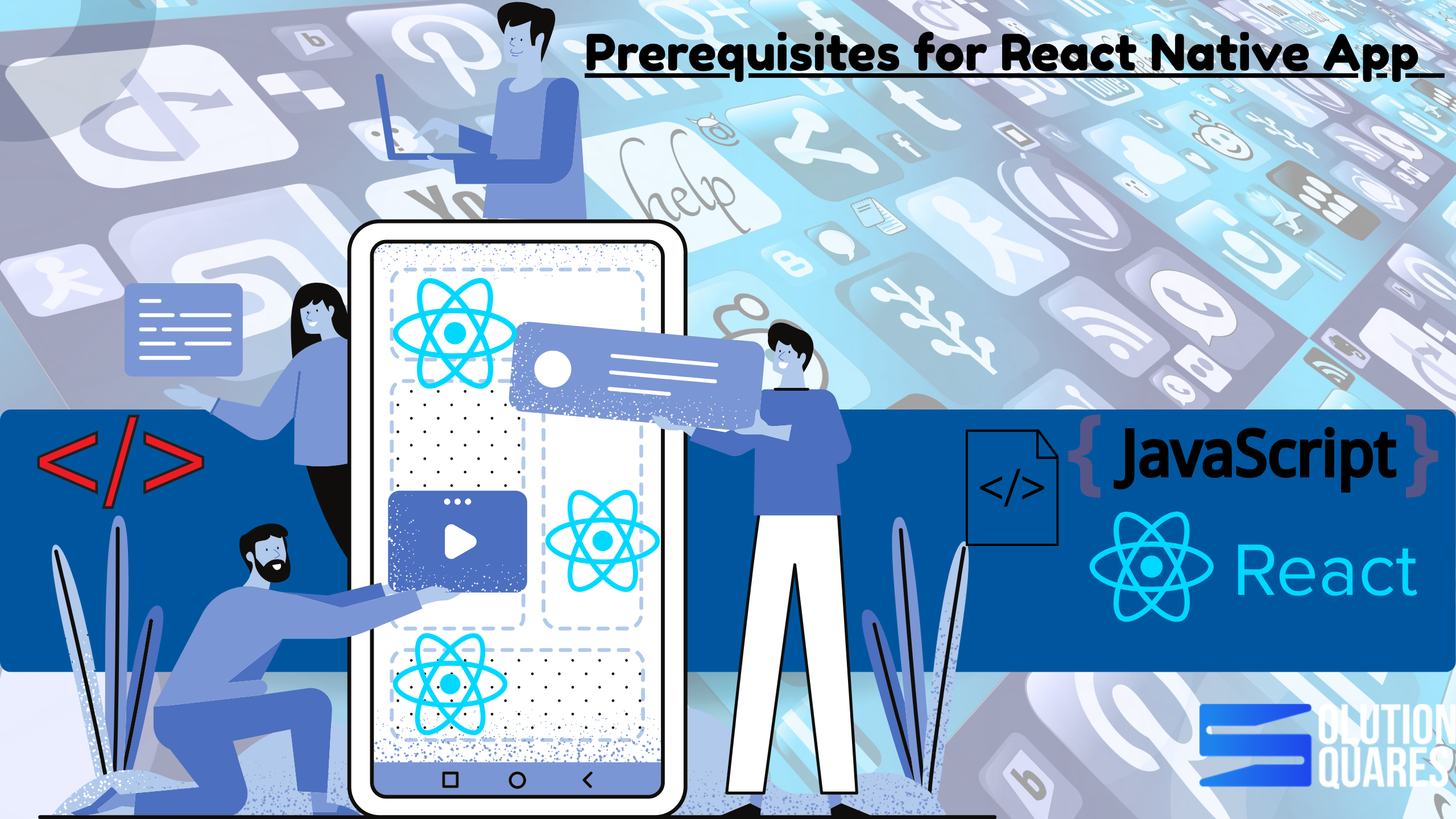
    Prerequisit For React Native Development Guide

    Technical Foundations

    • JavaScript Proficiency: At the core of React Native development lies JavaScript. A robust understanding of JavaScript is indispensable as it forms the backbone of your development structure, impacting both performance and scalability. Learn JavaScript
    • React Core Concepts: Beyond general JavaScript knowledge, familiarity with React’s ecosystem — including components, props, state management, JSX syntax, and lifecycle events — is critical for efficient development.
    • Basic CSS Knowledge: Although not a strict requirement, basic CSS skills will greatly aid in the aesthetic aspects of app development, allowing for visually appealing designs. For detailed knowledge, refer Codefinity

    Hardware & Software Requirements

    • Operating Systems: Whether you’re on macOS, Windows, or Linux, setting up the right environment is the first technical step. React Native Environment Setup
    • Node.js: Modern React Native development requires the latest long-term support (LTS) version of Node.js to ensure compatibility and stability.
    • npm: As a package manager, npm plays a crucial role in managing libraries and dependencies. It typically comes bundled with Node.js installations.
    • Version Control: While optional, using Git for source control and GitHub for collaboration can significantly enhance team productivity and streamline versioning. Unlocking Success with Custom Software Development Services

    Exploring React Native Documentation

    To excel in React Native, understanding its extensive documentation is key. Positioned as the most trustworthy resource, the official React Native documentation should be your go-to reference point. It is tailored for all experience levels, offering everything from setup instructions to advanced usage scenarios. This central repository contains detailed guidelines on environment setup, beginner concepts, API usage, and paths for troubleshooting common setbacks. Unveiling the Software Development Life Cycle (SDLC): A Comprehensive Guide

    Effective Usage of Documentation

    Learning how to navigate the React Native documentation effectively will save you time and effort, especially when troubleshooting. Regularly updated, it ensures that you have access to the latest knowledge and guidelines pivotal for successful app development.

    Setting Up a React Native App

    Setting Up a React Native App

    Following the correct steps to set up your React Native app is fundamental. Here’s how you can get started:

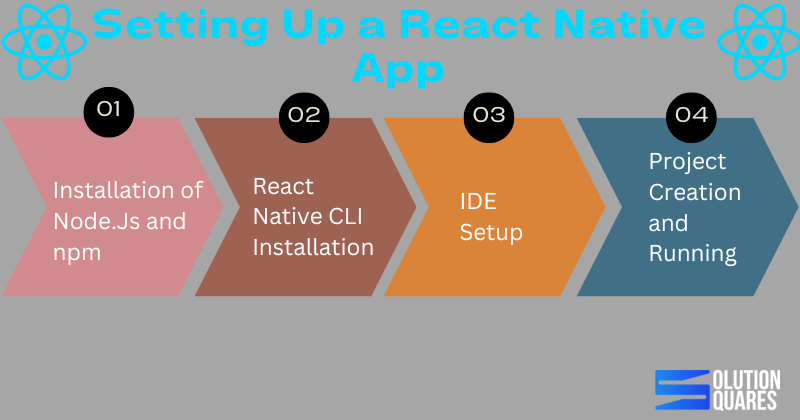
    • Installation of Node.js and npm: Start by downloading the latest LTS version of Node.js, which includes npm. Check the installations by running node -v and npm -v in your terminal.
    • React Native CLI Installation: While npx allows you to run React Native commands without installing them globally. Installing the React Native CLI can be beneficial for frequent users.
    • IDE Setup: Depending on your target platform, install Android Studio or Xcode. These tools are essential for app emulation and testing.
    • Project Creation and Running: Initialise a new project using npx react-native init MyNewApp and run your app by targeting specific platforms like Android or iOS.

    Common issues such as JDK mismatches or Gradle errors can occur, and it’s vital to refer to the documentation for specific resolutions.

    Native Environment Setup

    Conclusion: Mastering the Basics Leads to Masterful Apps

    To sum up, mastering the prerequisites for React Native application development is not merely about ticking off a checklist. It’s about understanding each component’s role in the broader development context and effectively using available tools and documentation to enhance productivity and outcome quality. The Importance of Mobile App Development

    As you embark on or continue your journey in React Native development, leverage this knowledge to build robust, efficient, and scalable mobile applications. Welcome to the future of multi-platform development!

    Frequently Asked Questions

    Q1: Do I need a real device to test React Native apps?


    Not always. You can use iOS Simulator or Android Emulator. However, real devices are recommended for performance and hardware-specific testing.

    Q2: Can I develop iOS apps without a Mac?


    No. iOS apps require macOS and Xcode. But you can use cloud-based Mac services if you don’t own one.

    Q3: What’s the best device for React Native testing?


    For iOS: Latest iPhone or iPad with iOS 16+.
    For Android: Mid-to-high range devices (Samsung Galaxy, Google Pixel, OnePlus).

    Q4: Can I test one app on both iPhone and iPad?


    Yes. React Native supports universal apps. You just need to optimise layouts for larger screens.


  • How to develop the best Hospital App?

    How to develop the best Hospital App?

    Do you want to develop the best hospital app?  We will give you complete details about how to develop the best hospital app.

    Process of the best Hospital App Development

    Normally, the development stage involves writing the code and implementing the planned features and functionalities. Developing a hospital app can be a complex process. This includes creating secure user authentication mechanisms, integrating with external systems like electronic health records (EHRs), implementing communication channels, and ensuring data privacy and security.

    [also_read slug=”https://solutionsquares.com/comprehensive-guide-for-health-app-development/”]

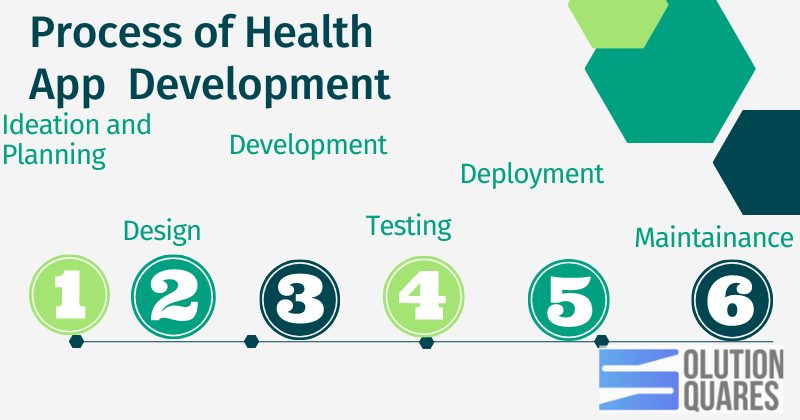
    To develop the best hospital app one needs to typically involves several stages that encompass planning, designing, developing, testing, deploying, and maintaining the application. Here’s an overview guide of the typical process of the best hospital app development;

    Process of Hospital App Development

    Ideation and Planning:


    During this initial phase, the concept, purpose, and goals of the app are defined. Market research and analysis are conducted to identify target users, competition, and unique value propositions. The project scope, requirements, and desired features are determined, forming the foundation for the subsequent stages.

    Design:


    The design phase focuses on creating the user interface (UI) and user experience (UX) of the app. Wireframes and mockups are developed to visualize the app’s structure and flow. Graphic elements, colour schemes, typography, and other design components are defined to ensure an appealing and intuitive user interface.

    Development:


    The development phase involves writing the code and implementing the features defined in the planning stage. App developers use programming languages (such as Java, Swift, or React Native) and development frameworks to build the app’s functionality. This includes front-end development for the user interface and back-end development for server-side logic and data storage.

    Testing:


    Thorough testing is crucial to ensure the app functions correctly and meets the desired quality standards. Testing involves various methods, including functional testing, performance testing, usability testing, and security testing. Bugs, errors, and issues are identified and fixed to improve the app’s stability, security, and user experience.

    Deployment:


    Once the app passes the testing phase, it is ready for deployment. This involves preparing the app for distribution through app stores (such as Apple App Store or Google Play Store) or other platforms. Developers must adhere to the guidelines and submission requirements of the chosen distribution platforms. The app is packaged, submitted, and reviewed for approval before becoming publicly available.

    Maintenance and Updates:


    After the app is deployed, it requires ongoing maintenance and updates to ensure its continued functionality, security, and compatibility with new devices and operating systems. This includes addressing user feedback, bug fixes, performance optimizations, adding new features, and ensuring data security. Regular updates are released to provide improvements and address any emerging issues.

    After development, rigorous testing is performed to identify and fix any bugs or usability issues. Testing ensures that the app functions correctly, meets the requirements, and provides a seamless user experience.

    Throughout the hospital app development process, project management plays a crucial role in overseeing and coordinating tasks, timelines, and resources. Indeed effective communication and collaboration between designers, developers, testers, and project stakeholders are essential for a successful app development project.

    It’s important to note that the hospital app development process can vary depending on factors such as project complexity, team size, development methodologies (such as Agile or Waterfall), and the specific requirements of the application. The process described above provides a general framework for understanding the steps involved in app development.

    You can also read a book for best hospital App development.

    Must have features for best Hospital app development


    Generally, there are some features which you have to include to make your hospital application experience wonderful. Here is the list of these features:

    User-friendly Interface:


    Generally, A user-friendly interface is the foundation of any successful app. A well-designed hospital app should have an intuitive interface that allows users to navigate effortlessly through various functionalities. The interface should be visually appealing, with clear and concise instructions, ensuring a seamless user experience for patients, doctors, and administrators alike.

    Appointment Booking and Reminders:


    Efficient appointment booking is a vital feature of a hospital app. It should enable patients to schedule appointments with doctors, specialists, or diagnostic centres based on their availability. Additionally, automated reminders for upcoming appointments can help reduce no-shows, allowing hospitals to optimize their resources effectively.

    Electronic Health Records (EHR) Integration:


    Seamless integration with electronic health records is crucial for a comprehensive hospital app. This feature enables doctors to access patient medical records, including medical history, diagnoses, medications, and lab results. Real-time patient data access helps healthcare professionals make informed decisions, provide accurate diagnoses, and deliver personalized care.

    Telemedicine and Video Consultations:


    The integration of telemedicine capabilities is increasingly becoming essential in hospital app development. This feature allows patients to connect with healthcare professionals remotely, ensuring timely consultations and reducing the need for in-person visits. Video consultations can benefit patients in rural areas, those with mobility issues, and those seeking quick medical advice.

    Medication Reminders and Prescription Management:


    A well-designed hospital app should provide features for medication reminders and prescription management. Users can set reminders for taking medications, ensuring adherence to prescribed treatment plans. Moreover, integrating prescription management allows patients to request medication refills online, reducing the need for physical visits to pharmacies.

    Emergency Services and Geo Location:


    In emergencies, time plays a critical role. A robust hospital app should provide quick access to emergency services, including contact information for nearby hospitals, ambulance services, and emergency hotlines. Furthermore, integrating geolocation services can assist users in identifying the nearest medical facilities based on their current location, ensuring prompt medical assistance during emergencies.

    Health Tips and Education:


    Educating patients and promoting a healthy lifestyle is an essential aspect of healthcare. Hospital apps can provide users with valuable health tips, educational articles, and preventive care information. This feature enhances patient engagement, promotes proactive healthcare practices, and improves overall wellness.

    Secure Messaging and Data Privacy:


    Data security and patient privacy are of utmost importance in healthcare app development. Implementing secure messaging features within the app enables doctors and patients to communicate confidentially. Strong encryption protocols should be in place to protect sensitive patient information from unauthorized access, ensuring compliance with privacy regulations like HIPAA.

    Costing to build the best Hospital app development:


    Cost plays a significant role to develop a hospital app. However, before embarking on the development journey, it is crucial to understand the factors that influence the cost of building a hospital app.

    Here, we will deal with the various components that contribute to the cost of hospital app development and provide insights into the investment required for such a project. Moreover, the cost of developing a hospital app depends on multiple factors, including app design, features, platform selection, system integrations, security, ongoing maintenance, and the development team’s expertise.

    It is crucial to evaluate the specific requirements and goals of the app project to determine a realistic budget. To give you a rough idea, the cost of developing a HIPAA-compliant medical supplies delivery platform can vary between $45,000 to $200,000.

    Further factors impact the overall development cost, including the complexity of the software, the hourly rate and location of the software development agency, the features to be implemented in the software, etc.

    Even though the total budget for app development may vary as per the type of software required and the services it should offer, it is necessary to get in touch with a dedicated healthcare software development company like Solution Squares that can offer you clear cost estimates by prioritizing the features based on your business requirements.

    App Design and User Interface:


    The app’s design and user interface (UI) play a significant role in attracting and engaging users. The cost of app design and UI development depends on factors such as complexity, customization, and visual elements. A well-designed and visually appealing interface will likely require more resources, including experienced designers, resulting in a higher cost.

    Features and Functionality:


    The features and functionality integrated into a hospital app significantly impact its cost. Basic features like appointment booking, doctor profiles, and patient registration are essential but less complex. However, advanced functionalities such as telemedicine capabilities, EHR integration, prescription management, and personalized health recommendations require more development effort and expertise, thus contributing to a higher cost.

    Platform Selection:


    Choosing the platform(s) on which the hospital app will be developed is another cost-determining factor. Generally, hospital apps are developed for multiple platforms, including iOS, Android, and sometimes web-based applications. Building separate versions for each platform increases development time, effort, and consequently, the cost. Alternatively, opting for cross-platform development frameworks can help reduce costs by allowing code reusability across platforms.

    Integration with Existing Systems:


    For comprehensive functionality, a hospital app may need to integrate with existing hospital systems such as electronic health records (EHR), laboratory information systems, or pharmacy databases. Integrations require careful planning, development, and testing, adding to the overall cost. The complexity and compatibility of the existing systems with the app will determine the level of effort and cost involved.

    Security and Compliance:


    Data security and compliance with healthcare regulations (e.g., HIPAA) are critical considerations in hospital app development. Implementing robust security measures, including data encryption, secure messaging, and user authentication, requires additional development effort and expertise. Complying with regulatory standards necessitates meticulous attention to detail, auditing processes, and ongoing maintenance, all of which contribute to the overall cost.

    Maintenance and Updates:


    Building a hospital app is not a one-time investment. Ongoing maintenance, bug fixes, and updates are necessary to ensure the app’s smooth functioning and compatibility with evolving technologies and operating systems. Additionally, user feedback and market demands may require the addition of new features or enhancements. It is essential to allocate a budget for post-development support and continuous improvement to keep the app relevant and up-to-date.

    Development Team Size:


    The cost of a hospital app development project also depends on the development team’s expertise, experience, and location. Hiring a skilled team of designers, developers, testers, and project managers will impact the overall cost. The hourly rates and resource requirements will vary based on the location, as rates differ across regions and countries.

    Functional requirements:


    Usually, function requirements describe the behaviour of your mobile app and its functionality. An example of functional requirements: The app allows doctors to share uploaded files, such as X-rays and test results with the patient in a private chat. However, non-functional requirements include information about the performance characteristics of your app.

    Next, the development team turns your project requirements into separate hospital mobile app features, prioritizes them, and starts developing your project.

    Technologies Used in Hospital application development:


    To develop the best hospital app one can use the potential of cloud computing and AI, as it will provide us with efficient data management, enabling healthcare professionals to make data-driven decisions for better patient outcomes. For the continuous monitoring of patient data, one can also use wearable devices and remote monitoring systems.

    As the core feature for this application is to secure the data for each patient we can use blockchain technology for data integrity and privacy. Finally, the technology USD for hospital app development completely depends on the nature, location, column, requirements etc of the client.


    Location of an Application agency:


    The location of the agency hired to develop HIPAA Compliant platforms for medical delivery is a major factor impacting its overall cost. For instance, the hourly rate of development in the regions like Asia or Eastern Europe varies between $35-$50. On the other hand, hiring a development team from the regions like the UK or the US can increase your overall development budget considering their hourly rates vary between $100-$120.

    Software Complexity

    Estimated Cost of Development

    Time Frame

    Highly Complex

    $120,000 to $200,000

    10 to 12 months

    Medium Complex

    $70,000 to $100,000

    6 to 8 months

    Simple

    $45,000 to $65,000

    3 to 6 months

    Who can help you to develop the best hospital development app?


    Generally, Collaborating with an experienced app development agency or consulting with experts in the field can provide valuable insights and ensure that the allocated resources align with the desired outcomes.

    By understanding the key cost components, healthcare organizations can make informed decisions and embark on a successful hospital app development journey.

    Frequently Asked Question

    Yes! Suppose your business deals with Private Health Information such as medical supplies, medical equipment, pharmacy items, or any other healthcare product. In that case, it’s necessary to adhere to the HIPAA Act to ensure the privacy and security of sensitive patient data.

    Generally, healthcare apps make money through Registration and subscription fees. However, if a medical app serves as a platform that connects physicians to patients, then it can charge registration fees for doctors who use it to fill in their free time slots. That’s one of the ways how to monetize a free app.

    Normally, HealthMetrics is a benefits administration platform that allows organizations to streamline processes related to the management of healthcare, well-being, and other employee benefits experience from within an integrated benefits management platform. These can help you reduce your administration expenses and enhance your service quality.

    Conclusion

    In short, a perfect process can help you to develop the best hospital application. Keep in mind that healthcare app development requires a deep understanding of the industry, and you may need to collaborate with healthcare professionals during the development process. Additionally, ensuring the security and privacy of patient data is of utmost importance, so make sure to prioritize these aspects throughout the development lifecycle.

  • What is the best Hospital App Development?

    What is the best Hospital App Development?

    In recent years, the healthcare industry has witnessed a significant digital transformation, and one of the remarkable advancements has been the of hospital app development. These applications have revolutionized patient care, making it more accessible, efficient, and convenient.

    However, to create the best hospital app, developers need to focus on incorporating essential features that enhance the overall user experience and provide comprehensive healthcare services.

    In this article, we will explore the key features of hospital app development to stand out and deliver exceptional value to patients, doctors, and healthcare providers.

    What is a Hospital Development App?

    Normally, Hospital app development refers to the process of creating mobile applications specifically designed for use in the healthcare industry, with a focus on enhancing patient care, improving communication between healthcare providers and patients, streamlining administrative tasks, and providing convenient access to healthcare services.

    However, Hospital apps are designed to address various aspects of healthcare, such as appointment scheduling, access to medical records, Telemedicine consultations, medication reminders, health education, and emergency services. Indeed, these apps can be accessed by patients, doctors, nurses, administrators, and other healthcare professionals, depending on the functionalities and user roles defined within the app.

    Generally, the development of a hospital app typically involves several stages, including ideation, planning, design, development, testing, deployment, and maintenance. During the ideation and planning phase, the app’s purpose, target audience, and key features are identified.

    However, this phase also involves considering the technical requirements, integration possibilities with existing healthcare systems, and compliance with relevant regulations like the Health Insurance Portability and Accountability Act (HIPAA).

    Why Develop a hospital app?

    According to Statistic forecast, the global Health market is expected to reach $332 billion by 2025. Developing the best hospital app offers numerous benefits for both healthcare providers and patients. Here are some compelling reasons to invest in hospital app development:

    Enhanced Patient Engagement:


    The best hospital app allows healthcare providers to engage with patients in a more convenient and personalized manner. Patients can access their medical records, view test results, schedule appointments, and receive medication reminders, empowering them to take an active role in their healthcare management.

    Improved Access to Healthcare:


    Generally, Hospital apps provide a platform for patients to access healthcare services from anywhere at any time. They can seek medical advice through telemedicine consultations, request prescription refills, or access health information and educational resources at their fingertips. This convenience eliminates geographical barriers and reduces the need for unnecessary hospital visits. This will increase customer satisfaction as well as the service quality of a hospital.

    Streamlined Appointment Management:


    Hospital apps simplify the appointment booking process for patients. They can view the availability of doctors, specialists, or diagnostic centers and schedule appointments accordingly. Furthermore, automated reminders and notifications help reduce no-shows, optimize resource utilization, and enhance overall scheduling efficiency.

    Efficient Communication:


    Hospital apps facilitate seamless communication between patients and healthcare providers. Additionally, patients can securely message their doctors, receive updates on their treatment plans, and seek clarifications on medical issues. This improves patient-doctor communication, reduces phone calls, and enables timely responses to patient inquiries.

    Remote Consultations:


    With the integration of tele -medicine capabilities, hospital apps enable patients to have remote consultations with healthcare professionals. This feature is particularly beneficial for patients in remote areas, those with limited mobility, or individuals seeking quick medical advice without the need for an in-person visit.

    Medication Management:


    Hospital apps can assist patients in managing their medications effectively. Indeed,  they can receive reminders to take prescribed medications, track their adherence, and request prescription refills conveniently through the app. This feature promotes medication compliance and helps prevent missed doses or potential adverse events.

    Emergency Assistance:


    Hospital apps can include emergency features such as providing emergency contact information, locating nearby hospitals or healthcare facilities, and accessing emergency hotlines. This immediate access to critical information can save valuable time during emergency situations and ensure prompt medical assistance.Health Monitoring and Personalized Care:Some hospital apps offer features for monitoring health parameters, such as tracking physical activity, diet, or vital signs. This data can be shared with healthcare providers, enabling them to deliver personalized care plans and interventions based on individual health metrics.

    Administrative Efficiency:


    Hospital apps streamline administrative tasks for healthcare organizations. They can facilitate patient registration, automate billing and payment processes, and enable seamless data integration with existing hospital systems such as electronic health records (EHRs) and laboratory information systems. However, this improves workflow efficiency, reduces manual errors, reduces administration expenses, and enhances administrative productivity.

    Competitive Advantage and Branding:


    Generally, investing in a well-designed and functional hospital app demonstrates a commitment to innovation and patient-centered care. However, it can differentiate healthcare providers from competitors, attract tech-savvy patients, and enhance the overall brand image of the organization.

    In summary, building a hospital app offers a wide range of benefits, including improved patient engagement, increased access to healthcare services, streamlined communication, enhanced medication management, emergency assistance, personalized care, administrative efficiency, and a competitive edge in the healthcare industry. It has the potential to transform healthcare delivery, making it more convenient, efficient, and patient-centric.

    Types of Hospital Development Apps


    Normally, there are several types of hospital app development, each catering to specific needs and functionalities within the healthcare industry. Here are some common types of hospital app development that we offer:

    types of hospital app development

    Patient-Facing Apps:


    Patient-facing apps are designed to provide healthcare services and information directly to patients. These apps focus on enhancing patient engagement, convenience, and access to healthcare services.

    Moreover, they often include features such as appointment scheduling, telemedicine consultations, medication reminders, access to medical records, health education resources, and emergency assistance.

    Doctor/Patient Communication Apps:


    Doctor/patient communication apps facilitate seamless communication between healthcare providers and patients. These apps allow patients to securely message their doctors, receive updates on their treatment plans, request prescription refills, and seek medical advice.

    Normally, they streamline communication channels, reducing the need for phone calls and enabling timely responses to patient inquiries.

    Telemedicine Apps:


    Telemedicine apps enable remote consultations and virtual healthcare services. Indeed, these apps allow patients to have video or audio consultations with doctors, specialists, or other healthcare professionals.

    Normally, telemedicine apps often include features such as appointment scheduling, secure video conferencing, medical file sharing, and prescription management. They provide convenient access to healthcare services, particularly for individuals in remote areas or with limited mobility.

    Electronic Health Record (EHR) Apps:


    EHR apps focus on providing access to patient medical records and facilitating their management. These apps allow healthcare professionals to view patient information, including medical history, diagnoses, medications, lab results, and imaging reports.

    Furthermore, EHR apps may also include features for updating patient records, documenting clinical notes, and generating reports. Integration with existing EHR systems is crucial for seamless data exchange and accurate record-keeping.

    Medication Management Apps:


    Medication management apps aim to improve medication adherence and patient safety. These apps help patients track their medications, set reminders for taking pills, and manage prescription refills.

    Additionally, they may include features such as medication schedules, dosage instructions, pill identification, and drug interaction checks. Medication management apps can help prevent medication errors and promote adherence to prescribed treatment plans.

    Health Monitoring Apps:


    Health monitoring apps focus on tracking and managing various health parameters. These apps often integrate with wearable devices or sensors to monitor physical activity, heart rate, sleep patterns, calorie intake, or other vital signs.

    Generally, Health monitoring apps can provide insights into personal health trends, offer health recommendations, and enable users to share data with healthcare providers for personalized care.

    Hospital Administrative Apps:


    Hospital administrative apps target internal hospital operations and administrative tasks. Normally, these apps streamline processes such as patient registration, appointment scheduling, billing, and payment management.

    However, they may integrate with existing hospital systems, such as billing systems or laboratory information systems, to optimize administrative efficiency and reduce manual errors.

    Emergency Assistance Apps:


    Emergency assistance apps provide immediate access to emergency services and information. These apps include features such as emergency contact information, location-based services for locating nearby hospitals or healthcare facilities, and access to emergency hotlines. Importantly,  they help users quickly find appropriate medical assistance during emergency situations.

    It’s worth noting that many hospital apps may encompass multiple functionalities, combining features from various types mentioned above to provide comprehensive healthcare services and solutions. The specific type of hospital app development depends on the goals, requirements, and target audience of the healthcare organization or application.

    Must have features for best Hospital app development


    User-friendly Interface:


    Generally, A user-friendly interface is the foundation of any successful app. A well-designed hospital app should have an intuitive interface that allows users to navigate effortlessly through various functionalities. The interface should be visually appealing, with clear and concise instructions, ensuring a seamless user experience for patients, doctors, and administrators alike.

    Appointment Booking and Reminders:


    Efficient appointment booking is a vital feature of a hospital app. It should enable patients to schedule appointments with doctors, specialists, or diagnostic centers based on their availability. Additionally, automated reminders for upcoming appointments can help reduce no-shows, allowing hospitals to optimize their resources effectively.

    Electronic Health Records (EHR) Integration:


    Seamless integration with electronic health records is crucial for a comprehensive hospital app. This feature enables doctors to access patient medical records, including medical history, diagnoses, medications, and lab results. Having real-time access to patient data helps healthcare professionals make informed decisions, provide accurate diagnoses, and deliver personalized care.

    Telemedicine and Video Consultations:


    The integration of telemedicine capabilities is increasingly becoming essential in hospital app development. This feature allows patients to connect with healthcare professionals remotely, ensuring timely consultations and reducing the need for in-person visits. Video consultations can benefit patients in rural areas, those with mobility issues, and those seeking quick medical advice.

    Medication Reminders and Prescription Management:


    A well-designed hospital app should provide features for medication reminders and prescription management. Users can set reminders for taking medications, ensuring adherence to prescribed treatment plans. Moreover, integrating prescription management allows patients to request medication refills online, reducing the need for physical visits to pharmacies.

    Emergency Services and Geo Location:


    In emergency situations, time plays a critical role. A robust hospital app should provide quick access to emergency services, including contact information for nearby hospitals, ambulance services, and emergency hotlines. Furthermore, integrating geo location services can assist users in identifying the nearest medical facilities based on their current location, ensuring prompt medical assistance during emergencies.

    Health Tips and Education:


    Educating patients and promoting a healthy lifestyle is an essential aspect of healthcare. Hospital apps can provide users with valuable health tips, educational articles, and preventive care information. This feature enhances patient engagement, promotes proactive healthcare practices, and improves overall wellness.

    Secure Messaging and Data Privacy:


    Data security and patient privacy are of utmost importance in healthcare app development. Implementing secure messaging features within the app enables doctors and patients to communicate confidentially. Strong encryption protocols should be in place to protect sensitive patient information from unauthorized access, ensuring compliance with privacy regulations like HIPAA.

    Conclusion


    In short, Creating the best hospital app requires careful consideration of the features that provide a seamless user experience while delivering comprehensive healthcare services.
    Incorporating user-friendly interfaces, appointment booking, EHR integration, telemedicine capabilities, medication reminders, emergency services, health tips, and robust data security ensures a reliable and efficient application. By focusing on these essential features, hospital app developers like solution squares can significantly contribute to improving patient care, increasing accessibility, and enhancing overall healthcare experiences.

    In recent years, the healthcare industry has witnessed a significant digital transformation, and one of the remarkable advancements has been the development of hospital apps. These applications have revolutionized patient care, making it more accessible, efficient, and convenient.

    However, to create the best hospital app, developers need to focus on incorporating essential features that enhance the overall user experience and provide comprehensive healthcare services. In this article, we will explore the key features that make a hospital app stand out and deliver exceptional value to patients, doctors, and healthcare providers.

  • Transforming Careers, Cultivatin: Empower Your Journey With Unparalleled  Job Portal Expertise

    Transforming Careers, Cultivatin: Empower Your Journey With Unparalleled Job Portal Expertise

    Embark on the journey of job portal development with a clear understanding of costs, features, and benefits to create a platform that not only meets current needs but is also poised for future success.

    Cost of Job Portal Development:

    Determining the exact cost of crafting a smartphone application is a meticulous process. App developers often find it challenging to provide an upfront estimate due to the variability in expenses linked to feature integration. Developing an app is a multifaceted and time-consuming endeavour that necessitates careful consideration of numerous factors.

    Usually, the standard billing approach for most software development firms involves hourly rates. The number of hours required is contingent upon the complexity of the application. According to industry standards, the creation of a digital job search and recruitment app may incur costs ranging from $40 to $60 per hour. This translates to an estimated expense of $45,000 to $60,000 for developing a basic job portal application. It’s essential to note that this cost encompasses UI/UX design and comprehensive testing of the smartphone application.

    However, Geographical location significantly influences the expense of product development. For instance, a company based in the United States may charge between $200 and $250 per hour, significantly elevating the overall cost. Similarly, development rates in Europe and neighbouring regions typically fall within the range of $125 to $170 per hour.

    In contrast, India stands out as a hub for skilled software developers offering exceptional services at markedly lower costs. Reputable software development companies in India commonly charge rates ranging from $20 to $25 per hour. This cost advantage makes India an attractive destination for cost-effective and high-quality app development services.

    • Basic Job Portal:

    This includes essential features like user registration, job search, and application submission. Depending on the complexity and features, development costs range from $50,000 to $100,000.

    • Advanced Job Portal with AI Matching:

    For a more sophisticated platform incorporating AI-driven job matching, personalized dashboards, and additional advanced features, costs can range from $100,000 to $200,000.

    Note: Costs may vary based on factors like the chosen technology stack, the geographical location of the development team, and specific customization requirements.

    Factors Affecting Cost Of Job Portal

    Several factors contribute to the cost of developing a job portal. The complexity and features of the portal, as well as the geographic location of the development team, play significant roles. Here are the key factors that can affect the cost of job portal development:

    1. Features and Functionality:

      • The number and complexity of features integrated into the job portal significantly impact the development cost. Basic features like user registration, job search, and application submission may have lower associated costs, while advanced features such as AI-driven matching algorithms, personalized dashboards, and advanced analytics can increase the overall expense.
    2. Design and User Experience:

      • The level of design sophistication and user experience (UI/UX) considerations influence the development cost. A well-designed and user-friendly portal often requires additional resources and expertise.
    3. Platform (Web, iOS, Android):

      • Developing the job portal for multiple platforms (web, iOS, Android) increases the complexity and, subsequently, the cost. Each platform requires unique development and testing efforts.
    4. Technology Stack:

      • The choice of technology stack, including programming languages, frameworks, and third-party integrations, can impact development costs. Some technologies may have higher licensing or development expenses.
    5. Geographical Location of Development Team:

      • The location of the development team is a crucial cost factor. Development rates vary significantly based on the region. For example, development costs in countries with a higher cost of living, such as the United States or Europe, tend to be higher than in countries like India, where skilled developers are available at a lower cost.
    6. Testing and Quality Assurance:

      • Rigorous testing is essential to ensure the reliability and security of the job portal. The more comprehensive the testing procedures, the higher the associated costs.
    7. Deployment and Maintenance:

      • Costs related to deploying the job portal and ongoing maintenance should be considered. Regular updates, bug fixes, and security patches contribute to the total cost of ownership.
    8. Scalability:

      • If the job portal is designed to handle a large volume of users and data, scalability becomes a factor. Developing a scalable architecture may require additional investment.
    9. Security Requirements:

      • The level of security required for the job portal can impact costs. Implementing advanced security measures to protect user data and sensitive information may require additional resources.
    10. Legal and Compliance:

      • Ensuring compliance with data protection regulations and obtaining necessary licenses can contribute to costs. Legal considerations, such as privacy policies and terms of service, should be factored in.
    11. Integration with External Systems:

      • If the job portal needs to integrate with external systems, such as social media platforms, payment gateways, or other third-party services, development and integration costs may increase.

    Considering these factors and defining the specific requirements of the job portal in detail will help in obtaining a more accurate and tailored cost estimate for development.

    Why To Develop A Job Portal?

    The rise of job portal development services is evident in the growing online recruitment market, as indicated by the report from Fortune Business Insights. According to the report, the online recruitment market is expected to reach a substantial size of USD 43.39 billion by the year 2027.

    This projection represents a significant increase compared to the market size of USD 28.68 billion just two years ago. The data suggests a robust growth trajectory, with the global online recruitment market expanding at a Compound Annual Growth Rate (CAGR) of 7.1% during this period.

    This growth can be attributed to several factors, including the increasing adoption of online platforms for job searches, the evolving dynamics of the job market, and the continuous innovation in technology facilitating more efficient and user-friendly recruitment processes.

    Businesses and job seekers alike are recognizing the benefits of leveraging online recruitment platforms, leading to a surge in demand for job portal development services. The trend is expected to continue as the job market becomes more competitive, and organizations seek effective and tech-driven solutions for talent acquisition and job placement.

    Must-Have Features Of Job Portal Development:

    It’s important to conduct thorough market research and consider the most recent developments when entering or investing in the job portal development market in India. Moreover, the landscape is dynamic, and staying informed about industry trends and user preferences is crucial for success.

    • User Registration and Profiles:

    This allows users to create accounts, build profiles, and manage their job-seeking journey effectively.

    Advanced Job Search and Filters:

    Provide a robust search functionality with filters for location, industry, experience level, and more.

    Company Profiles with Reviews:

    Enable users to explore detailed company profiles and access reviews from current and former employees.

    Personalized User Dashboards:

    Offer personalized dashboards for users to manage applications, save preferences, and track job searches.

    Application Submission and Tracking:

    Streamline the application process, allowing users to apply to jobs seamlessly and track their application status.

    AI-driven Job Matching Algorithms:

    Implement artificial intelligence to enhance job matching, providing users with personalized job recommendations.

    Salary Information Integration:

    Provide insights into salary information to empower job seekers with transparent compensation details.

    • Employer Accounts for Job Postings:

    Enable employers to create accounts, post job openings, and manage the recruitment process efficiently.

    • Mobile Responsiveness:

    Ensure cross-platform access with a responsive design for web and mobile devices.

    Benefits Of Job Portal Development:

    The development of a job portal offers a wide range of benefits for both job seekers and employers, creating a dynamic platform that fosters efficient, transparent, and effective interactions between the two parties.

    For Job Seekers:

    Job portal development offers numerous benefits for job seekers, enhancing their overall job search experience. Here are some key advantages:

    • Access to Diverse Opportunities:

    Job seekers gain access to a wide range of job opportunities from various industries and sectors, expanding their choices and increasing the likelihood of finding a suitable position.

    • Efficient Job Search:

    With advanced search filters and algorithms, job portals enable efficient and targeted job searches. Users can customize their searches based on factors such as industry, location, experience level, and more.

    • Transparent Company Information:

    Job portals often provide detailed company profiles, reviews, and ratings. This transparency empowers job seekers to make informed decisions about potential employers, fostering a better understanding of workplace culture and reputation.

    • Application Tracking:

    Job seekers can track the status of their job applications in real-time. This feature enhances transparency in the recruitment process and helps applicants stay organized throughout their job search.

    • Personalized User Dashboards:

    Job portals often offer personalized dashboards where users can save preferences, manage applications, and receive relevant job recommendations. This personalized experience enhances user engagement and satisfaction.

    • Salary Insights:

    Many job portals provide insights into salary ranges for different positions and industries. This information helps job seekers evaluate and negotiate compensation packages effectively.

    • Skill Enhancement Opportunities:

    Some job portals offer resources for skill development, training programs, and certifications. This encourages continuous learning and skill enhancement for job seekers looking to stay competitive in the job market.

    • Mobile Accessibility:

    Job portal apps ensure accessibility on mobile devices, allowing job seekers to browse and apply for jobs on the go. This flexibility is particularly beneficial for those with busy schedules.

    • Networking Opportunities:

    Some job portals incorporate networking features, enabling job seekers to connect with professionals in their industry, join relevant groups, and participate in discussions. Networking can open doors to new opportunities and insights.

    • Notifications and Alerts:

    Job portals often send notifications and alerts based on user preferences, keeping job seekers informed about relevant job openings, application status updates, and industry trends.

    In summary, job portal development significantly improves the job search experience for individuals by providing a user-friendly platform with diverse job opportunities, transparent company information, and tools for efficient and organized job hunting.


    For Employers:

    Job portal development offers several advantages for employers, streamlining the hiring process and enhancing their ability to attract and manage talent effectively. Here are the key benefits:

    • Wider Candidate Pool:

    Job portals provide access to a vast and diverse pool of potential candidates. Employers can reach a broader audience, increasing the chances of finding qualified and suitable candidates for their job openings.

    • Cost-Efficient Recruitment:

    Online job portals often offer cost-effective solutions compared to traditional recruitment methods. Employers can save on advertising costs and reach a large number of candidates without significant expenses.

    • Efficient Job Posting:

    Employers can easily create and post job openings on job portals, ensuring that their vacancies are visible to a wide audience. This streamlines the process of advertising job opportunities and attracting relevant applicants.

    • Targeted Candidate Search:

    Advanced search and filtering options on job portals enable employers to search for candidates based on specific criteria such as skills, experience, and qualifications. This targeted approach helps identify candidates who closely match the job requirements.

    • Brand Visibility:

    Employers can create and maintain detailed company profiles on job portals, showcasing their brand, values, and workplace culture. This visibility can attract top talent who align with the company’s ethos.

    • Applicant Tracking System (ATS):

    Many job portals come equipped with ATS features, allowing employers to manage the entire recruitment process efficiently. This includes tracking applications, scheduling interviews, and communicating with candidates seamlessly.

    • Real-Time Interaction:

    Job portals facilitate real-time communication between employers and candidates. This instant interaction expedites the hiring process, enabling quick responses to candidate queries and updates on application status.

    • Data-Driven Decision-Making:

    Employers can leverage analytics and insights provided by job portals to make informed decisions. Data on candidate engagement, application trends, and other metrics assist in refining recruitment strategies.

    • Reduced Time-to-Hire:

    The streamlined processes and efficient tools provided by job portals contribute to a reduced time-to-hire. Employers can quickly identify, assess, and hire suitable candidates, ensuring that critical positions are filled promptly.

    • Integration with Recruitment Software:

    Job portals often integrate with various recruitment and HR software, enabling seamless data transfer and synchronization. This integration enhances workflow efficiency and minimizes manual data entry.

    • Customized Employer Branding:

    Employers can use job portals to showcase their employer brand through multimedia content, employee testimonials, and company updates. This branding helps attract candidates who resonate with the company culture.

    In summary, job portal development provides employers with a range of tools and features to streamline the recruitment process, attract top talent, and make data-driven decisions. It is a valuable resource for companies seeking efficient and cost-effective solutions for talent acquisition.

    How Does Job Portal Make Money?

    Job portals generate revenue through various monetization strategies. Here are some common ways job portals make money, along with real-life examples:

    1. Job Posting Fees:

      • How it works: Employers pay a fee to post job openings on the portal, ensuring visibility to a large pool of potential candidates.
      • Example: Many job portals, including Indeed and Naukri.com, charge employers for posting their job listings. Prices may vary based on factors like job duration, visibility, and additional features.
    2. Resume Database Access:

      • How it works: Employers subscribe to access the portal’s resume database, allowing them to search and view resumes of potential candidates.
      • Example: LinkedIn offers a premium service called LinkedIn Recruiter, where recruiters pay a subscription fee for advanced search and access to a larger pool of candidate profiles.
    3. Featured Job Listings:

      • How it works: Employers can pay an additional fee to highlight their job listings for better visibility on the portal.
      • Example: Glassdoor offers a feature called “Sponsored Jobs,” where employers can boost the visibility of their job postings to attract more candidates.
    4. Premium Employer Services:

      • How it works: Job portals offer premium services to employers, including enhanced company profiles, branding opportunities, and additional recruitment tools.
      • Example: Indeed has a service called “Indeed Employer,” providing advanced features like enhanced job visibility, sponsored postings, and employer branding options at a premium cost.
    5. Advertising Revenue:
      • How it works: Job portals display targeted advertisements to users, generating revenue through pay-per-click (PPC) or impression-based models.
      • Example: Google AdSense is commonly used by job portals to display relevant ads to users based on their search and browsing behavior, generating revenue for each click or impression.
    6. Subscription Services for Job Seekers:

      • How it works: Job seekers may opt for premium subscriptions that offer additional features, such as resume visibility to more employers, personalized insights, or priority support.
      • Example: LinkedIn Premium is a subscription service that offers benefits to job seekers, including increased profile visibility and access to learning resources.
    7. Affiliate Marketing:

      • How it works: Job portals may earn commissions by referring users to external services or educational programs.
      • Example: A job portal might partner with an online course provider and earn a commission for each user who enrolls in a course through their referral link.
    8. Freemium Models:

      • How it works: Job portals may offer basic services for free while charging for premium features or additional functionalities.
      • Example: LinkedIn operates on a freemium model, where users can access basic features for free, but premium services come with a subscription fee.
    9. Event Sponsorship and Recruitment Fairs:

      • How it works: Job portals organize or sponsor job fairs, events, or webinars, charging employers for participation.
      • Example: Monster India, for instance, has organized career fairs where employers pay for booths to interact with potential candidates.

    These monetization strategies allow job portals to offer valuable services to both job seekers and employers while generating revenue to sustain and grow their platforms. The specific revenue mix may vary among different portals based on their business models and target audiences.