


Key Takeaways
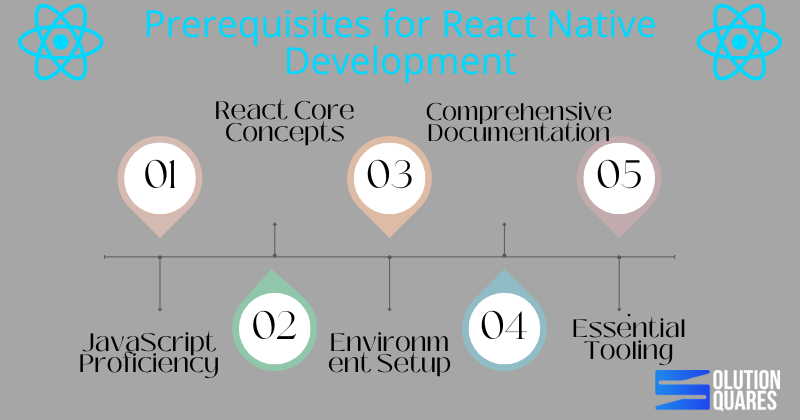
- JavaScript Proficiency: Mastery of JavaScript is fundamental for developing high-performance React Native applications.
- React Core Concepts: A solid understanding of React’s ecosystem, including components and state management, is essential.
- Environment Setup: Proper setup of the development environment is crucial for seamless React Native application development.
- Comprehensive Documentation: Utilising React Native’s official documentation can significantly enhance development efficiency and troubleshooting.
- Essential Tooling: Familiarity with tools like Node.js, npm, and version control systems like Git is important for managing dependencies and collaborating effectively.
Incorporating the Prerequisites for React Native Application Development
In the world of app development, React Native has emerged as a game-changer. Empowering developers to craft stunning, high-performance applications for both Android and iOS platforms, React Native streamlines development like never before. However, before diving into this powerful framework, it’s crucial to establish a solid foundation. In this blog post, we’ll navigate through the essential prerequisites for React Native application development, including detailed environment setup, core knowledge areas, and essential tooling to ensure a successful development journey.
Understanding the Prerequisites for React Native Development
Technical Foundations
- JavaScript Proficiency: At the core of React Native development lies JavaScript. A robust understanding of JavaScript is indispensable as it forms the backbone of your development structure, impacting both performance and scalability. Learn JavaScript
- React Core Concepts: Beyond general JavaScript knowledge, familiarity with React’s ecosystem — including components, props, state management, JSX syntax, and lifecycle events — is critical for efficient development.
- Basic CSS Knowledge: Although not a strict requirement, basic CSS skills will greatly aid in the aesthetic aspects of app development, allowing for visually appealing designs. For detailed knowledge, refer Codefinity
Hardware & Software Requirements
- Operating Systems: Whether you’re on macOS, Windows, or Linux, setting up the right environment is the first technical step. React Native Environment Setup
- Node.js: Modern React Native development requires the latest long-term support (LTS) version of Node.js to ensure compatibility and stability.
- npm: As a package manager, npm plays a crucial role in managing libraries and dependencies. It typically comes bundled with Node.js installations.
- Version Control: While optional, using Git for source control and GitHub for collaboration can significantly enhance team productivity and streamline versioning. Unlocking Success with Custom Software Development Services
Exploring React Native Documentation
To excel in React Native, understanding its extensive documentation is key. Positioned as the most trustworthy resource, the official React Native documentation should be your go-to reference point. It is tailored for all experience levels, offering everything from setup instructions to advanced usage scenarios. This central repository contains detailed guidelines on environment setup, beginner concepts, API usage, and paths for troubleshooting common setbacks. Unveiling the Software Development Life Cycle (SDLC): A Comprehensive Guide
Effective Usage of Documentation
Learning how to navigate the React Native documentation effectively will save you time and effort, especially when troubleshooting. Regularly updated, it ensures that you have access to the latest knowledge and guidelines pivotal for successful app development.
Setting Up a React Native App
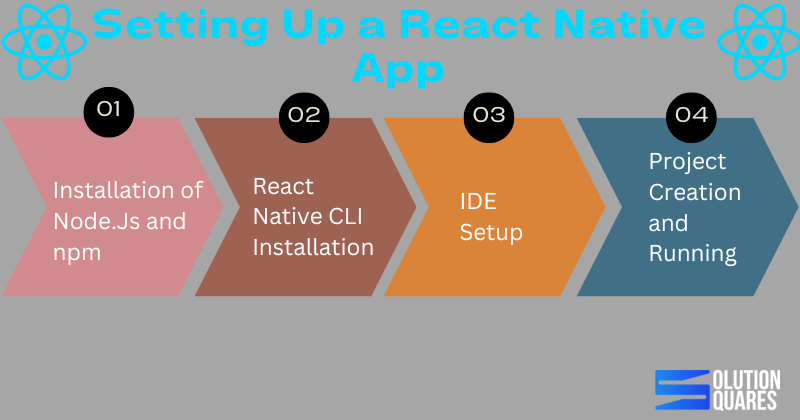
Following the correct steps to set up your React Native app is fundamental. Here’s how you can get started:
- Installation of Node.js and npm: Start by downloading the latest LTS version of Node.js, which includes npm. Check the installations by running
node -vandnpm -vin your terminal. - React Native CLI Installation: While
npxallows you to run React Native commands without installing them globally. Installing the React Native CLI can be beneficial for frequent users. - IDE Setup: Depending on your target platform, install Android Studio or Xcode. These tools are essential for app emulation and testing.
- Project Creation and Running: Initialise a new project using
npx react-native init MyNewAppand run your app by targeting specific platforms like Android or iOS.
Common issues such as JDK mismatches or Gradle errors can occur, and it’s vital to refer to the documentation for specific resolutions.
Conclusion: Mastering the Basics Leads to Masterful Apps
To sum up, mastering the prerequisites for React Native application development is not merely about ticking off a checklist. It’s about understanding each component’s role in the broader development context and effectively using available tools and documentation to enhance productivity and outcome quality. The Importance of Mobile App Development

As you embark on or continue your journey in React Native development, leverage this knowledge to build robust, efficient, and scalable mobile applications. Welcome to the future of multi-platform development!
Frequently Asked Questions
Q1: Do I need a real device to test React Native apps?
Not always. You can use iOS Simulator or Android Emulator. However, real devices are recommended for performance and hardware-specific testing.
Q2: Can I develop iOS apps without a Mac?
No. iOS apps require macOS and Xcode. But you can use cloud-based Mac services if you don’t own one.
Q3: What’s the best device for React Native testing?
For iOS: Latest iPhone or iPad with iOS 16+.
For Android: Mid-to-high range devices (Samsung Galaxy, Google Pixel, OnePlus).
Q4: Can I test one app on both iPhone and iPad?
Yes. React Native supports universal apps. You just need to optimise layouts for larger screens.