Category: App Development

You desire, and we deliver. Our app development service covers all kinds of app development react native, React, Flutter, iOS, Android and much more.

  • Building High-Performance iOS Apps with React Native: A Complete Guide

    Building High-Performance iOS Apps with React Native: A Complete Guide

    Comprehensive Guide to Building a React Native App for iOS and Beyond

    Key Takeaways

    • React Native enables the development of cross-platform mobile applications using a single codebase.
    • Building a React Native app for iOS offers superior performance and access to native iOS features.
    • React Native’s cross-platform capabilities reduce development time and costs.
    • Optimising for specific platforms, such as iOS, Android, and iPad, ensures a tailored user experience.
    • Adhering to best practices and leveraging community support are crucial for successful app development.

    Introduction

    React Native, a robust open-source framework, allows developers to create cross-platform mobile applications using JavaScript and React. This guide focuses on developing a React Native app for iOS, an increasingly popular choice among businesses aiming to straddle multiple platforms with a single codebase. Choosing the right device platform is crucial, aligning with user demographics and strategic market goals. We’ll explore how React Native facilitates development across iOS, desktop environments, and even extends to wearable devices like the Apple Watch.

    History and Development

    React Native was launched by Facebook in 2015, revolutionising native mobile development with React’s declarative UI framework. Originally designed for iOS, it quickly extended its support to encompass Android and other platforms.

    Core Features and Benefits

    • Code reusability between iOS and Android speeds development, fostering ease and efficiency. Learn more
    • High-performance applications thanks to native components that ensure a seamless user experience. Discover how
    • Community support within a vast ecosystem offers an array of libraries and resources that facilitate development.

    Cross-Platform Capabilities

    A major strength of React Native lies in its cross-platform capabilities, where much of the application logic and UI layers are shareable between iOS and Android, streamlining development processes and reducing costs. Read more

    React Native for iOS

    Setup Requirements

    To kickstart a React Native project for iOS, developers need macOS with tools like Xcode, Watchman, and CocoaPods in place. Check prerequisites

    Building Process

    Leverage the React Native CLI or solutions like Expo to initiate development, using Xcode’s simulator for testing or deploying directly to a physical device.

    iOS-Specific APIs

    Augment your app with iOS-specific APIs such as ActionSheetIOS, DynamicColorIOS, and Settings to maintain consistency with iOS functionalities.

    Advantages

    React Native on iOS allows businesses to target a lucrative user base, with advantages like superior performance and iterative capabilities through live/hot reloading. Discover advantages

    Best Practices

    Optimise your application to adhere to iOS-specific guidelines, leveraging native navigation and UI elements and testing across various device sizes.

    React Native for Android

    Overview

    While sharing a codebase with iOS, Android development includes platform-specific variations, particularly around navigation and styling. Learn more

    Building Process

    Utilise tools such as Android Studio and React Native CLI, adjusting to hardware and OS requirements that differ from iOS. Get started

    Key Differences and Optimisation

    Android presents unique challenges, such as diverse hardware specifications and OS versions. Tailoring performance and employing profiling tools are essential for optimal functionality.

    React Native for iPad

    Importance

    iPads offer a larger display and capabilities such as multitasking, demanding specific design considerations for an optimal user experience.

    UI/UX Considerations

    Design must accommodate responsive layouts and optimised touch interactions, prioritising user engagement and functionality on larger screens.

    Enhancements and Features

    Utilise iPad-specific features like Apple Pencil and keyboard shortcuts to enhance the application’s interactivity and productivity.

    React Native for TV

    Platforms

    Development for TVs must consider platforms like Apple TV (tvOS) and Android TV, each with its own set of user interaction principles, such as D-pad navigation and focus-based UI.

    Unique Challenges and Design Considerations

    Creating apps for TV involves designing for larger displays and simpler navigation schemes, focusing on media playback and minimal user inputs.

    Choosing the Right Platforms for Your Business

    Key Considerations

    Selecting the right platforms involves understanding the target audience, balancing the budget against the projected timeline, and accounting for performance needs across device ecosystems.

    Benefits of Using React Native for Multiple Platforms

    With React Native, code can be reused across iOS, Android, and other platforms, simplifying updates and maintenance while ensuring a consistent user experience. This approach not only saves time but also reduces development costs. Read more

    Conclusion

    React Native empowers businesses to build fast, cost-efficient, and scalable iOS apps without compromising performance. With the right optimizations, your React Native iOS app can deliver a native-like experience that meets Apple’s high standards and delights users.

    FAQs About iOS Apps with React Native

    Q1: Is React Native as good as Swift for iOS apps?
    React Native offers near-native performance. For apps requiring heavy graphics (e.g., 3D gaming), Swift may be better, but for most business apps, React Native works perfectly.

    Q2: Can React Native apps get published on the Apple App Store?
    Yes. Many popular iOS apps like Instagram and Bloomberg are built with React Native.

    Q3: How do you ensure smooth animations in React Native iOS apps?
    Using Reanimated 2, Gesture Handler, and offloading animations to the native thread ensures buttery-smooth performance.

    Q4: Will my app be secure with React Native?
    Yes, if you follow best practices like using Keychain, SSL pinning, and secure storage. Firebase or AWS integrations also add secure authentication.

    Q5: Does React Native support iOS-specific features?
    Yes. React Native can access iOS-specific APIs through native modules, allowing integration with features like Face ID, Siri, and ARKit.


    React Native is an invaluable framework for developing high-quality mobile apps across various platforms, with particular benefits for iOS-focused businesses. By leveraging this versatile tool, companies can ensure a consistent and efficient development process, adapting easily to new device categories. Learn more

    React Native enables companies to stay agile and responsive in the fast-evolving tech landscape, ensuring their applications meet user expectations across multiple platforms. Whether targeting iOS, Android, desktop, or even TV and wearables, React Native offers a robust solution for modern app development needs.

    Frequently Asked Questions

    Q1: Is React Native as good as Swift for iOS apps?


    React Native offers near-native performance. For apps requiring heavy graphics (e.g., 3D gaming), Swift may be better, but for most business apps, React Native works perfectly.

    Q2: Can React Native apps get published on the Apple App Store?


    Yes. Many popular iOS apps like Instagram and Bloomberg are built with React Native.

    Q3: How do you ensure smooth animations in React Native iOS apps?


    Using Reanimated 2, Gesture Handler, and offloading animations to the native thread ensures buttery-smooth performance.

    Q4: Will my app be secure with React Native?

    Yes, if you follow best practices like using Keychain, SSL pinning, and secure storage. Firebase or AWS integrations also add secure authentication.

    Q5: Does React Native support iOS-specific features?


    Yes. React Native can access iOS-specific APIs through native modules, allowing integration with features like Face ID, Siri, and ARKit.

  • The Only React Native vs Flutter Comparison You’ll Ever Need

    The Only React Native vs Flutter Comparison You’ll Ever Need

    Key Takeaways

    • Performance: Flutter offers superior rendering speeds with its Impeller engine compared to React Native‘s JavaScript bridge.
    • Development Language: React Native utilises JavaScript, while Flutter uses Dart.
    • Community and Ecosystem: React Native has a more mature ecosystem, whereas Flutter is rapidly growing.
    • UI Components: Flutter provides high-level customisation with its widget set, ensuring consistency across platforms.
    • Learning Curve: Flutter is generally easier for beginners due to Dart’s concise syntax.

    In the rapidly evolving realm of mobile development frameworks, choosing between React Native and Flutter can significantly impact your app’s performance, development time, and overall cost. Essential for any developer’s toolkit, these frameworks each have unique strengths and weaknesses that they bring to the table. In this blog post, we aim to delve deep into these popular frameworks to assist developers and businesses in making well-informed decisions regarding their upcoming mobile projects. This discussion is rooted in an understanding that the needs are both informational and investigational, focusing on a comparative analysis to shed light on each framework’s capabilities.

    react native vs flutter compare

    Overview of Cross-Platform Frameworks

    The Essence of Cross-Platform Development

    Cross-platform development signifies employing a single codebase to create applications that run across multiple operating systems, such as iOS and Android. This method is crucial in reducing development time and subsequent maintenance costs.

    Introduction to Key Frameworks

    • React Native:
      • Launched by Facebook in 2015, React Native allows developers to build applications using JavaScript and React. This approach is beneficial for creating apps across mobile, web, and desktop platforms.
    • Flutter:
      • Developed by Google in 2018, Flutter enables the building of apps with a single codebase using the Dart programming language. This is advantageous for developers aiming for application uniformity across multiple platforms.

    React Native vs Flutter Detailed Comparison

    Performance

    • React Native: Utilises a JavaScript bridge, recently enhanced by the non-bridge architecture and the Hermes engine. While performance is close to native, there is potential lag with complex animations.
    • Flutter: Direct compilation to native code and usage of the Impeller engine facilitate superior rendering and animation speeds, providing a smoother performance overall.

    Development Language

    • React Native: Uses JavaScript, one of the most popular languages worldwide, making it a go-to for developers experienced in JavaScript or React.
    • Flutter: Employs Dart, which is not as globally dominant but offers an easier learning curve for newcomers with its concise syntax.

    Community and Ecosystem

    • React Native: Boasts a large, mature community with an abundance of libraries and plugins thanks to its JavaScript foundation.
    • Flutter: Although it is relatively young, Flutter’s community is rapidly growing, with extensive packages available.

    UI Components and Customisation

    • React Native: Delivers real native components, thereby aligning closely with platform-specific UI updates.
    • Flutter: Offers high-level customisation with its own widget set, ensuring consistency across different platforms. Learn more.

    Learning Curve

    • React Native: Straightforward for those with a background in React or JavaScript, but may present challenges for others. Learn more.
    • Flutter: Considered easier for beginners due to Dart’s straightforward nature and well-praised documentation.

    Pros and Cons of React Native

    When it comes to building modern cross-platform mobile applications, React Native and Flutter are the top contenders. Both frameworks allow developers to create iOS and Android apps using a single codebase, but each comes with its own strengths and weaknesses.

    Pros of React Native

    • Uses JavaScript/TypeScript, which most developers already know.

    • Large ecosystem with plenty of third-party libraries.

    • Mature framework backed by Meta (Facebook).

    • Provides a native-like user experience by leveraging platform components.

    • Hot reloading speeds up development.

    • Smaller app size compared to Flutter.

    Cons of React Native

    • Depends on a JavaScript bridge, which can cause performance bottlenecks in complex apps.

    • Some advanced native modules may require custom native code.

    • UI consistency may vary across platforms.

    Pros of Flutture

    • Built with Dart, a clean and easy-to-learn language.

    • Provides excellent performance with no JavaScript bridge.

    • Uses its own Skia rendering engine, ensuring consistent UI across platforms.

    • Great for apps with rich animations and custom designs.

    • Backed by Google with fast-growing community support.

    • Comes with Material Design (Android) and Cupertino (iOS) widgets by default.

     Cons of Flutture

    • Dart is not as widely used as JavaScript, so finding developers can be harder.

    • Larger app sizes due to bundled rendering engine.

    • Ecosystem and libraries are growing but not as mature as React Native.

    • Limited support for some platform-specific APIs compared to React Native.

    Feature React Native Flutter
    Language JavaScript / TypeScript Dart
    Performance Good, but bridge overhead Excellent, no bridge needed
    UI Native components Customizable widgets
    App Size Smaller Larger due to Skia engine
    Ecosystem Mature, large library base Growing, less mature
    Community Bigger, long-standing Rapidly growing
    Best For Startups, enterprise, MVPs Apps with animations & custom UI

    react native cross platform app agency

    Conclusion

    As we wrap up this React Native vs Flutter comparison, the choice truly depends on your project’s specific needs. Flutter excels in delivering high-quality graphics and a customizable UI, making it suitable for visually intensive applications. On the other hand, React Native leverages its vast community and ecosystem for integrating with other web-based frameworks, providing a well-rounded development experience.

    Both frameworks support the development beyond traditional boundaries, fostering more accessible, efficient, and versatile solutions. When deciding on the right framework, weigh factors such as your project’s scale, required user experience, and available development resources.

    For a deeper exploration of your options and to ensure your final decision aligns with your developmental and business goals, further research and a clear understanding of your project’s demands are advisable.

    Frequently Asked Questions

    1. What are the main differences between React Native and Flutter?

    React Native utilises JavaScript and a bridge architecture, which can lead to performance bottlenecks when handling complex animations. Flutter, on the other hand, uses Dart and compiles directly to native code, offering smoother performance and faster rendering.

    2. Which framework has a larger community and more libraries?

    React Native benefits from a more mature and larger community with an extensive range of libraries and plugins due to its JavaScript foundation. Flutter has a rapidly growing community, but is still catching up in terms of available resources.

    3. Which framework is easier to learn for beginners?

    Flutter is often considered easier for beginners due to Dart’s concise syntax and well-documented resources. However, developers familiar with JavaScript or React may find React Native easier to pick up.

    4. Can both frameworks be used for web and desktop applications?

    Yes, both React Native and Flutter support web and desktop platforms. React Native extends its reach through projects like React Native Web, while Flutter offers desktop support as part of its core framework.

    5. Which framework is better for high-performance applications?

    Flutter generally offers better performance for high-performance applications due to its direct compilation to native code and efficient rendering engine. However, React Native can also achieve high performance with optimised code and by leveraging native modules.

    6. Which is faster, React Native or Flutter?

    Flutter is generally faster because it avoids the JavaScript bridge and uses its own rendering engine. 

    7.  Is Dart difficult to learn compared to JavaScript?
     

    No. Dart has a simple syntax and is beginner-friendly, but JavaScript has a larger developer base.


    8. Can both React Native and Flutter integrate with Firebase?

    Yes. Both frameworks support Firebase for authentication, databases, push notifications, and analytics. 

    9. Which framework is better for iOS apps?
     

    Both work well. Flutter ensures a consistent UI, while React Native integrates smoothly with iOS-specific APIs. 

    10. Which one is future-proof?

    Both are backed by tech giants (Meta for React Native, Google for Flutter), so both have long-term support.


  • How To Excel React Native Development Services?

    How To Excel React Native Development Services?


    Key Takeaways

    • Cost-Effective Development: React Native enables building applications for both iOS and Android platforms using a single codebase, reducing development costs.
    • Rapid Deployment: Features like “Hot Reloading” accelerate the development process, ensuring faster time to market.
    • High Performance: Delivers user experiences close to native applications with robust interfaces and smooth interactions.
    • Scalability and Customisation: Custom React Native solutions are scalable and can be tailored to unique business needs.
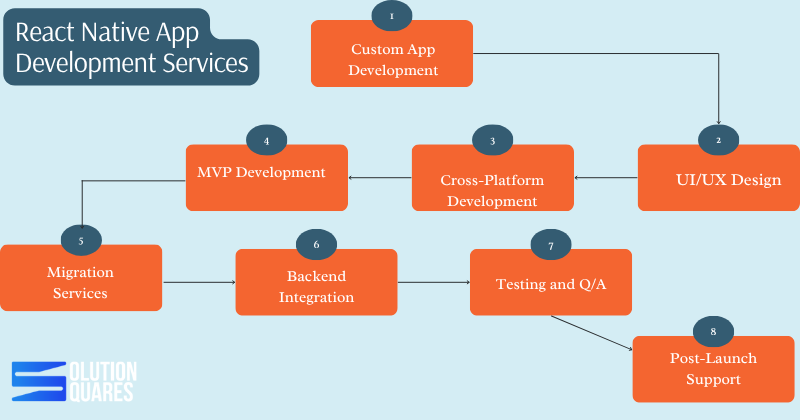
    • Comprehensive Service Offerings: Services range from custom app development, UI/UX design, cross-platform development, to post-launch support.

    React Native App Development Services signify professional services that capitalise on the React Native framework to craft superior mobile applications for both iOS and Android platforms. These services encompass a holistic approach, utilising a technology known for its cost-effectiveness, high performance, and scalability. Harnessing a single code base, React Native is becoming the go-to solution in the mobile app development sphere. 

    This blog aims to equip businesses with the necessary insights to evaluate React Native development offerings, understand their myriad benefits, and choose the right development partner with confidence.

    What Are React Native App Development Services?

    React Native, created by Facebook, is an innovative open-source framework that allows developers to engineer applications that operate seamlessly across iOS and Android from a singular JavaScript codebase.

    React Native has become a leading framework for building cross-platform mobile apps. To stand out and excel in providing React Native development services, companies and developers must focus on technical expertise, process optimisation, and client satisfaction. The offerings under React Native app development are broad and varied, tailored to meet diverse business needs:

    React Native App Development Services

    • Custom App Development: Specific solutions designed to meet unique business requirements. 
    • UI/UX Design: Development of engaging and intuitive user interfaces. 
    • Cross-Platform Development: Apps that deliver a consistent experience across iOS and Android.
    • MVP Development: Quick validation of business concepts through Minimum Viable Products.
    • Migration Services: Upgrading legacy systems to modern React Native solutions.
    • Backend Integration: Linking applications with essential APIs, payment systems, and cloud services.
    • Testing and QA: Comprehensive testing to ensure application reliability and performance.
    • Post-Launch Support: Ongoing maintenance and updates to enhance the app lifecycle.

    Selecting a competent development partner is vital to ensuring a project’s success, from seamless execution and cost efficiency to robust post-launch support.

    Steps to Excel in React Native Development Services


    1. Build a Strong Technical Foundation

    • Master React Native Core: Understand components, state management, navigation, and APIs.

    • Stay Updated: React Native is evolving—track updates, new libraries, and performance improvements.

    • Integrate Native Modules: Learn how to connect Swift/Objective-C (iOS) and Java/Kotlin (Android) for advanced features.

    • Leverage Third-Party Libraries: Utilise trusted libraries to accelerate development without compromising quality.

     2. Focus on Performance Optimisation

    • Use Hermes Engine: Improves performance on Android.

    • Optimise Rendering: Minimise unnecessary re-renders with memo and PureComponent.

    • Lazy Loading: Load resources only when needed.

    • Efficient Navigation: Implement React Navigation or Reanimated for a smooth user experience.

    3. Deliver Cross-Platform Consistency

    • Ensure apps look and perform well on both iOS and Android.

    • Test UI layouts on different screen sizes (phones & tablets).

    • Implement a responsive design for a uniform experience.

    4. Implement Robust Testing Practices

    • Unit Testing: Use Jest for testing components and logic.

    • End-to-End Testing: Utilise Detox or Appium for realistic device simulations.

    • Continuous Integration (CI/CD): Automate testing and deployment for faster delivery.

    5. Prioritise Security

    • Secure API calls with authentication (JWT, OAuth).

    • Store sensitive data using secure storage libraries.

    • Follow OWASP Mobile Security Guidelines.

    • Keep dependencies updated to avoid vulnerabilities.

    6. Provide Scalable Architecture

    • Use proper state management tools (Redux, Recoil, Zustand).

    • Maintain modular and reusable code.

    • Structure projects for easy scaling as apps grow.

    7. Focus on Client-Centric Approach

    • Understand client goals and target audience.

    • Provide transparent progress updates.

    • Offer post-launch support and updates.

    • Suggest improvements based on analytics and feedback.

     8. Build a Strong Portfolio & Case Studies

    • Showcase successful apps built with React Native.

    • Highlight performance improvements, cost savings, and user engagement results.

    • Include client testimonials to build trust.

    cross platform react native agency

    Benefits of React Native Development

    React Native development comes with numerous advantages:

    • Cost-Effectiveness: Develop iOS and Android apps on one platform, significantly cutting costs.
    • Faster Development & Market Deployment: “Hot Reloading” and other features expedite the development process, enhancing speed to market.
    • Enhanced Performance: Delivers a close-to-native user experience, ensuring robust app interfaces and smooth user interactions.
    • Community Support & Updates: An active community and ongoing updates from the open-source network foster continuous improvement and innovation.

    What is Custom React Native Development?

    Customisation is key in React Native development. It ensures that apps not only meet unique business requirements but also embody preferred aesthetics and functionality:

    • Tailored Solutions: Custom development can significantly enhance brand presence and user engagement.
    • Scalability: Ensures apps are future-proof and can evolve with your business.
    • Bespoke Designs: Specific features and modules tailored exclusively for your business needs.

    What are Enterprise React Native Development?

    Large-scale businesses benefit tremendously from Enterprise React Native Development. This service offers high scalability, robust security, and rich features suitable for enterprise needs:

    • Seamless Integration: Harmonises with existing corporate systems and databases to enhance business operations.
    • Security & Maintenance: Prioritises high security and easy maintainability, crucial for enterprise environments.

    Providing dedicated support and ensuring compliance with industry standards are crucial elements offered by seasoned providers.

    Cross-Platform React Native App Services

    Cross-Platform React Native App Services ensure that businesses can deploy applications that deliver uniform functionality and appearance across all device platforms:

    • Consistent UI/UX: Maintains a high-quality, consistent user experience across platforms.
    • Cost and Time Efficiency: Reduces the time and cost involved in developing and maintaining multiple codebases.
    • Simple Updates: Streamlines the update process, making it quicker and less complex.

    Prominent applications such as Facebook and Instagram are prime examples of successful cross-platform apps developed using React Native.

    Aspect Native Development React Native
    Codebase Count 2 1
    Development Time Longer Shorter
    Cost Higher Lower
    UI Consistency Variable High
    Maintenance Complex Simplified

    Hosting services For react native

    Hiring React Native Developers

    When looking to hire React Native developers, consider the following essential skills and models for collaboration:

    • Required Skills: Proficient in JavaScript, adept in native modules, and knowledgeable in modern UI/UX practices.
    • Hiring Models: Choose between in-house, outsourcing, or dedicated teams based on your project needs and budget.

    Evaluating portfolios and client feedback are crucial steps in selecting a team that aligns with your technical expectations and business ethos. 

    Why Choose Our React Native App Development Services

    Our React Native App Development Services stand out due to our commitment to technical excellence, award-winning design capabilities, fast delivery times, and extensive support post-launch. We ensure each project is handled with the utmost professionalism and tailored to meet individual client requirements and business objectives.

    react native cross platform app agency

    Conclusion

    React Native offers a compelling array of benefits, from cost savings and speed to scalability and community support. By partnering with experienced developers, businesses can leverage these advantages to achieve robust, efficient, and effective mobile app solutions.

    Considering React Native for your next mobile app project? Request a free consultation or quote today to explore how we can tailor our services to your needs. For more information, feel free to contact us or visit our service pages. Your journey towards an innovative, efficient mobile solution starts here!

    Frequently Asked Questions

    1. How much does it typically cost to develop a React Native application?

    The cost can vary significantly based on the app’s complexity, features, and the development team’s location. On average, development costs range from $30,000 to $100,000.

    2. How long does it take to develop a React Native app?

    Development timelines depend on the app’s complexity. A basic app might take 3-4 months, while more complex applications can take up to a year or more.

    3. What are the key advantages of using React Native over native development?

    React Native offers cost savings through a single codebase for both iOS and Android, faster development times with features like Hot Reloading, and a robust community for support and continuous improvement.

    4. Can React Native apps achieve performance comparable to native apps?

    Yes, React Native apps can achieve performance close to native apps, especially for applications that do not require intensive computational resources.

    5. What services are typically included in React Native App Development?

    Services often include custom app development, UI/UX design, cross-platform development, MVP development, backend integration, testing and QA, and post-launch support.

  • The Ultimate Prerequisites Guide Of React Native Application

    The Ultimate Prerequisites Guide Of React Native Application

    Key Takeaways

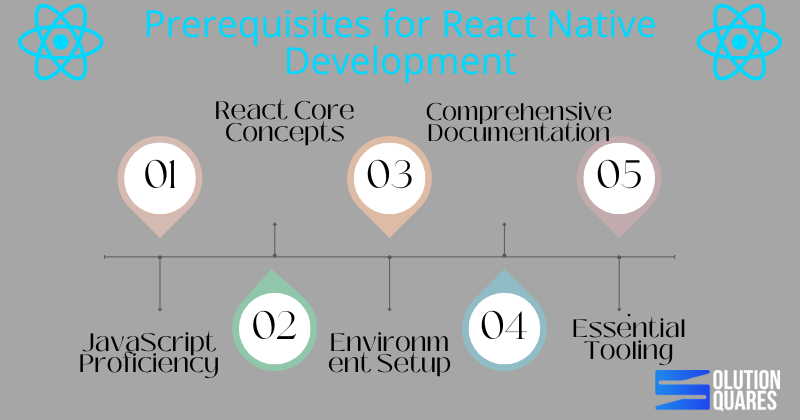
    • JavaScript Proficiency: Mastery of JavaScript is fundamental for developing high-performance React Native applications.
    • React Core Concepts: A solid understanding of React’s ecosystem, including components and state management, is essential.
    • Environment Setup: Proper setup of the development environment is crucial for seamless React Native application development.
    • Comprehensive Documentation: Utilising React Native’s official documentation can significantly enhance development efficiency and troubleshooting.
    • Essential Tooling: Familiarity with tools like Node.js, npm, and version control systems like Git is important for managing dependencies and collaborating effectively.

    Incorporating the Prerequisites for React Native Application Development

    In the world of app development, React Native has emerged as a game-changer. Empowering developers to craft stunning, high-performance applications for both Android and iOS platforms, React Native streamlines development like never before. However, before diving into this powerful framework, it’s crucial to establish a solid foundation. In this blog post, we’ll navigate through the essential prerequisites for React Native application development, including detailed environment setup, core knowledge areas, and essential tooling to ensure a successful development journey.

    Understanding the Prerequisites for React Native Development

    Prerequisit For React Native Development Guide

    Technical Foundations

    • JavaScript Proficiency: At the core of React Native development lies JavaScript. A robust understanding of JavaScript is indispensable as it forms the backbone of your development structure, impacting both performance and scalability. Learn JavaScript
    • React Core Concepts: Beyond general JavaScript knowledge, familiarity with React’s ecosystem — including components, props, state management, JSX syntax, and lifecycle events — is critical for efficient development.
    • Basic CSS Knowledge: Although not a strict requirement, basic CSS skills will greatly aid in the aesthetic aspects of app development, allowing for visually appealing designs. For detailed knowledge, refer Codefinity

    Hardware & Software Requirements

    • Operating Systems: Whether you’re on macOS, Windows, or Linux, setting up the right environment is the first technical step. React Native Environment Setup
    • Node.js: Modern React Native development requires the latest long-term support (LTS) version of Node.js to ensure compatibility and stability.
    • npm: As a package manager, npm plays a crucial role in managing libraries and dependencies. It typically comes bundled with Node.js installations.
    • Version Control: While optional, using Git for source control and GitHub for collaboration can significantly enhance team productivity and streamline versioning. Unlocking Success with Custom Software Development Services

    Exploring React Native Documentation

    To excel in React Native, understanding its extensive documentation is key. Positioned as the most trustworthy resource, the official React Native documentation should be your go-to reference point. It is tailored for all experience levels, offering everything from setup instructions to advanced usage scenarios. This central repository contains detailed guidelines on environment setup, beginner concepts, API usage, and paths for troubleshooting common setbacks. Unveiling the Software Development Life Cycle (SDLC): A Comprehensive Guide

    Effective Usage of Documentation

    Learning how to navigate the React Native documentation effectively will save you time and effort, especially when troubleshooting. Regularly updated, it ensures that you have access to the latest knowledge and guidelines pivotal for successful app development.

    Setting Up a React Native App

    Setting Up a React Native App

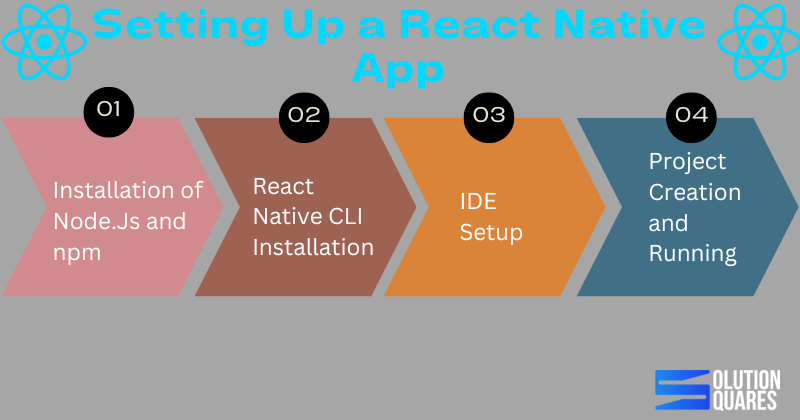
    Following the correct steps to set up your React Native app is fundamental. Here’s how you can get started:

    • Installation of Node.js and npm: Start by downloading the latest LTS version of Node.js, which includes npm. Check the installations by running node -v and npm -v in your terminal.
    • React Native CLI Installation: While npx allows you to run React Native commands without installing them globally. Installing the React Native CLI can be beneficial for frequent users.
    • IDE Setup: Depending on your target platform, install Android Studio or Xcode. These tools are essential for app emulation and testing.
    • Project Creation and Running: Initialise a new project using npx react-native init MyNewApp and run your app by targeting specific platforms like Android or iOS.

    Common issues such as JDK mismatches or Gradle errors can occur, and it’s vital to refer to the documentation for specific resolutions.

    Native Environment Setup

    Conclusion: Mastering the Basics Leads to Masterful Apps

    To sum up, mastering the prerequisites for React Native application development is not merely about ticking off a checklist. It’s about understanding each component’s role in the broader development context and effectively using available tools and documentation to enhance productivity and outcome quality. The Importance of Mobile App Development

    As you embark on or continue your journey in React Native development, leverage this knowledge to build robust, efficient, and scalable mobile applications. Welcome to the future of multi-platform development!

    Frequently Asked Questions

    Q1: Do I need a real device to test React Native apps?


    Not always. You can use iOS Simulator or Android Emulator. However, real devices are recommended for performance and hardware-specific testing.

    Q2: Can I develop iOS apps without a Mac?


    No. iOS apps require macOS and Xcode. But you can use cloud-based Mac services if you don’t own one.

    Q3: What’s the best device for React Native testing?


    For iOS: Latest iPhone or iPad with iOS 16+.
    For Android: Mid-to-high range devices (Samsung Galaxy, Google Pixel, OnePlus).

    Q4: Can I test one app on both iPhone and iPad?


    Yes. React Native supports universal apps. You just need to optimise layouts for larger screens.


  • Multi-Platform Apps Made Easy With React Native App Development Services

    Multi-Platform Apps Made Easy With React Native App Development Services

    Key Takeaways

    • React Native app development services enable efficient cross-platform mobile app development, reducing time and costs.
    • Leveraging a single codebase, developers can target multiple platforms, including iOS, Android, and more.
    • A robust community and extensive ecosystem support scalable and high-performance applications.
    • Integration with services like Firebase and AI enhances app functionality and user engagement.
    • Effective deployment and maintenance strategies ensure the long-term success and reliability of an app.

    Harnessing the Power of React Native App Development Services for Efficient Mobile App

    Introduction:

    React Native is an open-source framework created by Meta (formerly Facebook) that allows developers to build mobile applications for iOS and Android using a single codebase written primarily in JavaScript (and optionally TypeScript). It uses React, a popular JavaScript library for building user interfaces, but instead of targeting the browser, React Native targets mobile platforms.

    Unlike traditional hybrid frameworks that rely heavily on web views, React Native renders components using native UI building blocks. This means apps created with React Native look, feel, and perform much like apps built with Swift, Objective-C, Java, or Kotlin.

    Purpose and Significance

    With the growing demand for modern, feature-rich mobile applications, React Native app development has become a key player in the tech industry. Its cross-platform capabilities allow developers to write one codebase and deploy it across multiple platforms—iOS, Android, iPad, TV, Windows, macOS, Linux, desktop, and even Apple Watch. This versatility helps businesses maximise reach while minimising cost and development time.

    The main strength of React Native lies in delivering a seamless, native-like user experience, combined with faster development cycles and reduced expenses.

    Why It Matters?

    Whether you’re exploring the basics of React Native, comparing it with other frameworks, or considering hiring a development company, understanding this framework is essential. React Native is not just a tool for mobile app development—it’s a powerful solution for building high-performing, cross-platform applications that meet the needs of today’s digital-first world.

    What is React Native?


    The essence of React Native lies in its ability to allow developers to create a native like user experience. With this innovation, react native has revolutionised mobile app development by fostering the creation of multi-platform applications from a unified codebase. This significantly enhances application performance in terms of speed, efficiency and scalability compared to traditional development approaches.

    Is React Native Popular?

    • According to React Native.dev, with over 2 million downloads each week and support from a large community of hundreds of thousands of developers, React Native is a widely utilised technology. 
    • Cross-platform development is the foundation for 99% of React Native’s work, according to Git Hub
    • React Native received 14.51 per cent of the vote in the Stack Overflow Developers Survey 2021, placing it fifth.
    • According to a survey regarding the state of JS, 16% of respondents indicated that they had used React Native, while less than 5% of respondents indicated that they had used NativeScript.
    • Currently, the number of React Native contributors on StackOverflow is 10 times more than the number of NativeScript contributors.
    • In April 2019, NativeScript had 145 GitHub contributors and 5,699 commits compared to React Native’s 1990 contributors and 17,625 commits.
    • For cross-platform development, around 35% of software developers worldwide use React Native, Statista reports.
    • According to a survey by StackOverflow in 2019, Flutter has a popularity of 75.4% while React Native has a popularity of 62.5%. This survey sought to determine the most loved framework by developers.

    Key Comparisons in Mobile Development:

    React Native differs from other mobile development approaches in several ways. Compared to native development (Swift/Java/Kotlin), it saves time with a single codebase while still offering near-native performance, though native apps remain the fastest.

    Against Flutter, React Native uses JavaScript and native components, while Flutter uses Dart and custom widgets—Flutter can be slightly faster, but React Native has a larger ecosystem.

    Unlike Ionic, which relies on web views, React Native delivers smoother performance by using real native components. Compared to Xamarin, which uses C# and is popular in enterprise apps, React Native is fully open-source with stronger community support.

    Overall, React Native balances performance, cost, and speed, making it one of the most popular cross-platform frameworks today.

    Benefits of React Native App Development Services

    React Native isn’t just about writing once and running anywhere; it’s about doing so efficiently, cost-effectively, and with a performance that rivals native applications. Further, React Native combines speed, cost savings, scalability, and a near-native experience, making it a top choice for modern mobile app development. Here are the top reasons why businesses are turning to React Native development:

    1. Cross-Platform Development – A single codebase works for both iOS and Android, saving time and effort.

    2. Cost-Effective – Reduces development costs by eliminating the need for separate native apps.

    3. Near-Native Performance – Uses native UI components for smooth, responsive, and high-performing apps.

    4. Faster Development – Features like Hot Reloading and Fast Refresh allow quick updates and real-time testing.

    5. Code Reusability – Developers can reuse a large portion of code across different platforms.

    6. Strong Community Support – Backed by Meta and a huge developer community with abundant libraries, tools, and resources.

    7. Pre-Built Components and Third-Party Plugins – Ready-to-use solutions speed up development and add functionality.

    8. Scalability and Flexibility – Can easily integrate with native modules when higher performance or advanced features are needed.

    9. Rich User Interface – Delivers a seamless UI that feels like a native app, enhancing user experience.

    10. Easy Maintenance and Updates – Simplifies bug fixes and feature updates since changes apply across platforms simultaneously.

    11. Enterprise-Ready – Suitable for startups as well as large businesses aiming for rapid development and wide reach.

    12. Future-Ready – Expanding support beyond mobile (e.g., Windows, macOS, Web, and even wearables).

    Empower your business with React Native app development services that combine efficiency, scalability, and cost-effectiveness. From startups to enterprises, React Native enables faster time-to-market and wider reach with a single, powerful codebase. 


    React native platform partner

    Prerequisites  for React Native Developers

    Before diving into React Native development, there are several prerequisites and tools every developer should be aware of:

    • Knowledge of JavaScript, ES6+, and React basics (components, props, state, hooks).
    • Development Tools: Essential tools include Node.js, npm/yarn for package management, and Watchman (macOS) for file monitoring. A coding environment like VS Code. Developers targeting Android and iOS will respectively require Android Studio (with SDK & emulator) and Xcode(on macOS). Git for version control and Expo CLI (optional) can also be useful for easier app testing and deployment.
    • Languages: A strong grasp of JavaScript, ES6+, and key React concepts is fundamental for efficient React Native development.
    • Device Requirements: Testing requires access to actual devices or dependable emulators/simulators to mimic both iOS and Android environments.

    Documentation For React Native

    React Native documentation generally involves three steps:

    1. Installation
      To begin, install the React Native CLI by running:
    2. Creating a New Project
      Set up a fresh project

    3. Running the Application

      • iOS: Connect your device or launch the iOS simulator,

      • Android: Connect your Android device or open an emulator.

    Building the User Interface

    • Core Components: React Native provides essential building blocks like View, Text, Image, ScrollView, FlatList, and many more.

    • Styling: Components can be styled using JavaScript objects or stylesheets. The styling system is flexible and similar to CSS, making it easy to adapt for web developers.

    • Layout: With Flexbox, you can create responsive and dynamic layouts without much effort.

    • State Management: Manage data changes with React’s built-in tools, like useState or useReducer. For larger apps, you can integrate external libraries such as Redux or MobX.

    Working with Data

    • Fetching: Use the built-in fetch APIs or third-party libraries, such as axios, to pull data from servers.

    • Handling: Process and transform data using JavaScript functions before rendering.

    • Displaying: Present data by embedding it directly in components or looping through arrays with functions like .map().

    Testing Your App

    • Unit Testing: Check the logic and behaviour of individual components.

    • Integration Testing: Verify how different parts of your app interact with each other.

    • End-to-End Testing: Simulate real user flows to ensure the entire app works as expected.

    Indeed, comprehensive React Native documentation serves as the bible for developers, guiding them through setup, API usage, and troubleshooting.

    Best Practices

    • Adhere to Coding Standards: Consistent styles and patterns enhance readability and facilitate collaboration.

    • Optimise Performance: Use strategies like lazy loading, efficient data fetching, and image optimisation to make apps faster.

    • Modular Code: Break the app into smaller, reusable components to keep it organised and test-friendly.

    • Keep Dependencies Updated: Regular updates give you access to new features, bug fixes, and security patches.

    • Engage with the Community: Learn, share, and find solutions through the thriving React Native community and its vast resources.

    Setting Up a React Native Project

    React Native offers two popular paths for setting up and managing projects:

    1. React Native CLI: This option is perfect for developers needing full control over native capabilities and who are managing complex projects requiring custom native code.
    2. Expo: Ideal for beginners or when prototyping, Expo simplifies the setup and allows developers to see changes in real-time without dealing with native code.
    3. Run App: For app running, run the following command depending upon your platform,
    • iOS: npx react-native run-ios
    • Android: npx react-native run-android

    Managing a React Native

    Keep your project organised by using reusable components, proper folder structure, and version control (Git). Manage state with tools like useState, useReducer, or libraries such as Redux. Regularly update dependencies, test your app, and follow best practices to ensure smooth performance and easy maintenance.

    Building a React Native Project

    Use core components (View, Text, Image, etc.) and Flexbox for layouts. Apply styles with JavaScript objects or StyleSheet. Manage data and UI state using hooks (useState, useEffect) or libraries like Redux.

    Debugging a React Native App

    Use React Native Debugger, Chrome DevTools, or Flipper to inspect UI, network requests, and logs for debugging. Enable hot reload/fast refresh for quicker testing. Add error boundaries and use console logs for quick checks.

    Multi-Platform Reach: Extending Your App Across Devices

    The true strength of React Native lies in its extensive multi-platform support. From core platforms like iOS and Android to more niche devices such as Apple TV, Android TV, and even desktop environments (Windows, macOS, Linux), React Native allows Businesses to reach users across all touchpoints with a single investment in development. This broad device compatibility underscores the framework’s versatility and potential to cater to a wide audience.

    Deployment and Integration: Taking Your App Live

    Deployment involves building release versions using Xcode (iOS) or Android Studio/Gradle (Android). Publish apps to the App Store and Google Play Store following their guidelines. Integration is the process of connecting with APIs, third-party libraries, and native modules for added functionality. Use tools like Firebase for authentication, analytics, and push notifications.

    Hosting Options and Procedures

    While mobile apps are primarily distributed through app stores, understanding the hosting process and deploying React Native apps is crucial. The typical route involves deploying through the Apple App Store for iOS and the Google Play Store for Android. This involves ensuring the app meets store guidelines, signing the app, and managing through respective consoles with appropriate metadata and assets.

    Enhancements Through Integrations

    Integrating advanced features such as React Native with Firebase for backend services or React Native with AI for adding smart features scales the app’s functionalities and enriches user engagement. Managing and maintaining the React Native source code effectively, especially through platforms like GitHub, supports continuous improvement and collaboration.

    When developing a React Native app, one common mistake is overusing third-party libraries, which can lead to bloated code and long-term maintenance issues. The solution is to use only trusted, actively maintained libraries that have strong community support. Another frequent error is ignoring platform differences—features that work well on Android might behave differently on iOS, and vice versa. To prevent this, it’s essential to test extensively on both platforms throughout the development process.

    Finally, poor performance optimisation can hurt the user experience. To avoid this, developers should leverage FlatList for large lists, use memoisation to prevent unnecessary re-renders, and integrate native modules where performance-critical operations are required.

    The future of React Native looks promising, with deeper integration of the Fabric architecture set to deliver significantly better performance and smoother UI rendering. This will be complemented by enhanced support for the Hermes JavaScript engine, ensuring faster startup times and improved memory usage.

    Additionally, React Native is expected to see growing adoption in desktop and wearable devices, expanding its reach beyond mobile and solidifying its position as a truly cross-platform development framework.

    From Planning to Launch:

    Every React Native project requires thorough planning, meticulous execution, and ongoing enhancements. From deciding on the app name, exploring React Native app examples for inspiration, to understanding the cost of React Native development and choosing whether to hire React Native developers in-house or outsource, each decision impacts the project’s direction and success.


    launch React Native App with us


    React Native transcends traditional app development by providing a versatile, scalable solution that accommodates a multitude of development scenarios – from startups to large enterprises.

    By tapping into its extensive ecosystem, developers can deliver high-quality, cost-effective apps that satisfy various user intents, from learning about the technology to engaging professional development services.

    React Native not only aligns with technical and budgetary requirements but also fosters a community-driven approach to mobile development, ensuring resources and support are always within reach for enhancing app quality and performance.

    As mobile technology advances, React Native continues to be a reliable, innovative solution for building superior mobile experiences. Join the wave of efficient, effective mobile app development by choosing React Native for your next project, and leverage a framework that grows with your business needs.

    Database For React Native

    A database for React Native is used to store, manage, and retrieve data in a mobile application built with React Native. Since React Native is just the framework for building the React Native app’s UI and logic, it doesn’t include built-in storage for large or complex data. A database acts as the backend storage layer so your app can:

    • Save user data (e.g., profiles, settings, preferences).

    • Store app content (e.g., posts, products, messages).

    • Work offline and sync data when online.

    • Handle large datasets efficiently.

    Choosing the right database depends on your project size, offline requirements, and scalability needs. React Native supports different databases depending on your app’s needs:

    • SQLite – Lightweight database for local storage and offline apps.

    • Realm – Fast, real-time database with easy data synchronisation.

    • Firebase – Cloud-based, real-time database with built-in authentication and analytics.

    • WatermelonDB – Optimised for large datasets and offline-first apps.

    • AsyncStorage – Simple key-value storage for small amounts of data.

    Common Mistakes

    • Overusing Third-Party Libraries – Relying too much on external packages can cause compatibility and maintenance issues.

    • Ignoring Platform Differences – iOS and Android behave differently; not testing both can lead to bugs.

    • Poor Performance Optimisation – Heavy images, unnecessary re-renders, or unoptimized lists can slow the app.

    • Neglecting State Management – Improper handling of state can make apps buggy and hard to scale.

    • Skipping Proper Testing – Lack of unit, integration, or end-to-end tests often leads to unstable apps.

    • Not Updating Dependencies – Outdated React Native or libraries may break features or cause security risks.

    • Weak Project Structure – Poor organisation makes code harder to maintain and debug.

    Optimisation Of React Native

    1. Use FlatList instead of ScrollView for large lists to avoid performance issues.

    2. Optimise images by compressing and using appropriate formats.

    3. Reduce Re-renders with React.memo, useCallback, and useMemo.

    4. Lazy Load Components so only the required screens load initially.

    5. Minimise Bridge Usage between JavaScript and Native to cut overhead.

    6. Use Hermes Engine for faster app startup and better memory usage.

    7. Enable ProGuard (Android) and Bitcode (iOS) to shrink and optimise code.

    8. Efficient State Management using Context API, Redux, or Recoil.

    9. Monitor Performance with tools like Flipper or React Native Performance Monitor.

    10. Clean and Modular Code to keep the app lightweight and maintainable.

    Frequently Asked Questions

    1. How does Native differ from React.js?

    While both are developed by Meta and use the same foundational principles of React, they serve different purposes:

    • React.js is a JavaScript library for building user interfaces for web applications. It renders components to the Document Object Model (DOM) of a web browser.
    • React Native is a framework for building native mobile apps. It compiles JavaScript code into native UI components, which gives the application a native look, feel, and performance

    2. Is React Native suitable for every app?

    React Native is an excellent choice for a wide range of applications, including e-commerce platforms, social media apps, and business tools. It’s particularly well-suited for startups and projects with a limited budget that need to get an MVP (Minimum Viable Product) to market quickly. For apps that require intricate, platform-specific UI/UX elements or need to push the boundaries of performance (e.g., high-end games), native development might be a better fit.

    3. Who uses React Native?

    Many popular apps use React Native, including Facebook, Instagram, Skype, and Walmart. The framework is used by a variety of companies, from small startups to large enterprises.

    4. What is Expo?

    Expo is a framework and set of tools built on top of React Native. It simplifies the development process by providing pre-built libraries and services that handle many common tasks, such as accessing native APIs and managing assets. While you can build a React Native app without Expo, it’s often recommended for beginners and for projects that don’t have complex native dependencies.

  • How to Choose a Software Development Company: A Comprehensive Guide

    How to Choose a Software Development Company: A Comprehensive Guide

    Key Takeaways

    • Define your project scope and objectives: Clearly outline your project’s goals, desired features, and target audience.
    • In-house vs. Outsourcing: Weigh the pros and cons of in-house development versus outsourcing to decide which aligns best with your resources and needs.
    • Evaluate key factors: Consider expertise, portfolio, client testimonials, communication, and scalability when choosing a software development company.
    • Ask essential questions: Inquire about development processes, past work, project management, and pricing models to assess potential partners.
    • Understand costs: Be aware of different pricing models and budget accordingly for custom software development.
    • Tips for successful outsourcing: Establish clear communication and documentation to ensure project success when outsourcing.

    Introduction

    Wondering how to choose a software development company that aligns with your business goals? Selecting the right software development partner is a fundamental challenge many businesses encounter. It’s crucial to make an informed decision, as the outcome will significantly impact the success of your project.
    This post explores essential strategies to guide you through the selection process. We’ll discuss understanding your project requirements, weighing the pros and cons of in-house vs. outsourcing, key factors to consider, essential questions to ask potential agencies, understanding costs, and tips for successful outsourcing. Included are practical tips and direct advice to help you make the best choice for your software development needs.

    Understanding Your Project Requirements

    Define Project Scope and Objectives

    Defining the scope and objectives of your software project is vital. Start by listing desired features and functionalities. Identify your target audience and what you aim to achieve with the project. Establishing clear goals not only provides direction but also aids in selecting a development company with the right expertise.

    Aligning Company Expertise with Your Needs

    It’s essential to choose a software development company whose expertise aligns with your project needs. Whether you require a mobile app, a comprehensive enterprise solution, or custom software, finding a company that specializes in these areas, and preferably one with industry-specific experience, is crucial.


    In-House Development vs. Outsourcing Software Development

    Understanding In-House Development

    In-house development means utilizing your existing team to create software. It allows total control over the development process and ensures that your team is fully aligned with the company’s culture and goals.
    Pros of In-House Development:

    • Direct control and oversight
    • Enhanced team collaboration
    • Consistency with company culture

    Cons of In-House Development:

    • Potentially higher costs due to salaries and infrastructural needs
    • Limitations in specialized skill sets
    • Recruitment and scaling challenges

    Understanding Outsourcing Software Development

    Outsourcing involves hiring an external company to manage your software development needs. This option often provides access to a global talent pool and can be more cost-effective.
    Pros of Outsourcing:

    • Access to specialized skills
    • Cost-effectiveness
    • Scalability of resources

    Cons of Outsourcing:

    • Potential for communication hurdles due to language and time differences
    • Reduced control over the development process
    • Security and confidentiality risks

    Factors to Consider:
    When deciding between in-house and outsourcing, consider the complexity and scope of the project, budget limitations, and how quickly the solution needs to be delivered. Security is also a crucial factor if the information is sensitive.
    For more insights on choosing between in-house and outsourcing, visit Cleveroad’s Article.

    Key Factors in Choosing a Software Development Company

    Expertise and Technical Skills

    Evaluate the technical skills and expertise of the software development company. They should have a solid track record in the technologies needed for your project and substantial experience in your industry.

    Portfolio and Case Studies

    Review their previous projects to gauge their capability and experience with similar platforms. This insight is invaluable in assessing their suitability for your project. Create Mobile App Without Coding

    Client Testimonials and Reviews

    Feedback from past clients on platforms like Clutch can offer genuine insights into the company’s reliability and quality of service.

    Communication and Collaboration

    Effective communication is crucial. Ensure that the company uses robust communication tools and practices clear, transparent dialogues.

    Scalability and Flexibility

    The company should be able to scale operations in response to your project’s needs. Future growth and changes should be accommodated seamlessly.
    For detailed insights on selecting a software development company, check out Cleveroad’s Comprehensive Guide.

    Questions to Ask a Software Development Agency

    When interviewing potential software development partners, consider asking the following essential questions:

    1. What is your development process? Understand their preferred methodologies and ensure they align with your project requirements. Software Development Life Cycle Guide
    2. Can you provide references or case studies? Examples of past work are critical in assessing capability and fit.
    3. How do you handle project management and updates? Regular updates and transparent management practices are essential for smooth workflow.
    4. What are your pricing models and payment terms? Clear understanding of costs helps avoid unforeseen expenditures.

    Also, inquire about security measures, intellectual property rights, and post-launch support.

    Cost of Custom Software Development

    The cost of developing custom software can vary widely depending on several factors such as project complexity, the expertise of the team, and timeline pressures.
    Pricing Models to Consider:

    • Fixed Price Model: Suitable for projects with well-defined requirements.
    • Hourly Rate Model: Offers flexibility for projects where scope may evolve.

    Budgeting Tips:
    Set aside a contingency budget to handle unforeseen challenges. Prioritizing features can also help manage costs effectively.
    For a detailed breakdown of costs, refer to Saigon Technology’s article. Decoding the Cost of Developing a Mobile App

    Best Custom Software Development Companies

    When searching for the top software development companies, look for industry recognition, high client satisfaction ratings, and a demonstrated ability to innovate. Platforms like Clutch and GoodFirms are excellent resources for research.
    For guidance on selecting top-rated companies, visit VentionTeams’ blog.

    Outsourcing Software Development: Tips for Success

    Successful outsourcing is predicated on clear communication, realistic goals, and effective progress tracking. Establish structured communication channels and regular update mechanisms. Also, ensure comprehensive documentation and security protocols are in place to protect intellectual property and data.

    Conclusion

    Choosing the right software development company is crucial. This guide aimed to outline the critical steps involved—from understanding your project’s needs, evaluating in-house vs. outsourcing options, to key factors in choosing a partner and the important questions to ask.
    We encourage you to apply these strategies to ensure you select a partner that will meet your project needs and elevate your business. For further steps, consider reaching out for consultations or exploring more detailed resources.


    Additional Resources

    Further reading on related topics is available here:

    Download our comprehensive checklist for choosing a software development company to guide you through the process step-by-step.

    Frequantly Asked Questions

    1. What factors should I consider when Choosing a software development Company

    Consider factors such as their expertise and technical skills, portfolio and case studies, client testimonials, communication practices, and ability to scale and be flexible.

    2. How do I decide between in-house development and outsourcing

    Accordion Content

    3. What questions should I ask a potential Software development Partner?

    Accordion Content

    4. How much does custom Software development cost?

    Lorem ipsum dolor sit amet, consectetur adipiscing elit. Ut elit tellus, luctus nec ullamcorper mattis, pulvinar dapibus leo.

    5. How can I ensure successful outsourcing of software development?

    Lorem ipsum dolor sit amet, consectetur adipiscing elit. Ut elit tellus, luctus nec ullamcorper mattis, pulvinar dapibus leo.

  • What Are The Best Practices For Mobile App Security?

    What Are The Best Practices For Mobile App Security?

    Key Takeaways

    • Mobile app security is critical due to the surge in mobile malware attacks.
    • Common vulnerabilities include insecure data storage and weak server-side controls.
    • Implementing strong authentication mechanisms like MFA enhances security.
    • Regular updates and patches are essential to address new vulnerabilities.
    • Encryption plays a vital role in protecting user data.
    • API security must be stringent to prevent unauthorized access.
    • Performance optimization, such as reducing load time and effective caching, improves user experience.
    Mobile App Security Best Practices: Safeguarding User Data and Optimizing Performance

    In today’s interconnected world, the surge in mobile app usage has brought security and performance to the forefront of digital development priorities. With over 3.8 billion smartphone users globally, the necessity for robust mobile app security measures has never been more critical as evidenced by the 54% increase in mobile malware attacks in 2022 alone, according to the Symantec Threat Report. This blog post is designed to arm developers with key insights and strategies for implementing mobile app security best practices that not only protect user data but also optimize app performance, ensuring a smooth and secure user experience. For a deeper understanding of why mobile app development is essential, refer to our previous post on The Importance of Mobile App Development.

    Understanding Mobile App Security

    Mobile app security is the shield that protects applications from external threats like malware, hacking, and data breaches. The consequences of security lapses can be severe—leading to loss of sensitive data, financial loss, and significant damage to a company’s reputation. Here are some common mobile app security vulnerabilities:

    • Insecure Data Storage: A staggering 76% of apps do not adequately secure data stored on devices, creating prime targets for attackers (OWASP Mobile Top 10). Ensuring secure data storage is one of the essential features of a successful mobile app.
    • Weak Server-Side Controls: Often overlooked, this allows attackers to exploit inadequate security measures on the server side.
    • Insufficient Transport Layer Protection: Without proper encryption, data transferred can be intercepted; 25% of apps fail in this area (NowSecure Mobile App Security Statistics).
    • Client-Side Injection: These vulnerabilities allow attackers to manipulate the app’s client-side scripts.
    • Poor Authorization and Authentication: Weak authentication processes make unauthorized access easier.

    Developers need to prioritize these vulnerabilities to safeguard user data effectively.

    Mobile App Security Best PracticesImplementing Strong Authentication and Authorization Mechanisms

    Robust authentication and authorization are your first line of defense:

    • Multi-Factor Authentication (MFA): This method blocks over 99.9% of account compromise attacks (Microsoft Security Blog).
    • OAuth 2.0/OpenID Connect: Utilizing these frameworks can help secure authorization and authentication processes.
    • Strong Password Policies: Enforcing complex passwords and regular updates bolster security measures.

    Regularly Updating and Patching Apps

    Keeping your app updated is a crucial security strategy:

    • Consistent Update Schedule: Address vulnerabilities as they are discovered.
    • Automated Patching Systems: Tools that automate the patching process can help maintain security integrity.
    • Up to 60% of data breaches are linked to a lag in applying available patches (Verizon Data Breach Investigations Report). Understanding the cost factors in app development can help allocate resources effectively for regular updates.

    How to Prevent Data Breaches in Mobile Apps

    Ensuring data breach prevention involves several best practices:

    • Data Encryption: Both at rest and in transit, using protocols like AES-256 for stored data and SSL/TLS for data in transit can drastically reduce breach possibilities. Encrypting data can lower breach risk by 50% (Ponemon Institute Security Study). For applications in sensitive sectors like healthcare, refer to our Comprehensive Guide for Health App Development.
    • Secure Key Management: Encryption keys should be securely managed and stored, avoiding common pitfalls in key management.

    Importance of Encryption in Mobile Apps

    With 80% of organizations viewing encryption as critical, it’s a non-negotiable aspect of mobile app security (Global Encryption Trends Study).

    • Symmetric vs. Asymmetric Encryption: Knowing when to use each can protect data more effectively.

    API Security in Mobile Applications

    Security for APIs must be stringent to prevent unauthorized access:

    • API Keys and Tokens: These should be used to control access effectively.
    • Rate Limiting and Input Validation: Helps prevent abusive behaviors and injection attacks.
    • API Encryption: Ensuring all API communications use HTTPS can prevent eavesdropping.
    • API vulnerabilities comprised 21% of incidents in 2022, highlighting the need for robust API security practices (Gartner API Security Report). For apps handling financial data, see our insights on Fintech App Development Costs.

    Performance Optimization for Mobile Apps

    Balancing security with performance ensures not only safety but also a seamless user experience:

    Reducing Mobile App Load Time

    Mobile App Caching Strategies

    Effective caching can enhance performance by up to 60%:

    For more on optimizing mobile app performance, explore our Web Development Services to ensure your app is both secure and high-performing.

    Frequantly Asked Questions

    A: Mobile app security is crucial because it protects user data from threats like malware, hacking, and data breaches, which can lead to financial loss and damage to a company’s reputation.

    A: Common vulnerabilities include insecure data storage, weak server-side controls, insufficient transport layer protection, client-side injection, and poor authorization and authentication.

    A: Multi-factor authentication adds an extra layer of security by requiring additional verification methods, blocking over 99.9% of account compromise attacks.

    A: Encryption protects data both at rest and in transit, reducing the risk of data breaches by making sensitive information unreadable to unauthorized users.

    A: APIs are a gateway to backend data and services; securing them prevents unauthorized access and potential data breaches.

    A: Performance optimization techniques like reducing load time and implementing caching strategies enhance app speed and responsiveness, leading to better user retention and satisfaction.

    A: Failing to update and patch apps can leave vulnerabilities unaddressed, increasing the risk of data breaches and security incidents.

    A: Enforcing complex passwords and regular updates helps prevent unauthorized access by making it harder for attackers to guess or crack passwords.

    A: Caching strategies involve storing data locally to reduce server load and improve app load times, enhancing overall performance

    A: You can explore more on our website, including services and detailed guides on development and security practices.

  • How to Monetize a Mobile App?

    How to Monetize a Mobile App?

    Key Takeaways:

    • Understanding diverse monetization strategies is crucial for app success.
    • Effective marketing boosts visibility and profitability.
    • User retention strategies are essential for long-term sustainability.

    How to Monetize a Mobile App: Strategies for Success

    In today’s saturated mobile app market, differentiation and strategic monetization are more crucial than ever. With millions of apps vying for attention, understanding how to monetize a mobile app effectively is the key to not just surviving but thriving long-term. Learn more about essential features of successful mobile apps.

    Monetization, when paired with the best app marketing strategies, significantly boosts an app’s visibility and profitability. Without a well-thought-out approach to both, even the most innovative apps can fall short of their potential. In this comprehensive guide, we will explore diverse monetization strategies such as in-app advertising, in-app purchases, subscription models, and freemium models, alongside top-notch marketing techniques including ASO best practices and methods to retain users to enhance overall app success.

    Effective Strategies to Monetize a Mobile App

    In-App Advertising

    In-app advertising is a primary strategy for app monetization, involving ads displayed within the app, which generate revenue per user interaction. Understanding different types of in-app ads is crucial:

    • Banner ads: Less intrusive, appearing in small sizes typically at the top or bottom of the screen.
    • Interstitial ads: Full-page ads shown at natural pauses in app usage, such as between game levels.
    • Rewarded video ads: Optional ads offering users in-app incentives for watching.

    Best practices include:

    • Strategic Placement: Insert ads where they naturally fit within the app’s layout, enhancing rather than disrupting the user experience. Discover effective web design strategies.
    • Frequency Capping: Limit ads shown to avoid overwhelming users, thereby reducing the risk of ad fatigue.
    • Ad Relevance: Target ads based on user preferences to increase engagement and click rates.

    In-App Purchases

    This monetization strategy involves selling virtual goods or additional features within the app. Key strategies include:

    • Clear Value Proposition: Describe the benefits clearly, helping users understand what they gain from the purchase.
    • Limited-Time Offers: Introduce urgency by providing discounts for a specific duration.
    • Virtual Currency System: Facilitate purchases within the app through a bespoke currency system.

    Successful tips:

    Subscription Models

    Subscriptions can provide a steady revenue stream by offering additional content or features for a recurring fee.

    • Multiple Tiers: Provide options ranging from basic to premium, catering to various user needs.
    • Free Trial Periods: Allow users temporary free access to premium features.
    • Exclusive Content: Offer unique content available only to subscribers.

    Best practices:

    • Ease of cancellation builds trust and reduces subscriber churn.
    • Regularly refresh content and features to keep the subscription valuable.

    Freemium Models

    Freemium apps are free to download but require payment for premium features.

    • Essential Functionality: Ensure the free version is useful to attract a wider user base.
    • Premium Enhancements: Charge for advanced features which provide significant added value.
    • In-App Promotions: Strategically promote premium features within the app.

    Best App Marketing Strategies

    Content Marketing

    Develop and disseminate relevant content to draw and engage a target audience.

    • Blogging: Initiate a blog to share useful information and position your app as an industry leader.
    • Video Content: Create engaging video content that demonstrates the app’s value.
    • User-Generated Content: Encourage content creation by users to build community trust.

    Social Media Marketing

    Effectively use social media platforms to promote the app.

    • Platform Selection: Focus on platforms frequented by the target audience.
    • Consistent Engagement: Maintain regular activity and interact with users directly on social platforms.
    • Visual Content: Employ striking visuals to grab user attention.

    Influencer Partnerships

    Partner with influencers to extend your app’s reach.

    • Identify Relevant Influencers: Engage with influencers whose audience matches your target demographic.
    • Create Mutual Value: Provide value to influencers through giveaways, exclusive access, or sponsorships.

    Paid Advertising

    • Google Ads and Facebook Ads: These platforms allow for highly targeted advertising based on user demographics and behavior.
    • A/B Testing: Constantly test and adapt ads to enhance their effectiveness.
    • Conversion Tracking: Monitor actions taken by users after viewing ads to measure impact.

    ASO (App Store Optimization) Best Practices

    Refine your app’s storefront to improve visibility in app store searches.

    • Keyword Optimization: Use tools like App Annie to discover high-impact keywords.
    • App Title and Description: Include keywords strategically in your app’s title and description to boost SEO.
    • Visual Assets: Design an appealing app icon and include screenshots that highlight key app features.

    Strategies for Retaining Users in a Mobile App

    Successfully retaining users requires engaging them effectively.

    • User Onboarding: Implement an intuitive onboarding process to guide new users.
    • Engagement Hooks: Utilize push notifications judiciously to keep users interested.
    • Regular Updates: Continually update the app to fix bugs and introduce new features, keeping the user experience fresh. Understand the importance of mobile app development.

    Mobile App Analytics and KPIs

    Measure and understand key performance indicators to inform strategy adjustments.

    • Usage Patterns and Demographic Insights: Use tools like Google Analytics for detailed user insights.
    • Key Metrics: Track DAU/MAU, LTV, and CAC to gauge app performance and user engagement.
    • Targeted Improvements: Utilize data-driven insights to refine monetization and marketing strategies.

    Conclusion

    Effectively monetizing and marketing your mobile app requires a comprehensive strategy that encompasses attention to user acquisition, monetization methods, and retention tactics. By implementing the strategies detailed above, app developers can significantly enhance their app’s market performance and sustainability.

    Take action today by adapting these insights for your mobile app, and stay continuously informed on market trends to keep your strategies effective and relevant. For developers looking to dive deeper into these topics, engaging with industry forums and subscribing to relevant content can provide ongoing benefits. Share your thoughts or questions below, and join our community to keep the conversation going!

    Let’s connect and discuss more innovative app strategies

    Frequantly Asked Questions

    A: The most effective strategy varies depending on the app type and target audience. Common strategies include in-app advertising, in-app purchases, subscriptions, and freemium models. It’s crucial to understand your users and tailor the strategy accordingly.

    A: Improving user retention involves providing continuous value through regular updates, engaging content, and personalized experiences. Implementing engagement hooks like push notifications and ensuring a smooth onboarding process are also effective.

    A: ASO is essential because it enhances your app’s visibility in app store searches, leading to increased downloads. It involves optimizing your app’s title, description, keywords, and visual assets to rank higher in search results.

    A: KPIs are metrics used to evaluate the performance of your app. Important KPIs include Daily Active Users (DAU), Monthly Active Users (MAU), Lifetime Value (LTV), and Customer Acquisition Cost (CAC). Monitoring these helps in making data-driven decisions.

  • Decoding the Cost of Developing a Mobile App

    Decoding the Cost of Developing a Mobile App

    In the midst of a digital revolution, mobile apps have emerged as indispensable tools for businesses across all industries. As we witness a surge in daily reliance on smartphones and apps, it’s clear that understanding the cost of developing a mobile app is paramount for businesses and startups that want to thrive in today’s marketplace. This comprehensive guide will demystify the costs associated with mobile app development, shedding light on what businesses can expect in terms of investment and the benefits they can reap from making such a commitment.

    Key Takeaways

    • Mobile apps are essential for businesses to enhance customer engagement, accessibility, and brand visibility.
    • The cost of developing a mobile app varies depending on design complexity, feature set, development platform, and other factors.
    • Businesses should consider cost-saving strategies like prioritizing features for an MVP, utilizing cross-platform development, and outsourcing to cost-effective regions.
    • Choosing between native and hybrid app development impacts both cost and functionality.
    • Understanding the timeline for app development helps in planning and budgeting effectively.

    Why Businesses Need a Mobile App

    In the competitive landscape of digital business operations, mobile apps serve as crucial platforms for enhancing customer interaction and brand visibility. Here’s why every business should consider developing a mobile application:

    Enhanced Customer Engagement Through Personalized Experiences

    • Mobile apps enable businesses to tailor individual customer experiences by sending personalized updates, promotions, and recommendations directly to user devices.
    • The use of push notifications can foster real-time interaction and engagement.

    By leveraging enhanced customer engagement through personalized experiences, businesses can significantly improve customer satisfaction and loyalty.

    Improved Accessibility

    • Apps provide users with around-the-clock access to products and services with just a single tap, offering unmatched convenience.

    This improved accessibility ensures that customers can interact with your business anytime, anywhere.

    Increased Brand Visibility and Recognition

    • Having a mobile app ensures that your brand remains visible on consumer devices at all times, reinforcing brand recognition through frequent interaction.

    A mobile app can significantly enhance your brand visibility and recognition in the market.

    Valuable Data Collection for Better Decision-Making

    • Mobile apps are excellent tools for gathering valuable user data, which can be analyzed to adapt and refine business strategies for better outcomes.

    Utilizing valuable data collection helps businesses make informed decisions.

    Competitive Advantage in a Mobile-First World

    • In today’s mobile-first environment, having an app can significantly distinguish your business from competitors.

    Gaining a competitive advantage through mobile app adoption is key in staying ahead.

    Benefits of Mobile Apps for Startups

    Startups particularly can leverage mobile apps to fast-track their growth and establish a strong market presence:

    Establish Brand Presence Quickly

    • Mobile apps help startups establish a footprint in competitive markets much faster than traditional approaches.
    • App store optimization (ASO) plays a key role in improving app visibility.

    By focusing on establishing brand presence quickly, startups can gain early traction.

    Build Customer Loyalty from the Ground Up

    • Integrating loyalty programs and rewards into apps can effectively attract and retain customers from the outset.

    Building customer loyalty early can set the foundation for long-term success.

    Streamline Operations and Reduce Overhead Costs

    • Mobile apps automate numerous business processes like orders, bookings, and customer service, significantly reducing the need for extensive manual work.

    By streamlining operations, startups can efficiently manage resources.

    Facilitate Rapid Scaling and Growth

    • Apps can efficiently manage growing numbers of users and transactions without a corresponding increase in overhead.
    • Cloud services enhance scalability by accommodating user growth without the need for physical expansion.

    Facilitating rapid scaling is crucial for startups aiming for quick expansion.

    Cost of Developing a Mobile App

    The investment required to develop a mobile app varies significantly based on several factors:

    Design Complexity

    • Simple Apps ($5,000 – $50,000): Aimed at basic functionality with minimal user interaction.
    • Medium Complexity Apps ($50,000 – $120,000): Incorporates database integrations, API interactions.
    • Highly Complex Apps ($100,000 – $300,000+): Features like real-time capabilities, elaborate customizations.

    Understanding the impact of app complexity on costs is essential for budgeting.

    Feature Set

    • Basic Features ($10,000 – $50,000): User registration, basic profiles.
    • Advanced Features ($50,000 – $150,000): Includes sophisticated elements like GPS tracking, payment integrations.
    • Cutting-Edge Features ($150,000 – $500,000+): Advanced technologies such as AR/VR, AI implementations.

    Incorporating advanced features can significantly affect the overall development cost.

    Development Platform

    • Single Platform ($20,000 – $150,000): Opt for either iOS or Android for targeting a specific user base.
    • Cross-Platform ($25,000 – $200,000): Develop applications that function smoothly across multiple platforms.

    Choosing the right development platform is crucial for reaching your target audience effectively.

    Maintenance and Updates

    Expect to spend 15-20% of the initial development cost annually on updates and maintenance to keep the app competitive and up-to-date.

    Ongoing maintenance costs are an important consideration for long-term success.

    Geographic Location of Developers

    The cost can vary dramatically based on whether you employ local developers or outsource to regions with lower cost structures.

    Understanding geographic cost variations can help optimize your budget.

    Developer Expertise and Experience

    Veteran developers often command higher rates but bring in expertise that can significantly elevate the quality and efficiency of the app.

    Investing in experienced developers can enhance your app’s success.

    Budgeting and Cost-Saving Strategies

    • Prioritizing Features for MVP (Minimum Viable Product): Focus on developing core components first, and gradually enhance based on user feedback.
    • Utilizing Cross-Platform Development: Minimize expenditure and development time by adopting frameworks that accommodate multiple platforms.
    • Outsourcing to Cost-Effective Regions: Consider engaging developers from regions that offer competitive pricing without compromising on quality.

    Implementing effective budgeting strategies can help manage costs efficiently.

    Native vs. Hybrid App Development

    Choosing between native or hybrid app development models impacts both cost and functionality:

    Native App Development

    • Specified for platforms like iOS/Android using respective development languages.
    • Ensures top-notch performance, direct access to hardware features.

    Understanding native development costs helps in making informed decisions.

    Hybrid App Development

    • Utilizes a singular codebase for both iOS and Android platforms.
    • Saves time and resources in development but may have compromises in performance.

    Considering hybrid development costs is essential for budget-conscious projects.

    When to Choose What

    • Native: When app performance is crucial and budget is flexible.
    • Hybrid: Suitable for simpler apps with tighter budgets and faster timelines.

    How Long Does It Take to Develop an App

    • Planning and Research (2-4 Weeks): Define objectives and research market competitors.
    • Design Phase (4-6 Weeks): Create initial blueprints and user interfaces.
    • Development Phase (6-12 Weeks): Construct the app, incorporating all features.
    • Testing Phase (2-4 Weeks): Refine the app through rigorous testing phases.
    • Deployment Phase (1-2 Weeks): Launch the final product in the relevant app stores.

    Understanding the app development timeline aids in effective project planning.

    Conclusion

    Investing in mobile app development can be significant, but the potential benefits in customer engagement, efficiency, and market penetration typically offset the costs. With strategic planning, a focus on essential features, and the right development approach, your business can substantially benefit from a well-crafted mobile app. Whether you’re looking to enhance your startup’s visibility or streamline enterprise operations, mobile apps provide a robust platform for business growth and customer interaction.

    Ready to take your business to the next level with a mobile app? Consider reaching out for a detailed consultation or dive deeper into our resources to start your app development journey today. 


    Frequantly Asked Questions

    The cost can range from $5,000 for a simple app to over $300,000 for a highly complex app, depending on various factors like design complexity, features, and development platform.

    The development timeline can vary from a few months to over a year, depending on the app’s complexity and the development process. 

    If performance and access to device-specific features are critical, native development is preferable. If budget and development speed are priorities, hybrid development may be suitable.

    Prioritizing features for an MVP, utilizing cross-platform development, and outsourcing to cost-effective regions are effective strategies to manage costs.

    Regular maintenance ensures your app remains competitive, secure, and compatible with the latest devices and operating systems.

  • Essential Features of a Successful Mobile App: A Comprehensive Guide

    Essential Features of a Successful Mobile App: A Comprehensive Guide

    Introduction

    In today’s saturated mobile app market, knowing the essential features of a successful mobile app is more critical than ever. As user expectations soar, having a high-quality, user-friendly app that meets these needs effectively can set you apart. This blog post will delve into the core features that contribute to an app’s success, explore best UX/UI practices, discuss upcoming trends in mobile app design for 2025, and offer strategies to enhance app engagement. Additionally, we’ll cover common mobile app development mistakes to avoid, ensuring your app not only survives but thrives in this competitive landscape.

    Defining a Successful Mobile App

    What Makes an App Successful?

    A successful mobile app seamlessly combines user-centric design, robust functionality, and engaging features to meet user’s needs. It distinguishes itself by offering exceptional value and a seamless user experience, balancing functionality and aesthetic appeal. It’s vital for an app to be not just functional but also enjoyable to navigate.

    Essential Features of a Successful Mobile App

    1. Intuitive User Interface (UI)

    • Explanation: A clean, visually appealing interface that’s easy to navigate is pivotal for user satisfaction. Users should achieve their goals with minimal effort and confusion.
    • Implementation Tips:
      • Utilize familiar icons and maintain consistency in design elements.
    • Research Source: Appwrk

    2. Fast Loading Speed

    • Explanation: Quick loading times are crucial as delays can frustrate users and lead to app abandonment.
    • Implementation Tips:
      • Optimize images and utilize efficient coding practices.
    • Research Source: Appwrk

    3. Offline Functionality

    • Explanation: Access to core features offline can enhance usability and user satisfaction.
    • Implementation Tips:
      • Local caching of data and designing for data sync when connectivity is restored.
    • Research Source: Appwrk

    4. Cross-platform Compatibility

    • Explanation: App compatibility across devices and OS broadens the user base.
    • Implementation Tips:
      • Employ responsive design and extensive testing on various devices.
    • Research Source: Appwrk

    5. Security

    • Explanation: Strong security measures safeguard user data and foster trust.
    • Implementation Tips:
      • Implement data encryption and secure authentication methods.
    • Research Source: Appwrk

    Best UX/UI Practices for Mobile Apps

    Introduction to UX/UI Importance

    Good UX/UI design critically influences user satisfaction and app retention, positioning your app above competitors in a crowded market.

    1. Consistent Design Elements

    • Explanation: A cohesive visual style enhances user experience.
    • Implementation Tips:
      • Develop a style guide to ensure consistency across the app.
    • Research Source: Glassbox

    2. Intuitive Navigation

    • Explanation: Clear, logical navigation aids in user retention.
    • Implementation Tips:
      • Implement standard navigation patterns and an accessible search function.
    • Research Source: Glassbox

    3. Accessibility

    • Explanation: An app should be usable by everyone, regardless of disability.
    • Implementation Tips:
      • Support screen readers and ensure sufficient color contrast.
    • Research Source: Glassbox

    4. Minimalistic Design

    • Explanation: A clutter-free interface directs focus to essential elements.
    • Implementation Tips:
      • Use whitespace effectively and eliminate unnecessary elements.
    • Research Source: Glassbox

    5. Personalization

    • Explanation: Customizable features increase user engagement.
    • Implementation Tips:
      • Tailor content based on user data and preferences.
    • Research Source: Clowder

    Mobile App Design Trends in 2025

    Future Design Trends

    Staying updated with design trends is crucial for keeping apps modern and competitive. Here’s what to look for in 2025:

    1. AR and VR Integration

    • Explanation: Enhanced user experiences through accessible AR and VR technologies.
    • Implementation Tips:
      • Explore AR features for interactive user experiences.
    • Research Source: Appwrk

    2. Voice User Interfaces (VUI)

    • Explanation: VUIs offer convenient, hands-free control.
    • Implementation Tips:
      • Integrate voice command features and natural language processing.
    • Research Source: Glassbox

    3. AI and Machine Learning

    • Explanation: Personalized user experiences through predictive capabilities.
    • Implementation Tips:
      • Use AI for functionalities like recommendation engines and chatbots.
    • Research Source: Appwrk

    4. Predictive Analytics

    • Explanation: Anticipate and meet user needs through data-driven insights.
    • Implementation Tips:
      • Analyze user behavior to cater personalized experiences.
    • Research Source: Clowder

    5. Sustainability and Ethical Design

    • Explanation: Increasing focus on privacy, data security, and ethical considerations.
    • Implementation Tips:
      • Advocate transparency in data usage and implement sustainable design practices.

    How to Improve Mobile App Engagement

    Importance of User Engagement

    Engaged users are more likely to retain and promote the app, highlighting the importance of effective engagement strategies.

    1. Push Notifications

    • Explanation: Personalized notifications can enhance user retention and experience.
    • Implementation Tips:
      • Customize notifications based on user behavior and preferences.
    • Research Source: Clowder

    2. In-app Messaging

    • Explanation: Effective communication channel within the app.
    • Implementation Tips:
      • Utilize messages for onboarding and support.
    • Research Source: Appwrk

    3. Gamification

    • Explanation: Game-like elements boost user motivation and engagement.
    • Implementation Tips:
      • Include rewards systems such as badges and leaderboards.
    • Research Source: Appwrk

    4. Social Integration

    • Explanation: Facilitates content sharing and user interaction.
    • Implementation Tips:
      • Enable integration with social media platforms for increased visibility.
    • Research Source: Appwrk

    5. Regular Updates and Continuous Improvement

    • Explanation: Keeping the app up-to-date signifies commitment to quality.
    • Implementation Tips:

    Common Mobile App Development Mistakes to Avoid

    1. Overloading with Features

    • Explanation: Excessive features can complicate the user experience.
    • Implementation Tips:
      • Focus on refining core functionalities before adding new features. Learn more about developing a mobile app without coding here.
    • Research Source: Appinventiv

    2. Neglecting User Testing

    • Explanation: Inadequate testing may result in overlooked bugs and usability issues.
    • Implementation Tips:
    • Research Source: TechAhead

    3. Poor Performance Optimization

    • Explanation: Inefficiency can drain device resources and deteriorate user experience.
    • Implementation Tips:
      • Optimize the app’s performance by refining code and resources. Refer to this guide for more details.
    • Research Source: TechAhead

    4. Ignoring Platform Guidelines

    • Explanation: Non-compliance to platform guidelines can lead to app rejection.
    • Implementation Tips:
      • Stay updated with and adhere to iOS and Android platform guidelines.
    • Research Source: TechAhead

    5. Underestimating Development Costs

    • Explanation: Inappropriate budgeting can pause or stop app development.
    • Implementation Tips:
      • Accurately plan for all stages, including unforeseen expenses. For budgeting guidance, visit here.
    • Research Source: TechAhead

    Conclusion

    The journey to creating a successful mobile app is paved with continuous learning and adaptation. By incorporating the essential features of a successful mobile app, practicing the best UX/UI principles, staying abreast of upcoming trends like those of 2025, engaging users effectively, and avoiding common pitfalls, developers can significantly enhance their app’s potential for success. We invite all app developers and enthusiasts to apply these strategies in their projects and share their experiences. Let’s build apps that aren’t just functional but also delightful and successful in the competitive market of tomorrow. For more insights, visit Cost of Developing a Mobile App.

    Additional Resources

    For further reading and tools, consider the following:

    Let’s innovate responsibly and create apps that matter.