


Key Takeaways
- Authentication is crucial for securing user data in React Native apps.
- Various methods, such as biometric authentication and Two-Factor Authentication (2FA), enhance security.
- Implementing reliable libraries such as Firebase Authentication and react-native-app-auth is essential.
- Ensuring secure storage and management of tokens helps maintain app integrity.
- Comparing different authentication solutions helps you select the best fit for your project.
Introduction: Navigating React Native App Authentication
Authorisation is not just a technical step—it’s a critical layer of security, compliance, and trust. Clients rely on agencies to ensure that their apps are not only functional but also protected from unauthorised access, data breaches, and misuse.
Authentication is one of the most critical aspects of mobile app development. For React Native apps, implementing secure and user-friendly authentication ensures that only authorised users access sensitive features and data.
In the ensuing sections, we’ll delve into various facets of authentication, including methodology, implementation guidance, solid security practices, solution comparisons, troubleshooting, and tips to enhance the user experience. This guide explains the best practices, methods, and tools agencies can use to authorise React Native apps effectively.
Understanding Authentication in React Native
Authentication in React Native, typically manifested through login and signup procedures, is essential for verifying user identities. Here’s a breakdown of the prevalent methods:
- Username/password: This traditional approach requires users to create and maintain unique credentials.
- Social logins: These allow users to leverage existing credentials from services like Google, Facebook, and Apple for a streamlined authentication process.
- Biometric authentication: Modern apps enhance security with biometric options such as Face ID and Touch ID.
- Two-Factor Authentication (2FA): This method adds a layer of security by combining passwords with a secondary verification factor, such as a text message or app notification. Learn more.
The importance of a secure React Native login cannot be overstated, as it is fundamental in maintaining user trust and preserving the integrity of application data. Read more.
Why Authorisation Matters for Agencies?
-
Security & Compliance: Safeguards sensitive user data (e.g., payments, personal info).
-
Client Trust: Well-implemented authorisation enhances app credibility.
-
Scalability: A proper system supports future growth and feature expansion.
-
Reduced Liability: Protects agencies and clients from costly data breaches.
Authentication vs. Authorisation: A Clear Distinction
Before diving in, it’s crucial to understand the difference:
-
Authentication (AuthN): Verifies the identity of a user. It answers the question: “Who are you?” (e.g., logging in with email/password, Face ID, Google).
-
Authorisation (AuthZ): Determines what an authenticated user is permitted to do. It answers the question: “What are you allowed to do?” (e.g., a standard user can view their profile, an admin can manage all users).
Agencies must implement both effectively to build secure and functional applications.
Authentication Needs by Business Type (with Cost)
| Business Type | Needs | Recommended Authentication Options | Why | Approx. Cost |
|---|---|---|---|---|
| Small Businesses & Startups | Simple, quick setup, cost-effective | Email/Password login, Social Logins (Google, Facebook, Apple), Firebase Authentication | Fast to market, low cost, easy to maintain | Low – Free to ~$50/month (Firebase free tier covers 10k users; pay-as-you-go later) |
| E-Commerce & Consumer Apps | Secure + convenient login | JWT-based login, Social Logins, OTP (SMS/Email) for transactions | Balances user convenience with security | Medium – Free for JWT, but SMS OTPs cost ($0.01–$0.05 per OTP via Twilio/Firebase) |
| Enterprises & SaaS Platforms | Advanced control, scalability, and compliance | Role-Based Access Control (RBAC), Single Sign-On (SSO: Okta, Azure AD), Multi-Factor Authentication (MFA) | Supports large teams, sensitive data, and regulatory needs | High – $2–$6 per active user/month (Okta/Auth0); enterprise pricing scales higher |
| Financial & Healthcare Apps | High-security, regulatory compliance | Biometric Login (Face ID, Fingerprint), MFA (OTP/Hardware Keys), Device-Based Authentication | Meets strict compliance (HIPAA, PCI-DSS, GDPR) | High – Custom dev for biometrics ($10k+ one-time) + MFA service costs ($0.05 per OTP or $2–$4/user/month for Auth0/Authy) |
| Community / Content Apps | Easy onboarding, moderate security | Social Logins, Basic JWT, Firebase Authentication | Frictionless signup to attract more users | Low–Medium – Free to $25/month, depending on Firebase/social login API usage |
Benefits for Agencies Offering Authorisation Services
-
Upsell Opportunities: Offer App Security Packages beyond development.
-
Client Differentiation: Few agencies specialise in secure React Native authorisation.
-
Long-Term Engagement: Agencies can retain clients with ongoing security monitoring & compliance services.
Core Authentication Strategies for React Native
Choosing the right authentication method depends on the app’s requirements, target audience, and security needs.
-
Email and Password Authentication:
-
Description: The most common method. Users register with an email and create a password.
-
Implementation: Requires a backend (custom API, Firebase Auth, Auth0, Supabase) to handle user registration, password hashing, and login validation.
-
Security Best Practices:
-
Strong Password Policies: Enforce minimum length, special characters, etc.
-
Hashing: Always hash passwords on the server-side (e.g., bcrypt) – NEVER store plain text passwords.
-
Two-Factor Authentication (2FA/MFA): Add an extra layer of security (e.g., SMS code, authenticator app).
-
Rate Limiting: Prevent brute-force attacks by limiting login attempts.
-
-
-
Social Logins (Google, Facebook, Apple, etc.):
-
Description: Allows users to sign in using their existing social media accounts. This greatly simplifies the onboarding process.
-
Implementation: Typically involves using platform-specific SDKs (e.g.,
@react-native-google-signin/google-signin,react-native-fbsdk-next,@react-native-apple-authentication) or BaaS providers (Firebase, Auth0) that abstract these integrations. -
Security Best Practices:
-
OAuth 2.0 and OpenID Connect (OIDC): Understand these protocols for secure delegation of authentication.
-
PKCE (Proof Key for Code Exchange): Crucial for native apps to prevent authorization code interception. Many modern SDKs (
react-native-app-auth) support this. -
Retrieve Minimal Data: Only request necessary user information from social providers.
-
-
-
Token-Based Authentication (JWT):
-
Description: After successful authentication (via email/password or social login), the server issues a JSON Web Token (JWT). This token is stored securely on the client (React Native app) and sent with every subsequent request to access protected resources.
-
Implementation: Your backend generates and signs JWTs. The React Native app uses libraries like
axiosor the nativefetchAPI to send the token in theAuthorizationheader. -
Security Best Practices:
-
Secure Storage: NEVER store JWTs or sensitive tokens in
AsyncStoragedirectly. Use secure storage mechanisms likeexpo-secure-store(for Expo projects) or native Keychain (iOS) and Keystore (Android) services. -
Short-Lived Access Tokens, Long-Lived Refresh Tokens: Access tokens should expire quickly (e.g., 15-60 minutes). A refresh token (stored even more securely) can be used to obtain new access tokens without requiring the user to re-login.
-
HTTPS Only: Always communicate with your backend over HTTPS to encrypt data in transit.
-
Token Revocation: Implement mechanisms on the server to revoke tokens (e.g., when a user logs out or changes their password).
-
-
-
Biometric Authentication (Face ID, Fingerprint):
-
Description: Uses device-specific biometric sensors for quick and convenient re-authentication.
-
Implementation: Libraries like
react-native-biometricsorexpo-local-authenticationProvide APIs to access these features. -
Security Best Practices:
-
Not a Primary Authentication: Biometrics should typically be used as a secondary authentication factor or for re-authenticating an already logged-in user (e.g., to confirm a payment) after initial login with a stronger method. Biometric data should not be used as the sole identifier for initial authentication.
-
Device-Specific: Biometric data is stored securely on the device, not transmitted to your server.
-
-
Implementing Authorisation Strategies
Once a user is authenticated, authorisation determines their access levels.
-
Role-Based Access Control (RBAC):
-
Description: Users are assigned roles (e.g., “admin,” “editor,” “standard user”), and permissions are attached to these roles.
-
Implementation:
-
Backend: Your backend API checks the user’s role (usually decoded from their JWT) for every protected endpoint request.
-
Frontend (React Native): The app can conditionally render UI elements or enable/disable features based on the user’s role, but always relies on backend validation for true security.
-
-
Agency Advantage: Simple to implement and manage for many common scenarios.
-
-
Permission-Based Access Control:
-
Description: Users (or roles) are granted specific, granular permissions.
-
Implementation: More complex, often involving a dedicated authorisation service or library on the backend that checks individual permissions for each action.
-
Agency Advantage: Provides highly granular control for complex enterprise applications with diverse user types and actions.
-
Tools & Services Agencies Can Leverage
-
Auth0: Enterprise-grade authentication + authorisation.
-
Firebase Authentication: Easy integration with social logins, OTP, and email/password.
-
AWS Cognito: Scalable, secure identity and access management.
-
Okta: Ideal for B2B/enterprise identity management.
Best Practices for Agencies: Building Secure Projects
-
“Never Trust the Client”: Always implement both client-side and server-side validation for all authentication and authorisation checks. The client-side (React Native app) can provide a good user experience, but the backend is the ultimate arbiter of security.
-
HTTPS Everywhere: Ensure all communication between your React Native app and your backend is encrypted using HTTPS.
-
Secure Token Handling: Store tokens (especially refresh tokens) in native secure storage (
expo-secure-store, Keychain/Keystore), notAsyncStorage. -
Least Privilege Principle: Grant users (and app components) only the minimum necessary permissions to perform their tasks.
-
Error Handling & User Feedback: Provide clear, user-friendly error messages without revealing sensitive information (e.g., “Invalid credentials” instead of “User not found”).
-
Regular Security Audits: Conduct periodic security audits and penetration testing, especially for apps handling sensitive data.
-
Stay Updated: Keep all authentication libraries, SDKs, and React Native versions updated to patch known vulnerabilities.
-
Session Management: Implement proper session expiration and refresh token mechanisms to maintain security without constantly inconveniencing users.
-
Privacy by Design: Incorporate privacy considerations from the initial design phase, minimising data collection and ensuring compliance with regulations like GDPR and CCPA.
Conclusion: Your Agency’s Gateway to Secure Mobile Experiences
Implementing robust authentication and authorisation is fundamental to the success of any React Native project. For agencies, this expertise is a powerful differentiator, demonstrating a commitment to security, reliability, and ultimately, client satisfaction. By mastering these strategies and leveraging the right tools, your agency can deliver mobile applications that are not only functional and user-friendly but also inherently secure and trustworthy.
Frequently Asked Questions
1. What’s the benefit of using an Identity-as-a-Service (IDaaS) provider like Auth0 or Okta?
IDaaS providers abstract away much of the complexity and security overhead of authentication and authorisation. They handle user management, password hashing, 2FA, social logins, and compliance automatically. For agencies, this means faster development, reduced security risks, and more time to focus on core app features, especially beneficial for enterprise clients with complex identity requirements.
2. Should agencies use Firebase, Auth0, or build custom authorisation?
-
For startups → Firebase (fast, cost-effective).
-
For enterprises → Auth0 / AWS Cognito (scalable & feature-rich).
-
For highly custom apps → Build your own with JWT/OAuth 2.0.
3. How do we secure tokens in React Native?
Use Secure Storage (react-native-keychain) instead of AsyncStorage.
4 . Is role-based access control necessary for every app?
Not always. RBAC is best for apps with multiple user types (admins, staff, customers).
5. How do I handle token expiration and refreshing in React Native?
The standard practice is to use short-lived access tokens and long-lived refresh tokens. When an access token expires, your app should use the refresh token (stored securely) to request a new access token from your server. This process should happen transparently to the user, ensuring a continuous session without frequent re-logins.
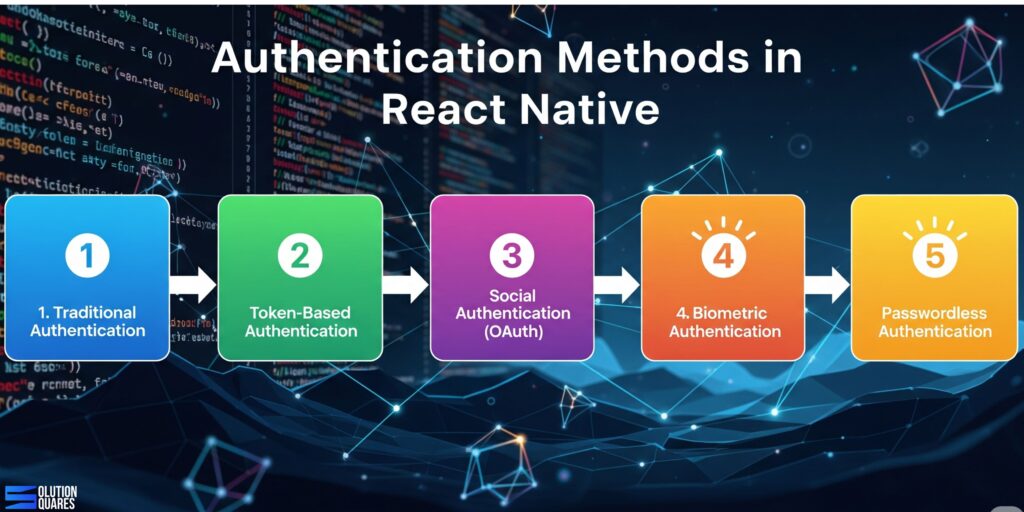
1.1 Traditional Authentication
-
Email & Password: Users register/log in using credentials stored in your backend.
-
Username & Password: Less common now, usually replaced by email/phone.
1.2 Token-Based Authentication
-
JWT (JSON Web Token): Stateless, widely used for APIs.
-
Access & Refresh Tokens: Helps maintain sessions securely.
1.3 Social Authentication (OAuth)
-
Google, Facebook, Apple Sign-In, Twitter, LinkedIn.
-
Reduces friction as users don’t need to remember credentials.
1.4 Biometric Authentication
-
Fingerprint / FaceID: Enhances user convenience and security.
-
Supported via libraries like
react-native-keychainorexpo-local-authentication.
1.5 Passwordless Authentication
-
Magic Links or OTPs (Email/SMS): No password needed, increasing ease of use.
Implementing React Native App Auth
Implementing a React Native app auth involves selecting reliable libraries and tools, alongside proper setup. Here’s a guide to help you get started:
- Choose Authentication Libraries and Tools:
- Firebase Authentication: Supports a variety of authentication methods, including email/password and social logins. Discover Firebase.
- Auth0: Provides broad protocol support through a hosted service.
- react-native-app-auth: An SDK supporting OAuth 2.0 and OpenID Connect with PKCE. More details.
Set up Example with Firebase Authentication:
import auth from '@react-native-firebase/auth';
// Email/password sign-in
auth().signInWithEmailAndPassword(email, password)
  .then(userCredential => {
    // User is signed in
  })
  .catch(error => {
    // Handle errors
  });
OAuth Implementation Example with react-native-app-auth:
import {authorize} from 'react-native-app-auth';
const config = {
  issuer: 'https://accounts.google.com',
  clientId: 'YOUR_CLIENT_ID',
  redirectUrl: 'com.yourapp:/oauthredirect',
  scopes: ['openid', 'profile'],
};
const authState = await authorize(config);
Ensuring Secure React Native Login
To safeguard the authentication process, consider these security measures:
- Use HTTPS Exclusively: All network requests should employ HTTPS to protect data in transit. Learn more.
- Secure Storage of Tokens: Use solutions like Expo Secure Store or react-native-keychain for encrypting and storing authentication tokens safely. Discover secure storage options.
- Token Management: Implement secure token formats like JWTs, regularly rotate them, and enforce session expiration protocols. Read about token management.
Comparing Authentication Solutions for React Native
- Assess various secure React Native login solutions to determine which best fits your project’s needs.
- Consider the pros, cons, and optimal scenarios for each solution stated in the comparison table within the detailed plan.
- Compare various solutions.
- Recommendations and guidelines for choosing an authentication method suited to your project scale and security requirements can aid in your selection process.
Troubleshooting Common Authentication Issues
Address typical challenges in authentication in React Native, such as token expiration, network failures, and social login discrepancies. Providing effective troubleshooting strategies and highlighting available resources like StackOverflow or GitHub can assist developers in quickly resolving issues. Get troubleshooting tips.
Enhancing User Experience with Seamless Auth
Improving user experience involves balancing seamless authentication processes with robust security measures. Techniques such as implementing biometric options, utilising social logins, and streamlining login processes can significantly enhance user satisfaction and app security. Explore seamless auth solutions.
Best Practices for React Native Authentication
Security Best Practices
-
Never store tokens in plain AsyncStorage → Use SecureStore (Expo), Keychain (iOS), or Keystore (Android).
-
Implement a token refresh mechanism (short-lived access tokens + refresh tokens).
-
Always use HTTPS to encrypt data in transit.
-
Avoid embedding secrets in app code → Use environment variables or remote config.
UX Best Practices
-
Keep the login/signup process fast and simple.
-
Offer multiple login options (social + traditional).
-
Provide clear error messages for failed logins.
-
Use progress indicators during authentication.
Code Organisation Best Practices
-
Maintain a dedicated AuthContext with React Context API.
-
Use React Navigation guards for protected routes.
-
Abstract API calls into a separate
authService.js. -
Recommended Libraries
-
Firebase Auth →
@react-native-firebase/auth -
JWT Storage →
expo-secure-store/react-native-keychain -
Social Login →
@react-native-google-signin/google-signin,react-native-fbsdk-next,@invertase/react-native-apple-authentication -
Biometrics →
expo-local-authentication/react-native-touch-id
-
Conclusion
Authentication in React Native can be implemented in many ways—whether you choose Firebase for ease, JWT for flexibility, or biometrics for modern security. The key is balancing security, user experience, and scalability.
React Native app auth plays a crucial role in protecting user data. By integrating advanced authentication methods and adhering to recommended practices, developers can create secure and user-friendly mobile applications.
Additional Resources
Consult additional resources for deeper insights into authentication in React Native:
- Official documentation and comprehensive guides on securing React Native apps are available through the provided links.
- Engage with the development community via forums and discussions to share insights and seek assistance on specific issues related to React Native authentication.
At Solution Squares, we help startups and enterprises implement seamless authentication systems—from Firebase and JWT to social logins and biometrics. Get in touch with us today
Frequently Asked Questions
1. What are the best practices for securing authentication in React Native?
Best practices include using HTTPS for all network requests, securely storing tokens with solutions like Expo Secure Store or react-native-keychain, implementing Two-Factor Authentication (2FA), and regularly updating and rotating tokens.
2. How can I implement social login in my React Native app?
You can implement social login by integrating libraries like Firebase Authentication, Auth0, or react-native-app-auth, which support various social providers such as Google, Facebook, and Apple.
3. What libraries are recommended for implementing OAuth in React Native?
Libraries such as react-native-app-auth are recommended for implementing OAuth 2.0 and OpenID Connect in React Native applications.
4. How do I handle token expiration in my React Native app?
Handling token expiration involves implementing token refresh mechanisms, setting appropriate expiration times, and ensuring the app gracefully prompts users to re-authenticate when necessary.
5. What are common mistakes to avoid when implementing authentication in React Native?
Common mistakes include not using secure storage for tokens, overlooking HTTPS for network requests, improper handling of token expiration, and failing to implement multi-factor authentication where necessary.
