


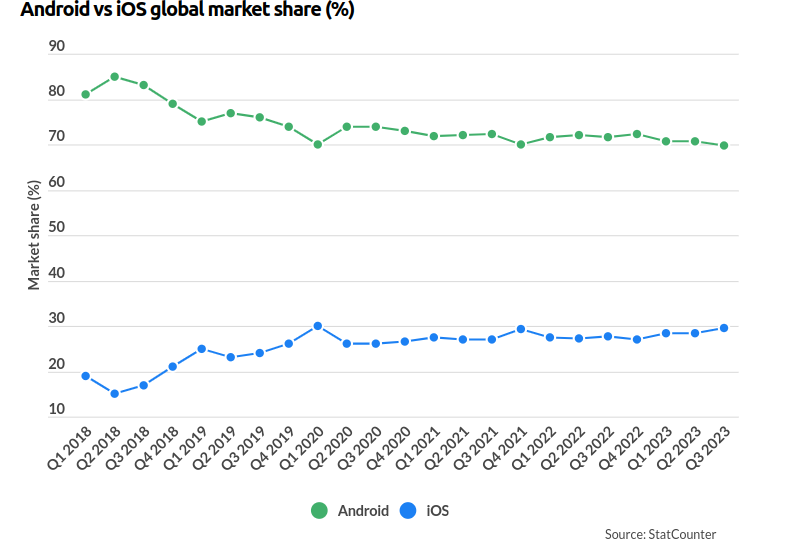
Android and iOS are the two dominant players in the smartphone market. Android holds a significantly larger market share compared to iOS. As per an update in January 2022, Android accounted for approximately 72% of the global smartphone user base, while iOS had around 27% of the market. Further, this means that a larger portion of the global population uses Android devices, such as smartphones and tablets.
App developers and businesses need to consider these market share dynamics. When deciding which platform(s) to target for their apps. Android’s larger user base offers a broader reach.
iOS’s user demographic is often associated with higher disposable income and increased willingness to spend on apps and in-app purchases. As such, the choice between iOS and Android development often depends on various factors. However, before this, let’s get to know about the difference between IOS and Android app development.
What is The Difference Between iOS vs. Android Development?
Usually, it’s inaccurate to say that iOS development is inherently better than Android development, or vice versa. The decision between iOS vs. Android development depends on various factors, and what’s “better” can vary depending on your specific needs and circumstances. The development of iOS and Android apps differs in several key ways. Here are some of the primary differences between the two platforms:
-
Programming Languages:
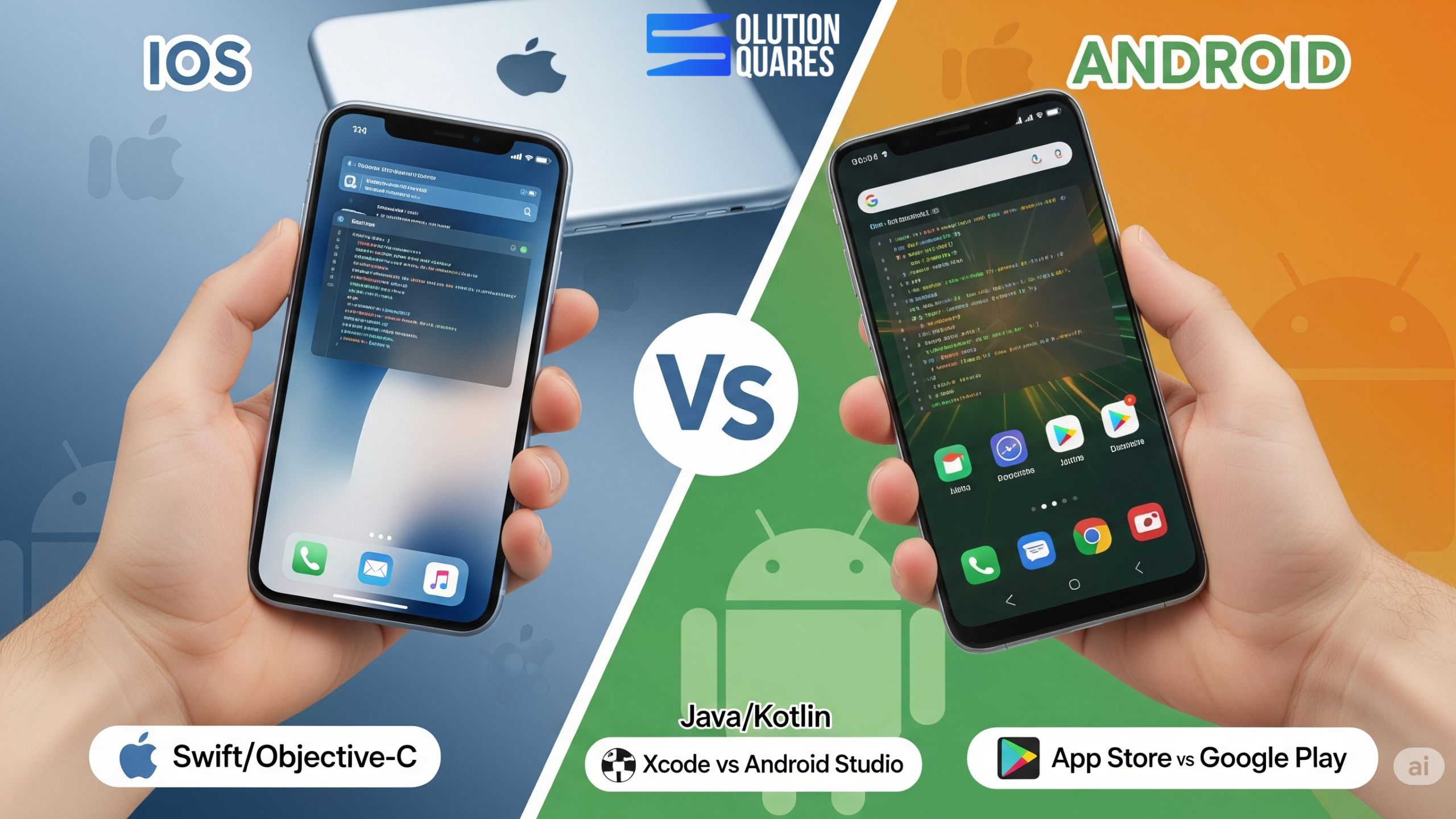
iOS and Android app development involves different programming languages. Here are the primary languages for each platform. Developers can use Swift or Objective-C for iOS app development. Swift is the newer and more preferred language, known for its simplicity and safety features. Here are the programming languages for iOS vs Android Development:
- Swift: Swift is Apple’s modern and preferred programming language for iOS app development. It’s known for its safety features, concise syntax, and performance improvements compared to its predecessor, Objective-C. Swift is widely used for creating new iOS apps and is considered more user-friendly by many developers.
- Objective-C: While Swift has largely replaced Objective-C for new iOS development projects, Objective-C is still relevant for maintaining legacy iOS apps. Moreover, some older iOS apps and libraries were written in Objective-C, and it’s possible to integrate Objective-C code into Swift projects.
Android App Development:
Android app development primarily involves Java or Kotlin. Kotlin has become increasingly popular due to its modern features and improved syntax.
- Kotlin: Kotlin is the modern, officially supported programming language for Android app development. It was introduced as an alternative to Java and has gained popularity for its concise syntax, null safety, and enhanced features. Moreover, many new Android projects are now written in Kotlin, and it’s the recommended language by Google for Android development.
- Java: Java has been the traditional language for Android app development for many years. While it’s still widely used, especially for maintaining older apps, Google’s focus has shifted toward promoting Kotlin for new Android projects. Additionally, Java remains relevant in the Android development ecosystem.
The choice between Swift and Objective-C for iOS and Kotlin and Java for Android often depends on the developer’s familiarity with the language, the specific project requirements, and personal preferences. Both Swift and Kotlin offer advantages over their predecessors (Objective-C and Java), making app development more efficient and user-friendly.
-
Development Environments:
iOS vs. Android app development use distinct development environments or integrated development environments (IDEs).
Developers use Xcode, Apple’s integrated development environment (IDE), for iOS app development. Xcode is known for its robust tools and features. Android Studio is the official IDE for Android app development, offering a comprehensive set of tools for designing, coding, and testing Android applications. However, both Xcode and Android Studio are competent development environments with integrated tools for designing, coding, testing, and debugging apps.
Indeed, the choice between them often depends on the platform you’re targeting, your familiarity with the IDE, and personal preferences. Developers for both iOS and Android have access to extensive resources, documentation, and community support to aid in app development using their respective IDEs.
-
UI/UX Design:
Usually, User Interface (UI) and User Experience (UX) design are crucial yet important aspects of app development. However, each platform has its design guidelines and principles that developers and designers should follow to create user-friendly and visually appealing apps. Both iOS and Android design systems prioritise consistency, clarity, and usability, but they have their unique characteristics. Designers and developers should follow the respective design guidelines for the platform they are targeting to create an app that feels native and familiar to users. Additionally, testing and user feedback are essential in refining the UI/UX for a successful mobile app.
iOS App Design:
iOS apps follow Apple’s Human Interface Guidelines (HIG), which provide design standards and principles for creating a consistent and intuitive user experience.
- Human Interface Guidelines (HIG): Apple provides Human Interface Guidelines for iOS that outline design principles and best practices. Designers and developers should follow these guidelines to create a consistent and intuitive user experience.
- Skeuomorphic vs. Flat Design: iOS design has transitioned from skeuomorphic design (mimicking real-world objects) to flat design with iOS 7 and beyond. The current trend is a balance between visual depth and simplicity.
- Typography: iOS favours a clean and legible typography style, with a focus on using the San Francisco font for text elements. Proper spacing and alignment are crucial for readability.
- Navigation: iOS typically employs a tab bar or navigation bar at the bottom of the screen for primary navigation. The back button is a core element for app navigation.
- Use of Gestures: iOS often incorporates swipe gestures and the use of gestures like pinch and zoom for user interactions.
Android App Design:
Android apps adhere to Material Design guidelines, which offer design principles and components for creating a cohesive and visually appealing user interface.
- Material Design Guidelines: Google’s Material Design guidelines offer a comprehensive set of design principles and components for creating visually pleasing and consistent Android apps. Material Design focuses on layers, shadows, and meaningful motion.
- Material Theming: Material Theming allows for the customisation of Material Design components to create a unique brand identity while adhering to Material Design principles.
- Typography: Android design emphasises using the Roboto font family for a modern and clean look. Typography choices are critical for readability and consistency.
- Navigation: Android commonly uses a navigation drawer (side navigation) or a bottom navigation bar for primary navigation. Up and back navigation are core components for maintaining user flow.
- Floating Action Button (FAB): Material Design encourages the use of a floating action button for the most important action within an app.
- Motion and Animation: Material Design incorporates meaningful animations to guide user interactions and provide visual feedback.
Device Fragmentation:
- iOS: Apple has a limited number of device models, which makes it easier to ensure app compatibility across various iOS devices.
- Android: Android has a more fragmented ecosystem with a wide range of device manufacturers, screen sizes, and hardware configurations, making it more challenging to ensure consistent app performance.
App Distribution:
- iOS: iOS apps are distributed through the Apple App Store, and all apps go through a review process to maintain quality and security.
- Android: Android apps can be distributed through the Google Play Store, but you also have the option to distribute apps through other channels, which provides more flexibility but potentially introduces security risks.
Monetisation Options:
- iOS: iOS users tend to spend more on apps and in-app purchases, making it a lucrative platform for monetisation.
- Android: Android users often prefer free apps, making ad-based monetisation more common, but there are also opportunities for in-app purchases and premium apps.
Development Community:
Both iOS and Android have large and active developer communities, with online forums, documentation, and resources for support and knowledge sharing.
Development Ecosystem:
- iOS apps are closely integrated with Apple’s ecosystem, including services like iCloud and Apple Pay.
- Android apps are integrated with Google’s ecosystem, offering services like Google Drive and Google Maps.
In summary, while both iOS and Android app development share some common principles, they also have distinct differences in terms of programming languages, development tools, design guidelines, device fragmentation, and distribution methods. The choice between the two depends on your project goals, target audience, and your personal preferences as a developer. It’s common for many app developers to choose to develop for both platforms to reach a broader audience.
Who Is Better: iOS vs. Android Development?
-
Audience and Market Share:
Generally, iOS devices, such as iPhones and iPads, are more expensive than many Android alternatives. As a result, iOS users tend to have higher disposable incomes. This can be an advantage for businesses targeting users who are more likely to spend on premium apps, in-app purchases, and services.
Besides, OS users are often more engaged with their devices, making them valuable for apps that require user interaction or frequent engagement, such as productivity and entertainment apps.
Further, Apple has a dedicated and loyal customer base. iOS users are known for their brand loyalty and often prefer Apple’s ecosystem of products and services.
iOS has a more affluent user base, which can be advantageous for certain types of apps, particularly those with a focus on monetization through in-app purchases or premium pricing. Android has a larger global market share, so if you want to reach a broader audience, it might be a better choice. Android stands as the world’s most widely adopted operating system, boasting more than 2.5 billion active users distributed across over 190 countries.
-
Development Languages:
iOS development primarily uses Swift or Objective-C, which are both considered user-friendly and offer a strong ecosystem.
Android development uses Java or Kotlin. Kotlin has gained popularity for its modern features and concise syntax.
-
Development Tools:
iOS App Development Tools:
Here is the list of the IOS App development tools that a developer needs.
- Xcode: Xcode is Apple’s official integrated development environment (IDE) for iOS app development. It provides a comprehensive set of tools for designing, coding, testing, and debugging iOS applications. Xcode includes an interface builder, code editor, and a range of debugging and performance analysis tools.
- Swift and Objective-C: iOS app development primarily involves using the Swift programming language, which is the preferred and more modern language. However, Objective-C is still in use, especially for maintaining legacy apps. Developers can write code in either language within Xcode.
- iOS Simulator: Xcode includes an iOS simulator, which allows developers to test their apps on virtual iOS devices with various screen sizes and hardware configurations.
- Interface Builder: Within Xcode, Interface Builder is a visual tool for designing user interfaces. It’s used in conjunction with Swift or Objective-C to create the app’s user interface.
- Debugging Tools: Xcode offers debugging tools, including LLDB (Low-Level Debugger), which helps developers find and fix issues in their code.
Android App Development Tools:
Here is a list of Android app development:
- Android Studio: Android Studio is the official IDE for Android app development. It’s based on IntelliJ IDEA and offers a wide range of features, including a code editor, visual layout editor, and tools for debugging and performance profiling.
- Java and Kotlin: Android app development can be done using either Java or Kotlin as the programming language. Kotlin has become increasingly popular due to its modern features and concise syntax.
- Android Emulator: Android Studio includes an Android Emulator, allowing developers to test their apps on virtual Android devices with different screen sizes and configurations.
- XML Layout Editor: Android Studio provides a visual editor for creating XML layouts, which define the user interface of Android apps.
- Android Debug Bridge (ADB): ADB is a command-line tool that helps developers communicate with Android devices and emulators, install and debug apps, and access various device features.
- Android Profiler: Android Studio includes a set of profiling tools that help developers optimize their app’s performance by tracking CPU, memory, and network usage.
However, both Xcode and Android Studio offer powerful development environments, and the choice between them often comes down to personal preference, the programming languages you’re comfortable with, and the platform you’re targeting.
Besides, developers for both iOS and Android can access a wealth of resources, documentation, and community support to aid in the app development process.
Xcode is the official integrated development environment (IDE) for iOS, while Android Studio is used for Android development. Both are powerful tools with robust features, but it often comes down to personal preference.
-
Fragmentation:
Android has a more fragmented device ecosystem, with numerous screen sizes and hardware configurations. This can make Android development more challenging when it comes to ensuring compatibility.
-
App Approval Process:
The App Store review process for iOS apps is known for its strict guidelines, which can be a pro or a con depending on your perspective. It ensures a certain level of quality and security, but can lead to rejection. Further, the Google Play Store has a more lenient review process, making it easier to get your app published.
-
Monetization:
iOS users tend to spend more on apps and in-app purchases, making it a lucrative platform for developers.
Android users tend to prefer free apps, so monetisation might be more challenging through paid downloads or in-app purchases.
-
Open Source vs. Closed Ecosystem:
Android is open source, which provides more flexibility but can lead to security concerns.
iOS is a closed ecosystem, offering more control and security but less flexibility for developers.
-
Development Community:
Both platforms have large and active developer communities, which can be a valuable resource for support and knowledge.
In short, to answer which is better, iOS vs Android development, it depends on your project’s goals, target audience, and your personal preferences as a developer. Many organisations choose to develop both platforms to reach the widest possible audience. It’s essential to consider these factors and conduct thorough research before deciding which platform is right for your specific app or project.