Category: Web Development

Empower your agency with custom web development services. That is designed to deliver scalable, secure, and high-performing websites.

From responsive designs to advanced integrations, we help agencies create digital solutions. Our solutions drive growth and client success.

Are you looking for High-quality web development services? Let’s create responsive, secure, and performance-driven websites for their clients.

Why Choose Us for Web Development?

  1. Agency-Focused Approach – We understand the unique needs of agencies and deliver solutions that align with your goals.
  2. Scalable Solutions – From startups to enterprise projects, our websites are built to grow with your business and adapt to future demands.
  3. Performance & Security – We prioritise fast load times, smooth functionality, and top-level security for every project.
  4. Custom Development – Every website is tailored—whether it’s e-Commerce, corporate, or portfolio—ensuring it reflects your brand identity.
  5. Seamless Integrations – From CRMs and APIs to payment gateways, we integrate the tools your business needs.
  6. Ongoing Support & Maintenance – Our partnership doesn’t end at launch. We provide continuous updates, monitoring, and improvements.

Partner with us for expert web development services. We build modern, secure, and scalable websites that help agencies achieve client goals

  • Why Build React Native for Windows in 2025?

    Why Build React Native for Windows in 2025?

    React Native has revolutionised the way developers build mobile applications, combining the best aspects of native performance with the agility of JavaScript development. Now, this versatile framework is expanding its horizons beyond mobile, offering robust solutions for desktop application development on Windows and macOS platforms. In this post, we will delve into the technical feasibility of using Windows apps with React Native and explore React Native macOS applications, highlighting the growing trend towards unified codebases that transcend individual platforms. Overview of React Native

    Overview of React Native

    React Native is an open-source JavaScript framework developed by Facebook, enabling developers to create native applications for multiple platforms using a single codebase of React and JavaScript. Originally targeted at iOS and Android, its capabilities have extended thanks to a vibrant community contributing to its expansion. The key advantages of React Native include:

    • Unified development workflow that promotes code reuse across iOS, Android, and now desktop platforms
    • A large open-source community that drives continuous innovation and extension of the framework

    React Native’s adaptability now includes support for desktop environments, paving the way for applications that run seamlessly across mobile devices and desktop computers. More information about React Native’s core features can be found on the Creole Studios website. Additionally, for a comprehensive understanding of multi-platform development with React Native, visit Harnessing React Native App Development Services for Seamless Multi-Platform Mobile Apps.

    Why Build with React Native for Windows?
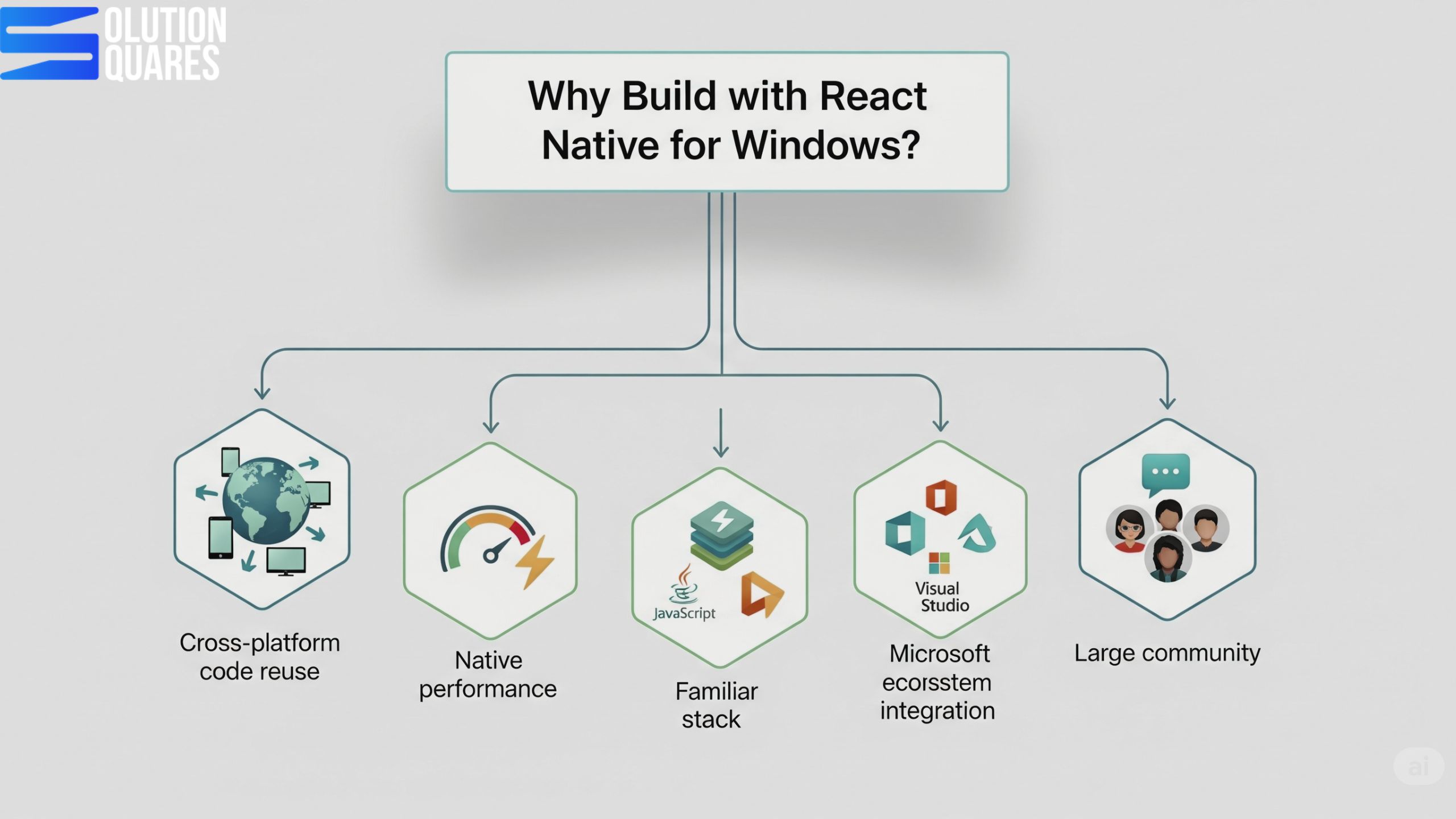
    Advantages of React Native App for Windows

    AdvantageBenefit
    Cross-platform code reuseShare logic & UI components across mobile and desktop
    Native performanceUses native Windows APIs for smooth rendering
    Familiar tech stackJavaScript, TypeScript, React
    Microsoft ecosystem integrationAccess Windows-specific APIs (file system, notifications, etc.)
    Large communityBacked by Microsoft + React Native community

    React Native for Windows

    Windows apps with React Native are developed through React Native Windows, a Microsoft-supported extension. This allows developers to adapt their existing React Native code for the Universal Windows Platform (UWP) and Win32 applications, making it possible to maintain a unified codebase. Essential tools for setting up a React Native for Windows project include:

    • Node.js and the React Native CLI
    • Visual Studio 2022, equipped with the necessary workloads for Windows and C++ development

    Developers are provided the tools to build applications compatible with both recent versions of Windows 10 and Windows 11, leveraging the latest Windows APIs. Examples of successful implementations include Microsoft’s own products and numerous enterprise applications that take advantage of this cross-platform approach. Learn more about this from Shivlab and the detailed guides on React Native for Windows Documentation. For an ultimate guide on building cross-platform desktop applications, refer to Solution Squares.
    Build Windows App with React Native

    React Native for macOS

    Similarly, React Native macOS extends the framework’s capabilities to Apple desktop environments. With tools such as Xcode and the react-native-macos CLI developers can bring their applications to macOS, supported by active community projects and Microsoft’s support initiatives. Compatible with the latest macOS versions, this extension allows the development of native macOS applications using the familiar React Native components and APIs. For implementation examples and further info, check Creole Studios.

    Prerequisites

    Before starting, make sure you have:

    RequirementNotes
    Windows 10 or 1164-bit, Version 1809 (Build 17763) or later
    Node.jsLTS version (e.g., 18.x)
    YarnOptional but recommended
    Visual Studio 2022With Desktop development with a C++ workload
    React Native CLIFor project creation
    Windows SDKComes with Visual Studio

    Developing Windows Apps with React Native

    Building Windows applications with React Native involves specific setup steps:

    1. Install Node.js and the React Native CLI.
    2. Set up the development environment in Visual Studio with the necessary workloads.
    3. Initialise your React Native project and add Windows compatibility with specific commands designed to streamline the process.
    4. Extensive testing across different Windows versions ensures compatibility and optimises performance.

    This process, detailed React Native for Windows Documentation, underscores the adaptability and potential of React Native in creating desktop applications. For additional optimisation and deployment strategies, visit Solution Squares.

    Comparing React Native Windows and React Native macOS

    Both extensions offer tailored experiences for their respective platforms, but they share a unified approach to React Native development. Key differences lie in supported platforms, toolchains, community support, and the specific use cases they cater to, as demonstrated in the following table:

    AspectReact Native WindowsReact Native macOS
    Supported PlatformWindows 10, 11, UWP, Win32Current macOS releases
    ToolchainVisual Studio 2022, Windows Build ToolsXcode, macOS CLI
    Community SupportStrong (Microsoft-backed, official docs)Growing (community-driven, some Microsoft support)
    Platform APIsWindows APIs, C++, UWP componentsmacOS APIs, Swift/Obj-C native modules
    Use CasesEnterprise desktops, utilities, and productivity toolsCreative tools, utilities, and cross-device apps
    LimitationsMobile APIs not mapped to desktop equivalentsAdditional Apple platform restrictions

    For a deeper comparison between React Native and other frameworks, explore React Native vs ReactJS: Navigating the Differences for Your Next Project.

    Why React Native for Desktop Matters

    Traditionally, businesses had to develop separate applications for Windows, macOS, and mobile platforms—a process that was costly, time-consuming, and complex. With React Native for Desktop, agencies can:

    • Use a single codebase → Develop apps that work across mobile, web, and desktop.

    • Reduce costs → Faster development cycles lower project budgets.

    • Ensure consistent UX → Unified interfaces across all platforms.

    • Tap into a growing ecosystem → Backed by Microsoft (React Native Windows + macOS) and community-driven efforts.

    Useful Libraries for Windows Development

    LibraryPurpose
    react-native-windowsCore Windows integration
    react-native-fsFile system access
    react-native-vector-iconsIcons
    react-navigationRouting/navigation
    react-native-device-infoSystem info
    Technical Feasibility Analysis

    Building desktop applications with React Native is technically feasible if developers possess proficiency in React Native and JavaScript/TypeScript, along with access to platform-specific build tools like Xcode for macOS and Visual Studio for Windows. The performance of apps can be akin to native applications for several use cases, especially when employing optimisation techniques like the Hermes JavaScript engine.

    Future of React Native in Desktop Development

    React Native has long been the go-to framework for building high-quality cross-platform mobile apps. But in recent years, it has evolved beyond mobile—expanding into desktop development for Windows, macOS, and even Linux. For agencies, this evolution opens the door to faster delivery, broader reach, and cost savings for clients who want multi-platform solutions with a single codebase. So, what does the future of React Native in desktop development look like, and why should agencies care?

    Cross-Platform Strategy

    You can target:

    • Android + iOS → Mobile

    • Windows + macOS → Desktop

    • Web → Browser (using React Native for Web)

    By structuring your app with shared logic + platform-specific components, you can cover all platforms with a single codebase.

    React Native application Agency
    React Native application Agency

    Conclusion

    The potential for building feature-rich, native desktop applications with React Native is immense. With strong community and official support, the framework is well-positioned to become a staple in the toolbox of developers aiming to leverage a unified codebase for mobile and desktop environments. As the ecosystem continues to expand, React Native appears increasingly capable of meeting the intricate demands of modern software development.

    Additional Resources

    For developers eager to dive deeper, the following resources are invaluable:

    • Official Documentation: Comprehensive guides and updates are available at React Native Windows and related Microsoft documentation.
    • Community Tutorials and Forums: Engage with other developers and find solutions through community-driven resources and forums.
    • Essential Tools and Plugins: Node.js, Visual Studio, Xcode, plus various React Native packages, are essential for developing robust applications.

     Whether you’re planning a new project or scaling an existing one, React Native offers a compelling framework for creating seamless and efficient cross-platform applications.

    Frequently Asked Questions

    1. What are the main benefits of using React Native for desktop application development?

    React Native allows developers to use a unified codebase for both mobile and desktop applications, which reduces development time and maintenance efforts. Additionally, it leverages the performance of native applications while providing the flexibility and ease of JavaScript development.

    2. What tools are required to develop React Native applications for Windows?

    To develop React Native applications for Windows, you’ll need Node.js, the React Native CLI, and Visual Studio 2022 with the necessary workloads for Windows and C++ development.

    3. How does React Native ensure performance comparable to native desktop applications?

    React Native leverages native components and APIs, which allows applications to perform similarly to native desktop applications. Additionally, using optimisation techniques like the Hermes JavaScript engine can further enhance performance.

    4. Is it necessary to have separate codebases for Windows and macOS applications in React Native?

    One of the key advantages of using React Native for both Windows and macOS is the ability to maintain a unified codebase. This approach simplifies development and maintenance, allowing developers to reuse most of the code across both platforms.

    5. What are the limitations of using React Native for desktop applications?

    One limitation is that mobile APIs are not always mapped to their desktop equivalents, which can require additional custom implementations. Additionally, there may be platform-specific restrictions, especially on macOS, that developers need to navigate.

  • How To Do Web Development with React Native?

    How To Do Web Development with React Native?

    Key Takeaways

    • Cross-Platform Development: React Native enables seamless development across iOS, Android, and web platforms from a single codebase.
    • Code Reusability: Significant portions of code can be reused across mobile and web applications, enhancing efficiency.
    • Enhanced Performance: Advanced rendering optimisations and native UI components ensure superior performance.
    • Responsive Design: Supports Flexbox and mobile-first design for adaptable web applications.
    • Integration with Web Technologies: Combines React Native components with traditional web elements.

    Harnessing the Power of Web Development with React Native

    In today’s rapidly evolving digital landscape, web development with React Native is emerging as a pioneering strategy for crafting scalable, performant, and cross-platform web applications. With the advent of React Native Web, the significance of React Native has surged, marking its transition from a mobile-centric technology to a versatile tool capable of powering robust web projects. This technology enables developers to utilise a familiar framework to deliver seamless user experiences across all platforms, YouTube Source, React Native App Development Services

    Understanding Web Development With React NAtive

    Originally developed by Facebook, React Native was designed to build native mobile applications using JavaScript combined with React’s proven component-based architecture. The extension of React Native into the realm of web development through React Native Web allows developers to apply the same code constructs and development practices to create React Native web apps, effectively merging the workflows of mobile and web projects. YouTube Source, Prerequisites for React Native Development.

    Advantages of React Native development services For android

    Benefits of Building Websites with React Native

    Building websites with React Native, specifically using the react-native-web library, offers a unique set of benefits by extending the “learn once, write anywhere” philosophy to the web. This approach is not a replacement for traditional web development with React but a powerful strategy for teams that need to maintain a presence across multiple platforms.

    1. Code Reusability and Efficiency

    The most compelling benefit is the ability to share a significant portion of the codebase between mobile (iOS/Android) and web applications. This is a game-changer for several reasons:

    • Reduced Development Time and Cost: Instead of maintaining separate teams and codebases for mobile and web, a single team can work on both. This dramatically shortens the time-to-market and reduces overall development costs.

    • Streamlined Development Process: With a unified approach, developers can work on features and bug fixes once, and the changes can be deployed across all platforms simultaneously. This makes the development cycle more agile and efficient.

    • Consistent UI/UX: Sharing UI components ensures a consistent look, feel, and user experience across all platforms, which is crucial for brand consistency.

    2. Access to a Rich Ecosystem

    React Native for Web benefits from the robust and mature ecosystem of both React and React Native.

    • Vast Library of Components: Developers can use a wide range of pre-built components and third-party libraries for things like navigation, state management (e.g., Redux, Zustand), and more, many of which have been adapted for web use.

    • Strong Community Support: With a large and active community, developers can easily find solutions, tutorials, and support for any challenges they face.

    3. High Performance and Optimisation

    React Native for Web is designed for performance, leveraging modern web technologies.

    • Optimised Styling: The framework uses a “CSS-in-JS” approach that converts JavaScript styles into highly optimised, production-ready CSS.

    • Server-Side Rendering (SSR): It supports SSR, which is essential for improving initial load times and boosting Search Engine Optimisation (SEO). This is a critical advantage for web applications that need to be discoverable by search engines.

    4. Simplified Maintenance

    With a single codebase, maintaining the application becomes much simpler. Bug fixes and updates only need to be applied in one place, reducing the chance of inconsistencies and errors across platforms. This also makes scaling the application and adding new features a much more straightforward process.

    5. Benefits for React Developers

    For teams already familiar with React, the transition to React Native for Web is seamless. The core concepts of components, JSX, state, and props are the same, allowing web developers to quickly become productive in a cross-platform environment without a steep learning curve.

    6. Progressive Web App (PWA) Support

    React Native for Web can be used to build Progressive Web Apps. PWAs are web applications that provide a native app-like experience, including offline support, push notifications, and home screen installation. This allows businesses to provide a high-quality experience to users on a mobile browser without requiring them to download a separate app.

    Key Features of React Native Web Apps

    Many well-known companies have successfully adopted React Native for Web to create cross-platform experiences, allowing them to share a single codebase between their mobile apps and web platforms. This approach significantly streamlines development, reduces costs, and ensures brand consistency.

    React Native For web workflow

    Case Studies and Examples

    • Twitter: Twitter used React Native for Web for its mobile web experience. This strategic decision allowed the company to improve performance and consistency across different platforms, including iOS, Android, and the web, using a single set of tools and components.

    • Discord: The Discord team leveraged React Native for Web to power its web application. Because of the shared codebase, Discord can maintain a consistent user experience and quickly roll out new features to both its mobile and web users with minimal extra effort.

    • Major League Soccer (MLS): The official MLS app uses React Native for Web to provide a consistent experience across its mobile app and website. This ensures that users, whether on their phone or a desktop, get the same high-quality, up-to-date content and functionality.

    • Flipkart: India’s leading e-commerce company, Flipkart, has used React Native for Web to improve the performance and user experience of its mobile website. This move helped them to create a faster, more responsive shopping experience while managing a massive volume of users and products.

    Use Cases

    • Rapid Prototyping and MVP Development: Startups and development teams can use React Native for Web to build and launch a Minimum Viable Product (MVP) simultaneously on multiple platforms (iOS, Android, and web). This allows them to get to market faster and validate their idea with a wider audience.

    • Web Companion to a Mobile App: For businesses with an existing React Native mobile app, integrating a web version using React Native for Web is an efficient way to expand their reach to desktop users. This is a common strategy for e-commerce, content, and social media platforms.

    • Internal Tools and Dashboards: Many companies use React Native for Web to build internal tools, such as dashboards for monitoring data or administrative panels for managing content. The ability to use the same codebase for both a mobile app (for on-the-go access) and a web version (for desktop use) simplifies development and maintenance.

    Getting Started with Web Development with React Native

    Setting Up the Development Environment

    Embarking on your React Native web development journey begins with setting up essential tools such as Node.js, npm, and the Expo CLI, along with the React Native Web library YouTube Source.</p>

    Step-by-Step Guide

    1. Initialisation: Begin by installing Expo CLI or React Native CLI (npm install -g expo-cli or npx react-native init).
    2. Project Creation: Create a new project using npx create-expo-app or npx react-native init ProjectName.
    3. Web Integration: Add react-native-web to your project’s dependencies.
    4. Configuration: Adjust configuration files to support web functionalities.
    5. Testing: Ensure the application operates correctly on both web and mobile platforms. YouTube Source: How to Build a React Native App.

    Recommended Resources

    <p>For further exploration and mastery, delve into resources like JavaScript Mastery, Expo documentation, and comprehensive YouTu

    be tutorials that cater to both beginners and advanced developers. YouTube Source.

    Case Studies and Examples

    Successfully adopted React Native for Web to create cross-platform experiences, allowing them to share a single codebase between their mobile apps and web platforms. This approach significantly streamlines development, reduces costs, and ensures brand consistency.

    Examples For  React Native Web

      • Twitter: Twitter used React Native for Web for its mobile web experience. This strategic decision allowed the company to improve performance and consistency across different platforms, including iOS, Android and web, using a single set of tools and components.
      • Discord: The Discord team leveraged React Native for Web to power its web application. Because of the shared codebase, Discord can maintain a consistent user experience and quickly roll out new features to both its mobile and web users with minimal effort. features to both its mobile and web users with minimal extra effort.
      • Major League Soccer (MLS): The official MLS app uses React Native for Web to provide a consistent experience across its mobile app and website. This ensures that users, whether on their phone or a desktop, get the same high-quality, up-to-date content and functionality.
      • Flipkart: India’s leading e-commerce company, Flipkart, has used React Native for Web to improve the performance and user experience of its mobile website. This move helped them to create a faster, more responsive shopping experience while managing a massive volume of users and products.

    Use Cases

      • Rapid Prototyping and MVP Development: Startups and development teams can use React Native for Web to build and launch a Minimum Viable Product (MVP) simultaneously on multiple platforms (iOS, Android and web). This allows them to get to market faster and validate their idea with a wider audience.
      • Web Companion to a Mobile App: For businesses with an existing React Native mobile app, integrating a web version using React Native for Web is an efficient way to expand their reach to desktop users.

    Best Practices for Building React Native Web Apps

    Performance Optimization

    To maximise app responsiveness, employ techniques such as profiling, code splitting, and asset optimisation. These strategies are pivotal in maintaining high-performance standards in React Native web applications, YouTube Source.

    Maintainable Code Structures

    Organise your codebase logically with a focus on scalability. Employ a modular structure and share code judiciously to prevent conflicts across different platforms, YouTube Source.

    Security Considerations

    Implement up-to-date security measures, including robust authentication protocols, encrypted data transmission, and regular updates to dependencies.

    high performance React Native For web workflow

    Conclusion

    React Native for Web allows developers to create web applications using the same codebase as their mobile apps. This approach, enabled by the react-native-web library, brings key features of the React Native ecosystem to the web platform.

    Frequently Asked Questions

    1. How does code reusability benefit development?

    Code reusability significantly reduces development time and maintenance efforts by allowing the same code to be used across multiple platforms.

    2. What are the key tools needed to start with React Native Web development?

    Essential tools include Node.js, npm, Expo CLI or React Native CLI, and the React Native Web library.

    3. How does React Native ensure enhanced performance?

    React Native integrates advanced rendering optimisations and native UI components, which often surpass traditional web development performance benchmarks.

    4. What are the common challenges when developing with React Native for the web?

    Common challenges include platform-specific inconsistencies and compatibility issues with third-party modules not designed for the web.

    high performance React Native For web workflow
  • The Only React Native vs Flutter Comparison You’ll Ever Need

    The Only React Native vs Flutter Comparison You’ll Ever Need

    Key Takeaways

    • Performance: Flutter offers superior rendering speeds with its Impeller engine compared to React Native‘s JavaScript bridge.
    • Development Language: React Native utilises JavaScript, while Flutter uses Dart.
    • Community and Ecosystem: React Native has a more mature ecosystem, whereas Flutter is rapidly growing.
    • UI Components: Flutter provides high-level customisation with its widget set, ensuring consistency across platforms.
    • Learning Curve: Flutter is generally easier for beginners due to Dart’s concise syntax.

    In the rapidly evolving realm of mobile development frameworks, choosing between React Native and Flutter can significantly impact your app’s performance, development time, and overall cost. Essential for any developer’s toolkit, these frameworks each have unique strengths and weaknesses that they bring to the table. In this blog post, we aim to delve deep into these popular frameworks to assist developers and businesses in making well-informed decisions regarding their upcoming mobile projects. This discussion is rooted in an understanding that the needs are both informational and investigational, focusing on a comparative analysis to shed light on each framework’s capabilities.

    react native vs flutter compare

    Overview of Cross-Platform Frameworks

    The Essence of Cross-Platform Development

    Cross-platform development signifies employing a single codebase to create applications that run across multiple operating systems, such as iOS and Android. This method is crucial in reducing development time and subsequent maintenance costs.

    Introduction to Key Frameworks

    • React Native:
      • Launched by Facebook in 2015, React Native allows developers to build applications using JavaScript and React. This approach is beneficial for creating apps across mobile, web, and desktop platforms.
    • Flutter:
      • Developed by Google in 2018, Flutter enables the building of apps with a single codebase using the Dart programming language. This is advantageous for developers aiming for application uniformity across multiple platforms.

    React Native vs Flutter Detailed Comparison

    Performance

    • React Native: Utilises a JavaScript bridge, recently enhanced by the non-bridge architecture and the Hermes engine. While performance is close to native, there is potential lag with complex animations.
    • Flutter: Direct compilation to native code and usage of the Impeller engine facilitate superior rendering and animation speeds, providing a smoother performance overall.

    Development Language

    • React Native: Uses JavaScript, one of the most popular languages worldwide, making it a go-to for developers experienced in JavaScript or React.
    • Flutter: Employs Dart, which is not as globally dominant but offers an easier learning curve for newcomers with its concise syntax.

    Community and Ecosystem

    • React Native: Boasts a large, mature community with an abundance of libraries and plugins thanks to its JavaScript foundation.
    • Flutter: Although it is relatively young, Flutter’s community is rapidly growing, with extensive packages available.

    UI Components and Customisation

    • React Native: Delivers real native components, thereby aligning closely with platform-specific UI updates.
    • Flutter: Offers high-level customisation with its own widget set, ensuring consistency across different platforms. Learn more.

    Learning Curve

    • React Native: Straightforward for those with a background in React or JavaScript, but may present challenges for others. Learn more.
    • Flutter: Considered easier for beginners due to Dart’s straightforward nature and well-praised documentation.

    Pros and Cons of React Native

    When it comes to building modern cross-platform mobile applications, React Native and Flutter are the top contenders. Both frameworks allow developers to create iOS and Android apps using a single codebase, but each comes with its own strengths and weaknesses.

    Pros of React Native

    • Uses JavaScript/TypeScript, which most developers already know.

    • Large ecosystem with plenty of third-party libraries.

    • Mature framework backed by Meta (Facebook).

    • Provides a native-like user experience by leveraging platform components.

    • Hot reloading speeds up development.

    • Smaller app size compared to Flutter.

    Cons of React Native

    • Depends on a JavaScript bridge, which can cause performance bottlenecks in complex apps.

    • Some advanced native modules may require custom native code.

    • UI consistency may vary across platforms.

    Pros of Flutture

    • Built with Dart, a clean and easy-to-learn language.

    • Provides excellent performance with no JavaScript bridge.

    • Uses its own Skia rendering engine, ensuring consistent UI across platforms.

    • Great for apps with rich animations and custom designs.

    • Backed by Google with fast-growing community support.

    • Comes with Material Design (Android) and Cupertino (iOS) widgets by default.

     Cons of Flutture

    • Dart is not as widely used as JavaScript, so finding developers can be harder.

    • Larger app sizes due to bundled rendering engine.

    • Ecosystem and libraries are growing but not as mature as React Native.

    • Limited support for some platform-specific APIs compared to React Native.

    Feature React Native Flutter
    Language JavaScript / TypeScript Dart
    Performance Good, but bridge overhead Excellent, no bridge needed
    UI Native components Customizable widgets
    App Size Smaller Larger due to Skia engine
    Ecosystem Mature, large library base Growing, less mature
    Community Bigger, long-standing Rapidly growing
    Best For Startups, enterprise, MVPs Apps with animations & custom UI

    react native cross platform app agency

    Conclusion

    As we wrap up this React Native vs Flutter comparison, the choice truly depends on your project’s specific needs. Flutter excels in delivering high-quality graphics and a customizable UI, making it suitable for visually intensive applications. On the other hand, React Native leverages its vast community and ecosystem for integrating with other web-based frameworks, providing a well-rounded development experience.

    Both frameworks support the development beyond traditional boundaries, fostering more accessible, efficient, and versatile solutions. When deciding on the right framework, weigh factors such as your project’s scale, required user experience, and available development resources.

    For a deeper exploration of your options and to ensure your final decision aligns with your developmental and business goals, further research and a clear understanding of your project’s demands are advisable.

    Frequently Asked Questions

    1. What are the main differences between React Native and Flutter?

    React Native utilises JavaScript and a bridge architecture, which can lead to performance bottlenecks when handling complex animations. Flutter, on the other hand, uses Dart and compiles directly to native code, offering smoother performance and faster rendering.

    2. Which framework has a larger community and more libraries?

    React Native benefits from a more mature and larger community with an extensive range of libraries and plugins due to its JavaScript foundation. Flutter has a rapidly growing community, but is still catching up in terms of available resources.

    3. Which framework is easier to learn for beginners?

    Flutter is often considered easier for beginners due to Dart’s concise syntax and well-documented resources. However, developers familiar with JavaScript or React may find React Native easier to pick up.

    4. Can both frameworks be used for web and desktop applications?

    Yes, both React Native and Flutter support web and desktop platforms. React Native extends its reach through projects like React Native Web, while Flutter offers desktop support as part of its core framework.

    5. Which framework is better for high-performance applications?

    Flutter generally offers better performance for high-performance applications due to its direct compilation to native code and efficient rendering engine. However, React Native can also achieve high performance with optimised code and by leveraging native modules.

    6. Which is faster, React Native or Flutter?

    Flutter is generally faster because it avoids the JavaScript bridge and uses its own rendering engine. 

    7.  Is Dart difficult to learn compared to JavaScript?
     

    No. Dart has a simple syntax and is beginner-friendly, but JavaScript has a larger developer base.


    8. Can both React Native and Flutter integrate with Firebase?

    Yes. Both frameworks support Firebase for authentication, databases, push notifications, and analytics. 

    9. Which framework is better for iOS apps?
     

    Both work well. Flutter ensures a consistent UI, while React Native integrates smoothly with iOS-specific APIs. 

    10. Which one is future-proof?

    Both are backed by tech giants (Meta for React Native, Google for Flutter), so both have long-term support.


  • Empower Web Design Mastery: Unleashing an Astonishing Online Presence

    Empower Web Design Mastery: Unleashing an Astonishing Online Presence

    What is Web Design?

    Web Design is the process of planning, thinking, and implementing a website to create a website that works and provides a good user experience. User experience is the foundation of the web design process. The website has a lot of content presented in an easy-to-use way. Basic web design is about all aspects of the web that people interact with, making the web easy and efficient, and making the information users want fast and pleasing to the eye. All these factors come together to determine the level of website design.

    10 Things to Consider When Planning a Website Design (or Re-design)

    Website Purpose:

    Like a mission statement, a website’s purpose provides the main reason the web exists in the world. Whether training, advocacy, distribution, community engagement, etc. Regardless, the main purpose of the website ultimately informs the design of the content and the decision-making process.

    Target audiences

    Frequently I’ll ask nonprofits, “Who is your target audience?” and they’ll respond, “Everyone.” While I understand the logic behind that answer, it’s a simple fact that you cannot design with “everyone” in mind (that’s why there are so many different kinds of cars, clothes, computing devices, etc.). If you identify and design to your top two audiences, the site is more likely to accomplish your organization’s goals.

    Site objectives

    Like the objectives in your organization’s strategic plan (and if you don’t have one of those, you have bigger concerns than your website!), the objectives for your website outline the main goals of the site. I like to ask my nonprofit clients to answer these questions for each target audience: What actions will this audience want to perform when they visit your website? What does your organization want these visitors to do when they visit your website? Remember to reconsider your goals during design and content creation to ensure they are achieved.

    Responsive, mobile-friendly Web Design

    Responsive design is the adjustment of the design of the website according to the screen size it is viewed on. Unfortunately, adding functionality to an existing website is difficult; and it often costs more to innovate. The days of two separate websites (one for viewing on a monitor and one for viewing on mobile) are over.

    New content

    Imagine museums never changing their exhibits. Why did you come back after your first visit? We return to museums again and again because of new exhibits and programs – new things to see. We return to the site when we learn that the content will change and there will be new content for our review. Create quality content for your website to keep people coming back.

    Content Interaction

    It is a known fact that people read only 20-28% of the texts on web pages. This is why people gravitate towards shorter blocks of text, more images, and more space usage. The great thing about non-text content these days is that all you really need is a good smartphone and you can quickly create your own photo and video content.

    Features

    Features, like donate buttons, online articles, embedded videos or podcasts, online quizzes, social media buttons/integration, and all other information about gadgets and widgets, are what make a website powerful and interesting. It’s important to know as much as possible beforehand to create a more cohesive experience. (Later you wondered if you needed social media buttons, now there is no good place to put them without deleting or clicking other content.)

    Search engine optimization (SEO)

    68% of internet users start their online experience with a search engine. This means you need to make sure your website is good for search engines. While there are companies that only do SEO, their services often exceed the budget of most nonprofits. Fortunately, there are many SEO tasks you (or your web designer) can do.

    Website maintenance

    There are two main costs associated with website development: the cost of creating and maintaining the website, and the cost of continuing website maintenance. Construction of the site is often an expensive project. Site maintenance can vary greatly depending on the developer. I’ve used Dreamweaver for my sites and my clients either learned about this complex software or paid me to update it. About seven years ago, I switched to WordPress, and turned on the content management system so I could replace this implementation. Now, my nonprofit clients do the updates themselves and rarely ask me to do anything after the site is up. Another site maintenance question to consider first: Who will maintain your site after launch? Is this person responsible for uploading content created by others, or will this person do all the work?

    Accessibility

    Website accessibility increases usability and generally provides a better user experience. Online content that meets accessibility requirements can be easy for anyone. Accessible websites and online content are more likely to appeal to more potential users. For UNCG, this means expanding website traffic to more sites, which can increase registration, services, and more.

  • Revolutionary Web Development: Empowering Websites with Dynamism and Responsiveness

    Revolutionary Web Development: Empowering Websites with Dynamism and Responsiveness

    What is Web Development?

    Web development is the process of designing, building, and managing websites, web applications, and other online platforms accessible over the Internet. It includes a combination of programming languages, frameworks, tools, and techniques to design, build and implement web solutions that users can access in products. use different browsers.
    The word Web Development is made up of two words, that is:

    1. Web: It refers to websites, web pages or anything that works over the internet.
    2. Development: It refers to building the application from scratch.

    Web Development can be classified into two ways:

    1. Frontend Development
    2. Backend Development

    Frontend Development

    Front-end development, also known as user-side development, refers to the practice of designing the user interface and user experience of a website or web application. It includes the use of visual and interactive features that users see and interact with directly in their web browser. Front-end developers use various technologies such as HTML (Hypertext Markup Language), CSS (Cascading Style Sheets), and JavaScript to design and develop the front-end components of a website.

    • Frontend Roadmap:

    • HTML: HTML stands for HyperText Markup Language. HTML consists of the creation of web pages and the creation of content, sentences, images, links, etc. responsible for its definition. It acts as a skeleton for a website since it is used to make the structure of a website.
    • CSSCascading Style Sheets fondly referred to as CSS is a simply designed language intended to simplify the process of making web pages presentable. It is used to style format HTML content, controlling things like colors, fonts, layout, and space design.
    • JavaScriptJavaScript is a scripting language used to provide a dynamic behavior to our website. It supports features such as form validation, animation, user input processing, and asynchronous communication with the server.

    Front-end developers work with designers to translate visual ideas into code, ensuring that the website’s design, aesthetics, and user experience match established standards. They focus on creating intuitive and user-friendly interfaces, optimizing performance, and making the browser compatible. Front-end developers often use frameworks, libraries, and tools as mentioned below to simplify development, increase productivity, and build diverse and interactive web applications.
    Frontend Frameworks and Libraries:

    Backend Development in Web Development

    Back-end development, also known as server-side development, refers to the creation and maintenance of server-side logic, databases, and APIs that power a website or website. It includes handling behind-the-scenes tasks that allow the front end to communicate with the server and perform various tasks.
    Back-end developers are responsible for building and managing server-side components that manage data processing, storage, and retrieval. They use programming languages ​​like Python, Ruby, Java, PHP, or Node.js and frameworks like Django, Ruby on Rails, Spring, Laravel, or Express.
    js to generate server-side logic.

     Roles of the Backend Developers:

    1. Implement Business Logic
    2. Perform Data validation and Authentication
    3. Handle Database transaction
    4. Ensure Application Security and Scalability
    5. creating API that allows Communication between front-end and Backend Systems
    6. Managing User Accounts
    7. Processing Documents
    8. Handling File Uploads
    9. Maintaining regular Files
    10. Performing calculations and Complex Operations
    • Backend Roadmap:
    • PHP: PHP is a server-side scripting language designed specifically for web development.
    • Java: Java is one of the most popular and widely used programming languages. It is highly scalable.
    • PythonPython is a programming language that lets you work quickly and integrate systems more efficiently.
    • Node.js: Node.js is an open-source and cross-platform runtime environment for executing JavaScript code outside a browser.
    • Back-End Frameworks: The list of back-end frameworks are: Express, Django, Rails, Laravel, Spring, etc.

    Web Development Tutorials

    • HTML
    • CSS
    • JavaScript
    • jQuery
    • BootStrap
    • React JS
    • AngularJS
    • PHP
    • Node.js

    Collaboration between front-end and back-end developers is essential to create seamless and responsive web applications that provide a great user experience. This also ensures the achievement of the goal of web development.